
1. Introduction
The Alliance Outdoor Lighting TF150 is a 150-watt low-voltage power supply designed for both indoor and outdoor landscape lighting applications. This transformer features a built-in photocell and timer for automated operation, providing reliable power to your low-voltage lighting system. It is constructed from durable plastic and is UL Listed to U.S. and Canadian safety standards.
2. Safety Information
- Read all instructions: Before installation and operation, carefully read and understand all instructions to prevent injury or damage.
- Electrical Safety: This unit operates on 120 volts AC primary voltage. Ensure the power supply is disconnected before performing any installation, maintenance, or troubleshooting. All wiring should comply with local electrical codes.
- Grounding: The transformer must be properly grounded to reduce the risk of electric shock.
- Indoor/Outdoor Use: The TF150 is suitable for both indoor and outdoor use. When used outdoors, ensure all connections are waterproof and protected from the elements.
- Load Capacity: Do not exceed the maximum load capacity of 150 watts (1.5 amps at 120V primary, 12V secondary). Overloading can damage the transformer and create a fire hazard.
- UL Certification: This product is UL Listed, indicating compliance with U.S. and Canadian safety standards for low voltage landscape lighting.
3. Package Contents
Verify that all components are present before beginning installation:
- Alliance Outdoor Lighting TF150 150-Watt Low-Voltage Transformer
- Instruction Manual (this document)
4. Installation and Setup
4.1 Mounting the Transformer
The TF150 transformer is designed for wall mounting. Choose a suitable location that is:
- Close to a 120V AC power outlet.
- Protected from direct impact or excessive moisture, even though it is rated for outdoor use.
- Accessible for wiring and adjustments.
- At a height that allows for easy access to controls and connections.
Use appropriate screws and anchors (not included) to securely fasten the transformer to a sturdy surface.
4.2 Wiring the Low-Voltage Lighting System
Important: Ensure the 120V AC power supply to the transformer is disconnected before making any low-voltage connections.
- Prepare Wires: Strip approximately 1/2 inch of insulation from the ends of your low-voltage landscape lighting cables.
- Connect to Terminals: Open the transformer's low-voltage wiring compartment. Connect the low-voltage cables from your lighting fixtures to the 12-volt output terminals. The TF150 has 12 available voltage taps, allowing for multiple lighting zones or optimized voltage distribution. Ensure connections are tight and secure. Using electrical terminal connectors is recommended, especially for multiple lines.
- Verify Load: Calculate the total wattage of all connected fixtures. Ensure it does not exceed 150 watts. It is recommended to stay under the maximum for optimal performance and longevity.
- Close Compartment: Securely close the low-voltage wiring compartment to protect connections from moisture and debris.
4.3 Initial Power-Up
Once all connections are made and secured, plug the transformer's 120V AC cord into a grounded outlet. The unit should power on.
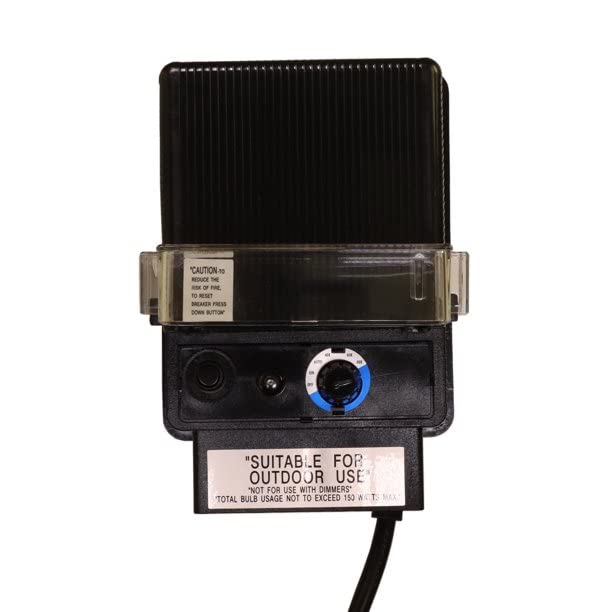
Image: Alliance Outdoor Lighting TF150 150-Watt Low-Voltage Transformer. This image displays the front view of the transformer, highlighting its compact design and the control panel with the photocell and timer settings. Specifications such as Max Amperage (1.5 amps), Max Input (120 volts), Secondary Voltage (12 volts), and Certification (UL Listed) are also visible.
5. Operation
5.1 Photocell Function
The built-in photocell automatically detects ambient light levels. When light levels drop (e.g., at dusk), the transformer will activate the connected lights. When light levels rise (e.g., at dawn), the lights will turn off.
- Photocell Placement: Ensure the photocell sensor is not obstructed by objects, shadows, or artificial light sources, as this can interfere with its operation.
- Delay: The light sensor may have a short delay (e.g., a couple of minutes) when first activating or deactivating. This is normal behavior to prevent flickering due to momentary light changes.
- Weather Conditions: On cloudy or rainy days, the lights may come on due to low sunlight. They will turn off automatically once sufficient sunlight returns.
5.2 Timer Function
The integrated timer allows you to set specific operating durations for your lights after the photocell activates them at dusk. Consult the specific timer dial or buttons on your unit for detailed programming instructions. Common settings include 4-hour, 6-hour, 8-hour, or dusk-to-dawn options.
6. Maintenance
Regular maintenance ensures optimal performance and longevity of your TF150 transformer.
- Cleaning: Periodically wipe the exterior of the transformer with a damp cloth to remove dirt and debris. Do not use abrasive cleaners or solvents. Ensure the photocell lens is clean for accurate light detection.
- Connection Checks: Annually, or if issues arise, disconnect power and inspect all low-voltage wiring connections for corrosion or looseness. Tighten any loose connections.
- Ventilation: Ensure the transformer has adequate ventilation and is not covered, especially during operation, to prevent overheating.
7. Troubleshooting
| Problem | Possible Cause | Solution |
|---|---|---|
| Lights do not turn on | No power to transformer Photocell obstructed Timer set incorrectly Loose wiring connections Overloaded circuit Faulty bulbs/fixtures | Check 120V outlet and circuit breaker. Clear any obstructions from photocell. Adjust timer settings. Inspect and tighten all low-voltage connections. Reduce total wattage of connected lights. Test individual bulbs/fixtures. |
| Lights stay on constantly | Photocell receiving insufficient light Photocell faulty | Ensure photocell is exposed to adequate daylight and not in a shaded area or covered. Contact customer support if photocell is suspected to be faulty. |
| Lights flicker | Loose connections Voltage drop due to long wire runs or undersized wire | Check and tighten all connections. Consult a professional for proper wire gauge and layout for your lighting system. |
8. Specifications
| Specification | Value |
|---|---|
| Model Number | TF150 |
| Max Amperage (Load) | 1.5 amps |
| Max Input (Primary Voltage) | 120 volts AC |
| Secondary Voltage | 12 volts AC |
| Available Voltage Taps | 12 |
| Wattage Capacity | 150 watts |
| Exterior Construction | Durable Plastic |
| Features | Built-in Photocell, Built-in Timer |
| Power Source | Corded Electric |
| Mounting Type | Wall Mount |
| Certification | UL Listed to U.S. and Canadian safety standards for low voltage landscape lighting |
| Item Weight | 11.2 ounces |
| Package Dimensions | 1.1 x 0.9 x 0.6 inches |
9. Warranty Information
The Alliance Outdoor Lighting TF150 transformer comes with a 2-year limited warranty from the date of purchase. This warranty covers defects in materials and workmanship under normal use. It does not cover damage caused by improper installation, misuse, abuse, accidents, or unauthorized repairs. For warranty claims, please retain your proof of purchase and contact customer support.
10. Customer Support
If you have any questions, require technical assistance, or need to report a problem with your Alliance Outdoor Lighting TF150 transformer, please contact Alliance Outdoor Lighting customer support. Refer to the product packaging or the official Alliance Outdoor Lighting website for the most current contact information.


