
1. Introduction
This manual provides detailed instructions for the safe installation, operation, and maintenance of your YITAHOME 52-inch Industrial Wood Ceiling Fan. Please read this manual thoroughly before installation and retain it for future reference. Proper installation and adherence to these instructions will ensure optimal performance and safety.
2. Safety Information
WARNING: To reduce the risk of fire, electric shock, or personal injury, always follow these instructions.
- Ensure the power is turned off at the circuit breaker before installation or servicing.
- All wiring must be in accordance with national and local electrical codes. Consult a qualified electrician if you are unsure about wiring procedures.
- The mounting structure must be capable of supporting the weight of the fan (approximately 13.45 lbs).
- Do not operate the fan with damaged blades or housing.
- Keep hands, clothing, and other objects clear of the fan blades when the fan is in operation.
- This fan is designed for indoor use only.
3. Package Contents
Verify that all components are present before beginning installation. If any parts are missing or damaged, contact YITAHOME customer service.
- Ceiling Fan Motor Housing
- Solid Wood Blades (3)
- LED Light Kit with Acrylic Shade
- Remote Control
- Wall Switch
- Downrods (5-inch and 10-inch)
- Mounting Bracket
- Hardware Pack (screws, wire nuts, washers, balance kit)
- Instruction Manual
4. Specifications
| Feature | Specification |
|---|---|
| Brand | YITAHOME |
| Model Name | MAYIH0008832MA |
| Product Dimensions | 52"D x 52"W x 12.4"H |
| Power Source | DC |
| Voltage | 12 Volts |
| Noise Level | 35 Decibels |
| Number of Blades | 3 |
| Room Type | Living Room, Bedroom (suitable for 144-300 sq ft) |
| Special Features | LED Light (Dimmable, 3 Color), Reversible Motor, Memory Function |
| Control Method | Remote, Wall Switch |
| Installation Type | Downrod Mount (5" and 10" included), Angled Mount (max 15°) |
| Item Weight | 13.45 Pounds |
5. Setup and Installation
Before installation, ensure you have all necessary tools and that the power supply is disconnected at the circuit breaker.
5.1 Pre-Installation
- Unpack all components and inspect for any damage.
- Ensure the electrical box is securely mounted and capable of supporting the fan's weight.
- Determine your preferred mounting option: downrod (5-inch or 10-inch) or angled mount (up to 15 degrees).
5.2 Mounting the Fan
- Attach the mounting bracket to the electrical junction box using the provided screws.
- Assemble the downrod (if using) to the fan motor housing, ensuring all screws are tightened.
- Carefully lift the fan assembly and hang it from the mounting bracket using the safety cable.
5.3 Wiring Connections
Connect the electrical wires according to local codes and the wiring diagram provided in the full instruction manual. Use the included wire nuts to secure connections.
5.4 Attaching Blades and Light Kit
- Securely attach the three solid wood blades to the motor housing using the provided screws.
- Connect the LED light kit wiring to the fan's electrical system.
- Attach the acrylic lampshade to the light kit.
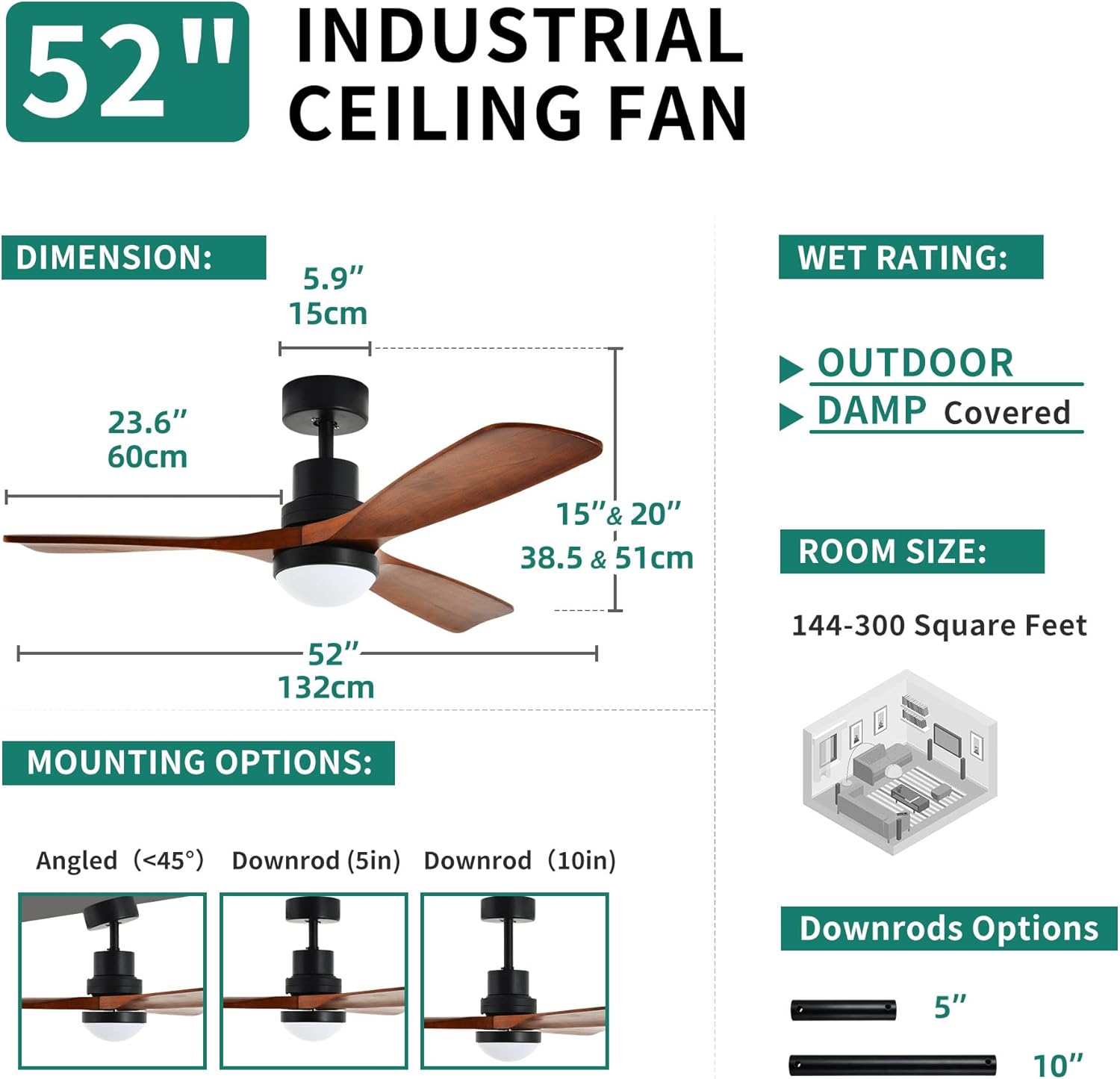
Image: Fan dimensions and mounting options, including angled, 5-inch downrod, and 10-inch downrod configurations.

Image: Detailed view of the fan's acrylic lampshade and solid wood blades, highlighting material quality.
6. Operating Instructions
Your YITAHOME ceiling fan can be controlled using the included remote control or the wall switch.
6.1 Remote Control Functions
- Power On/Off: Press the power button to turn the fan and light on or off.
- Fan Speed: Select from 6 available fan speeds to adjust airflow.
- Light Control:
- Color Temperature: Cycle through 3 color temperatures: 3000K (Warm White), 4500K (Natural White), and 6000K (Cool White).
- Dimming: Adjust the brightness of the LED light steplessly.
- Timer Function: Set the fan to turn off automatically after 1, 2, 4, or 8 hours.
- Reversible Motor: Activate the reversible function for seasonal use.
- Memory Function: The fan remembers your last light settings (color temperature and brightness) when turned off and on again.
6.2 Wall Switch Functions
The included wall switch provides convenient control over the fan and light functions, mirroring many of the remote control's capabilities.
6.3 Reversible Airflow
The fan features a reversible DC motor for year-round comfort:
- Summer Mode: Downward airflow creates a cooling effect.
- Winter Mode: Upward airflow circulates warm air trapped near the ceiling.

Image: Overview of the fan's control features, including the remote and wall switch, highlighting 6 speed settings, 4 timer options, 3-color dimmable light, and memory function.

Image: Illustration of the fan's stepless dimming capability and three adjustable light color temperatures: warm white (2800K-3300K), natural white (3300K-4500K), and cool white (4500K-6000K).

Image: Visual representation of the reversible ceiling fan function, showing downward airflow for summer cooling and upward airflow for winter heat circulation.
7. Maintenance
Regular maintenance helps prolong the life and performance of your ceiling fan.
- Cleaning: Use a soft, damp cloth to clean the fan blades and motor housing. Do not use abrasive cleaners or solvents.
- Blade Care: Periodically check the blade screws for tightness. Loose blades can cause wobbling and noise.
- Light Shade: The acrylic light shade can be removed for cleaning if necessary. Ensure it is securely reattached.
- General Inspection: Annually inspect all connections and mounting hardware for security.
CAUTION: Always turn off the power at the circuit breaker before performing any cleaning or maintenance.
8. Troubleshooting
If you experience issues with your fan, refer to the following common problems and solutions:
| Problem | Possible Cause | Solution |
|---|---|---|
| Fan does not start | No power to the fan; Loose wire connections; Remote control battery low/dead. | Check circuit breaker; Verify all wire connections are secure; Replace remote control batteries. |
| Light does not work | Loose wire connection to light kit; LED driver issue. | Check light kit wiring; Contact customer support if LED driver is suspected. |
| Fan wobbles | Loose blade screws; Unbalanced blades; Loose mounting bracket. | Tighten all blade screws; Use the included balance kit to balance blades; Ensure mounting bracket is secure. |
| Remote control not working | Batteries dead or incorrectly inserted; Remote not paired with fan. | Replace batteries, ensuring correct polarity; Refer to the full manual for remote pairing instructions. |
| Excessive noise | Loose screws; Motor housing rubbing; Blades hitting an obstruction. | Check and tighten all screws; Ensure no parts are rubbing; Verify blades have clear rotation path. |
9. Warranty and Support
9.1 Warranty Information
This YITAHOME ceiling fan comes with a 1-year limited warranty from the date of purchase. This warranty covers defects in materials and workmanship under normal use. It does not cover damage resulting from improper installation, accident, misuse, abuse, or unauthorized modifications.
9.2 Customer Support
For technical assistance, warranty claims, or replacement parts, please contact YITAHOME customer service. Have your model number (MAYIH0008832MA) and proof of purchase ready when contacting support.
You can visit the official YITAHOME store for more information: YITAHOME Store


