
1. Product Overview
The imuto X-30 PRO is a high-capacity 27000mAh portable power bank designed to provide reliable power for a wide range of electronic devices, including laptops, tablets, and smartphones. Featuring 65W USB-C Power Delivery (PD) and multiple output ports, it ensures fast and efficient charging on the go. The integrated LCD display provides real-time battery status and charging information.

The imuto X-30 PRO portable power bank, featuring a sleek black design with gold accents and a digital LCD screen showing 100% battery.
2. Package Contents
- imuto X-30 PRO 27000mAh Power Bank
- USB-C to USB-C Charging Cable
- User Manual
3. Setup and Initial Use
3.1 Initial Charging of the Power Bank
Before first use, fully charge your imuto X-30 PRO power bank. For optimal charging speed, use a 65W (or higher) USB-C PD wall charger (not included) with the provided USB-C to USB-C cable. A full charge typically takes approximately 3.5 hours with a 65W charger.

Illustration demonstrating the fast recharge capability of the imuto X-30 PRO, showing it can be fully recharged in 3.5 hours using a 65W wall charger.
3.2 Understanding the LCD Display
The intelligent LCD display shows the remaining battery percentage. It also indicates charging speed and battery health status. The display activates when the power bank is in use or when a button is pressed.

A detailed view of the imuto X-30 PRO's intelligent LCD screen, which clearly shows the remaining battery percentage and other status indicators.
4. Operating Instructions
4.1 Charging Your Devices
The imuto X-30 PRO features three output ports:
- USB-C Port (65W PD Input/Output): Use this port for fast charging compatible laptops (e.g., MacBook Pro), tablets (e.g., iPad Pro), and smartphones. This port also serves as the input for recharging the power bank itself.
- Two USB-A Ports (18W Output each): These ports are suitable for charging a variety of devices that require up to 18W, such as smartphones, smartwatches, and other USB-powered accessories.
To charge a device, connect it to the appropriate port on the power bank using a compatible charging cable. The power bank will automatically begin charging.

A close-up of the imuto X-30 PRO's multiple charging ports, including two USB-A ports and one USB-C port, highlighting their respective power outputs and compatibility with various devices.
4.2 Simultaneous Charging
The power bank supports charging up to three devices simultaneously. When charging multiple devices, the total maximum output is 65W. The USB-C port can deliver up to 45W, and each USB-A port can deliver up to 18W.

The imuto X-30 PRO power bank connected to and charging three different devices concurrently: a laptop, a smartphone, and a tablet, showcasing its multi-device charging feature.
4.3 Capacity and Usage Examples
With its 27000mAh capacity, the imuto X-30 PRO can provide multiple charges for various devices, making it ideal for travel and outdoor activities. For example, it can charge an iPhone 14 approximately 6 times, a MacBook Pro 14" about 1.5 times, an iPad Pro 2 times, or a Samsung Galaxy S20 4 times.
An image depicting the imuto X-30 PRO power bank being used during travel, emphasizing its large 27000mAh capacity and ability to provide multiple charges for various devices.
5. Maintenance
To ensure the longevity and optimal performance of your imuto X-30 PRO power bank, follow these maintenance guidelines:
- Storage: Store the power bank in a cool, dry place away from direct sunlight and extreme temperatures.
- Cleaning: Use a soft, dry cloth to clean the exterior of the power bank. Avoid using harsh chemicals or abrasive materials.
- Charging Cycles: For best battery health, avoid completely draining the power bank frequently. Recharge it when the battery level is low.
- Avoid Drops: Protect the device from drops and impacts, which can damage internal components.
6. Troubleshooting
If you encounter issues with your imuto X-30 PRO power bank, refer to the following common solutions:
- Power Bank Not Charging: Ensure the charging cable is securely connected to both the power bank and the wall charger. Verify that the wall charger is functioning correctly and meets the recommended power output (65W PD for fastest charging).
- Device Not Charging from Power Bank: Check if the power bank has sufficient charge. Ensure the charging cable connecting your device to the power bank is functional and correctly inserted. Try a different port or cable.
- Slow Charging: Confirm that your device supports fast charging protocols (e.g., USB-C PD) and that you are using a compatible cable. Ensure the power bank itself is adequately charged.
- LCD Display Not Working: Press the power button to activate the display. If it remains unresponsive, try recharging the power bank.
If problems persist, please contact customer support for further assistance.
7. Specifications
| Feature | Specification |
|---|---|
| Model Name | X-30 PRO |
| Brand | imuto |
| Battery Capacity | 27000 mAh |
| Battery Composition | Lithium-Polymer |
| Connector Type | USB Type A, USB Type C |
| Voltage | 20 Volts |
| Power Source | Cable Electric |
| Special Features | Digital Display, Fast Charging, Short-Circuit Protection, Discharge Protection |
| Recommended Uses | Camera, Laptop, Tablet, Phone |
8. Safety Information
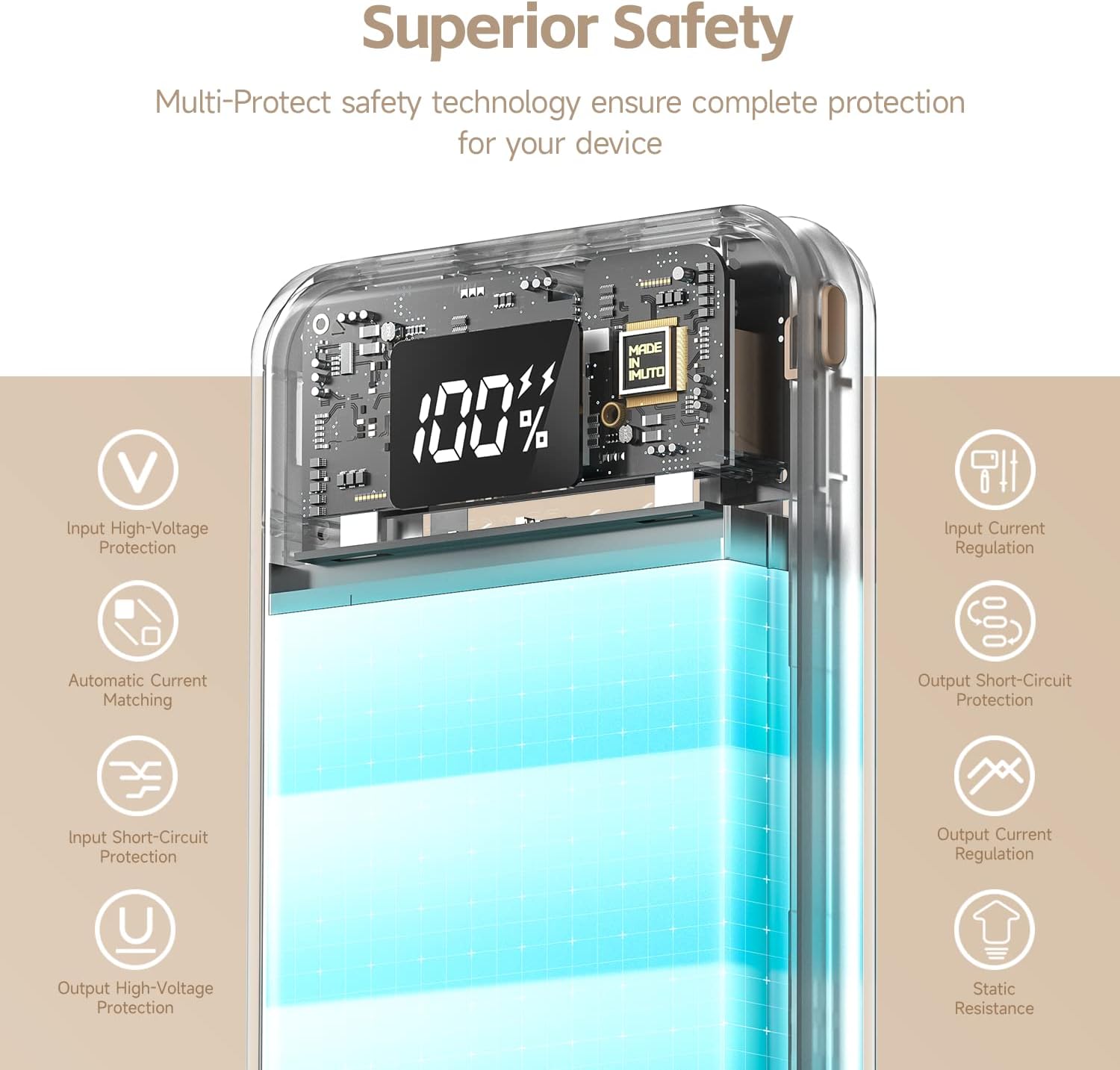
The imuto X-30 PRO is equipped with multi-protect safety technology to ensure complete protection for your devices and the power bank itself. These features include:
- Input High-Voltage Protection
- Input Current Regulation
- Automatic Current Matching
- Output Short-Circuit Protection
- Input Short-Circuit Protection
- Output Current Regulation
- Output High-Voltage Protection
- Static Resistance
Always use the power bank according to the instructions and avoid exposing it to extreme conditions, moisture, or physical damage.

An illustration highlighting the comprehensive safety mechanisms built into the imuto X-30 PRO, including protections against over-voltage, short-circuits, and current regulation.
9. Warranty and Support
Your imuto X-30 PRO power bank comes with a standard manufacturer's warranty. For detailed warranty information, please refer to the warranty card included in your product packaging or visit the official imuto website.
For technical support, troubleshooting assistance, or any inquiries regarding your product, please contact imuto customer service through their official website or the contact information provided in your product documentation.