
LOMCA Replacement Remote Control
LOMCA Replacement Remote Control User Manual
For Yamaha Soundbar Models: ATS-1070, ATS-1080, ATS-1060, ATS-2090, YAS-106, YAS-207, YAS-107, YAS-108
Introduction
This manual provides comprehensive instructions for the LOMCA Replacement Remote Control, designed for seamless operation with various Yamaha Soundbar systems. This remote control is compatible with Yamaha Soundbar models ATS-1060, ATS-1070, YAS-106, YAS-207, YAS-107, YAS-108, ATS-2090, ATS-1080, ATS-2070, NS-WSW42, YAS-207BL, and YAS-CU207.
No programming or setup is required; simply insert batteries to begin use.
Setup
Battery Installation
- Locate the battery compartment on the back of the remote control.
- Slide the battery cover downwards or in the direction indicated by an arrow to open it.
- Insert two (2) AAA batteries, ensuring the positive (+) and negative (-) terminals align correctly with the markings inside the compartment.
- Replace the battery cover by sliding it back into position until it clicks securely.
Note: Batteries are not included with the remote control. Always use new batteries for optimal performance.
Initial Use
This LOMCA replacement remote control is pre-programmed and does not require any additional setup or pairing with your Yamaha Soundbar. Once batteries are installed, it is ready for immediate use.

Image Description: This image displays the front and back of the LOMCA replacement remote control. The front shows all the buttons, including power, input selectors (HDMI, TV, Analog, Bluetooth, NET), sound modes (Surround, Stereo, 3D Surround), audio adjustments (Info, Clear Voice, Bluetooth Standby, Dimmer, Bass Extension), and volume/subwoofer controls. The back of the remote is plain black with a battery compartment cover visible at the bottom, indicating where to insert batteries.

Image Description: The image shows the LOMCA replacement remote control held in a hand, with a modern living room background featuring a soundbar and television. Text overlays emphasize "Work right out of the box" and "No Programming or pairing needed," reinforcing the remote's plug-and-play functionality.
Operating Instructions
Familiarize yourself with the buttons on your LOMCA replacement remote control. Each button corresponds to a specific function on your compatible Yamaha Soundbar.
| Button | Function |
|---|---|
| Power (Orange) | Turns the soundbar on or off. |
| NET | Selects the network input source. |
| HDMI | Selects the HDMI input source. |
| TV | Selects the TV input source. |
| ANALOG | Selects the analog input source. |
| BLUETOOTH | Selects the Bluetooth input source. |
| SURROUND | Activates or deactivates surround sound mode. |
| STEREO | Activates or deactivates stereo sound mode. |
| 3D SURROUND | Engages or disengages 3D surround sound. |
| INFO | Displays information on the soundbar's status or settings. |
| CLEAR VOICE | Enhances dialogue clarity. |
| BLUETOOTH STANDBY | Enables or disables Bluetooth standby mode. |
| DIMMER | Adjusts the brightness of the soundbar's display. |
| BASS EXTENSION | Enhances bass output. |
| SUBWOOFER (+/-) | Adjusts the subwoofer volume level. |
| VOLUME (+/-) | Adjusts the main soundbar volume level. |
| MUTE | Mutes or unmutes the sound. |
| NET RADIO (1/2) | Selects preset network radio stations. |

Image Description: A close-up view of the LOMCA replacement remote control, clearly showing the layout and labels of all its buttons. This image helps users identify each button for its corresponding function.
Maintenance
Battery Replacement
If the remote control's range decreases or buttons become unresponsive, it may be time to replace the batteries. Follow the battery installation steps outlined in the "Setup" section. Always replace both AAA batteries simultaneously with new ones.
Cleaning
- Wipe the remote control with a soft, dry cloth.
- For stubborn dirt, lightly dampen the cloth with water. Avoid using harsh chemicals or abrasive cleaners, as these can damage the remote's surface or internal components.
Storage
Store the remote control in a cool, dry place away from direct sunlight and extreme temperatures. If the remote will not be used for an extended period, it is recommended to remove the batteries to prevent leakage.
Troubleshooting
- Remote not responding:
- Ensure fresh AAA batteries are correctly installed.
- Check for any obstructions between the remote control and the soundbar's sensor.
- Ensure you are within the effective operating range and pointing the remote directly at the soundbar.
- Specific functions not working:
- Verify that your Yamaha Soundbar model is listed as compatible with this remote control.
- Some advanced functions may require specific soundbar settings or modes to be active. Refer to your Yamaha Soundbar's original manual for details.
Specifications
- Brand: LOMCA
- Color: Black
- Material: ABS (Acrylonitrile Butadiene Styrene)
- Special Feature: Ergonomic design
- Power Source: 2 x AAA Batteries (not included)
- Compatible Devices: Yamaha Soundbar ATS-1060, ATS-1070, YAS-106, YAS-207, YAS-107, YAS-108, ATS-2090, ATS-1080, ATS-2070, NS-WSW42, YAS-207BL, YAS-CU207
- Package Dimensions: 7.87 x 3.15 x 0.39 inches
- Item Weight: 1.06 ounces

Image Description: This image illustrates the physical dimensions of the LOMCA replacement remote control. It shows the remote from the front and side, with measurements indicating a length of 4.95 inches, a width of 2.06 inches, and a thickness of 0.37 inches.
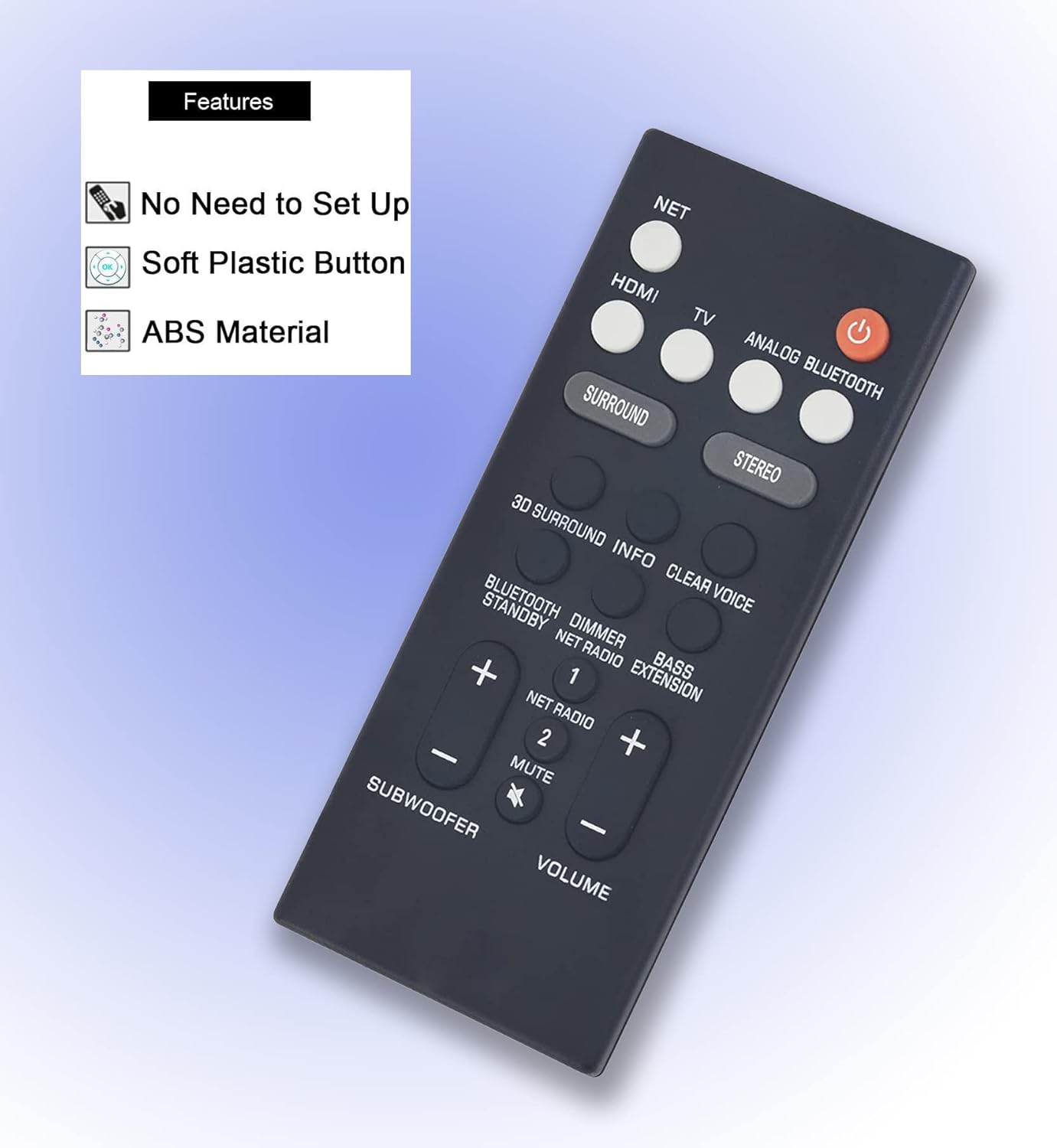
Image Description: The image displays the LOMCA replacement remote control at an angle, with a text box highlighting its key features: "No Need to Set Up," "Soft Plastic Button," and "ABS Material." This visually communicates the ease of use and construction quality.
Warranty and Support
Warranty Information
This LOMCA replacement remote control comes with a 90-day warranty from the date of purchase. This warranty covers manufacturing defects under normal use. Please retain your proof of purchase for warranty claims.
Customer Support
For any questions, troubleshooting assistance, or warranty inquiries, please contact LOMCA customer support through the retailer where the product was purchased. Provide your product details and purchase information for efficient service.