
1. Introduction
This manual provides detailed instructions for the setup, operation, and maintenance of your JF Digital MX-2A Pro Android Streaming Music Audio HiFi Player. Please read this manual thoroughly before using the device to ensure proper functionality and to maximize your listening experience.
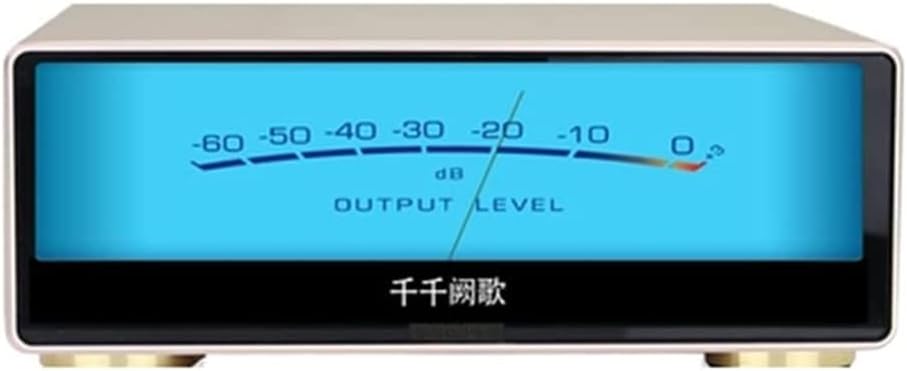
Front view of the MX-2A Pro HiFi Player, featuring a prominent output level meter display and a screen that shows 'Thousands of Songs' in Chinese characters.
2. Key Features
- Android Streaming capabilities for versatile music access.
- High-Fidelity (HiFi) Audio Player designed for superior sound quality.
- Equipped with Dual CS43197 DACs for advanced digital-to-analog conversion.
- Features XMOS technology for precise audio processing.
- Supports popular streaming services like Tidal and Qobuz.
3. Audio Technology
The MX-2A Pro incorporates advanced audio technologies to deliver exceptional sound quality. It utilizes the CS43198 decoding chip, recognized for its comprehensive performance in sound reproduction. This is particularly beneficial for audio sources derived from CD ripping, where the player's clock recovery system, featuring a dual clock de-jitter circuit, minimizes sound quality loss.
The XMOS low-jitter asynchronous clock outputs an ultra-low-jitter I2S digital signal to the DAC chip. Combined with the unique clock recovery capability of the CS43198, the player's clock link performance ensures no bottlenecks when playing high-stream audio sources, achieving sound quality comparable to high-end CD players.
The CS43198 DAC, an upgraded product based on the CS4399, redefines audio DAC performance. It features a unique 'clock clear' patented technology to eliminate the impact of system clock jitter on the audio path, and also offers a unique no oversampling (NOS) simulation mode.

Diagram illustrating the 'Clean Clock Source' technology, detailing the process from input clock to clean output via Clock Clean Up Technology and FLL (Frequency Locked Loop).

Table comparing the performance characteristics of three DAC chips: CS43198, AK4497, and ES9038 Pro, highlighting differences in analog flavor, style, frequency response, detail, dynamic range, DSD format support, and power requirements.

Internal view of the MX-2A Pro, highlighting key components such as the custom-made EMI power filter, audio screening can, and toroidal transformer screening can, designed for optimal audio performance.
4. Setup Guide
4.1. Package Contents
Ensure all items are present in the package:
- MX-2A Pro Android Streaming Music Audio HiFi Player
- Power Cable
- User Manual (this document)
4.2. Connecting the Device
Refer to the rear panel diagram for proper connection of power, audio outputs, and network cables.

Rear panel of the MX-2A Pro, displaying the AC input, power switch, LAN port, USB ports (USB 3.0, Audio Output, USB Input), and various audio output ports including RCA and balanced XLR, along with a WiFi antenna connection.
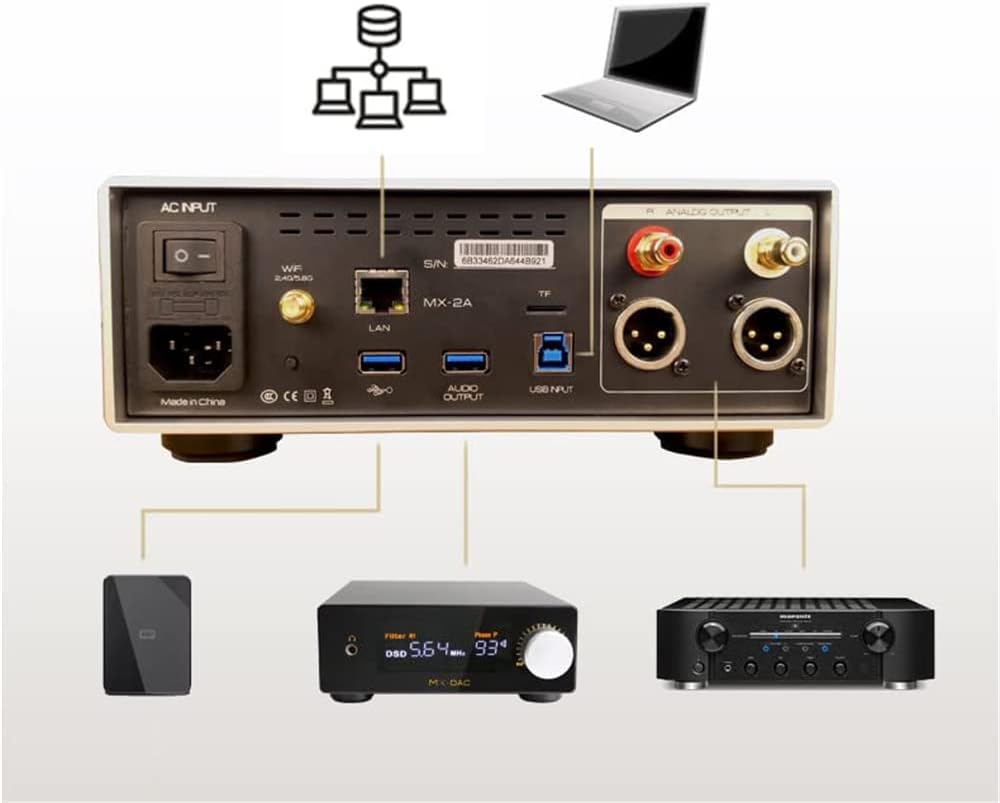
Connection diagram for the MX-2A Pro, illustrating how to connect it to a network (via LAN or WiFi), a laptop, an external hard drive, an external DAC, and an amplifier using its various input and output ports.
- Power Connection: Connect the provided power cable to the AC INPUT port on the rear panel and then to a wall outlet.
- Audio Output: Connect your amplifier or active speakers to the ANALOG OUTPUT ports (RCA or XLR) on the rear panel.
- USB Audio Output: For connecting to an external DAC, use the USB AUDIO OUTPUT port.
- USB Input: Connect external storage devices (e.g., USB hard drives) to the USB INPUT ports.
4.3. Network Configuration
The MX-2A Pro supports both wired and wireless network connections.
- Wired Connection: Connect an Ethernet cable from your router to the LAN port on the rear panel.
- Wireless Connection: Attach the provided WiFi antenna to the designated connector. Navigate to the network settings on the device's interface to connect to your 2.4G or 5.0G WiFi network.
4.4. Initial Power On
After all connections are made, flip the power switch on the rear panel to the 'ON' position. The device will boot up, and the display will show the operating system interface.
5. Operating Instructions
5.1. Basic Playback
Navigate the Android interface using the touchscreen or a connected remote control. Select your desired music source, whether from local storage, network shares, or streaming applications.
5.2. Streaming Services
The MX-2A Pro supports various streaming applications, including Tidal and Qobuz. Download and install these applications from the device's app store, then log in with your account credentials to access your music library.
5.3. Mobile Application Control
Control the MX-2A Pro remotely using a dedicated Android mobile application. This allows for convenient playback control, library browsing, and settings adjustments from your smartphone or tablet.
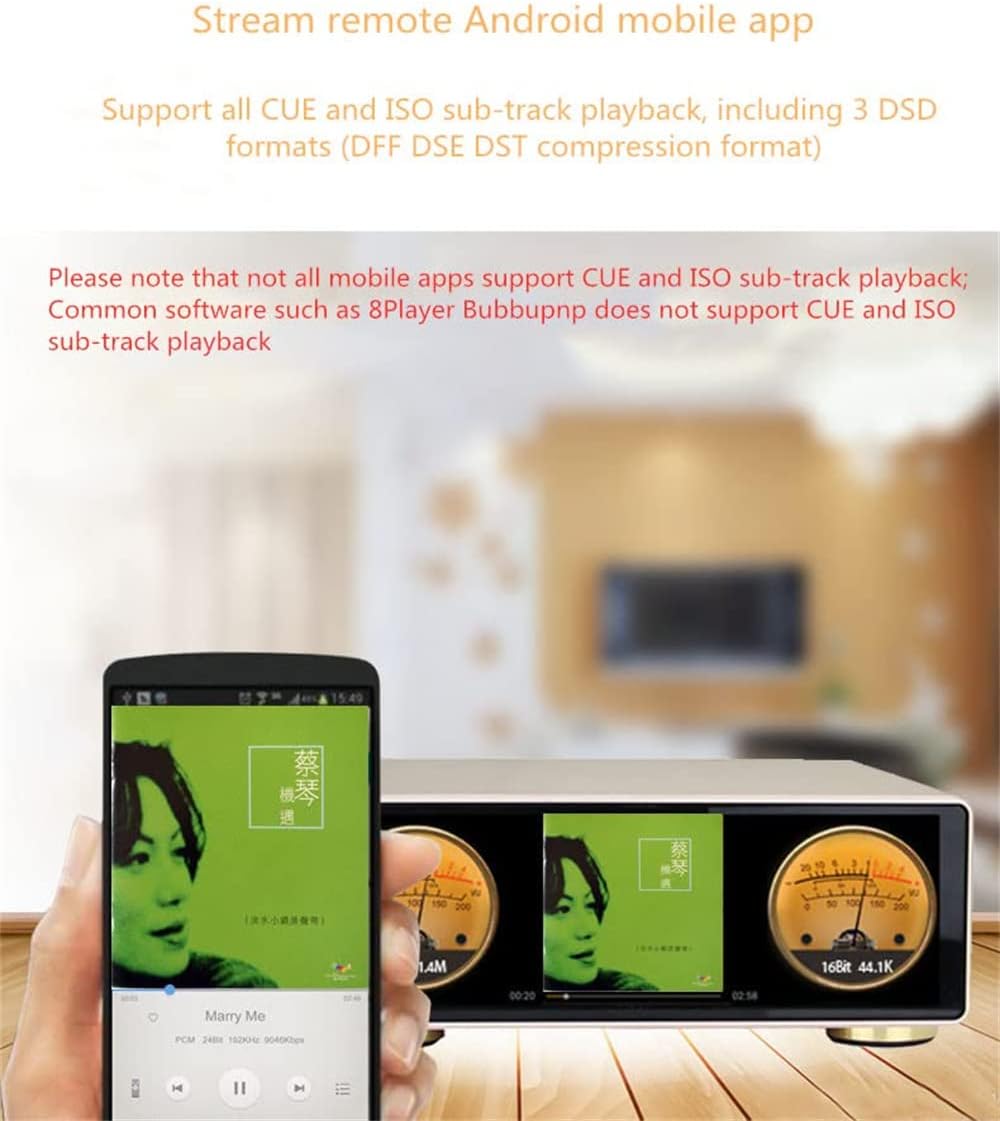
An Android mobile app interface on a smartphone controlling the MX-2A Pro, which displays album art and output meters, demonstrating remote streaming capabilities.
Note that while the device supports CUE and ISO sub-track playback, not all mobile apps may support these features. Common software like 8Player and BubbuPNP may not support CUE and ISO sub-track playback.
5.4. Supported Audio Formats
The MX-2A Pro supports a wide range of audio file formats and sampling rates:

Table outlining the various audio file formats supported by the MX-2A Pro, including DSF, DSDIFF, DST, PCM (WAV), FLAC, APE, and MP3, along with their respective sampling rate capabilities.
6. Maintenance
6.1. Cleaning
To maintain the appearance and functionality of your device, regularly wipe the exterior with a soft, dry cloth. Avoid using abrasive cleaners or solvents, as these can damage the finish. Ensure the device is powered off and unplugged before cleaning.
6.2. Software Updates
The MX-2A Pro supports Over-The-Air (OTA) software upgrades. Periodically check for available updates through the device's system settings to ensure you have the latest features and performance enhancements.
7. Troubleshooting
If you encounter issues with your MX-2A Pro, refer to the following common problems and solutions:
- No Power: Ensure the power cable is securely connected to both the device and a working power outlet. Check the power switch on the rear panel.
- No Sound Output: Verify that your amplifier or active speakers are correctly connected to the audio output ports and are powered on. Check the volume level on both the MX-2A Pro and your connected audio system. Ensure the correct input source is selected on your amplifier.
- Network Connection Issues: For wired connections, ensure the Ethernet cable is properly connected. For wireless connections, verify the WiFi password and signal strength. Restart your router and the MX-2A Pro.
- Cannot Play Certain Files: Refer to the 'Supported Audio Formats' section to ensure the file type and sampling rate are compatible. Some mobile apps may not support specific sub-track playback formats.
- Device Unresponsive: If the device becomes unresponsive, perform a soft reset by holding down the power button (if available) or by briefly unplugging and re-plugging the power cable.
8. Specifications
Detailed technical specifications for the MX-2A Pro:

Comprehensive table of technical specifications for the MX-2A Pro, covering hardware, software, connectivity, audio performance metrics, and physical dimensions.
| Feature | Specification |
|---|---|
| Product Dimensions | 8.66 x 9.84 x 2.99 inches |
| Item Weight | 11 pounds |
| Item Model Number | MX-2A Pro |
| Brand | JF Digital |
| Model Name | MX-2A Pro |
| Color | White |
| Connectivity Technology | Auxiliary, Wi-Fi, Ethernet |
| Included Components | Android Streaming Music Audio Player |
| Manufacturer | JF Digital |
| OS | Android 7.1+ custom audio framework |
| CPU | 4 Core CPU |
| RAM | DDR3 2G |
| ROM | eMMC 64G |
| Screen | 8 inch full screen |
| USB Hard Disk Interface | USB OTG, support 8TB |
| TF Card | Support 256G |
| Wireless | 2.4G/5.8G, AC+BT 4.0 |
| Wired | 100M/1000M |
| Upgrade | TF Card, OTA Upgrade |
| Agreement | DLNA, Airplay, Samba |
| USB Audio Output | 32bit / 384KHZ, DSD512 Native Dop128 |
| USB Audio Input | 32bit / 384KHZ, DSD256 Native Dop128 |
| Analog Output (CS43198*2) | RCA≥2.5V rms balance≥5Vrm |
| Frequency Response | 10Hz~40KHz(±0.5dB) |
| THD+N | ≤0.0005%/1KHz |
| Signal to Noise Ratio | ≥125dB/1KHz |
| Dynamic Range | ≥125dB/1KHz |
| Channel Separation | ≥120dB/1KHz |
9. Warranty and Support
For warranty information and technical support, please refer to the documentation provided with your purchase or contact JF Digital customer service. Keep your proof of purchase for warranty claims.