
Kenko Back Y006
Kenko Back Wireless Charging Case User Manual
Model: Y006 | Compatible with AirPods 1st & 2nd Generation
Introduction
This manual provides detailed instructions for the Kenko Back Wireless Charging Case, designed as a replacement for AirPods 1st and 2nd Generation charging cases. It covers product features, setup, operation, and maintenance to ensure optimal performance and longevity of your device.
Safety Information
- Keep the charging case away from open flames or high heat sources.
- Do not attempt to disassemble or modify the device.
- Avoid exposure to water or other liquids.
- Use only compatible charging cables and power adapters.
Package Contents
- 1 x Kenko Back Wireless Charging Case (Model Y006)
Note: Earbuds and charging cable are not included.
Features
- Perfect Replacement: Functions as a direct replacement for lost or damaged original AirPods 1st and 2nd Generation charging cases.
- High Capacity Battery: Built-in 700 mAh battery provides up to 5 full charges for your earbuds.
- Dual Charging Options: Supports both wired charging via a Lightning cable and wireless Qi charging.
- Bluetooth Pairing Sync Button: Enables sensitive Bluetooth pairing with your device.
- Battery Monitoring: Allows monitoring of the charging case and earbud battery levels when connected to your iPhone.
Setup & Pairing
- Charge the Case: Before initial use, fully charge the charging case using either a Lightning cable or a wireless charging pad. Refer to the 'Charging Instructions' section for details.
- Insert Earbuds: Place your AirPods into the charging case. Ensure they are correctly seated in their respective slots.
- Activate Bluetooth: On your iPhone, navigate to Settings > Bluetooth and ensure Bluetooth is turned on.
- Initiate Pairing: With the AirPods inside the case and the lid open, press and hold the sync button on the back of the charging case until the indicator light flashes green.
- Connect on iPhone: A pop-up window will appear on your iPhone displaying the AirPods. Tap 'Connect' to complete the pairing process.
- Finalize: Once pairing is complete, close the lid of the charging case and briefly press the sync button. Tap 'Done' on your iPhone to exit pairing mode.

Image: Detailed pairing steps showing Bluetooth activation, pressing the sync button, connecting via iPhone pop-up, and finishing the connection.

Image: The Kenko Back charging case with AirPods inside, next to an iPhone showing the 'Connect with iCloud' prompt for pairing.
Charging Instructions
Charging the Case
The Kenko Back charging case supports both wired and wireless charging methods.
- Wired Charging: Connect a Lightning cable to the charging port on the bottom of the case and plug the other end into a USB power adapter.
- Wireless Charging: Place the charging case on a Qi-compatible wireless charging pad. Ensure the case is centered on the pad for optimal charging.
A full charge for the case typically takes approximately 3 hours. The built-in 700 mAh battery can provide up to 5 full charges for your AirPods.

Image: The Kenko Back charging case demonstrating both wireless charging on a pad and indicating the wired charging port.

Image: A visual representation of the two charging methods: connecting a Lightning cable or placing the case on a wireless charging pad.
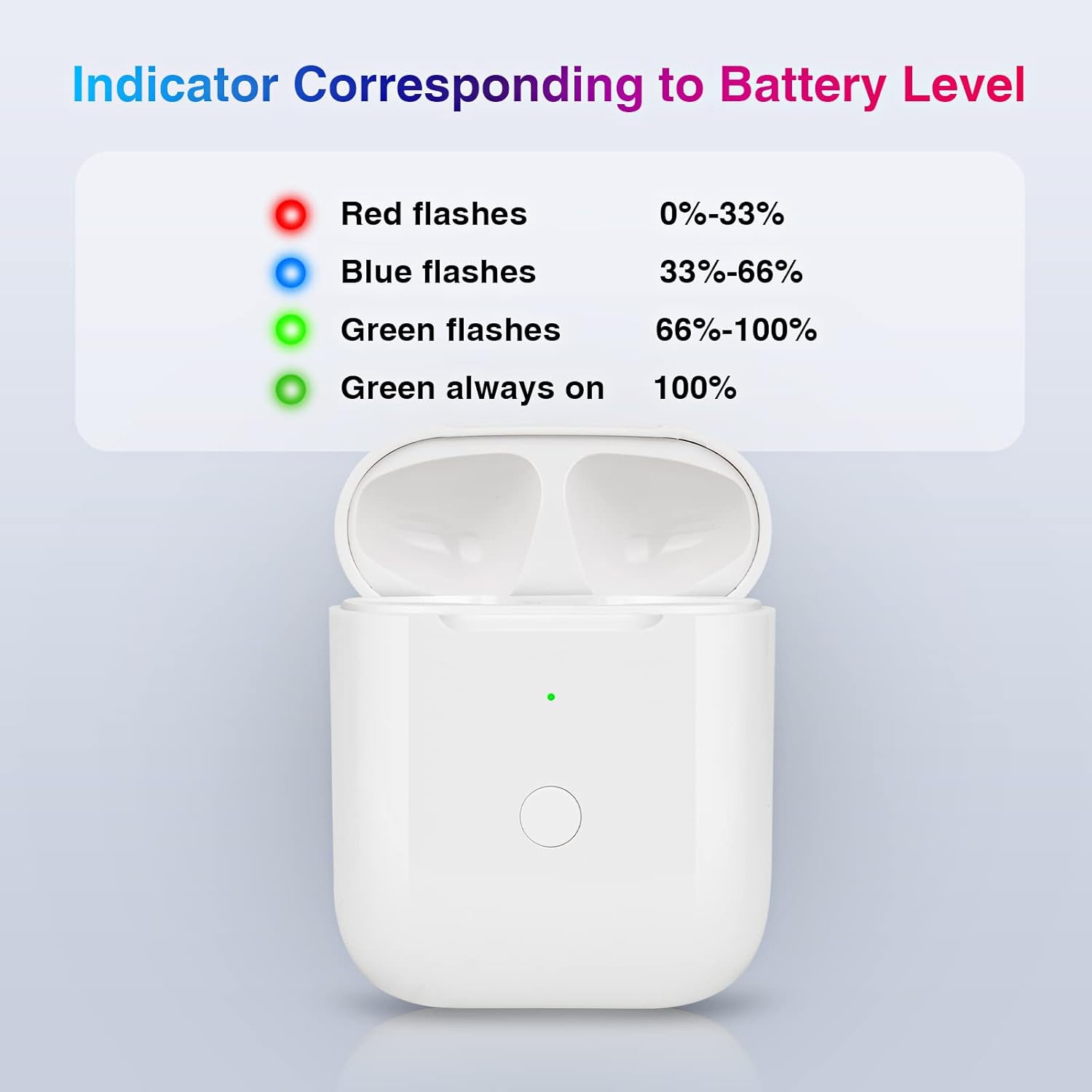
Image: An internal view diagram highlighting the 700mAh capacity battery within the charging case, emphasizing its long-lasting endurance.
Charging AirPods
Simply place your AirPods into the charging case. They will begin charging automatically as long as the case has sufficient power. The indicator light on the case will show the charging status.
Battery Indicator
The LED indicator light on the front of the charging case provides information about the case's battery level and charging status:
- Red flashes: 0% - 33% battery remaining
- Blue flashes: 33% - 66% battery remaining
- Green flashes: 66% - 100% battery remaining
- Green always on: 100% battery charged
Image: A visual guide illustrating the various states of the LED indicator light (red, blue, green flashing, and solid green) and their corresponding battery percentages.
Maintenance
- Clean the charging case regularly with a soft, dry, lint-free cloth.
- Avoid using abrasive cleaners or solvents.
- Keep the charging ports free of dust and debris.
- Store the case in a cool, dry place when not in use.
Troubleshooting
- AirPods not charging in the case:
- Ensure the charging case itself is charged. Verify that the AirPods are correctly seated in their slots. Clean the charging contacts on both the AirPods and the case if necessary.
- Case not charging:
- For wired charging, try a different Lightning cable and power adapter. For wireless charging, ensure the case is properly aligned on a Qi-compatible charging pad and the pad is powered on.
- AirPods not pairing with iPhone:
- Ensure Bluetooth is enabled on your iPhone. Try resetting the pairing by placing AirPods in the case, closing the lid for 15 seconds, then opening and holding the sync button until the light flashes. If issues persist, forget the AirPods from your iPhone's Bluetooth settings and repeat the pairing process.
- Indicator light not working:
- Ensure the case has some charge. If the issue persists, contact customer support.
Specifications
| Feature | Detail |
|---|---|
| Model Number | Y006 |
| Battery Capacity | 700 mAh (Lithium Ion) |
| Charging Time (Case) | Approx. 3 hours |
| Charging Type | Wired (Lightning), Wireless (Qi-compatible) |
| Compatibility | AirPods 1st Generation, AirPods 2nd Generation |
| Item Weight | 1.41 ounces |
| Package Dimensions | 2.95 x 2.56 x 1.26 inches |
| Manufacturer | Swancloud |
Warranty & Support
For any questions or concerns regarding your Kenko Back Wireless Charging Case, please contact our customer support team via the platform where you purchased the product. We aim to respond and assist within 24 hours.
Ask a question about this manual
Ask about setup, troubleshooting, compatibility, parts, safety, or missing instructions. Manuals+ will review the question and use this page’s manual context to help answer it.