1. Getting Started
1.1. What's in the Box
- USB cable
- SIM tray ejector
- Manual
1.2. Device Overview
The SAMSUNG Galaxy A14 5G features a sleek design with a textured back for a comfortable grip. Key physical components include:
- Power/Lock Button: Located on the side, this button also integrates a responsive fingerprint sensor for secure unlocking.
- Volume Controls: Positioned above the power button for easy access.
- USB-C Port: Located at the bottom for charging and data transfer.
- 3.5 mm Audio Jack: Situated at the bottom, allowing for wired headphone connectivity.
- SIM/MicroSD Card Slot: Found on the side, supporting a single SIM card and expandable memory up to 1TB via microSD card.
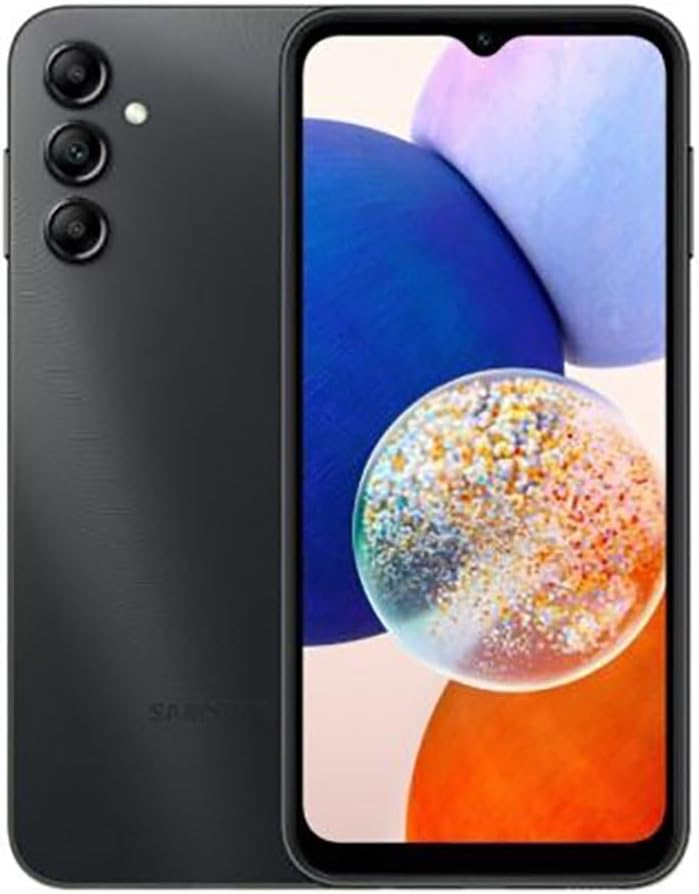
Image: Front and rear view of the SAMSUNG Galaxy A14 5G, highlighting its display and triple camera system.
2. Basic Operation
2.1. Display Features
The Galaxy A14 5G boasts a vibrant 6.6-inch Infinity-V display, offering an immersive viewing experience.
- Size: 6.6 Inches
- Resolution: 1080 x 2408 pixels
- Refresh Rate: 90Hz for smoother scrolling and animations.
- Pixel Density: Approximately 396 pixels per inch.
2.2. Performance
Powered by an Octa-core processor, the Galaxy A14 5G delivers reliable performance for everyday tasks and 5G connectivity.
- CPU Model: Samsung Exynos 3110 (Octa-core, 2000 MHz)
- RAM: 4GB (other configurations may exist)
- Internal Storage: 64GB or 128GB (expandable up to 1TB via microSD card).
2.3. Camera Functionality
Capture your moments with the versatile camera system:
- Rear Camera: Triple lens setup including a 50MP main camera, 5MP ultra-wide camera, and 2MP macro camera.
- Front Camera: 13MP for clear selfies.
- Video Recording: Supports 1080p video recording at 30 frames per second.
2.4. Battery and Charging
The device is equipped with a large battery to keep you powered throughout the day.
- Battery Capacity: 5000mAh
- Charging: Supports 15W fast wired charging.
2.5. Connectivity
Stay connected with various network and wireless options:
- Network: 5G, 4G LTE
- Wireless: Wi-Fi, Bluetooth
- SIM: Single SIM support
- NFC: Note that some regional variants may not include NFC functionality.
3. Device Maintenance
3.1. Software Updates
Samsung is committed to providing long-term software support for the Galaxy A14 5G. This includes:
- Up to 4 years of Android OS updates.
- Up to 5 years of security updates.
3.2. General Care
To ensure the longevity and optimal performance of your device:
- Keep the device clean and free from dust and debris.
- Avoid exposure to extreme temperatures or direct sunlight.
- Use only Samsung-approved chargers and accessories.
- Protect the screen with a screen protector and use a protective case.
4. Troubleshooting
If you encounter issues with your device, consider the following common troubleshooting steps:
- Device Unresponsive: Try a forced restart by holding the Power and Volume Down buttons simultaneously for about 10 seconds.
- Network Connectivity Issues: Check your SIM card insertion, ensure mobile data is enabled, or try restarting the device. Verify compatibility with your carrier.
- Slow Performance: Clear cache, close unused apps, or consider a factory reset if issues persist (back up data first).
- Battery Drain: Adjust screen brightness, disable unnecessary features (GPS, Bluetooth, Wi-Fi when not in use), and check app battery usage in settings.
5. Technical Specifications
| Feature | Specification |
|---|---|
| Model Name | Galaxy A14 |
| Item Model Number | SM-A146PZKGEUE |
| Product Dimensions | 6.61 x 3.07 x 0.36 inches |
| Item Weight | 7.2 ounces (205 Grams) |
| Operating System | Android 13.0 |
| CPU Model | Samsung Exynos 3110 |
| CPU Speed | 2000 MHz |
| Screen Size | 6.6 Inches |
| Resolution | 1080 x 2408 |
| Refresh Rate | 90Hz |
| RAM Memory Installed Size | 64 GB (other configurations may exist) |
| Memory Storage Capacity | 128 GB (expandable) |
| Battery Capacity | 5000 Milliamp Hours |
| Phone Talk Time | 6 Hours |
| Wireless Communication Technologies | Bluetooth, Cellular, Wi-Fi |
| Connectivity Technologies | 5G, 4G LTE |
| Special Features | Expandable Memory |
6. Warranty and Support
Samsung provides comprehensive support for the Galaxy A14 5G. For detailed warranty information, troubleshooting guides, and customer service, please visit the official Samsung support website.
As part of Samsung's commitment, the Galaxy A14 5G is expected to receive up to 4 years of Android OS updates and 5 years of security updates, ensuring your device remains secure and up-to-date.