
1. Product Overview
The Rush Charge COMET Portable Power Bank (Model RC32) is a compact and versatile charging solution designed to keep your devices powered on the go. With a 3200mAh battery capacity and 2.1A high-speed charging, it can charge up to three devices simultaneously. Its universal compatibility includes built-in Lightning, USB-C, and Micro-USB connectors, making it suitable for a wide range of smartphones, tablets, earbuds, and other portable electronics.
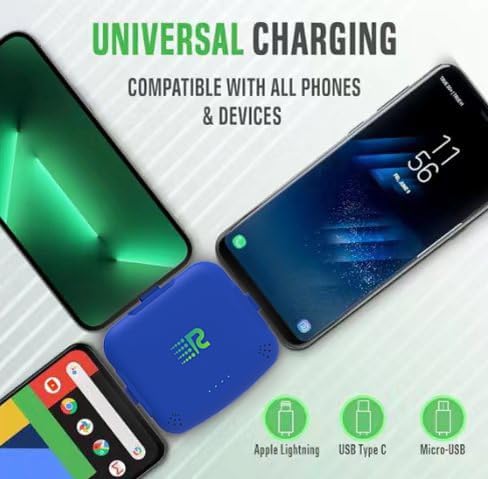
Image: The Rush Charge COMET Power Bank demonstrating its universal charging capabilities with various phone types.
2. Setup and Initial Use
The Rush Charge COMET comes pre-charged, allowing for immediate use upon unboxing. No initial charging is required before its first use.
2.1 Identifying Connectors
The power bank features three integrated connectors: Lightning, USB-C, and Micro-USB. These connectors are typically protected by small, retractable caps. Gently pull out the appropriate connector for your device.

Image: Bottom view of the power bank, highlighting the integrated USB-C, Micro-USB, and Lightning connectors.
2.2 Interchangeable Top Connector
The top connector is interchangeable. The device typically comes with a Lightning connector installed, and a spare USB-C connector is provided. To swap, press the small button on the back of the power bank near the top connector, then gently pull out the connector. Insert the desired connector until it clicks into place.

Image: Top view of the power bank, illustrating the interchangeable Lightning connector.
3. Operating Instructions
3.1 Charging Your Devices
- Identify the correct connector for your device (Lightning, USB-C, or Micro-USB).
- Gently pull out the corresponding connector from the power bank.
- Plug the connector directly into your device's charging port.
- The power bank will automatically begin charging your device. The LED indicator lights on the front of the power bank will illuminate to show the remaining battery level.
- You can charge up to three devices simultaneously using the available connectors.

Image: A blue Rush Charge COMET Power Bank connected to an iPhone, demonstrating device charging.
3.2 Recharging the Power Bank (Pass-Through Technology)
The Rush Charge COMET features Pass-Through Technology, allowing you to recharge the power bank itself while it is simultaneously charging your devices.
- Locate the Micro-USB input port on the side of the power bank.
- Connect a standard Micro-USB charging cable (not included) to this port and to a power source (e.g., wall adapter, computer USB port).
- The LED indicator lights will flash to indicate that the power bank is recharging.
- While the power bank is recharging, you can continue to charge your devices using its built-in connectors.

Image: Front view of the power bank, displaying the LED indicator lights for battery status.
3.3 LED Indicator Lights
The LED lights on the front of the power bank indicate its battery status:
- 4 Solid Lights: 75-100% charged
- 3 Solid Lights: 50-75% charged
- 2 Solid Lights: 25-50% charged
- 1 Solid Light: 0-25% charged (recharge soon)
- Flashing Lights: Currently charging
4. Maintenance
- Keep the power bank dry and away from moisture.
- Avoid exposing the device to extreme temperatures (hot or cold).
- Do not drop, puncture, or disassemble the power bank.
- Clean the exterior with a soft, dry cloth. Do not use harsh chemicals or abrasive materials.
- Store in a cool, dry place when not in use.
5. Troubleshooting
5.1 Device Not Charging
- Ensure the power bank has sufficient charge (check LED indicators).
- Verify that the correct connector is fully inserted into your device's charging port.
- Try a different connector or device to rule out a faulty connector or device issue.
5.2 Slow Charging
- Ensure the power bank is adequately charged. Charging multiple devices simultaneously may reduce the charging speed for each individual device.
- Check if your device supports 2.1A fast charging.
5.3 Power Bank Not Recharging
- Ensure the Micro-USB charging cable is securely connected to the power bank's input port and a working power source.
- Try a different Micro-USB cable or power adapter.
6. Specifications
| Feature | Detail |
|---|---|
| Model Name | COMET |
| Model Number | RC32 |
| Battery Capacity | 3200 Milliamp Hours |
| Amperage | 2.1 Amps |
| Voltage | 5 Volts |
| Connector Types | Lightning, USB-C, Micro-USB |
| Number of Ports | 3 (integrated) |
| Special Features | Fast Charging, LED Indicator Lights, Pocket Size, Slim, Pass-Through Technology |
| Reusability | Rechargeable |
| Item Dimensions L x W x Thickness | 2.9"L x 2.6"W x 0.5"Th |
| Battery Weight | 46.9 Grams |
| Manufacturer | XINTEC ENTERPRISE (HK) LIMITED |
7. Warranty and Support
The Rush Charge COMET Portable Power Bank comes with a Limited Warranty. For specific warranty details, claims, or technical support, please contact Rush Charge customer service or refer to the official product packaging and website.
Manufacturer: XINTEC ENTERPRISE (HK) LIMITED
8. Product Videos
Rush Charge Portable Power for Multiple Devices
Video: This video demonstrates the Rush Charge power bank providing portable power for multiple devices, showcasing its compact design and ease of use.
Rush Charge Comet - Portable Power for Multiple Devices
Video: A detailed demonstration of the Rush Charge Comet, highlighting its ability to charge various devices simultaneously and its convenient portability.