
1. Introduction
Thank you for choosing the BULLSEYE PRO Tire Inflator. This compact and portable device is designed to provide convenient and accurate tire inflation for various items, including vehicle tires, sports balls, and other inflatables. Featuring an automatic shut-off function and a bright LED display, it ensures precise and hassle-free operation. Please read this manual thoroughly before use to ensure proper operation and maintenance.
2. Safety Information
- Always read and understand all instructions before operating the device.
- Keep the device away from children and pets.
- Do not operate the inflator in wet conditions or near flammable liquids or gases.
- Ensure the air hose is securely attached to the valve stem before starting inflation.
- Do not over-inflate items. Always refer to the recommended pressure levels for your specific item.
- Allow the device to cool down after extended use to prevent overheating.
- Store the inflator in a cool, dry place when not in use.
3. Package Contents
Verify that all items listed below are included in your package:
- 1x BULLSEYE PRO Tire Inflator Unit
- 1x Rechargeable Lithium Ion Battery
- 1x USB-C Type Home Charging Cord (3.3 ft)
- 1x 12V DC Cigarette Lighter Power Cable for Car Use (9.8 ft)
- 1x Inflation Sports Needle
- 2x Nozzle Adapters (wide and narrow)
- 1x Spare Fuse
- 1x Carrying Bag
- 1x User Manual

4. Product Overview
The BULLSEYE PRO features an ergonomic design for comfortable handling and a clear digital display for easy monitoring of pressure and battery levels.


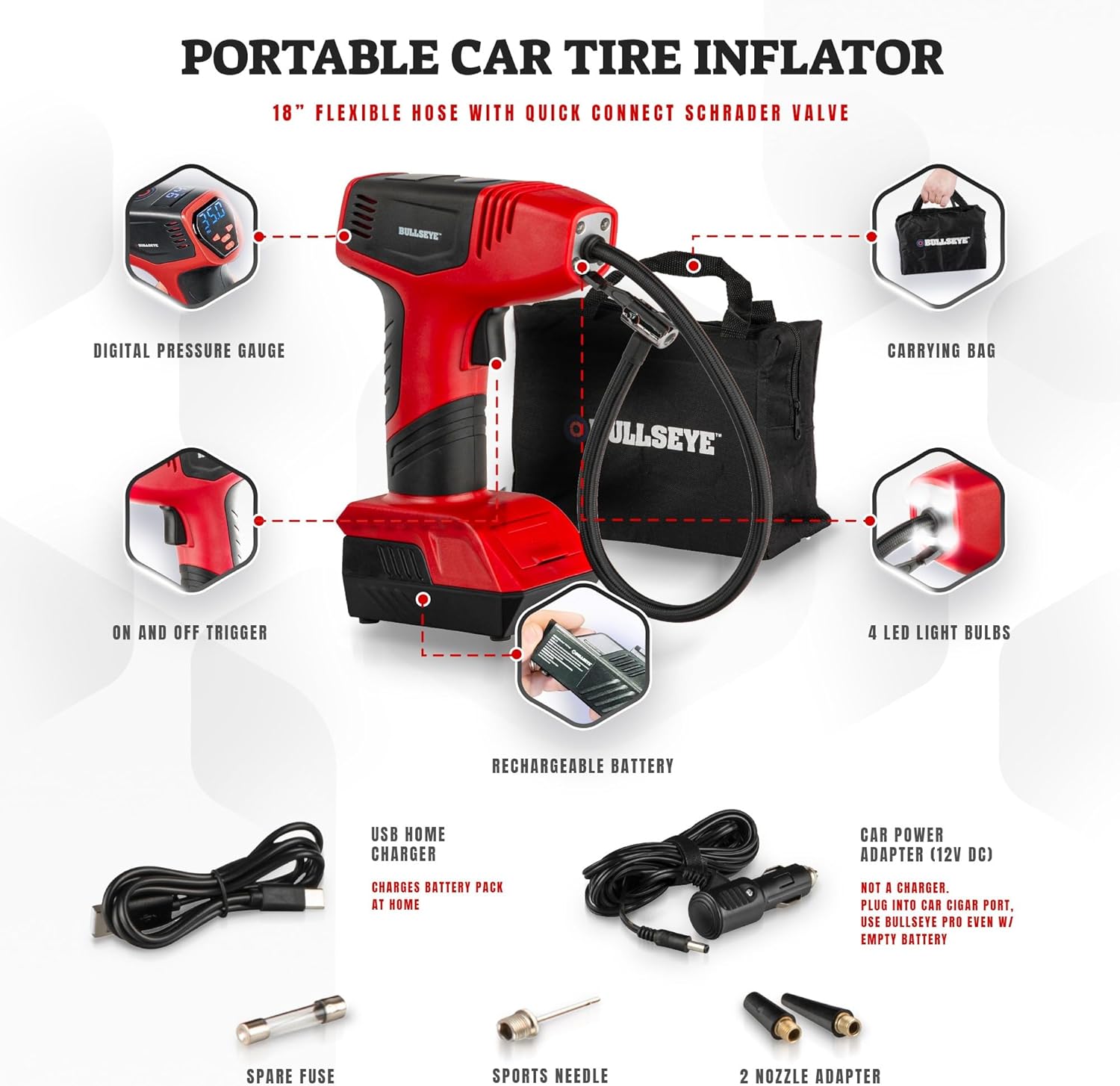

5. Setup
5.1. Charging the Battery
The BULLSEYE PRO comes with a detachable rechargeable Lithium Ion battery. Ensure the battery is fully charged before first use.
- Home Charging: Connect the 3.3 ft USB-C type home charging cord to the battery pack and plug it into a compatible USB power adapter (not included).
- Vehicular Charging: Use the 9.8 ft DC cigarette lighter power cable to charge the device directly from your vehicle's 12V outlet. This also allows the inflator to operate even if the battery is depleted.
5.2. Attaching the Hose and Nozzles
The 18-inch flexible air hose with a quick connector is integrated into the unit. Additional nozzle adapters are stored in a built-in compartment on the lower front of the device.
- To access the nozzle adapters, open the small door on the front base of the inflator.
- Select the appropriate adapter for your inflation needs (sports needle, wide nozzle, narrow nozzle).
6. Operating Instructions
6.1. Powering On/Off
- To power on, press and hold the power button (located on the back display) for 2 seconds. The LED screen will illuminate.
- To power off, press and hold the power button for 2 seconds. The display will turn off.
6.2. Setting Desired Pressure
- Press the 'M' button (Mode) on the display to cycle through the available pressure units: PSI, BAR, KPA, and KG/CM. Select your preferred unit.
- Use the '+' and '-' buttons to adjust the desired target pressure. Holding the buttons will increase/decrease the value more rapidly.
- Once the desired pressure is set, the display will blink for a few seconds and then lock in the value.
6.3. Inflation Process
- Securely attach the air hose's quick connector to the item's valve stem.
- Pull the trigger to start the inflation process. The digital display will show the real-time pressure.
- The inflator will automatically shut off once the preset target pressure is reached.
- To manually stop inflation, simply pull the trigger again.
6.4. Using Nozzle Adapters
The included nozzle adapters allow for versatile use:
- Sports Needle: For inflating sports balls (e.g., basketballs, soccer balls).
- Wide Nozzle: For larger inflatables (e.g., air mattresses, pool toys).
- Narrow Nozzle: For smaller inflatables or specific valve types.
Simply attach the desired nozzle adapter to the end of the air hose before connecting to the item.


6.5. Official Product Videos
Watch these official product videos for visual demonstrations and additional tips:
Bulls Eye Infomercial
This video provides a general overview and demonstration of the BULLSEYE PRO Tire Inflator's features and benefits.
7. Maintenance
- Cleaning: Wipe the device with a clean, damp cloth. Do not use harsh chemicals or abrasive cleaners.
- Storage: Store the inflator and all accessories in the provided carrying bag in a cool, dry place.
- Battery Care: For optimal battery life, charge the battery regularly, even if not in frequent use. Avoid fully discharging the battery for extended periods.
8. Troubleshooting
If you encounter any issues with your BULLSEYE PRO Tire Inflator, please refer to the following common troubleshooting tips:
| Problem | Possible Cause | Solution |
|---|---|---|
| Device does not power on. | Battery is not charged or not properly inserted. | Ensure battery is fully charged and securely clicked into place. |
| Inflator runs but no air comes out. | Hose not properly connected or valve stem is blocked. | Check hose connection to both the inflator and the item's valve stem. Clear any obstructions from the valve stem. |
| Device does not stop at preset pressure. | Incorrect pressure unit selected or sensor issue. | Verify the correct pressure unit (PSI, BAR, KPA, KG/CM) is selected. If issue persists, contact customer support. |
For more detailed troubleshooting or persistent issues, please refer to the full User Manual (PDF) or contact customer support.
9. Technical Specifications
| Feature | Specification |
|---|---|
| Brand | EMSON |
| Model Name | Original (9475) |
| Voltage | 12 Volts |
| Power Source | Battery Powered |
| Maximum Operating Pressure | 150 PSI |
| Air Flow Capacity | 25 LPM |
| Item Weight | 1.9 Pounds |
| Product Dimensions | 6.5"L x 3.5"W x 10.16"H |
| Hose Length | 18 Inches |
| Special Feature | Pre-set with Automatic Stop function, LED Lights |
| Battery Type | Lithium Ion (3 required, included) |
| Material | Acrylonitrile Butadiene Styrene |
10. Warranty and Support
The BULLSEYE PRO Tire Inflator is covered by the Manufacturer's Warranty. For assistance with your purchase, please send an email via Amazon. The manufacturer is committed to providing support for any issues you may encounter.
For additional information or to download the full user manual, please visit the official product page or access the User Manual (PDF) directly.


