Introduction
Thank you for choosing the GOWENIC X6 Bone Conduction Stereo Headphone. This manual provides essential information for the safe and effective use of your new device. Please read it thoroughly before operation and retain it for future reference.
The X6 features bone conduction technology for open-ear listening, an IP68 waterproof rating, 16GB internal memory for MP3 playback, and Bluetooth 5.3 connectivity, making it ideal for various activities including running and driving.

Figure 1: GOWENIC X6 Bone Conduction Stereo Headphone.
Product Specifications
| Feature | Description |
|---|---|
| Model | X6 |
| BT Version | V5.3 |
| Protocol | A2DP, AVRCP, HSP, HFP |
| Decoding | MP3, APE, FLAC |
| Built-in Memory | 16GB |
| Input Voltage | DC 5V |
| Waterproof Level | IP68 (Full Waterproof Design) |
| Playback Time | 10H (70% Volume in BT Mode) |
| Battery Type | 180mAh Lithium Ion Battery (Built-in) |
| Weight | 16 Grams |
| Material | Titanium Alloy, ABS |
Package Contents
Ensure all items are present in the package:
- 1 x GOWENIC X6 Bone Conduction BT Headphone
- 1 x Magnetic Charging Cable
- 1 x Instruction Manual (this document)

Figure 2: Headphone and included magnetic charging cable.
Setup Guide
1. Initial Charging
Before first use, fully charge the headphones.
- Connect the magnetic charging cable to the charging port on the headphones.
- Connect the USB-A end of the cable to a standard USB power adapter (DC 5V) or a computer's USB port.
- The indicator light on the headphones will show charging status (refer to LED indicator section for details). A full charge takes approximately 2 hours.
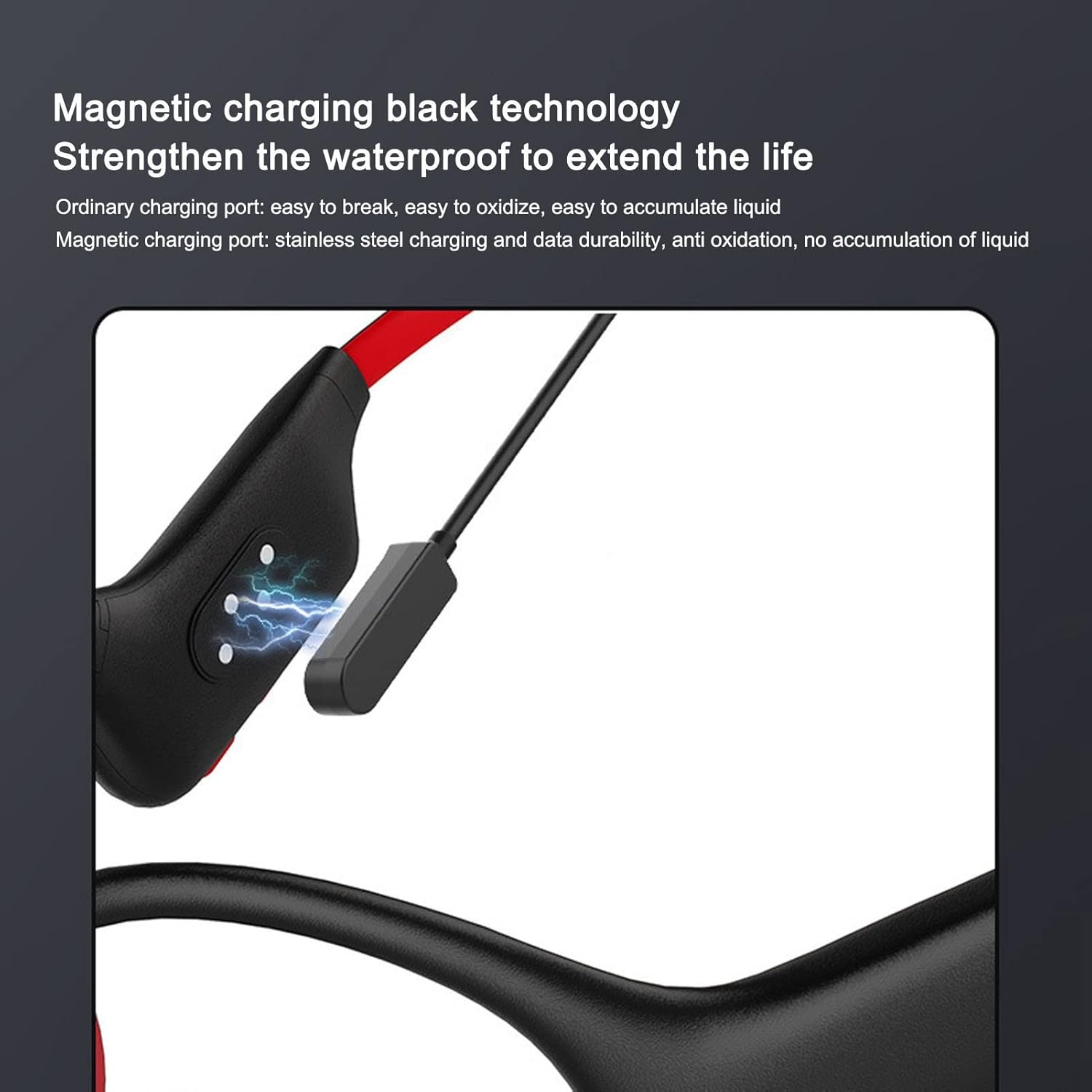
Figure 3: Magnetic charging port on the headphone.
2. Wearing the Headphones
The X6 headphones are designed for open-ear wear, resting on your cheekbones.
- Place the headphone transducers on your cheekbones, just in front of your ears.
- Ensure the band wraps comfortably around the back of your head.
- Adjust for a secure and comfortable fit. The lightweight and flexible design allows for easy adjustment.

Figure 4: Proper wearing position for the X6 headphones.
Operating Instructions
1. Power On/Off
- To power on: Press and hold the Power button for 3 seconds until the indicator light flashes.
- To power off: Press and hold the Power button for 5 seconds until the indicator light turns off.
2. Bluetooth Pairing
The X6 headphones support Bluetooth 5.3 for wireless connection to your devices.
- Ensure the headphones are powered off.
- Press and hold the Power button for approximately 5-7 seconds until the indicator light flashes red and blue alternately, indicating pairing mode.
- On your device (smartphone, tablet, computer), enable Bluetooth and search for available devices.
- Select "X6" from the list of found devices.
- Once paired, the indicator light will turn solid blue, and you will hear a confirmation tone.
Note: The headphones will automatically attempt to reconnect to the last paired device when powered on.
3. MP3 Mode (Internal Memory)
The X6 features 16GB of internal memory for direct MP3 playback, allowing you to listen to music without a connected device.
- To switch to MP3 mode: Press the Mode button (if available, or refer to specific button functions).
- To transfer music: Connect the headphones to a computer using the magnetic charging cable. The headphones will appear as a removable disk. Drag and drop your MP3, APE, or FLAC audio files into the headphone's storage.
- The headphones support volume and breakpoint memory, resuming playback from where you left off.

Figure 5: Illustration of the 16GB internal memory.
4. Call Functions
When connected via Bluetooth, you can manage calls directly from the headphones.
- Answer/End Call: Press the Multi-function button once.
- Reject Call: Press and hold the Multi-function button for 2 seconds.
- Redial Last Number: Double-press the Multi-function button.
5. Music Playback Control
- Play/Pause: Press the Multi-function button once.
- Next Track: Press and hold the Volume + button.
- Previous Track: Press and hold the Volume - button.
- Volume Up: Short press the Volume + button.
- Volume Down: Short press the Volume - button.
Maintenance and Care
Proper maintenance ensures the longevity and optimal performance of your GOWENIC X6 headphones.
- Cleaning: Wipe the headphones with a soft, damp cloth. Do not use harsh chemicals or abrasive cleaners.
- Waterproof Rating: The headphones are IP68 rated, meaning they are fully waterproof and can withstand submersion. However, avoid prolonged exposure to saltwater or chlorinated water. Rinse with fresh water after exposure to such liquids.
- Storage: Store the headphones in a cool, dry place away from direct sunlight and extreme temperatures.
- Charging Port: Keep the magnetic charging contacts clean and dry to ensure efficient charging and prevent corrosion.
- Battery Care: To preserve battery life, avoid fully discharging the battery frequently. Charge the headphones regularly, even if not in use for extended periods.

Figure 6: The IP68 waterproof design allows for use in various conditions.
Troubleshooting
If you encounter issues with your GOWENIC X6 headphones, please refer to the following common problems and solutions:
| Problem | Possible Cause / Solution |
|---|---|
| Headphones do not power on. |
|
| Cannot pair via Bluetooth. |
|
| No sound or low volume. |
|
| Cannot transfer files to internal memory. |
|
| Sound leakage. |
|
Warranty Information
GOWENIC products are manufactured to the highest quality standards. This product is covered by a standard manufacturer's warranty against defects in materials and workmanship from the date of purchase.
Warranty Exclusions:
- Damage caused by accident, abuse, misuse, flood, fire, earthquake, or other external causes.
- Damage caused by operating the product outside the permitted or intended uses described by GOWENIC.
- Damage caused by service (including upgrades and expansions) performed by anyone who is not a representative of GOWENIC or an authorized GOWENIC Service Provider.
- Products or parts that have been modified to alter functionality or capability without the written permission of GOWENIC.
- Consumable parts, such as batteries, unless failure has occurred due to a defect in materials or workmanship.
For warranty claims, please retain your proof of purchase. Contact customer support for assistance.
Customer Support
For further assistance, technical support, or warranty inquiries, please contact GOWENIC customer service through the platform where you purchased the product or visit the official GOWENIC store page.
Online Store: GOWENIC Official Store on Amazon UK
Safety Information
Please read and follow these safety guidelines to prevent injury or damage to your device:
- Do not disassemble, repair, or modify the product. This may cause fire, electric shock, or complete damage to the product, and will void the warranty.
- Keep the product away from extreme temperatures, direct sunlight, and high humidity.
- Do not expose the product to fire or dispose of it in fire, as the battery may explode.
- Avoid using the headphones at excessively high volumes for prolonged periods to prevent hearing damage.
- Be aware of your surroundings when using open-ear headphones, especially in traffic or other potentially hazardous situations.
- Keep out of reach of children and pets.

Figure 7: Important safety reminder to read instructions carefully.


