
1. Introduction
The Giexperience ZIGBEE Garden Soil Moisture & Temperature Meter (Model GXM-01) is designed to monitor soil moisture and temperature in various gardening environments. This device helps users maintain optimal conditions for plant growth by providing real-time data through a compatible smart application.

Image: Giexperience ZIGBEE Garden Soil Moisture & Temperature Meter, showing its compact design and probes.
2. Product Features
- Dual Monitoring: Measures both soil moisture and temperature.
- ZIGBEE Connectivity: Seamless integration with ZIGBEE gateways for smart home ecosystems.
- App Compatibility: Works with TUYA Smart APP for remote data access and control.
- Waterproof Design: IP67 rated, making it suitable for outdoor use in various weather conditions.
- Data Logging: Records and stores historical data for up to 7 days, providing insights into soil conditions over time.
- Solar Charging: Features a solar panel for supplementary power, extending battery life (activates when battery is below 30%).
- Three-Probe Design: Ensures precise and stable measurements of soil parameters.

Image: The soil sensor demonstrating its IP67 waterproof capability in a garden setting.
3. Specifications
| Model Number | GXM-01 |
| Product Dimensions | 7.09 x 1.81 x 1.81 inches |
| Item Weight | 5.9 ounces |
| Power Supply | 2*AA Batteries 1.5V |
| Humidity Range | 0-100% |
| Humidity Accuracy | 0~50% (±3%), 50~100% (±5%) |
| Temperature Range | -4°F ~ 140°F (-20°C ~ 60°C) |
| Temperature Accuracy | ±1°C |
| Waterproof Rating | IP67 |
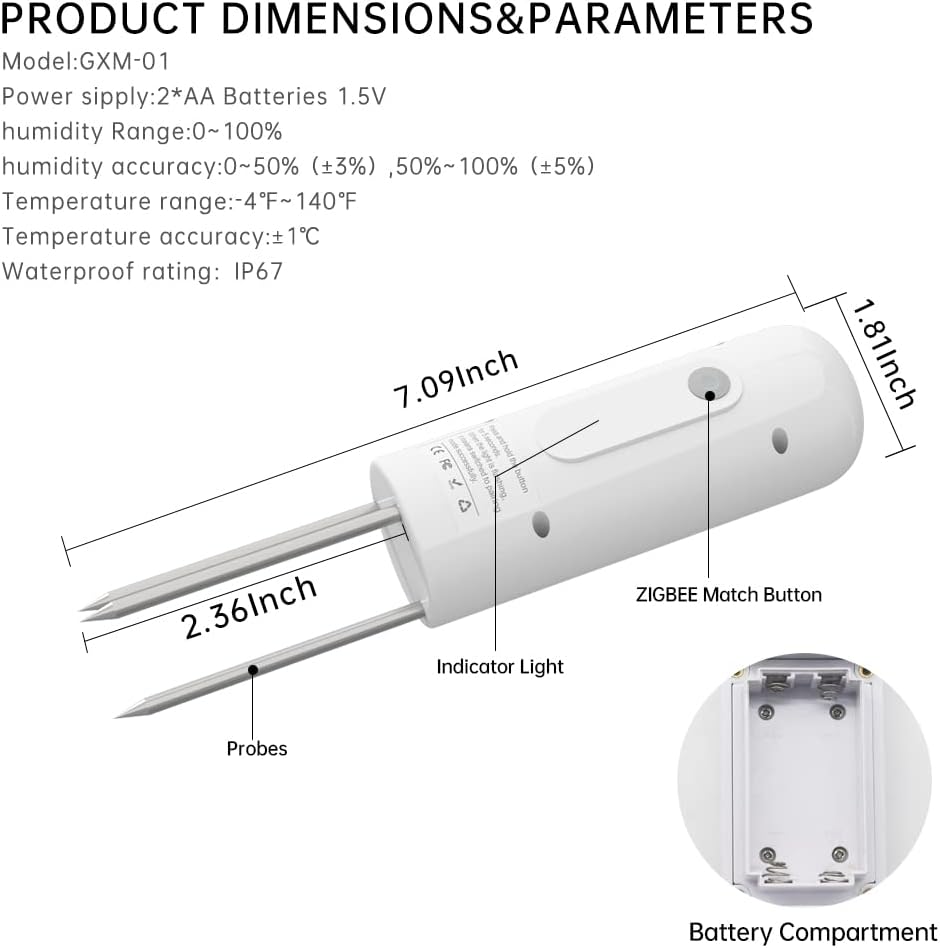
Image: Detailed diagram showing the product dimensions, probes, ZIGBEE match button, indicator light, and battery compartment.
4. Setup Guide
- Download the App:
Download either the "Tuya Smart" or "Smart Life" application from your mobile device's app store. You can also scan the QR codes provided in the product documentation for direct download.
Video: Demonstrates the process of adding the soil sensor to the Smart Life app, including connecting to Wi-Fi and pairing the device.
- Install Batteries:
Open the battery compartment and insert two 1.5V AA batteries, ensuring correct polarity. Close the compartment securely.
- Add ZIGBEE Gateway (if not already set up):
Ensure you have a compatible ZIGBEE gateway connected to your Wi-Fi network and added to your chosen smart home app (Tuya Smart or Smart Life). The sensor requires a ZIGBEE gateway to function.

Image: Diagram illustrating the connection of the soil sensor to a ZIGBEE gateway, enabling remote monitoring from anywhere.
- Pair the Sensor:
In the app, navigate to your ZIGBEE gateway and select "Add Device" or "Search for devices". Press and hold the ZIGBEE Match Button on the sensor for approximately 5-12 seconds until the indicator light flashes, indicating pairing mode. The app should then discover and add the sensor.
- Insert into Soil:
Carefully insert the sensor probes into the soil, ensuring they are fully submerged past the standard line for accurate readings. Avoid forcing the sensor into hard soil to prevent damage to the probes.
5. Operating Instructions
- Monitor Real-time Data:
Open the Tuya Smart or Smart Life app. Select your GXM-01 sensor from the device list to view real-time soil moisture and temperature readings. The app displays current humidity percentage and temperature in Fahrenheit or Celsius.

Image: Screenshot of the mobile application displaying real-time soil moisture and temperature data from the sensor.
- Access Data Logs:
The app provides historical data logs for temperature and humidity, viewable by day, month, or year. This feature helps you understand trends and make informed decisions about plant care.
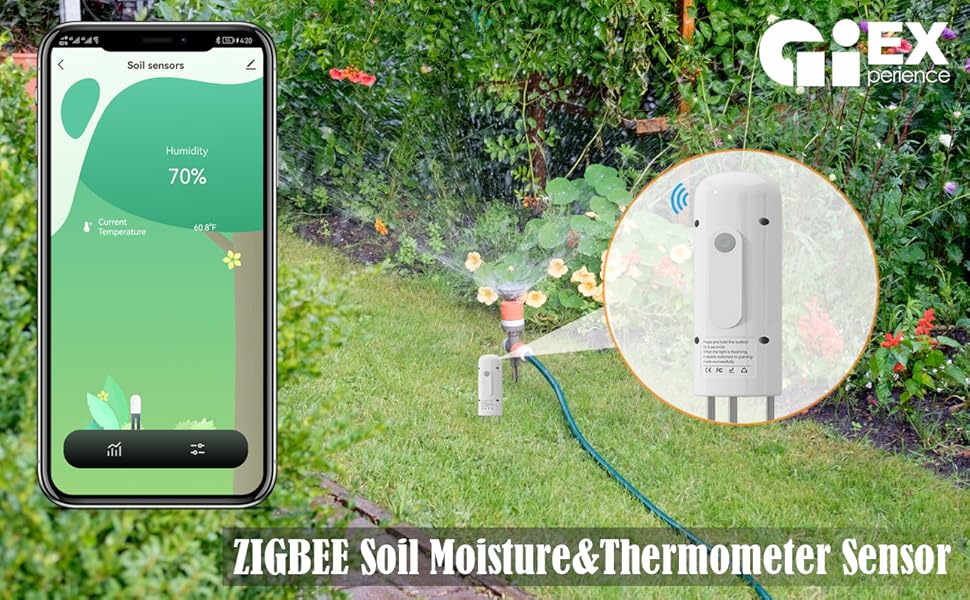
Image: The data log feature within the app, showing temperature and moisture trends over time.
- Set Up Smart Automation:
Utilize the app's automation features to create rules based on sensor readings. For example, you can configure a smart watering timer (sold separately) to activate when soil moisture drops below a certain percentage, or to stop watering when it reaches an optimal level.

Image: Illustration of the soil sensor connected to a ZIGBEE gateway, triggering a smart watering system based on soil dryness.
6. Maintenance
- Battery Replacement: The sensor is powered by 2 AA batteries. Replace them when the app indicates a low battery level. Ensure the battery compartment is sealed properly after replacement to maintain its waterproof integrity.
- Probe Cleaning: Periodically clean the metal probes with a soft cloth to remove any soil residue or mineral buildup. This ensures accurate readings.
- Firmware Updates: Check the app regularly for any available firmware updates for the sensor or ZIGBEE gateway to ensure optimal performance and new features.
- Storage: When not in use for extended periods, clean the sensor, remove batteries, and store it in a dry, cool place.
7. Troubleshooting
- Device not pairing or frequently disconnecting:
Ensure your ZIGBEE gateway is powered on, connected to your network, and within range of the sensor. Try re-pairing the device by pressing and holding the ZIGBEE Match Button for 5-12 seconds. Verify that the app is in pairing mode during this process. Obstacles or other wireless interference can affect connectivity.
- Inaccurate moisture or temperature readings:
Confirm that the sensor probes are fully inserted into the soil past the marked standard line. Different soil types (e.g., clay, sand, potting mix) can influence readings; establish a baseline for your specific soil. Ensure the probes are clean and free of debris.
- Rapid battery drain:
Check the quality and type of AA batteries used. Ensure the sensor is not constantly attempting to connect or re-transmit data due to poor ZIGBEE signal, which can increase power consumption. Replace batteries if they are old or of low quality.
- No data updates in the app:
Verify the sensor's battery level and ZIGBEE connection status in the app. If the device is offline, follow the steps for pairing or troubleshooting connectivity. Ensure the app has the necessary permissions on your mobile device.
- Indicator light not flashing during pairing:
Even if the light is not visibly flashing, the device might still enter pairing mode. Continue with the pairing steps in the app. If issues persist, try replacing the batteries or contacting support.
8. Usage Scenarios
The Giexperience ZIGBEE Garden Soil Moisture & Temperature Meter is versatile and can be used in a variety of settings to monitor soil conditions effectively:
- Potted Plants: Ideal for monitoring moisture and temperature in indoor and outdoor potted plants, ensuring they receive adequate care.
- Flower Beds and Courtyards: Helps maintain optimal conditions for ornamental plants and flowers in garden beds and courtyard areas.
- Vegetable Gardens: Essential for vegetable plots to ensure proper hydration and temperature for healthy crop growth.
- Orchards and Greenhouses: Suitable for larger-scale applications like orchards or controlled environments such as greenhouses, providing data for efficient irrigation and climate control.

Potted Plants

Garden Beds

Vegetable Gardens

Orchards
9. Additional Resources
Explore this video for further guidance on using smart soil sensors and integrating them into your gardening system:
Smart 3-in-1 Soil Moisture/Temperature/Fertility Meter (GreenVation)
Video: This video from GreenVation demonstrates a similar smart soil sensor, highlighting features like solar charging, three-probe design, pairing, and monitoring soil moisture, temperature, and fertility. While this video features a 3-in-1 sensor, many operational aspects are applicable to the GXM-01.