
1. Introduction
Thank you for choosing the KOITAT Pressurized Steam Cleaner, Model FSC-SC307. This handheld steam cleaner is designed for versatile cleaning tasks around your home, utilizing high-temperature steam to effectively remove dirt, grime, and grease without the need for harsh chemicals. Please read this manual thoroughly before first use to ensure safe and optimal operation of your device.
2. Important Safety Information
WARNING: Failure to follow these instructions may result in electric shock, fire, or serious injury.
- Always unplug the appliance from the electrical outlet before filling with water, cleaning, or performing maintenance.
- Do not leave the appliance unattended when plugged in.
- Keep the appliance out of reach of children and pets.
- Do not direct steam at people, animals, or electrical appliances. Steam is extremely hot and can cause severe burns.
- Use only clean tap water. Do not add cleaning solutions, perfumes, or other chemicals to the water tank, as this can damage the appliance and void the warranty.
- Ensure the safety cap is securely tightened before operating the steam cleaner.
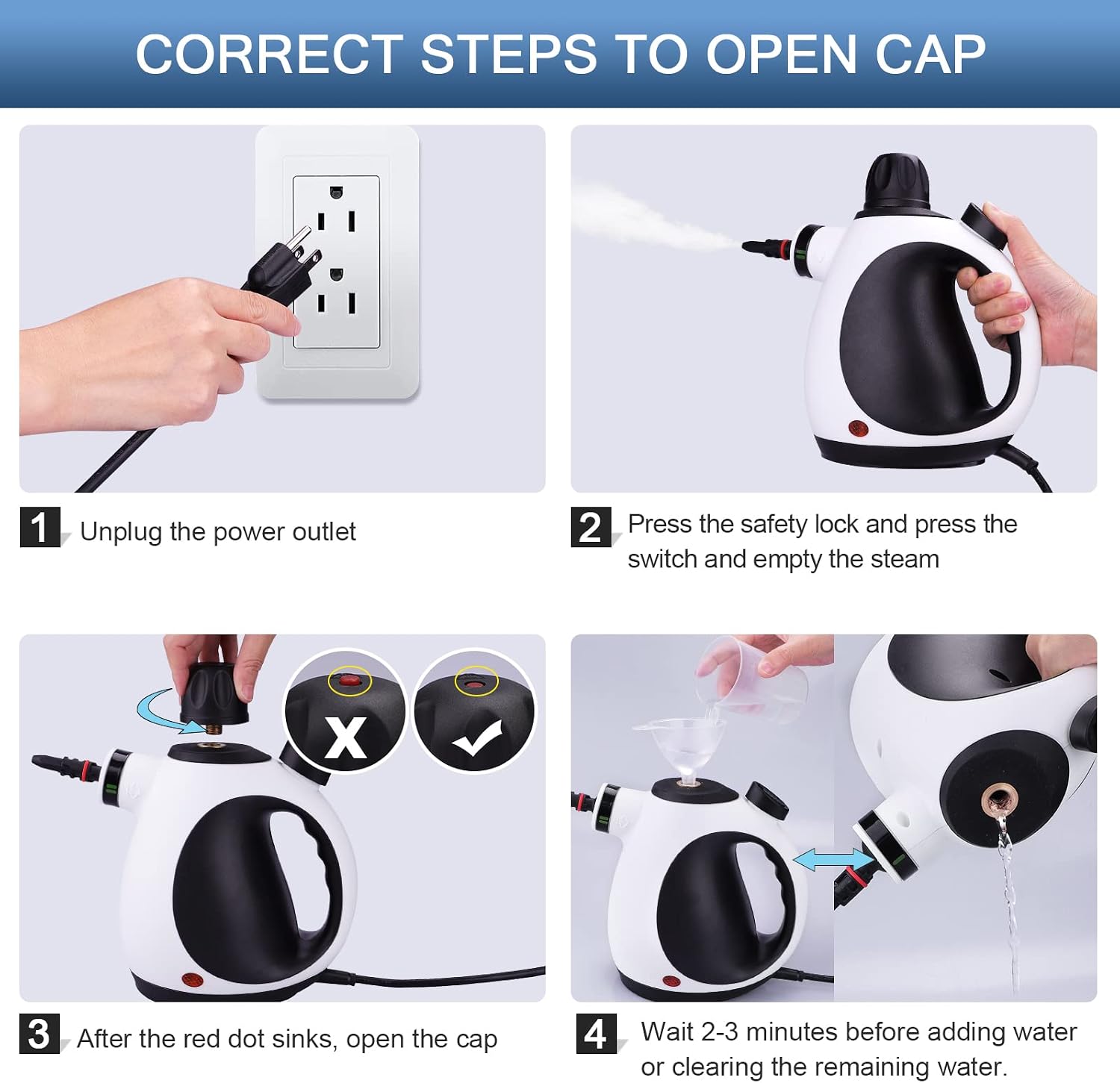
- Never attempt to open the safety cap while the unit is pressurized or hot. Wait for the unit to cool down and depressurize completely.
- Use the appliance only for its intended household use as described in this manual.
3. Package Contents
Verify that all items listed below are included in your package. If any items are missing or damaged, please contact customer support.
- KOITAT Pressurized Steam Cleaner (Main Unit)
- Nozzle
- Cleaning Pad
- Measuring Cup
- Brass Brush
- Squeegee
- Nylon Brush
- Carpet Glider
- Hose
- Mop Pad
- Funnel
- Extension Tube
- Towel Sleeve
- Plastic Brush
- Grout Brush

4. Product Overview
Familiarize yourself with the main components of your steam cleaner:

- 360° Rotation Connection: Allows for easy attachment of various accessories.
- Safety Cup: Locks the water filling hole to prevent accidental opening during operation.
- Child Lock: Engages to prevent unintended steam release, enhancing safety.
- Indicator Light: Red light indicates heating; light off means ready for use.
- Steam Trigger: Activates steam release.
- Water Tank: Holds water for steam generation.
5. Setup Instructions
Follow these steps to prepare your steam cleaner for use:
- Unpack: Carefully remove all components from the packaging.
- Attach Nozzle: Connect the desired nozzle or accessory to the main unit. Ensure it clicks securely into place.
- Fill Water Tank:
- Unscrew the safety cap counter-clockwise.
- Using the provided measuring cup and funnel, pour up to 350 ml of clean tap water into the water tank. Do not overfill.
- Securely screw the safety cap back on clockwise until tight.
- Power On: Plug the power cord into a grounded electrical outlet. The indicator light will illuminate red, indicating the unit is heating.
- Wait for Heating: Allow approximately 3-5 minutes for the water to heat up and generate steam. The red indicator light will turn off when the unit is ready for use.
6. Operating Instructions
Once the indicator light turns off, your steam cleaner is ready. Press and hold the steam trigger to release steam. Release the trigger to stop steam flow.
6.1. Using Accessories
The KOITAT steam cleaner comes with a variety of accessories for different cleaning tasks:


General Usage Tips:
- Always test the steam cleaner on an inconspicuous area first to ensure no damage or discoloration occurs.
- For stubborn stains, apply steam directly to the area for a few seconds, then scrub with an appropriate brush attachment.
- Wipe away loosened dirt and moisture with a clean cloth immediately after steaming.
- The pressure and temperature of the steam will vary with the nozzle distance and operating time. Continuous heating in an airtight and pressurized state increases temperature. Water converts to vapor at 221°F (105°C) or higher.

7. Maintenance
Regular maintenance ensures the longevity and optimal performance of your steam cleaner.
7.1. After Each Use
- Unplug: Always unplug the unit from the power outlet.
- Depressurize: Press the steam trigger to release any remaining steam until no more steam comes out.
- Cool Down: Allow the unit to cool down completely (at least 10-15 minutes). The red dot on the safety cap should sink.
- Empty Water: Carefully unscrew the safety cap and pour out any remaining water from the tank.
- Clean Accessories: Wash all used accessories with warm, soapy water and rinse thoroughly. Allow them to air dry.
- Wipe Down: Wipe the exterior of the main unit with a damp cloth.
7.2. Storage
Store the steam cleaner and its accessories in a cool, dry place, out of reach of children.
8. Troubleshooting
If you encounter issues with your steam cleaner, refer to the following table for common problems and solutions.
| Problem | Possible Cause | Solution |
|---|---|---|
| No steam or weak steam. |
|
|
| Water leaking from nozzle. |
|
|
| Safety cap cannot be opened. |
|
|

9. Specifications
| Feature | Detail |
|---|---|
| Model Name | Pressurized Steam Cleaner |
| Model Number | FSC-SC307 |
| Brand | KOITAT |
| Rated Voltage | 110-120V |
| Rated Power | 1050W |
| Tank Capacity | 350 Milliliters |
| Steam Temperature | 212-221°F (100-105°C) |
| Steam Pressure | 2.6-3.2 bar |
| Cord Length | 3m |
| Item Weight | 4.07 pounds |
| Package Dimensions | 10.08 x 9.69 x 5.75 inches |

10. Warranty and Support
KOITAT products are manufactured to high-quality standards. For warranty information, technical support, or service inquiries, please refer to the contact information provided on your product packaging or visit the official KOITAT website. Please retain your proof of purchase for warranty claims.