
Xiaomi AD652G
Xiaomi Mi 65W Fast Charger User Manual
Model: AD652G
1. Introduction
This user manual provides essential information for the safe and efficient operation of your Xiaomi Mi 65W Fast Charger. Please read this manual thoroughly before using the product and retain it for future reference.
2. Safety Information
To ensure safe operation and prevent damage, observe the following precautions:
- Do not expose the charger to water or excessive moisture.
- Avoid dropping or subjecting the charger to strong impacts.
- Do not disassemble, modify, or attempt to repair the charger yourself. Refer to qualified service personnel.
- Use only with compatible devices and within specified voltage ranges (Input voltage: 240 Volts).
- Ensure proper ventilation around the charger during use.
- Unplug the charger from the power outlet when not in use or during electrical storms.
- This product features Over Temperature Protection. If the charger becomes excessively hot, disconnect it immediately.
3. Package Contents
Verify that all items are present in the package:
- Xiaomi Mi 65W Fast Charger (AD652G)
- Type-C to Type-C cable
- User Manual (this document)
4. Product Overview
The Xiaomi Mi 65W Fast Charger utilizes GaN and GaNFast New Technology for efficient and compact power delivery. It features both USB Type-A and Type-C ports.

Figure 4.1: Front view of the Xiaomi Mi 65W Fast Charger, highlighting its compact design and 65W power rating. The charger is white with a UK plug type.

Figure 4.2: Side view of the Xiaomi Mi 65W Fast Charger, displaying regulatory markings such as ECAS and NB-0017, along with the Xiaomi logo.
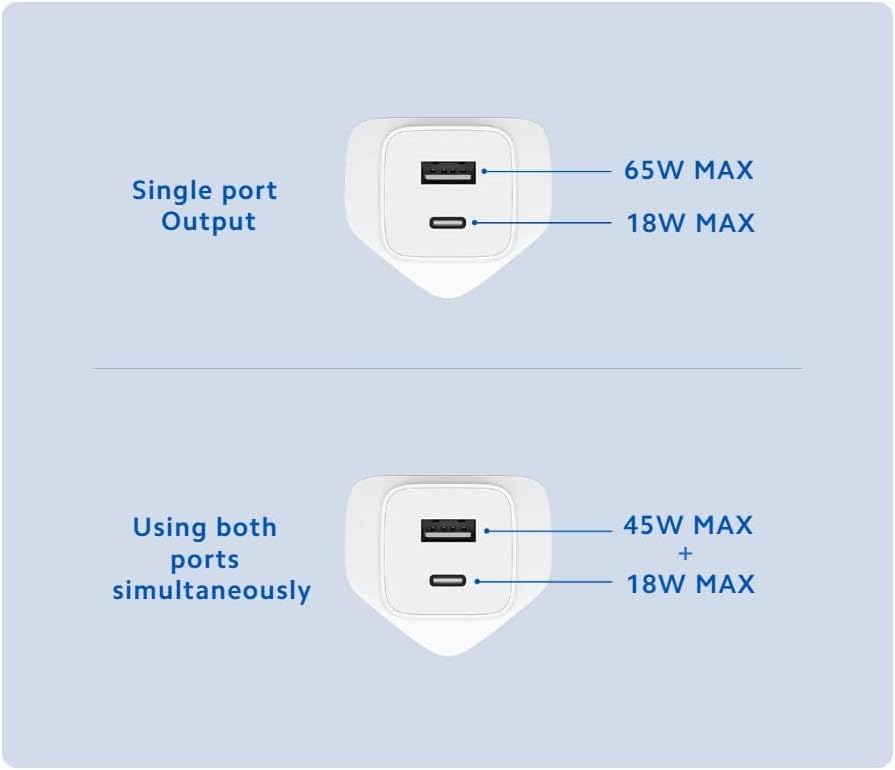
Figure 4.3: Diagram illustrating the power output capabilities. When using a single port, the USB-C port can deliver up to 65W MAX and the USB-A port up to 18W MAX. When both ports are used simultaneously, the USB-C port delivers 45W MAX and the USB-A port delivers 18W MAX.
Key Features:
- Technology Feature: GaN and GaNFast New Technology for high efficiency.
- Size: Smaller size and lighter weight for portability.
- Output Power: 65W higher power output for faster charging.
- Smart Compatibility Function: Intelligently identifies USB Type-C ports of different devices for optimal charging.
- Compatible Devices: Designed for laptops, game consoles, and other compatible devices.
5. Setup
- Unpack: Carefully remove the charger and cable from the packaging.
- Connect to Power: Insert the charger's plug into a standard wall power outlet (240 Volts).
- Connect Device:
- For USB Type-C charging: Connect one end of the provided Type-C to Type-C cable to the charger's USB-C port and the other end to your device's USB-C charging port.
- For USB Type-A charging: Use a compatible USB-A cable (not included) to connect your device to the charger's USB-A port.
- Verify Connection: Ensure all connections are secure. Your device should indicate that it is charging.
6. Operating Instructions
The Xiaomi Mi 65W Fast Charger is designed for simple plug-and-play operation.
- Single Port Charging:
When only one port is in use, the USB-C port can deliver up to 65W, and the USB-A port can deliver up to 18W. For maximum charging speed for compatible devices, use the USB-C port.
- Dual Port Simultaneous Charging:
When both the USB-C and USB-A ports are used simultaneously, the power distribution will be 45W MAX for the USB-C port and 18W MAX for the USB-A port. The charger's smart compatibility function will optimize power delivery to connected devices.
- Charging Indication: The charging status is typically indicated on your connected device's screen. The charger itself does not have an indicator light.
7. Maintenance
Proper care will extend the life of your charger:
- Cleaning: Disconnect the charger from the power outlet and your devices before cleaning. Use a soft, dry cloth to wipe the surface. Do not use liquid cleaners or aerosols.
- Storage: Store the charger in a cool, dry place away from direct sunlight and extreme temperatures.
- Cable Care: Avoid bending or kinking the charging cable excessively, as this can damage the internal wires.
8. Troubleshooting
| Problem | Possible Cause | Solution |
|---|---|---|
| Charger not working / Device not charging. |
|
|
| Slow charging. |
|
|
| Charger feels warm. | Normal operation, or excessive load. | A slight warmth is normal during operation. If it becomes excessively hot, disconnect immediately and allow it to cool. Ensure adequate ventilation. |
9. Specifications
| Feature | Detail |
|---|---|
| Brand | Xiaomi |
| Model Number | AD652G |
| Product Dimensions | 3.08 x 3.08 x 7.44 cm |
| Item Weight | 140 g |
| Color | White |
| Connectivity Technology | USB (Type-A, Type-C) |
| Input Voltage | 240 Volts |
| Special Features | Over Temperature Protection, GaN and GaNFast New Technology, Smart Compatibility Function |
| Compatible Devices | Game Consoles, Laptops, Xiaomi phones |
| Included Components | Charger, Type-C to Type-C cable, User Manual |
10. Warranty and Support
For warranty information and technical support, please refer to the official Xiaomi website or contact your local authorized dealer. Keep your purchase receipt as proof of purchase.
Online Support: Visit the official Xiaomi support page for FAQs and further assistance.
Contact Information: Refer to the packaging or official Xiaomi website for regional contact details.
Related Documents - AD652G
 |
Xiaomi 67W GaN Charger 2C1A User Manual Comprehensive user manual for the Xiaomi 67W GaN Charger 2C1A, detailing specifications, features, safety warnings, and compliance information. |
 |
Xiaomi 6A Type-A to Type-C Cable User Guide User guide for the Xiaomi 6A Type-A to Type-C Cable, including compliance information and WEEE disposal instructions in multiple languages. |
 |
Xiaomi 5-in-1 Type-C Hub User Manual and Specifications User manual and specifications for the Xiaomi 5-in-1 Type-C Hub (Model XMDS05YM), detailing its features, usage, connectivity options, and compliance information. |
 |
Xiaomi Mi 33W Wall Charger (Type-A + Type-C) AD332EU User Manual & Declaration of Conformity Comprehensive user guide and official declaration of conformity for the Xiaomi Mi 33W Wall Charger (Type-A + Type-C), model AD332EU. Features, specifications, safety guidelines, and compliance information. |
 |
Mi 65W Fast Charger with GaN Tech User Manual User manual for the Xiaomi Mi 65W Fast Charger with GaN Tech (Model AD65GEU), detailing its product overview, specifications, features, safety warnings, and WEEE information. Learn about its compact design, 65W output, and GaN technology. |
 |
Xiaomi Mi ANC & Type-C In-Ear Earphones User Manual and Specifications Official user manual and technical specifications for the Xiaomi Mi ANC & Type-C In-Ear Earphones (Model JZEJ01JY). Learn about Ear Secure technology, button functions, product specs, FCC compliance, and recycling information. |
Ask a question about this manual
Ask about setup, troubleshooting, compatibility, parts, safety, or missing instructions. Manuals+ will review the question and use this page’s manual context to help answer it.