1. Introduction
Welcome to your new FEZEQIN SY-8801 Portable AM/FM Radio. This device offers a versatile listening experience with its AM/FM bands, digital tuning, alarm clock, and sleep timer functions. It is designed for both home and portable use, powered by either AC or batteries. Please read this manual thoroughly before use to ensure proper functionality and longevity of your device.
Package Contents
- FEZEQIN SY-8801 Portable AM/FM Radio
- Owner's Manual
2. Product Overview
Familiarize yourself with the various parts and controls of your radio.
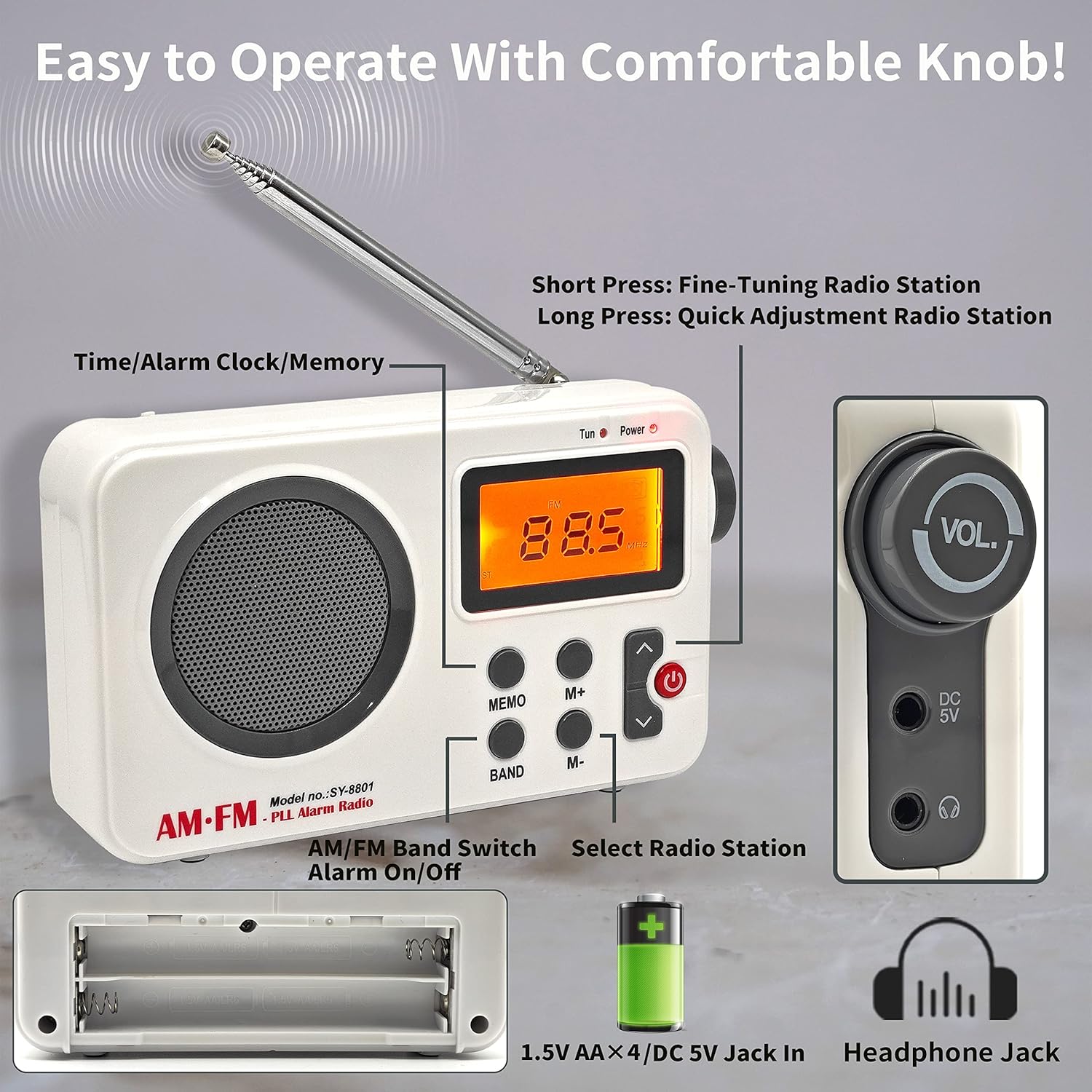
This image illustrates the front and side panels of the SY-8801 radio, highlighting key components such as the telescopic antenna, speaker grille, LCD display, control buttons (MEMO, M+, M-, BAND, Power/Alarm On/Off, Tuning Up/Down), volume knob, DC 5V input, and headphone jack.
Front Panel Controls
- LCD Display: Shows frequency, time, alarm status, and other indicators.
- MEMO Button: Used for storing and recalling preset radio stations.
- M+ / M- Buttons: Used to select preset radio stations.
- BAND Button: Switches between AM and FM radio bands.
- Up/Down Arrow Buttons: Short press for fine-tuning radio frequencies; long press for automatic scanning or quick adjustment.
- Power Button (Red): Turns the radio on/off. Also functions as Alarm On/Off.
Side Panel Controls
- VOL. Knob: Rotates to adjust the volume level.
- DC 5V Jack: Power input for AC adapter (adapter not included).
- Headphone Jack (3.5mm): For private listening with headphones.
Rear Panel
- Battery Compartment: Holds 4 x AA batteries.

This image provides a clear view of the radio's front, showcasing its compact design and the extended telescopic antenna for optimal reception.
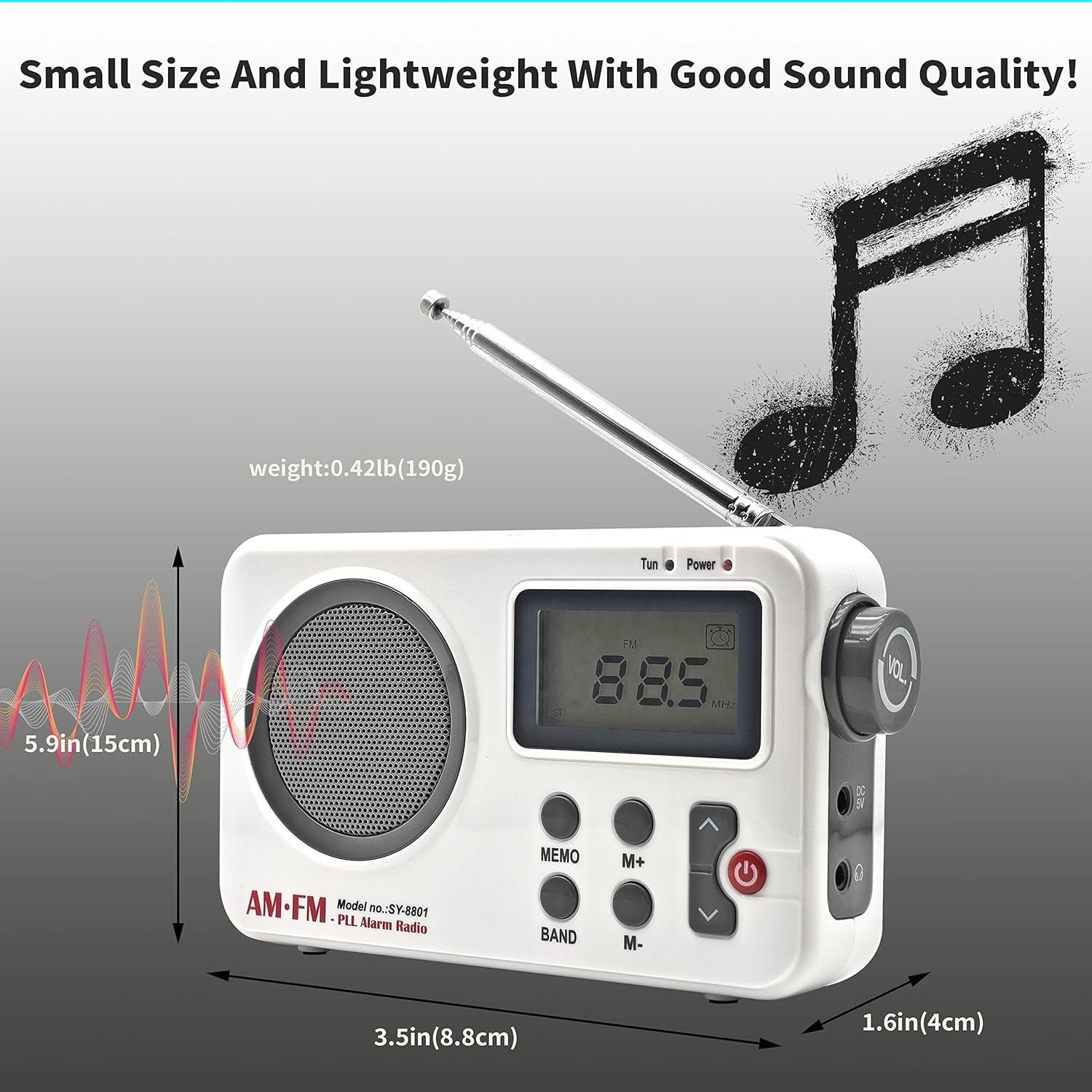
This diagram illustrates the physical dimensions and approximate weight of the radio, indicating its compact and portable size.
3. Setup
Powering the Radio
Your FEZEQIN SY-8801 radio can be powered by two methods:
Battery Power
- Open the battery compartment cover on the rear of the radio.
- Insert 4 x 1.5V AA batteries, ensuring correct polarity (+/-).
- Close the battery compartment cover securely.
This image details the battery compartment, indicating where to insert the 4 AA batteries for portable operation.
AC Power
- Connect a compatible DC 5V power adapter (not included) to the DC 5V jack on the side of the radio.
- Plug the power adapter into a standard AC wall outlet.
Initial Setup
Setting the Time
The LCD display shows the time. To set the time, typically you would long-press a dedicated 'Time Set' button or the 'MEMO' button, then use the Up/Down arrow buttons to adjust hours and minutes. Press the same button again to confirm. The radio supports both 12-hour and 24-hour clock formats.
4. Operating Instructions
Turning On/Off
Press the Power button to turn the radio on or off.
Tuning Radio Stations
Selecting Band (AM/FM)
Press the BAND button to switch between AM and FM radio bands.
Manual Tuning
Short press the Up/Down Arrow buttons to fine-tune the radio frequency step by step.
Automatic Scan / Quick Adjustment
Long press the Up/Down Arrow buttons to automatically scan for the next available station or for quick frequency adjustment.
Storing and Recalling Presets
To store a station: Tune to the desired station, then long-press the MEMO button until the display indicates the station is saved. Use the M+ and M- buttons to select the memory slot. To recall a station: Short press the MEMO button, then use the M+ and M- buttons to navigate through stored preset stations.
Adjusting Volume
Rotate the VOL. knob on the side of the radio to increase or decrease the volume.
Using the Alarm Clock
The radio features an alarm clock function to wake you up.

This image highlights the radio's alarm clock and sleep timer features.
To set the alarm:
- Access the alarm setting mode (refer to the display for an alarm icon or specific instructions, often by long-pressing the Power button or a dedicated alarm button).
- Use the tuning or M+/M- buttons to set the desired alarm time.
- Confirm the alarm setting.
- Press the Power button to toggle the alarm on/off (an alarm icon on the display usually indicates it's active).
Using the Sleep Timer
The sleep timer allows the radio to play for a set duration (10-90 minutes) before automatically turning off, helping you fall asleep.
To set the sleep timer:
- Access the sleep timer setting mode (look for a sleep icon or specific button).
- Use the tuning or M+/M- buttons to select a duration between 10-90 minutes.
- Confirm the sleep timer setting. The radio will automatically turn off after the selected time.
Headphone Use
Plug 3.5mm headphones into the headphone jack on the side of the radio for private listening. The built-in speaker will be muted automatically.
USB/TF Card Playback
Note: While the product description mentions USB/TF card playback, no dedicated ports are visible in the provided product images. Please refer to the physical product for these features if present and consult the product packaging or manufacturer's website for specific instructions on their use.
5. Maintenance
- Clean the radio with a soft, dry cloth. Do not use abrasive cleaners, solvents, or strong chemicals.
- Keep the radio away from direct sunlight, extreme temperatures, and high humidity to prevent damage.
- If not using the radio for an extended period, remove the batteries to prevent leakage and corrosion.
- Do not attempt to disassemble or repair the radio yourself. Refer all servicing to qualified personnel.
6. Troubleshooting
| Problem | Possible Cause | Solution |
|---|---|---|
| Radio does not turn on | No power / Low batteries | Check battery installation and charge level, or connect to AC power. |
| Poor radio reception | Weak signal / Antenna not extended | Extend the telescopic antenna fully and adjust its position. Try moving to a different location. |
| No sound from speaker | Volume too low / Headphones connected | Increase volume. Disconnect headphones if not in use. |
| Alarm does not sound | Alarm not set / Alarm volume too low | Ensure alarm time is set correctly and alarm function is activated. Increase volume. |
7. Specifications
| Feature | Detail |
|---|---|
| Model | SY-8801 (D801) |
| Brand | FEZEQIN |
| AM Frequency Range | 520-1710 kHz |
| FM Frequency Range | 87-108 MHz |
| Power Source | 4 x 1.5V AA Batteries / DC 5V AC Adapter (not included) |
| Speaker | Built-in |
| Headphone Jack | 3.5mm |
| Dimensions (H x W x D) | Approx. 15 cm x 8.8 cm x 4 cm (5.9 in x 3.5 in x 1.6 in) |
| Weight | Approx. 190g (0.42 lb) |
| Special Features | Digital Display, Alarm Clock, Sleep Timer, USB/TF Card Playback (check product for ports) |
8. Warranty and Support
For warranty information and customer support, please refer to the documentation provided with your purchase or contact the retailer/manufacturer directly. Specific warranty details are not provided in this manual.