
1. Introduction
Thank you for choosing the debopo 20000mAh Portable Power Bank. This device is designed to provide reliable and fast charging for your electronic devices on the go. Its compact size and high capacity make it an ideal companion for daily use, travel, and outdoor activities.
Key Features:
- High Capacity: 20000mAh premium lithium battery cells, capable of charging a smartphone multiple times.
- Fast Charging: USB-C port with 20W Power Delivery and USB-A ports with 22.5W SuperCharge Protocol for rapid device charging.
- Multi-Device Charging: Simultaneously charge up to three devices.
- Integrated Flashlight: A 20-lumen LED flashlight with up to 40 hours of run time for emergency illumination.
- LED Display: Clear digital display shows the remaining battery percentage.
- Comprehensive Protection: Built-in safeguards against overcurrent, overvoltage, overcharge, overheat, overdischarge, and short circuits.
- Compact and Portable: Dimensions of 15.4x7.3x2.1cm and a weight of 350g for easy portability.
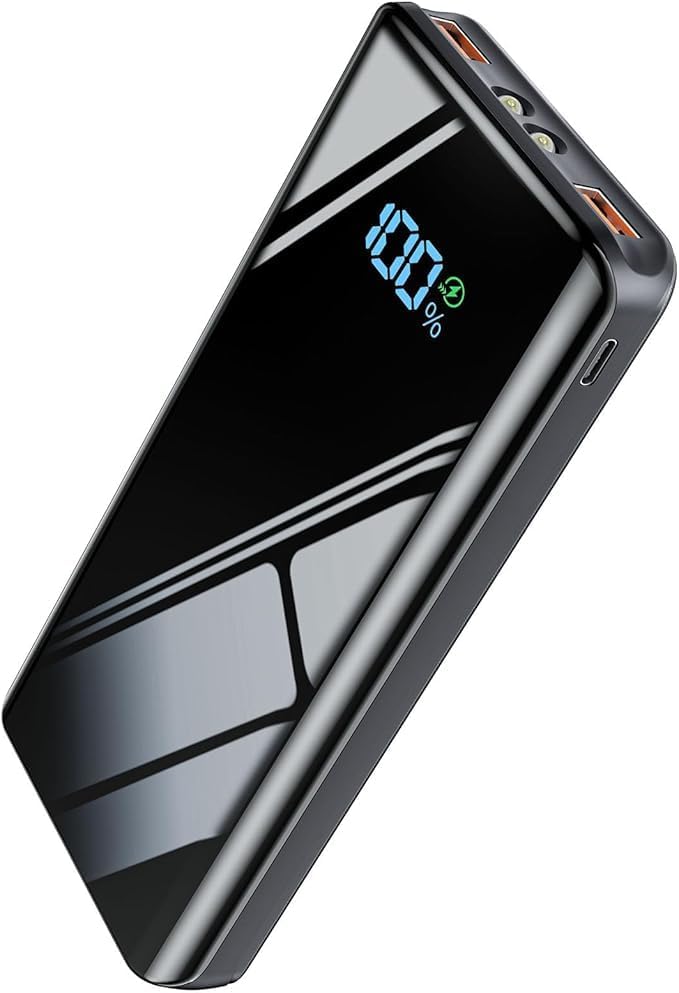
Image 1.1: debopo 20000mAh Portable Power Bank, showcasing its sleek design and LED display.
2. Safety Information
Please read and follow these safety instructions carefully to prevent damage to the device or injury to yourself.
- Do not expose the power bank to extreme temperatures (above 60°C/140°F or below 0°C/32°F), direct sunlight, or high humidity.
- Avoid dropping, hitting, or disassembling the device.
- Keep the power bank away from water and other liquids.
- Do not use the power bank if it is damaged, swollen, or leaking.
- Use only certified charging cables and adapters.
- Keep out of reach of children.
- Dispose of the power bank responsibly according to local regulations.
- The power bank features multiple protection systems including overcurrent, overvoltage, overcharge, overheat, overdischarge, and short-circuit protection. However, always monitor charging.
3. Package Contents
Verify that all items are present in your package:
- 1x debopo 20000mAh Portable Power Bank
- 1x USB Type-C Charging Cable
- 1x User Manual (this document)

Image 3.1: Contents of the debopo 20000mAh power bank package, including the power bank, USB-C cable, and user manual.
4. Product Overview
Familiarize yourself with the different components of your power bank.
Ports and Indicators:
- USB-C Port: Supports 20W Power Delivery (Input/Output).
- USB-A Ports (x2): Supports 22.5W SuperCharge Protocol (Output only).
- LED Digital Display: Shows battery percentage.
- Power Button: Activates the display and flashlight.
- LED Flashlight: Integrated at the top for illumination.

Image 4.1: The debopo power bank demonstrating 20W USB-C fast charging capability for compatible devices.

Image 4.2: The debopo power bank highlighting 22.5W USB-A fast charging for devices like the Huawei P40 Pro.

Image 4.3: Diagram illustrating the input and output functionality of the USB-C port on the debopo power bank.
5. Setup
Initial Charging of the Power Bank:
Before first use, fully charge your debopo power bank.
- Connect the provided USB Type-C cable to the USB-C port on the power bank.
- Connect the other end of the cable to a compatible USB wall charger (not included, 20W or higher recommended for fastest charging).
- The LED display will show the charging progress. It typically takes about 5 hours to fully charge the power bank with a 20W+ adapter.
- Once the display shows "100%", the power bank is fully charged and ready for use.

Image 5.1: The debopo power bank's LED display indicating a full 100% charge, ready for use.
6. Operating Instructions
6.1 Charging Your Devices:
- Connect your device's charging cable to one of the output ports on the power bank (USB-C or USB-A).
- Connect the other end of the cable to your device.
- The power bank will automatically begin charging your device. The LED display will show the remaining battery percentage.
- To stop charging, simply disconnect your device.

Image 6.1: The debopo power bank simultaneously charging an Android phone, an iPhone, and a tablet, demonstrating its multi-device capability.

Image 6.2: Illustration of the debopo power bank's universal compatibility with Huawei, iPhone, and Samsung devices, supporting various fast charging protocols.
6.2 Using the Flashlight:
- To turn on the flashlight, press and hold the power button for approximately 3 seconds.
- To turn off the flashlight, press and hold the power button again for approximately 3 seconds.

Image 6.3: The debopo power bank's integrated LED flashlight in operation, providing backup illumination.
6.3 Checking Battery Level:
Briefly press the power button to activate the LED digital display, which will show the current battery percentage.
7. Maintenance
7.1 Cleaning:
- Wipe the power bank with a soft, dry cloth.
- Do not use harsh chemicals or abrasive cleaners.
7.2 Storage:
- Store the power bank in a cool, dry place away from direct sunlight.
- For long-term storage, it is recommended to charge the power bank to about 50-75% every three months to maintain battery health.
8. Troubleshooting
If you encounter any issues with your debopo power bank, refer to the following common problems and solutions:
- Power bank not charging:
- Ensure the charging cable is securely connected to both the power bank and the wall adapter.
- Try a different USB-C cable and/or wall adapter.
- Verify the wall adapter is functioning correctly and provides sufficient power (20W or higher recommended).
- Device not charging from power bank:
- Ensure the charging cable is securely connected to both the power bank and your device.
- Try a different charging cable.
- Check if the power bank has sufficient charge (refer to the LED display).
- Ensure your device is compatible with the power bank's output ports.
- Slow charging:
- Ensure you are using a fast-charging compatible cable and your device supports fast charging.
- Verify that the power bank itself is fully charged.
- Some devices may limit charging speed if they are too hot or too cold.
- Flashlight not working:
- Ensure the power bank has sufficient charge.
- Press and hold the power button for approximately 3 seconds to activate/deactivate.
If the problem persists, please contact customer support.
9. Specifications
| Model | 20000mAh |
| Battery Type | Premium Lithium Polymer |
| Capacity | 20000mAh |
| USB-C Input | 20W Max (PD) |
| USB-C Output | 20W Max (PD) |
| USB-A Output (x2) | 22.5W Max (SCP) |
| Total Output | Simultaneous charging of 3 devices |
| Dimensions | 15.4 x 7.3 x 2.1 cm |
| Weight | 350g |
| Flashlight | 20 Lumens, 40 hours run time |
| Display | LED Digital Percentage Display |

Image 9.1: Diagram illustrating the superior protection features of the debopo power bank, including safeguards against overcharge, overcurrent, overvoltage, overdischarge, short circuit, temperature, electromagnetic field, and overpressure.
10. Warranty and Support
Warranty Information:
The debopo 20000mAh Portable Power Bank comes with a standard manufacturer's warranty. For specific warranty terms and conditions, please refer to the product packaging or contact customer support.
Customer Support:
If you have any questions, concerns, or require assistance with your product, please do not hesitate to contact our customer support team. We are committed to providing prompt and satisfactory solutions.
Please refer to the contact information provided on the product packaging or the official debopo website for support details.