
1. Introduction
Product Overview
The QiSa 16000mAh Portable Power Bank (Model: PN-A10) is a versatile and compact charging solution designed to keep your electronic devices powered on the go. Featuring PD 30W and QC4.0 fast charging capabilities, built-in Type-C and iPhone output cables, and a clear LED display, this power bank offers convenience and efficiency for a wide range of smartphones and other gadgets.

Figure 1: QiSa 16000mAh Portable Power Bank, showcasing its sleek design and integrated cables.
Key Features
- Fast Charging: Type-C port supports PD30W fast output and input. USB-A port supports 22.5W QC4.0 fast charging output. Micro USB supports 18W fast input.
- Built-in Cables: Includes a 5V3.1A Type-C output cable and an iPhone output cable for direct charging without extra cables.
- High Capacity: 16000mAh lithium polymer battery provides sufficient power for multiple device charges.
- LED Display: Accurate digital display shows remaining battery percentage.
- Multiple Security Protection: Built-in intelligent protection chip with nine functions including overcharge, short circuit, overcurrent, high temperature, and over-discharge protection.
2. Safety Information
To ensure safe and optimal operation of your QiSa Portable Power Bank, please adhere to the following safety guidelines:
- Do not expose the power bank to extreme temperatures (above 60°C/140°F or below 0°C/32°F), direct sunlight, or high humidity.
- Avoid dropping, disassembling, or attempting to repair the device yourself. This may cause damage and void the warranty.
- Keep the power bank away from water, fire, and corrosive materials.
- Use only compatible charging cables and adapters.
- The intelligent protection chip provides safeguards against overcharge, short circuit, overcurrent, high temperature, and over-discharge. However, always monitor the device during charging.
- Do not use the power bank if it is visibly damaged, swollen, or leaking.

Figure 2: The power bank incorporates multiple security protections for safe operation.
3. Package Contents
Please check the package for the following items:
- QiSa 16000mAh Portable Power Bank (Model: PN-A10)
- USB-A to USB-C Charging Cable
- User Manual
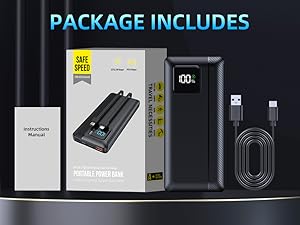
Figure 3: Items included in the QiSa Power Bank package.
4. Product Components
Familiarize yourself with the different parts of your power bank:
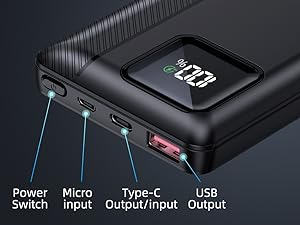
Figure 4: Top view of the power bank showing its various ports and the power button.
- Power Switch: Press to activate the power bank and check battery level.
- Micro Input: For recharging the power bank.
- Type-C Output/Input: Supports PD30W fast charging for both charging devices and recharging the power bank.
- USB Output: Supports 22.5W QC4.0 fast charging for devices.
- LED Display: Digital screen showing battery percentage.
- Built-in Type-C Cable: Integrated cable for Type-C devices.
- Built-in iPhone Cable: Integrated cable for iPhone devices.
5. Setup
Initial Charging
Before first use, fully charge your QiSa Portable Power Bank. This ensures optimal performance and battery longevity.
- Connect the provided USB-A to USB-C cable to the power bank's Type-C port or Micro input port.
- Plug the other end of the cable into a compatible USB wall adapter (not included). For fastest charging, use a PD 30W or QC4.0 compatible adapter.
- The LED display will show the charging progress. The power bank is fully charged when the display shows 100%.

Figure 5: Recharging the power bank using its USB-C input, showing estimated charging times.
6. Operating Instructions
Charging Your Devices
The QiSa Power Bank offers multiple ways to charge your devices:
- Using Built-in Cables: Simply pull out the integrated Type-C or iPhone cable from its slot and plug it directly into your compatible device.
- Using USB-A or Type-C Ports: Connect your device's charging cable to the power bank's USB Output or Type-C Output/Input port.
- The power bank will automatically begin charging your device. If not, press the power button once.

Figure 6: The power bank features convenient built-in Type-C and iOS charging cables.

Figure 7: Direct charging of a smartphone using the power bank's integrated cable.
You can charge multiple devices simultaneously using a combination of the built-in cables and external ports.

Figure 8: The 16000mAh capacity allows for simultaneous charging of up to four devices.
Checking Battery Level
To check the remaining battery level of the power bank, simply press the power button once. The LED display will illuminate and show the exact percentage.

Figure 9: The LED display provides an accurate percentage of the remaining power.
7. Maintenance
Proper maintenance will extend the life of your power bank:
- Store the power bank in a cool, dry place when not in use.
- Clean the surface with a soft, dry cloth. Do not use harsh chemicals or abrasive cleaners.
- Recharge the power bank at least once every three months to prevent battery degradation if stored for long periods.
- Avoid exposing the power bank to extreme physical shock or vibration.
8. Troubleshooting
If you encounter any issues with your power bank, refer to the following common problems and solutions:
- Power Bank Not Turning On: Ensure the power bank has sufficient charge. Press the power button firmly.
- Device Not Charging:
- Check if the charging cable is securely connected to both the power bank and your device.
- Ensure the power bank is turned on (press the power button).
- Verify that your device is compatible with the power bank's output specifications.
- Try a different charging cable or port on the power bank.
- Slow Charging:
- Ensure both your device and the charging cable support fast charging protocols (PD, QC4.0).
- Avoid using your device heavily while it is charging.
- Power Bank Not Recharging:
- Check the charging cable and wall adapter. Try a different one if necessary.
- Ensure the charging port on the power bank is clean and free of debris.
If the issue persists after trying these steps, please contact customer support.
9. Specifications
| Feature | Detail |
|---|---|
| Model Number | PN-A10 |
| Battery Capacity | 16000mAh |
| Battery Type | Lithium Polymer |
| Type-C Output/Input | PD 30W |
| USB-A Output | 22.5W QC4.0 |
| Micro USB Input | 18W |
| Built-in Cables | Type-C, iPhone (5V3.1A) |
| Product Dimensions | 6.29 x 2.83 x 0.78 inches |
| Item Weight | 10.8 ounces |
10. Warranty and Support
For detailed warranty information and customer support, please refer to the official user manual PDF or visit the QiSa brand store.
- User Manual (PDF): Download Here
- QiSa Store: Visit QiSa Store on Amazon