
VASAGLE HU-XI-89
VASAGLE L-Shaped Computer Desk Instruction Manual
Model: HU-XI-89
Introduction
Thank you for choosing the VASAGLE L-Shaped Computer Desk. This manual provides detailed instructions for assembly, usage, maintenance, and troubleshooting to ensure you get the most out of your new workstation. Please read this manual carefully before assembly and retain it for future reference.

Image: The VASAGLE L-Shaped Computer Desk, showcasing its spacious design suitable for multiple monitors and office equipment.
Safety Information
- For safety reasons, children are not allowed to climb or play with the desk.
- Ensure all screws and fasteners are securely tightened before use.
- Do not exceed the maximum static load capacities specified in the 'Specifications' section.
- Place the desk on a level surface to prevent instability.
Product Features
- Generous L-Shaped Desktop: The 138 x 138 cm desktop provides ample space for multiple monitors, laptops, and other office essentials, optimizing your workspace.
- Removable Middle Shelf: A versatile shelf that can be kept for organizing smaller items or removed to accommodate a computer tower, offering flexible storage solutions.
- Sturdy and Stable Construction: Built with robust particleboard and a steel frame, this desk offers strong support and durability. Adjustable feet ensure stability on uneven floors.
- Space-Saving Design: The L-shaped configuration is ideal for fitting into room corners, maximizing your available space.
- Thoughtful Cable Management: A cut-off corner design facilitates easy routing of cables, helping to keep your desktop neat and organized.

Image: An overhead view highlighting the expansive 138 x 138 cm desktop, designed to meet both gaming and working needs.
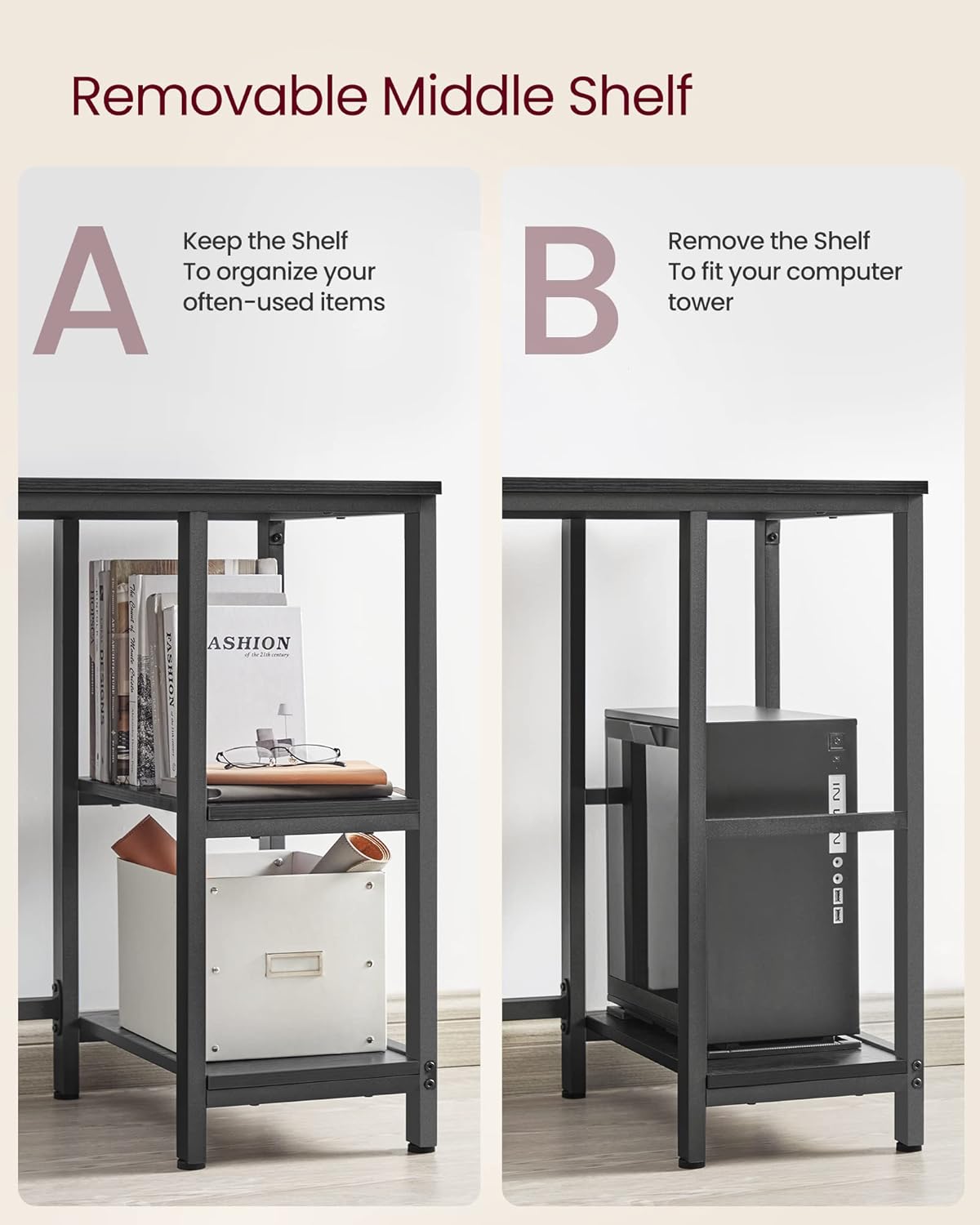
Image: Detail of the removable middle shelf, illustrating its dual functionality for organizing items or housing a computer tower.

Image: A visual comparison demonstrating the desk's unique cut-off corner design, which aids in efficient cable management compared to traditional desk corners.
Specifications
| Attribute | Detail |
|---|---|
| Model Number | HU-XI-89 |
| Color | Ebony Black + Ink Black |
| Product Dimensions | 138D x 138W x 76H cm (54.3"D x 54.3"W x 29.9"H) |
| Material | Particleboard, Steel |
| Item Weight | 23.8 kg (52.5 lb) |
| Max. Static Load Capacity (Tabletop) | 50 kg (110 lb) |
| Max. Static Load Capacity (Each Storage Shelf) | 10 kg (22 lb) |

Image: A detailed diagram illustrating the dimensions of the desk and its maximum static load capacities for both the tabletop and storage shelves.
Setup and Assembly
The VASAGLE L-Shaped Computer Desk is designed for easy assembly. Please follow the included accessory kit and instructions carefully. It is recommended to assemble the desk with two people for optimal ease and safety.
- Unpack and Verify: Carefully unpack all components and compare them with the parts list provided in the accessory kit to ensure nothing is missing or damaged.
- Prepare Workspace: Clear a spacious area for assembly. Lay out all parts on a soft, clean surface to prevent scratches.
- Follow Instructions: Refer to the step-by-step assembly instructions and diagrams in the included manual. Each part is clearly labeled for straightforward identification.
- Tighten Securely: Once all parts are in place, securely tighten all screws and fasteners. Avoid over-tightening to prevent damage.
- Adjust Feet: After assembly, adjust the leveling feet at the bottom of the desk to ensure it is stable and level on your floor.

Image: A close-up of the adjustable feet, which help stabilize the desk on uneven surfaces and protect your floor from scratches.
Operating Instructions
Your VASAGLE L-Shaped Computer Desk is designed for versatile use in a home office or gaming setup.
- Workspace Utilization: Arrange your monitors, keyboard, mouse, and other peripherals on the spacious L-shaped desktop. The corner design allows for efficient use of room space.
- Storage Shelves: Utilize the integrated storage shelves for books, documents, office supplies, or decorative items. Remember the maximum load capacity for each shelf.
- Cable Management: Route power cords and data cables through the cut-off corner to maintain a tidy and organized workspace, preventing tangles and clutter.
- Ergonomics: Position your chair and equipment to ensure an ergonomic setup that promotes comfort and reduces strain during long periods of use.
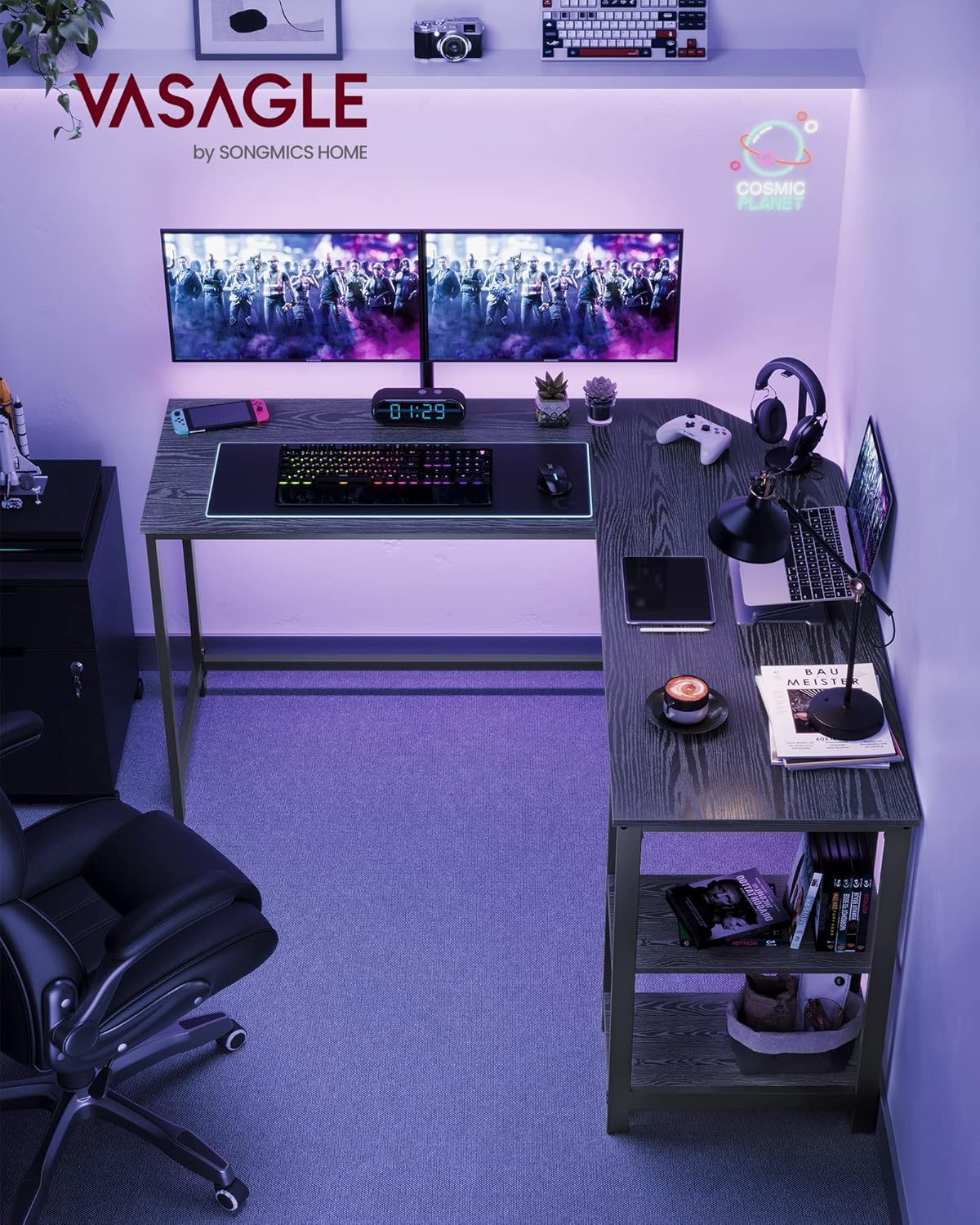
Image: The VASAGLE L-Shaped Computer Desk integrated into a home office environment, demonstrating its practical use with multiple devices.
Maintenance
Proper care will extend the life and appearance of your desk.
- Cleaning: Wipe the desk surfaces with a soft, damp cloth. Avoid using harsh chemicals or abrasive cleaners, which can damage the finish.
- Spills: Immediately wipe up any spills to prevent moisture damage to the particleboard.
- Fastener Check: Periodically check all screws and fasteners to ensure they remain tight. Re-tighten if necessary.
- Avoid Direct Sunlight: Prolonged exposure to direct sunlight can cause fading or warping of the desk material.
- Heat Protection: Use coasters or protective pads under hot items to prevent heat damage to the desktop.
Troubleshooting
If you encounter any issues with your desk, refer to the following common solutions:
- Desk Wobbles: Ensure the desk is placed on a flat surface. Adjust the leveling feet at the bottom of the legs until the desk is stable. Check that all assembly screws are securely tightened.
- Missing Parts: If any parts are missing upon unboxing, please contact VASAGLE customer support with your product model number and a description of the missing components.
- Difficulty Assembling: Double-check the assembly instructions and diagrams. Ensure you are using the correct screws for each step. Do not force parts together; if they don't fit, re-examine the instructions.
- Surface Damage: For minor scratches, furniture repair pens or markers matching the desk's color may be used. For significant damage, contact customer support for advice.