
Coleshome B0BW8FLL7M
Coleshome L Shaped Gaming Desk Instruction Manual
Model: B0BW8FLL7M
Introduction
This manual provides comprehensive instructions for the assembly, operation, and maintenance of your Coleshome L Shaped Gaming Desk. Designed for both gaming and home office environments, this desk offers ample space, integrated power solutions, and customizable LED lighting to enhance your workspace.
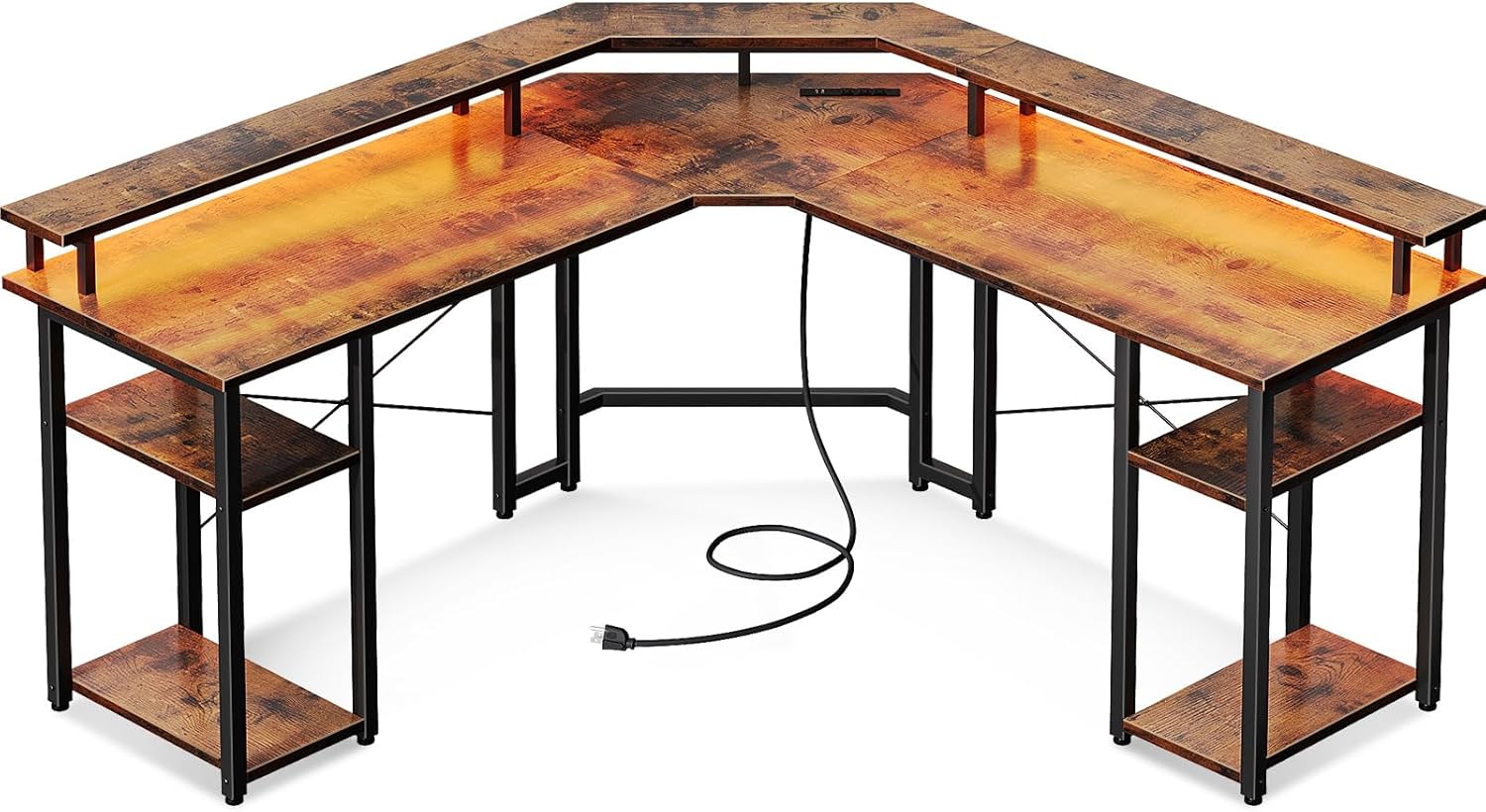
Image: The Coleshome L Shaped Gaming Desk, showcasing its overall structure and integrated power cord.
Product Features
- Power Outlets & USB Charging Ports: Equipped with 3 standard AC outlets and 2 USB ports for convenient charging of electronic devices.
- Cool Lighting Effects: Features LED lighting with 7 colors, 13 lighting modes, 8 adjustable brightness levels, and 9 flicker frequencies for an immersive experience. Includes a memory function.
- Double Shelves Design: Two-tier shelves on both sides provide space for computer hosts, headphones, and other accessories, helping to keep your desk tidy. The desk is reversible for left or right corner installation.
- Abundant Storage Capacity & Full Monitor Stand: A spacious top surface and a full monitor stand accommodate multiple monitors, elevating your line of sight for ergonomic posture.

Image: Close-up of the recessed power outlet with 3 AC outlets and 2 USB ports.

Image: Detailed view of the durable LED light strip and its components.

Image: The desk showcasing its double-sided shelves for storage.

Image: The desk featuring its full monitor stand for elevated display.
Setup & Assembly
The Coleshome L Shaped Gaming Desk is designed for straightforward assembly. It is recommended that 2 people participate in the assembly process to ensure stability and ease of construction.
Before You Begin:
- Unpack all components and verify against the included parts list.
- Ensure you have the detailed installation instructions and assembly tools provided with the desk.
- Clear a spacious area for assembly to prevent damage to components or your surroundings.
Assembly Steps:
- Follow the step-by-step instructions provided in the separate assembly manual.
- Carefully attach the steel frame components using the provided screws and Allen key.
- Secure the desk boards to the frame. Note that the desk can be configured for either left or right corner orientation during this step.
- Install the full monitor stand and double-tier shelves as per the instructions.
- Connect the LED light strip and power outlet unit according to the wiring diagram.
- Adjust the leg pads to ensure the desk is stable on uneven floors.
Operating Instructions
Using the LED Lights:
The integrated LED lighting system offers various customization options:
- Power On/Off: Use the control button to turn the LED lights on or off.
- Color Selection: Cycle through 7 different colors to match your preference or mood.
- Lighting Modes: Choose from 13 distinct lighting modes, including static, fade, and flash effects.
- Brightness Adjustment: Adjust the intensity of the lights with 8 adjustable brightness levels.
- Flicker Frequency: Select from 9 flicker frequencies for dynamic lighting effects.
- Memory Function: The LED lights will automatically return to the last used mode and color when powered on.
Utilizing Power Outlets & USB Ports:
The desk is equipped with a convenient power strip:
- Plug your devices into the 3 standard AC outlets (125V/12A).
- Use the 2 USB ports (5V/2A) to charge your smartphones, tablets, or other USB-powered devices.
- The power cord is 6.5 feet long, providing flexibility for placement.
Maintenance
- Cleaning: Wipe the desk surfaces with a soft, damp cloth. Avoid harsh chemicals or abrasive cleaners that could damage the finish.
- Spills: Immediately wipe up any spills to prevent water damage to the engineered wood.
- Connections: Periodically check all screws and connections to ensure they remain tight and secure.
- LED Lights: Ensure the LED light strip is free from dust and debris. Do not attempt to modify or repair the LED strip or power unit yourself.
- Weight Distribution: Distribute weight evenly across the desk surface and shelves to maintain stability and prevent warping. The maximum weight recommendation is 100 kilograms.
Troubleshooting
LED Lights Not Functioning:
- Check Power Connection: Ensure the power cord for the LED lights is securely plugged into a working outlet and the desk's integrated power unit.
- Verify Control Unit: Make sure the LED control unit is properly connected to the light strip and is not damaged.
- Reset: Try unplugging the desk's power cord from the wall outlet for a few minutes, then plug it back in to reset the system.
Power Outlets/USB Ports Not Working:
- Check Wall Outlet: Confirm that the wall outlet the desk is plugged into is functional by testing it with another device.
- Overload: Ensure you are not exceeding the maximum current rating (12A for AC outlets, 2A for USB). Unplug some devices if overloaded.
- Internal Connection: Verify that the internal wiring for the power unit is securely connected during assembly.
Desk Instability:
- Tighten Screws: Re-check and tighten all assembly screws, especially those connecting the frame components.
- Adjust Leg Pads: Use the adjustable leg pads at the bottom of the desk legs to level the desk on uneven surfaces.
- Even Weight Distribution: Ensure heavy items are not concentrated on one side of the desk.
If issues persist after following these steps, please contact customer support.
Specifications
| Feature | Detail |
|---|---|
| Brand | Coleshome |
| Model | B0BW8FLL7M |
| Product Dimensions | 18.9"D x 55.9"W x 35"H |
| Color | Vintage |
| Style | Modern |
| Base Material | Alloy Steel |
| Top Material Type | Engineered Wood |
| Finish Type | Steel |
| Special Feature | Lightweight, LED Lights, Power Outlets, Monitor Stand, Storage Shelves |
| Room Type | Office |
| Mounting Type | Freestanding |
| Included Components | 3 Standard Outlets, 2 USB Ports, a full monitor stand, two-tier shelves on both sides |
| Item Weight | 30.53 Kilograms |
| Number Of Shelves | 4 |
| Maximum Weight Recommendation | 100 Kilograms |
| Recommended Number of People for Assembly | 2 |
| Includes All Assembly Tools | Yes |
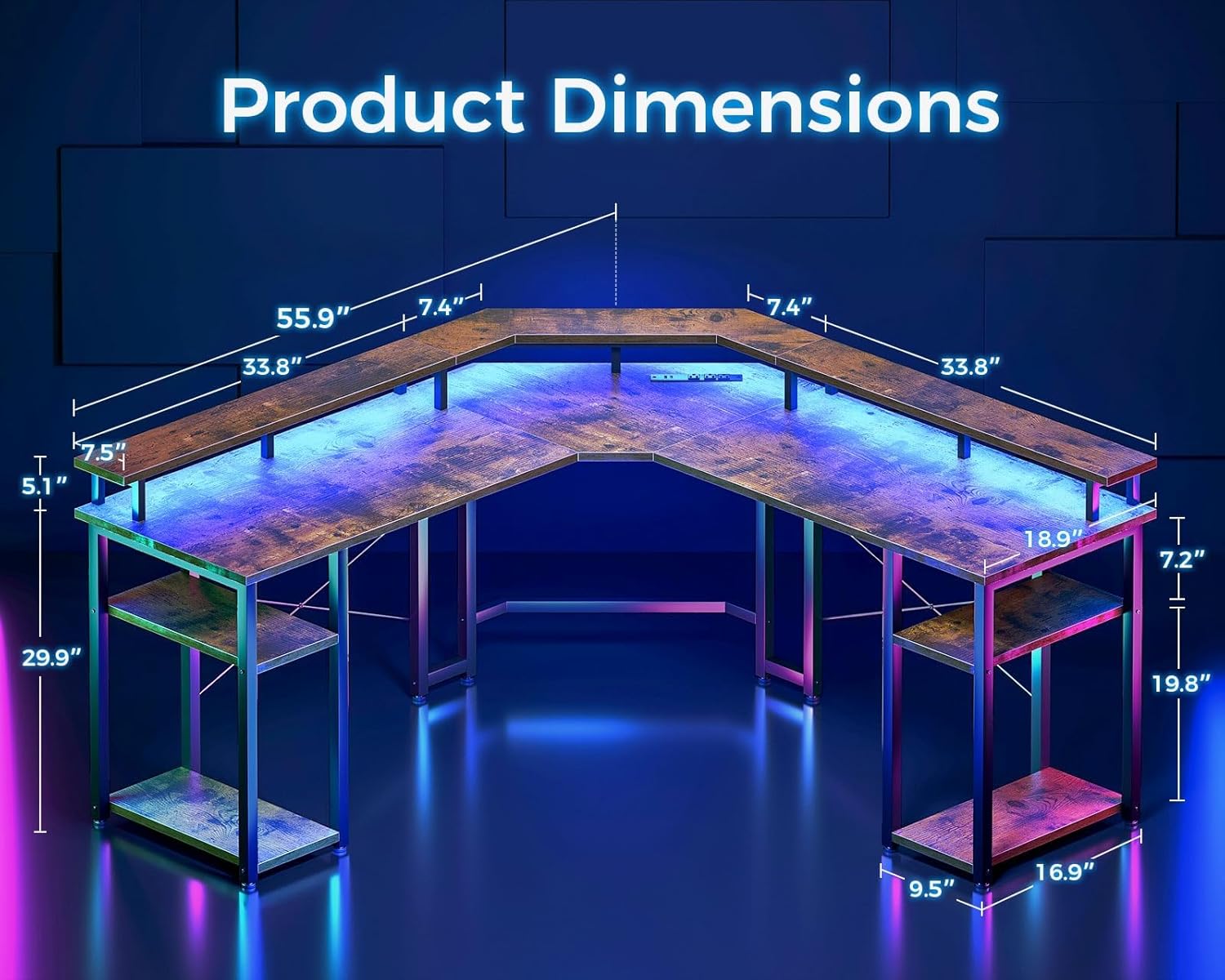
Image: Detailed product dimensions for the Coleshome L Shaped Gaming Desk.
Warranty & Support
Coleshome is committed to providing high-quality products. For any issues or inquiries regarding your L Shaped Gaming Desk, please refer to the contact information provided at the point of purchase or visit the official Coleshome website for support resources.
If you have any problems, please feel free to contact us. We are dedicated to ensuring your satisfaction with our products.
Please retain your purchase receipt for warranty claims.
Related Documents - B0BW8FLL7M
 |
Coleshome 39 Inch Computer Desk Installation Manual Step-by-step installation guide for the Coleshome 39 Inch Computer Desk, including parts list and assembly instructions. |
 |
L Shaped Desk User Manual & Assembly Guide Comprehensive user manual and assembly instructions for the L Shaped Desk, including package contents, precautions, parts list, and step-by-step guidance for easy setup. |
Ask a question about this manual
Ask about setup, troubleshooting, compatibility, parts, safety, or missing instructions. Manuals+ will review the question and use this page’s manual context to help answer it.