
1. Setup
1.1 Battery Installation
The LONICERA DT126 Digital Meat Thermometer comes with one CR2032 battery pre-installed. To activate, ensure the battery is properly seated. If replacing, open the battery compartment and insert a new CR2032 battery with the positive (+) side facing up.
1.2 Power On/Off
To power on the thermometer, simply pull out the probe. The display will illuminate. To power off, fold the probe back into the unit. The thermometer also features an automatic shut-off function after 10 minutes of inactivity to conserve battery life.
1.3 Temperature Unit Selection
The thermometer defaults to Fahrenheit (°F). To switch between Fahrenheit (°F) and Celsius (°C), press the '°C/°F' button located on the device.
1.4 Calibration
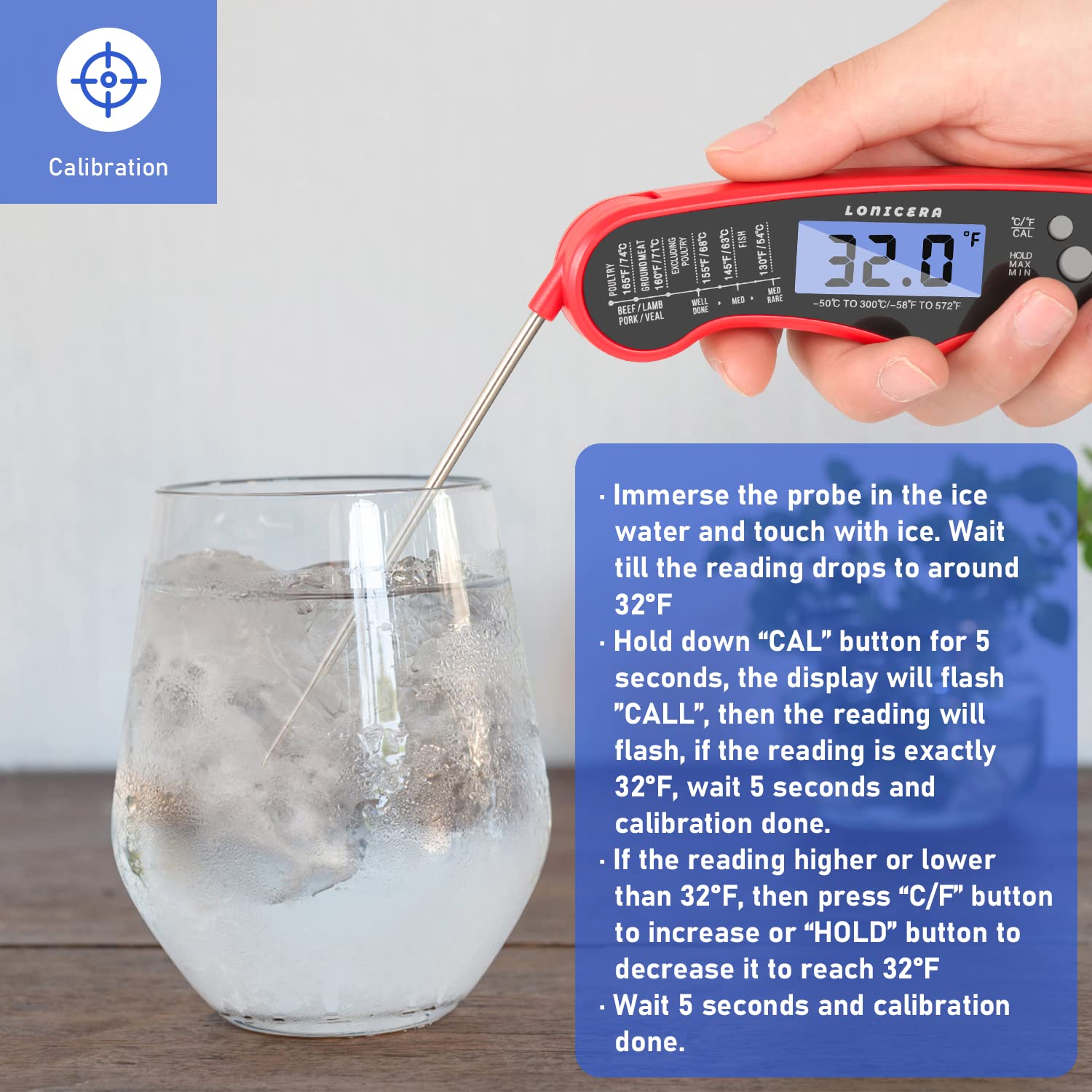
For optimal accuracy, the thermometer can be re-calibrated using an ice-water bath. Follow these steps:
- Prepare an ice-water bath by filling a glass with crushed ice and a small amount of cold water. The mixture should be mostly ice with some water.
- Immerse the thermometer probe into the ice-water bath, ensuring the probe tip touches the ice.
- Wait until the temperature reading stabilizes, typically around 32°F (0°C).
- Press and hold the 'CAL' button for 5 seconds. The display will flash 'CALL'.
- If the reading is exactly 32°F (0°C), wait 5 seconds, and calibration is complete.
- If the reading is higher or lower than 32°F (0°C), use the '°C/°F' or 'HOLD' buttons to adjust the displayed temperature to 32°F (0°C).
- Wait 5 seconds for the setting to save, and calibration is complete.
2. Operating Instructions
2.1 Taking a Temperature Reading
Extend the probe to power on the thermometer. Insert the stainless steel probe into the thickest part of the food, avoiding bones. The thermometer provides an instant reading within 2-3 seconds.

2.2 Backlight Function
The large LED screen features a backlight for easy reading in low-light conditions. Press the backlight button (often indicated by a light bulb icon) to activate or deactivate the backlight.

2.3 Hold Function
To lock the current temperature reading on the display, press the 'HOLD' button. This allows you to remove the thermometer from the heat source and read the temperature more comfortably. Press 'HOLD' again to release the reading.

2.4 Max/Min Temperature Record
The thermometer can record the maximum and minimum temperatures measured. Press the 'MAX/MIN' button to view these records. Press again to cycle through Max, Min, and current temperature.
2.5 Recommended Internal Temperatures
Refer to the following guide for safe internal cooking temperatures. Always cook food to the minimum safe temperature.

| Food Type | Temperature (°F) | Temperature (°C) |
|---|---|---|
| Poultry (Chicken, Turkey) | 165°F | 74°C |
| Ground Meat (Beef, Pork, Lamb) | 160°F | 71°C |
| Beef, Lamb, Pork, Veal (Steaks, Roasts, Chops) - Medium Rare | 145°F | 63°C |
| Beef, Lamb, Pork, Veal (Steaks, Roasts, Chops) - Medium | 155°F | 68°C |
| Beef, Lamb, Pork, Veal (Steaks, Roasts, Chops) - Well Done | 170°F | 77°C |
| Fish | 145°F | 63°C |
3. Maintenance
3.1 Cleaning
The LONICERA DT126 thermometer is designed with IP66 grade waterproofing. This allows for easy cleaning under running water with a soapy cloth. Ensure the probe is thoroughly cleaned after each use to prevent cross-contamination. The main body can also be wiped clean. Hand wash only. Do not immerse the entire unit in water for extended periods or place in a dishwasher.

3.2 Storage
The thermometer features a foldable probe for compact and safe storage. It also has a magnetic back and a hanging hole for convenient storage on metal surfaces or hooks.

4. Troubleshooting
4.1 Inaccurate Readings
- Recalibrate: Perform the ice-water calibration procedure as described in Section 1.4.
- Battery Check: Ensure the CR2032 battery is not low. Replace if necessary.
- Proper Insertion: Ensure the probe is inserted into the thickest part of the food and not touching bone or the bottom of the cooking vessel.
4.2 Display Not Working
- Probe Position: Ensure the probe is fully extended to power on the device.
- Battery Check: Verify the CR2032 battery is correctly installed and has sufficient charge. Replace if needed.
- Auto-Off: The device may have entered auto-off mode after 10 minutes of inactivity. Extend the probe or press a button to reactivate.
5. Specifications
- Brand: LONICERA
- Model: DT126
- Color: Red
- Special Features: Auto Off, Fast Reading System, High Accuracy, Large Display, Waterproof, Backlight, Calibration
- Included Components: Thermometer X1, Instruction X1, CR2032 battery X1, Cooking Temp Guideline X1
- Outer Material: Acrylonitrile Butadiene Styrene (ABS)
- Probe Material: 304 Stainless Steel (Food Safety)
- Specification Met: CE, FCC, FDA, RoHS
- Display Type: Digital
- Product Care Instructions: Hand Wash Only
- Power Source: Battery Powered (1 CR2032 battery included)
- Upper Temperature Range: 572°F (300°C)
- Lower Temperature Range: -58°F (-50°C)
- Response Time: 2-3 seconds
- Accuracy: +/-1°F
- Reusability: Reusable
- Indoor/Outdoor Usage: Indoor
- Item Length: 6.1 Inches (folded)
6. Warranty & Support
6.1 Warranty Information
LONICERA offers a 100% money-back guarantee within 60 days of purchase and an 18-month warranty against manufacturing defects. Please retain your proof of purchase for warranty claims.
6.2 Customer Support
For any questions, concerns, or support needs regarding your LONICERA DT126 Digital Meat Thermometer, please refer to the contact information provided with your product packaging or visit the official LONICERA store on Amazon: LONICERA Amazon Store.