
1. Important Safety Information
Please read all instructions carefully before using the PowerCure Pro Handheld Cold Laser Device. Failure to follow these instructions may result in injury or device malfunction. Keep this manual for future reference.
- Eye Protection: Do not look directly into the laser light. Avoid directing the laser beam towards the eyes of humans or animals.
- Medical Advice: This device is intended for general wellness and is not a substitute for professional medical advice, diagnosis, or treatment. Consult with a healthcare professional before use, especially if you have pre-existing medical conditions, are pregnant, or have implanted medical devices.
- Children and Pets: Keep the device out of reach of children and pets.
- Water Exposure: Do not immerse the device in water or use it in wet environments.
- Damage: Do not use the device if it appears damaged or is not functioning correctly. Contact customer support for assistance.
- Charging: Use only the provided charging cable and adapter. Do not attempt to charge with incompatible chargers.
- Temperature: Store and operate the device within recommended temperature ranges. Avoid extreme heat or cold.
2. Product Overview
The Generic PowerCure Pro Handheld Cold Laser Device utilizes Low-Level Laser Therapy (LLLT), also known as Cold Laser Therapy, to deliver low-power light energy within the visible red and near-infrared spectrum. This device is designed for convenient home use to support various wellness applications.

Figure 2.1: The PowerCure Pro Handheld Cold Laser Device, showing its ergonomic design and digital display.
2.1 Key Features
- Low-Level Laser Therapy (LLLT): Utilizes specific wavelengths of light.
- Handheld Design: Ergonomic and portable for easy home use.
- Rechargeable Battery: Integrated Lithium Ion battery for cordless operation.
- Digital Display: Provides information on countdown timer and power settings.
2.2 Package Contents
Upon opening the package, ensure all items are present and undamaged:
- PowerCure Pro Handheld Cold Laser Device
- Charging Cable
- User Manual (this document)
3. Setup and Charging
3.1 Initial Charging
Before first use, fully charge the device. The device contains a Lithium Ion battery.
- Locate the charging port on the device.
- Connect the provided charging cable to the device and a suitable USB power adapter (not always included, check packaging).
- Plug the adapter into a power outlet.
- The display will indicate charging status. Allow approximately [X hours - information not provided, placeholder for typical charging time] for a full charge.
- Once fully charged, disconnect the device from the charger.
3.2 Device Components

Figure 3.1: Close-up of the device's control panel and digital display.
- Digital Display: Shows countdown timer, power level, and battery status.
- Power Button (⑁): Press and hold to turn on/off. Short press to cycle through power levels.
- Timer Button (T): Press to adjust treatment duration.
- Light Emitting Array: The area where the red and near-infrared light is emitted.
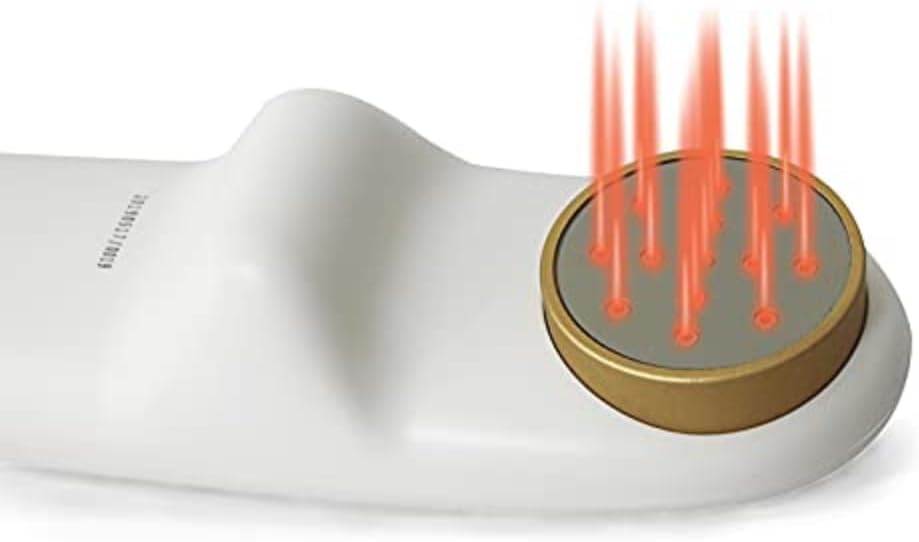
Figure 3.2: The light emitting array, showing multiple diodes.
4. Operating Instructions
Follow these steps for safe and effective use of your PowerCure Pro device.
- Power On: Press and hold the Power button (⑁) for approximately 2-3 seconds until the display illuminates.
- Select Power Level: Short press the Power button (⑁) to cycle through available power intensity levels. The display will show the current power setting (e.g., "POWER" indicator with bars).
- Set Treatment Time: Press the Timer button (T) to adjust the desired treatment duration. The display shows a countdown (e.g., "06:34" or "10:00"). Common treatment times range from 5 to 20 minutes, depending on the application area.
- Begin Treatment: Once power and time are set, place the light emitting array directly onto the skin of the desired treatment area. Ensure good contact. The device will begin emitting light.
- During Treatment: Hold the device steadily over the area. Do not move it rapidly. The device will automatically turn off once the countdown timer reaches zero.
- Power Off: After treatment, or if you need to stop early, press and hold the Power button (⑁) for 2-3 seconds to turn off the device.
4.1 Recommended Usage
- For general wellness, use the device for 5-15 minutes per area, 1-3 times daily.
- Maintain direct contact with the skin for optimal light penetration.
- Consult a healthcare professional for specific treatment protocols related to particular conditions.
5. Maintenance and Storage
5.1 Cleaning
- Ensure the device is turned off and disconnected from any power source before cleaning.
- Wipe the device's surface with a soft, slightly damp cloth.
- Do not use abrasive cleaners, solvents, or harsh chemicals.
- Do not allow water to enter the device's openings.
5.2 Storage
- Store the device in a cool, dry place, away from direct sunlight and extreme temperatures.
- Keep the device in its original packaging or a protective case to prevent damage.
- Ensure the device is fully charged before long-term storage to maintain battery health.
6. Troubleshooting
| Problem | Possible Cause | Solution |
|---|---|---|
| Device does not turn on. | Low battery or device is off. | Charge the device fully. Press and hold the Power button for 2-3 seconds. |
| Light output is weak or inconsistent. | Low battery or incorrect power setting. | Ensure the device is fully charged. Adjust the power setting using the Power button. |
| Device turns off unexpectedly. | Battery depleted or timer expired. | Recharge the device. Check the timer setting before starting treatment. |
| Display is not working. | Device is off or malfunction. | Ensure the device is powered on. If the issue persists after charging, contact customer support. |
7. Specifications
- Model: PowerCure Pro
- Power Source: 1 Lithium Ion battery (included)
- Package Dimensions: 12 x 9 x 4 inches
- Weight: 2.4 Pounds
- Manufacturer: lotuxs Tecnology
- ASIN: B0BW4WC2X3
- Date First Available: February 17, 2023
- Light Wavelengths: Visible Red and Near-Infrared (specific wavelengths not provided in input)
8. Warranty and Support
Information regarding the specific warranty period and terms for the Generic PowerCure Pro Handheld Cold Laser Device is not available in this manual. Please refer to the product packaging or contact the retailer/manufacturer directly for warranty details and customer support.
For technical assistance or inquiries, please contact:
- Manufacturer: lotuxs Tecnology
- (Contact information such as website or email is not provided in the input data.)