
Introduction
This manual provides detailed instructions for the safe and proper use of your RPNB Deluxe Smart Touchscreen Biometric Home Safe, Model RPHS60W. Please read this manual thoroughly before operating the safe to ensure optimal performance and security. This safe is designed for secure storage of valuables in home, office, or hotel environments.
Key Features
- One-Touch Unlock System: Equipped with a smart touchscreen panel and advanced biometric fingerprint recognition. The handle integrates a fingerprint sensor for unlocking within 1 second. Offers 4 ways to open the safe.
- Two-Factor Authentication (2FA): Enhanced security requiring both a valid passcode and a registered fingerprint for access.
- Dual Warning Alarm and Silence Mode: Features a tamper and motion-sensitive alarm that sounds for 1 minute if the passcode is entered incorrectly 3 times or if the safe is violently shaken. Silence Mode allows for silent entry.
- Durable and Secure Construction: Made of anti-theft solid steel (over 80 lbs), with a pry-resistant 5mm thick solid door, 3-way large solid steel live-locking bolts, and anti-impact hinges. Features a durable powder-coated finish.
- High Capacity and Interior Light: 2.8 cubic feet capacity, includes a built-in jewelry drawer with durable PU leather and soft velvet lining. LED interior light turns on automatically when the door is opened.

Figure 1: RPNB Deluxe Smart Touchscreen Biometric Home Safe (Model RPHS60W).
Setup
- Unboxing and Initial Inspection: Carefully remove the safe from its packaging. Inspect for any signs of damage. Ensure all accessories (keys, manual, mounting hardware) are present.
- Battery Installation:
The safe requires 4 AA alkaline batteries (not included). Open the safe using the emergency key. Locate the battery compartment on the inside of the safe door. Insert the batteries, ensuring correct polarity. Close the battery compartment cover.

Figure 2: Smart Control Touchscreen Panel with Voice Prompt.
- Mounting (Optional):
For enhanced security, the safe can be mounted to a floor or wall using the provided expansion bolts. Refer to the detailed instructions in the included paper manual for proper mounting procedures.
Operating Instructions
1. Setting the Master Passcode
- Ensure the safe door is open.
- Press the green program button located on the inside of the safe door.
- On the touchscreen panel, enter your desired new passcode (4-8 digits) within 10 seconds.
- Press the '#' key to confirm. The safe will provide a voice prompt confirming the new passcode.
- Test the new passcode with the door open to ensure it works correctly before closing the safe.
Video 1: How to program the RPNB Smart Touchscreen Home Safe (RPHS Series). This video demonstrates the steps for setting up the master passcode and registering fingerprints.
2. Registering Fingerprints
- With the safe door open, press the red program button located on the inside of the safe door.
- Place your finger on the fingerprint sensor on the handle. The safe will prompt you to lift and place your finger multiple times (typically 3-5 times) to register the full print.
- The safe will provide a voice prompt upon successful registration. You can register up to 30 unique fingerprints.
- Test the registered fingerprint with the door open to ensure it works correctly.

Figure 3: One-Touch Unlocking with Biometric Fingerprint Recognition.
3. Two-Factor Authentication (2FA) Setting
To activate 2FA, which requires both a passcode and a fingerprint for unlocking:
- Wake up the touchscreen panel.
- Enter '1' on the keypad.
- Press the green program button once. The safe will announce that 2FA is activated.
- To unlock in 2FA mode, first enter your passcode, then place a registered fingerprint on the sensor.
4. Dual Warning Alarm and Silence Mode
- The alarm system is automatically active. It will trigger if an incorrect passcode is entered 3 times or if the safe experiences violent vibration.
- To activate Silence Mode (mute electronic sounds): Wake up the touchscreen panel, enter '0', then press the green program button once.
- To deactivate Silence Mode: Repeat the steps (Wake up panel, enter '0', press green program button).

Figure 4: Dual Warning System for security breaches.
5. Unlocking the Safe
The RPHS60W offers four methods for unlocking:
- Fingerprint: Place a registered finger on the sensor.
- Passcode: Wake up the panel, enter your passcode, then press '#'.
- Two-Factor Authentication: Enter passcode, then place a registered finger on the sensor.
- Emergency Key: In case of battery failure or forgotten codes, use the emergency key to manually open the safe. The keyhole is typically hidden behind a cover on the front panel.

Figure 5: Multiple methods for safe entry.
Maintenance
- Battery Replacement: Replace all 4 AA alkaline batteries when the low battery indicator appears or if the safe does not respond. Always use new, high-quality alkaline batteries.
- Cleaning: Wipe the exterior and interior surfaces with a soft, damp cloth. Avoid abrasive cleaners or solvents.
- Key Storage: Store emergency keys in a secure location away from the safe.
Troubleshooting
| Problem | Possible Cause | Solution |
|---|---|---|
| Safe does not open with passcode/fingerprint. | Incorrect entry, low batteries, or unprogrammed credentials. | Ensure correct passcode/fingerprint. Replace batteries. Re-program passcode/fingerprint if necessary. Use emergency key. |
| Alarm sounds unexpectedly. | Incorrect passcode attempts or physical tampering/vibration. | Enter correct passcode or use a registered fingerprint to disarm. Avoid shaking the safe. |
| No power/display. | Dead or incorrectly installed batteries. | Replace all 4 AA batteries, ensuring correct polarity. |
| Fingerprint sensor not recognizing print. | Finger not placed correctly, dirty sensor, or unprogrammed print. | Ensure full contact with the sensor. Clean the sensor. Re-register fingerprint if issues persist. |
Specifications (Model RPHS60W)
- Brand: RPNB
- Model Number: RPHS60W
- Product Dimensions: 17.32"D x 14.96"W x 23.62"H
- Lock Type: Biometric (Fingerprint) and Electronic Keypad
- Color: White
- Capacity: 2.8 Cubic Feet
- Special Features: Alarm System, Voice Prompt, One-Touch Unlock, Two-Factor Authentication, Interior LED Light, Built-in Jewelry Drawer, Key Hooks, Multi-Purpose File Holder.
- Mounting Type: Floor Mount (Expansion Bolts Included)
- Item Weight: 87.08 Pounds
- Water Resistance Level: Not Water Resistant
- Batteries Required: Yes (4 x AA, not included)
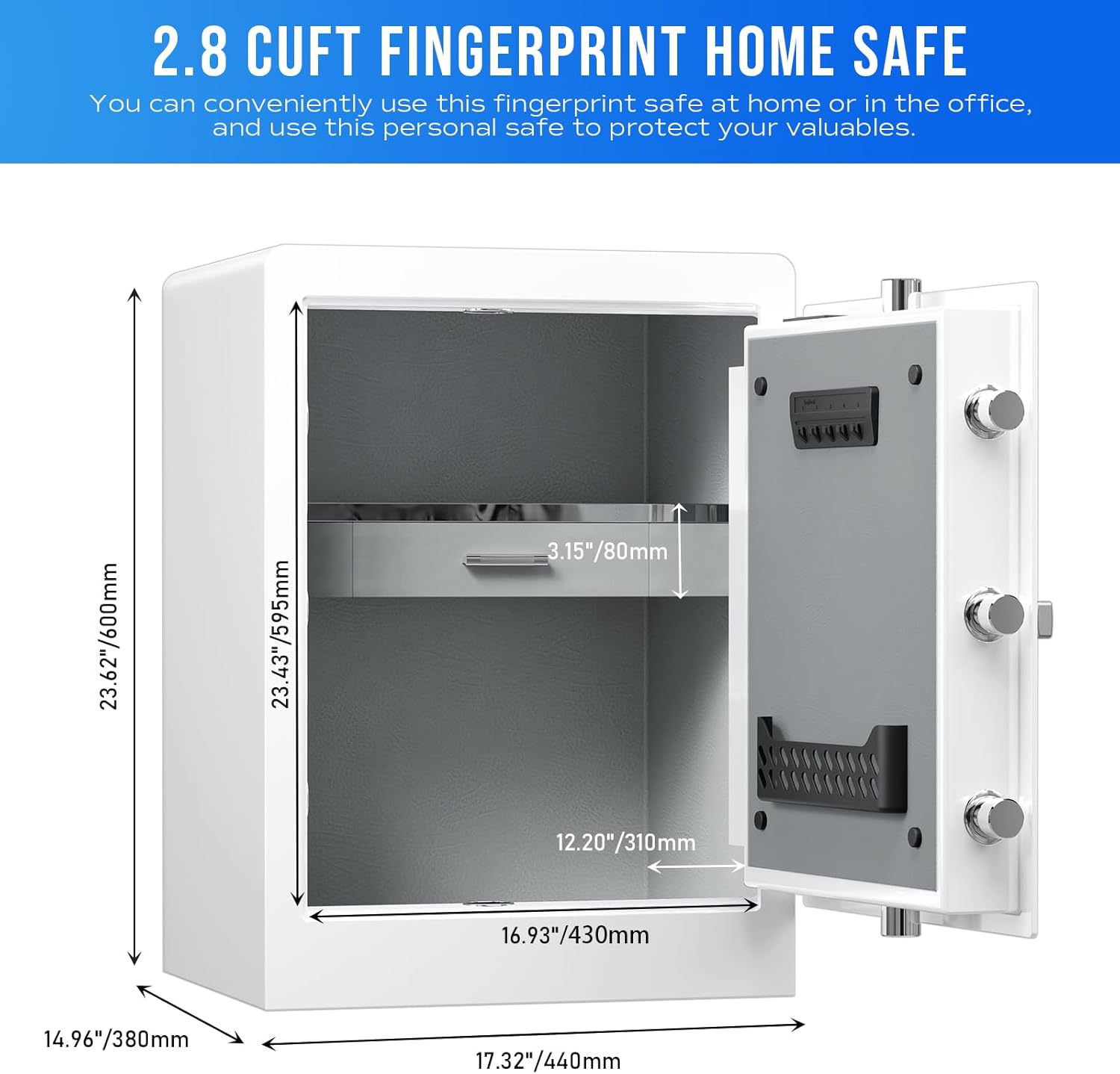
Figure 6: Dimensions and interior capacity of the RPHS60W safe.
Warranty and Support
For any questions, difficulties, or after-sales service, please contact RPNB customer support. Refer to the contact information provided in your product packaging or on the official RPNB website.


