
FilterTech CHP-242N
FilterTech Compatible Replacement Water Filter Set User Manual
Model: CHP-242N
Product Overview
This manual provides essential information for the installation, operation, and maintenance of your FilterTech Compatible Replacement Water Filter Set for Coway CHP-242N.
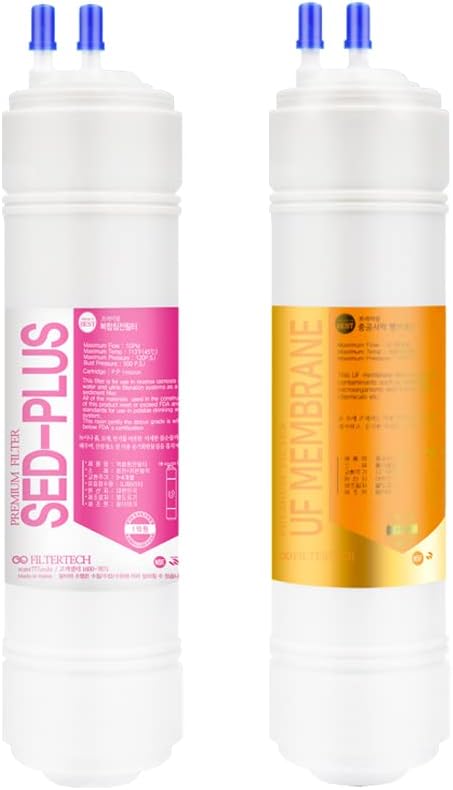
Image: FilterTech Compatible Replacement Water Filter Set. The set includes a Sediment Filter (pink label) and a UF Membrane Filter (orange label).
Filter Components:
- 1st Filter: Sediment Filter (1 EA)
Removes fine impurities of 10 microns, including rust, soil, sand, and dust. The carbon block absorbs and removes residual chlorine and various organic compounds. Recommended replacement: 3-4 months.
- 2nd Filter: UF Membrane Filter (1 EA)
A 0.1-0.4 micron filter designed to remove impurities while allowing clean water containing natural minerals to pass through. Note: This filter has 2 knots on top for correct installation. Recommended replacement: 12-16 months.
- 3rd Filter: Post-Carbon Filter (1 EA)
Uses carbon to improve water quality and taste. Recommended replacement: 9-12 months.
These filters are U-type, meaning water inlet and outlet are located on top. This is a new generation of filters.
Note: If your device has an RO membrane filter, you may need to disconnect the drain part of that filter for compatibility with the UF Membrane Filter.
Setup and Installation
- Preparation: Ensure your water purification system is turned off and the water supply is shut off before beginning installation.
- Identify Filters: Locate the existing filters in your Coway CHP-242N system. Identify the Sediment, UF Membrane, and Post-Carbon filter slots.
- Remove Old Filters: Carefully remove the old filters by twisting or releasing their locking mechanisms as per your Coway system's instructions. Be prepared for some water spillage.
- Install New Filters: Insert the new FilterTech replacement filters into their corresponding slots. Ensure the U-type connections (inlet/outlet on top) are correctly aligned. For the UF Membrane Filter, pay attention to the 2 knots on top for proper orientation.
- Secure Filters: Twist or lock the new filters into place until they are securely seated.
- Reconnect Water Supply: Slowly turn on the water supply to your purification system. Check for any leaks around the newly installed filters.
- Initial Flushing: This is a critical step. Before consuming water, flush each filter thoroughly to discharge air and remove carbon powder (charcoal powder) from the manufacturing process. Let the water flow for approximately 2 minutes (about 4 liters) for each filter. Repeat this process for all newly installed filters.
Caution: Do not drink the water until the flushing process is complete.
Operating Instructions
Once the filters are installed and flushed, your water purification system is ready for normal operation. The filters work automatically as water passes through them.
Filter Functionality:
- The Sediment Filter acts as the first line of defense, removing larger particles.
- The UF Membrane Filter then purifies the water further by removing microscopic impurities while retaining beneficial minerals.
- Finally, the Post-Carbon Filter refines the water's taste and odor.
Maintenance and Replacement
Regular filter replacement is crucial for maintaining optimal water quality and system performance.
| Filter Type | Quantity | Recommended Lifespan |
|---|---|---|
| Sediment Filter | 1 EA | 3-4 months |
| UF Membrane Filter | 1 EA | 12-16 months |
| Post-Carbon Filter | 1 EA | 9-12 months |
To replace filters, follow the "Setup and Installation" steps in reverse for removal, and then proceed with installation of new filters, including the crucial flushing step.
Included Accessories for Maintenance:
- Aqua tissue
- Latex gloves
- Aqua taps
- Plastic spanner
- L fitting connector (2 pieces)
Troubleshooting
Common Issues and Solutions:
- Issue: Water tastes unusual or has an odor after filter replacement.
Solution: Ensure the initial flushing process was performed correctly and for the recommended duration (2 minutes per filter). This removes residual carbon powder. If the issue persists, re-flush the filters.
- Issue: Water leakage around filters.
Solution: Turn off the water supply and system. Check that each filter is securely seated and locked into its position. Ensure O-rings or seals are properly in place and not damaged. Re-tighten if necessary.
- Issue: Reduced water flow.
Solution: This can indicate a clogged filter. Check the replacement schedule and replace any filters that are past their recommended lifespan. Ensure proper installation and no kinks in water lines.
- Issue: UF Membrane Filter compatibility with RO system.
Solution: If your Coway system uses an RO membrane filter, you may need to disconnect its drain part to ensure proper flow and function with the UF Membrane Filter. Consult your Coway system's manual for specific RO membrane bypass instructions if needed.
Specifications
| Attribute | Detail |
|---|---|
| Brand | FilterTech |
| Product Dimensions | 38.1 x 27.94 x 15.24 cm |
| Material | Plastic, Rubber |
| ASIN | B0BVXTP5W3 |
| Date First Available | Feb. 16 2023 |
| Manufacturer | FilterTech (South Korea) |
| Number of Items | 3 (Sediment, UF Membrane, Post-Carbon filters) |
| Filter Type | U-type (inlet/outlet on top) |
Warranty and Support
For specific warranty information or technical support regarding your FilterTech replacement filters, please refer to the manufacturer's official website or contact their customer service directly. As these are compatible replacement parts, warranty terms may differ from the original equipment manufacturer.
Manufacturer: FilterTech (South Korea)
Please retain your purchase receipt for any warranty claims.