
1. Introduction
This manual provides essential information for the proper use and maintenance of the Ace Instruments Elitech GSP-6 Pro Digital Temperature and Humidity Data Logger. Please read this manual thoroughly before operating the device to ensure accurate data collection and optimal performance. This device is designed for precise monitoring of temperature and humidity in various critical environments.
2. Product Overview
The Elitech GSP-6 Pro is a multi-use digital data logger capable of measuring and recording both temperature and humidity. It is equipped with an LCD display for real-time readings and features a built-in magnet for convenient placement. The device is compliant with FDA 21 CFR Part 11 requirements, making it suitable for sensitive applications such as medicine and vaccine storage monitoring. Data can be easily exported via USB using the ElitechLog software.
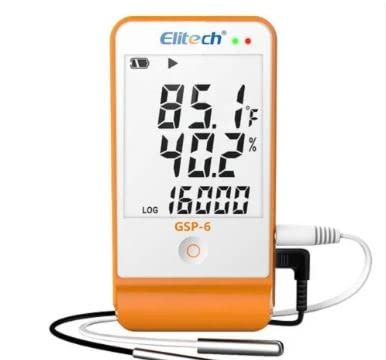
Figure 1: Elitech GSP-6 Pro Digital Temperature and Humidity Data Logger. The device features an LCD screen showing current temperature (85.1°F), humidity (40.2%), and a log count (16000). It is connected to external temperature and humidity probes via cables. The device itself is orange and white.
3. Key Features
- Meets CDC/VFC requirements for vaccine storage and monitoring.
- FDA 21 CFR Part 11 Compliant.
- Integrated magnet for secure mounting.
- Capable of Thermal Mapping and Area Mapping.
- Measures and records both temperature and humidity.
- Power supply options: Single-use 3.6V ER14505H lithium battery or USB power.
- Clear LCD display for real-time data.
- Audible and indicator alarms for out-of-range conditions.
- Data export via ElitechLog Software (macOS & Windows).
- Report formats: PDF/EXCEL/TXT (TXT for Windows only).
4. Package Contents
Upon unpacking, verify that the following items are included:
- 1 x Elitech GSP-6G Data Logger
- 1 x Instruction Manual
- 1 x Factory Calibration Certificate
5. Setup
5.1 Battery Installation
The device uses a single-use 3.6V ER14505H lithium battery. Ensure the battery is correctly inserted according to polarity markings. The battery provides power for logging when not connected via USB.
5.2 Initial Configuration
Before first use, connect the data logger to a computer via the Micro USB interface. Use the ElitechLog software to configure logging parameters such as logging interval, alarm thresholds, and start/stop modes. Refer to the ElitechLog software manual for detailed configuration instructions.
5.3 Sensor Connection
Connect the external temperature and humidity probes to the designated ports on the data logger. Ensure connections are secure to prevent inaccurate readings.
6. Operation
6.1 Starting a Log Session
Once configured via software, press and hold the start button on the device (if configured for manual start) or the logging will begin automatically based on software settings. The LCD will indicate that logging is active.
6.2 Monitoring Data
The LCD display shows current temperature, humidity, and the number of recorded data points. Periodically check the display for real-time values and alarm indicators.
6.3 Stopping a Log Session
Logging can be stopped manually by pressing and holding the stop button (if configured for manual stop), or automatically when the memory is full (if configured for 'Stop when full' mode), or after a set duration. The device also supports 'Circular logging' where older data is overwritten once memory is full.
7. Software Installation and Data Export
7.1 ElitechLog Software
Download and install the ElitechLog software from the official Elitech website. The software is compatible with both macOS and Windows operating systems. This software is essential for device configuration, data download, and report generation.
7.2 Data Export
Connect the data logger to your computer using the Micro USB cable. Open the ElitechLog software. The software will detect the device and allow you to download the recorded data. You can then generate reports in PDF, EXCEL, or TXT format. Note that TXT format export is available for Windows systems only.
8. Maintenance
8.1 Battery Life
The battery life is approximately two years at room temperature with a 15-minute record interval and buzzer alarm disabled. Replace the battery when the low battery indicator appears on the LCD or in the software.
8.2 Cleaning
Clean the device exterior with a soft, dry cloth. Do not use abrasive cleaners or solvents. Ensure the sensor probes are kept clean and free from obstructions for accurate readings.
9. Troubleshooting
- Device not turning on: Check battery installation and charge level. Ensure USB cable is properly connected if powering via USB.
- Inaccurate readings: Verify sensor probes are clean and correctly connected. Ensure the device is placed in an environment suitable for its operating range.
- Software not detecting device: Ensure ElitechLog software is installed correctly and the USB cable is functional. Try a different USB port.
- Data not logging: Check if logging was initiated correctly. Verify memory capacity and logging interval settings in the software.
- Alarms triggering frequently: Review alarm threshold settings in the ElitechLog software to ensure they are appropriate for your application.
10. Specifications
| Parameter | Value |
|---|---|
| Temperature Range | -40°C to +85°C (-40°F to 185°F) |
| Temperature Accuracy | ±0.5°C/±0.9°F (-20°C to +40°C), ±1°C/±1.8°F (Others) |
| Humidity Range | 0%RH to 100%RH |
| Humidity Accuracy | ±3%RH (25°C, 20%RH to 80%RH), ±5%RH (Others) |
| Resolution | 0.1°C/°F, 0.1%RH |
| Maximum Memory Capacity | 16,000 points |
| Logging Interval | 10 seconds to 24 hours (configurable) |
| Data Interface | Micro USB |
| Alarm Configuration | Buzzer; LCD display |
| Power Supply | Single-use 3.6V ER14505H lithium battery; or powered via USB |
| Battery Life | Two years (at room temperature with 15 min record interval & buzzer disabled) |
| Logging Mode | Stop when full; Circular logging |
| Dimensions | 118 x 61.5 x 19 mm (4.65"H x 2.42"W) |
| Mounting Type | Tabletop, Magnetic |
| Software | ElitechLog (for macOS & Windows System) |
| Report Format | PDF/EXCEL/TXT (TXT for Windows ONLY) |
11. Certifications
The Elitech GSP-6 Pro data logger holds the following certifications:
- EN12830
- CE
- RoHS
12. Applications
This data logger is suitable for a variety of applications requiring precise temperature and humidity monitoring, including:
- Pharmaceutical Industry
- Cold Chains & Logistics
- Medicine Storage & Monitoring
- Vaccine Storage & Monitoring
- Thermal Mapping Studies
- Area Mapping Studies
13. Support
For technical assistance, troubleshooting, or warranty inquiries, please contact Ace Instruments customer support. Refer to the product packaging or the official Ace Instruments website for contact details.