
1. Introduction
This manual provides essential instructions for the safe and effective use, care, and maintenance of your Westinghouse Electric Heated Throw Blanket. Please read all instructions thoroughly before first use and retain this manual for future reference.

Image 1.1: The Westinghouse Electric Heated Throw Blanket, folded with its digital controller.
2. Important Safety Information
WARNING: To reduce the risk of burns, electric shock, fire, or injury, this product must be used in accordance with the following instructions.
- Do not use with an infant, child, incapacitated person, or anyone insensitive to heat.
- Do not use with animals.
- Do not use if the blanket is wet.
- Do not use if the power cord or controller is damaged.
- Do not use with pointed objects.
- Do not fold, bunch, or tuck the blanket while in use. Ensure the blanket lies flat.
- Do not dry clean, iron, or bleach the blanket.
- Always unplug the blanket from the power outlet when not in use.
- This blanket is equipped with ETL and FCC safety certifications, ensuring compliance with safety standards.

Image 2.1: Digital controller with safety certifications.
3. Package Contents
Verify that all items are present in the package:
- 1 x Westinghouse Electric Heated Throw Blanket (50" x 60", Grey)
- 1 x Detachable Digital Controller with Power Cord
- 1 x User Manual (this document)
4. Product Features
Your Westinghouse Electric Heated Throw Blanket is designed for comfort and warmth, incorporating several key features:
- Premium Material: Constructed with 260 GSM faux fur on one side and 180 GSM sherpa on the reverse, offering softness and breathability.
- 6 Heating Levels: Adjustable temperature settings ranging from 95°F to 118°F to suit individual comfort preferences.
- Auto-Off Timer: Programmable automatic shut-off function from 2 to 10 hours for safety and energy conservation.
- Quick Heat-Up: Rapid heating technology ensures the blanket reaches your desired temperature efficiently.
- Memory Heating Design: Retains your last temperature setting for consistent comfort upon next use.
- Even Heat Distribution: Engineered for uniform warmth across the entire blanket surface.
- Washable Design: Machine washable for easy care (controller must be detached).

Image 4.1: Internal structure of the heating elements.

Image 4.2: Versatile use of the heated throw blanket.
5. Setup
- Unpack: Carefully remove the heated blanket and controller from its packaging.
- Inspect: Examine the blanket and controller for any signs of damage. Do not use if damaged.
- Connect Controller: Locate the connector on the blanket and the corresponding plug on the controller. Firmly push the controller plug into the blanket connector until it clicks securely into place.
- Position Blanket: Lay the blanket flat on your bed, sofa, or desired surface. Ensure there are no folds, creases, or bunched areas that could concentrate heat.
- Plug In: Insert the power cord into a standard 120V AC electrical outlet.
6. Operating Instructions
The digital controller allows for easy adjustment of heat and time settings.
- Power On/Off: Press the Power button (ⓘ) to turn the blanket on or off. The digital display will illuminate when powered on.
- Adjust Heat Level: Press the HEAT button repeatedly to cycle through the 6 available heat settings (1-6). The selected heat level will be shown on the digital display. Heat levels range from 95°F (Level 1) to 118°F (Level 6).
- Set Auto-Off Timer: Press the TIME button repeatedly to select an automatic shut-off duration from 2 to 10 hours. The chosen time will be displayed. If no time is selected, the blanket will default to a standard auto-off setting (typically 4 hours, refer to specific product labeling if different).
- Memory Function: The blanket will remember your last used heat and time settings for convenience upon next use.
7. Care and Maintenance
Proper care ensures the longevity and safe operation of your heated blanket.
Washing Instructions:
- Disconnect Power: Always unplug the blanket from the wall outlet before cleaning.
- Detach Controller: Carefully disconnect the digital controller from the blanket. Ensure the connection is completely separated.
- Machine Wash: Place the blanket in a washing machine. Use cold water on a gentle cycle.
- Drying: Tumble dry on low heat or air dry. Ensure the blanket is completely dry before reconnecting the controller and plugging it back into a power source.
Do NOT:
- Do not dry clean.
- Do not rinse.
- Do not iron.
- Do not use bleach or harsh cleaning agents.
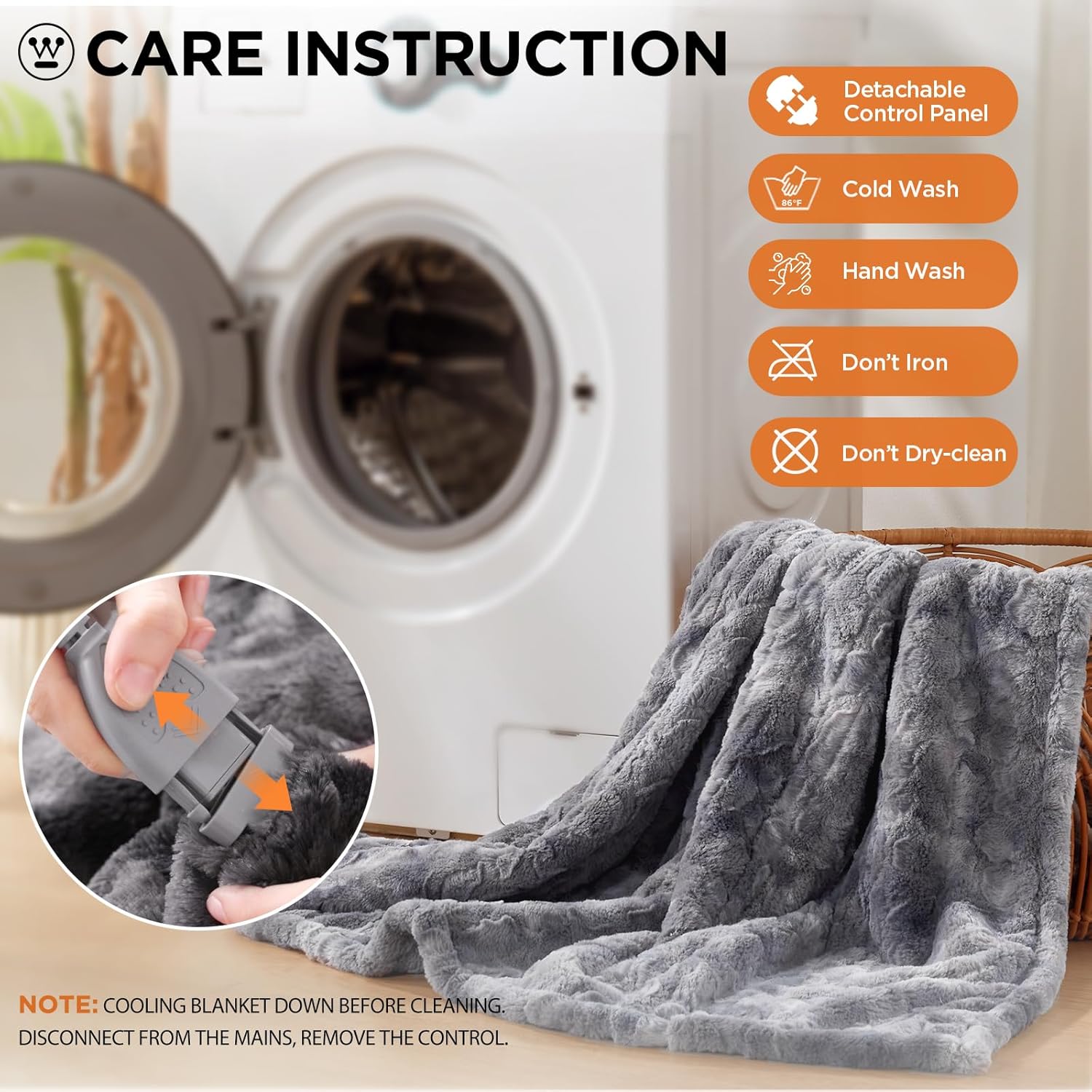
Image 7.1: Visual guide for blanket care.
8. Troubleshooting
If you encounter issues with your heated blanket, refer to the following common problems and solutions:
| Problem | Possible Cause | Solution |
|---|---|---|
| Blanket is not heating. | Not plugged in, controller not connected securely, power outage, blanket folded/bunched. | Ensure power cord is fully inserted into outlet. Check controller connection to blanket. Verify power to outlet. Lay blanket flat. |
| Controller display is off. | Blanket is off, power issue. | Press the Power button. Check power connection. |
| Uneven heating. | Blanket is folded or bunched. | Ensure the blanket is spread out flat and not folded or creased during use. |
| Blanket turns off unexpectedly. | Auto-off timer activated, safety feature triggered. | This is normal operation if the timer has expired. If it turns off prematurely, unplug, wait a few minutes, and plug back in. If problem persists, contact support. |
If troubleshooting steps do not resolve the issue, please contact Westinghouse customer support.
9. Specifications
| Feature | Detail |
|---|---|
| Model Name | PM-FVS |
| Brand | Westinghouse |
| Product Dimensions | 50"L x 60"W |
| Color | Grey |
| Material | Faux Fur to Wool-like (Sherpa) |
| Fabric Type | Faux Fur |
| Heating Levels | 6 (95°F - 118°F) |
| Auto-Off Timer | 2-10 Hours |
| Special Feature | Automatic, Premium |
| Product Care | Machine Washable |
| Item Weight | 4.16 pounds |
| Certifications | ETL, FCC |
| UPC | 737879466292 |
10. Warranty and Support
Westinghouse products are designed for quality and reliability. Your electric heated blanket comes with a warranty service. For specific warranty details, please refer to the documentation included with your purchase or visit the official Westinghouse website.
If you encounter any problems during use, require technical assistance, or have questions not covered in this manual, please contact Westinghouse customer support. Have your model number (PM-FVS) and purchase information ready when contacting support.
Contact Information: Please refer to the Westinghouse official website or your product packaging for the most current customer support contact details.