
Introduction
This manual provides comprehensive instructions for the installation, operation, and maintenance of your LANPAN LSI SAS9362-8I 12Gb/s 8-Port RAID Controller Card. This high-performance controller is designed to enhance data storage capabilities and reliability in server and workstation environments. Please read this manual thoroughly before installation and use to ensure proper functionality and safety.
Safety Information
Always observe the following safety precautions when handling computer components:
- Ensure your computer system is powered off and unplugged from the electrical outlet before installation.
- Discharge any static electricity from your body by touching a grounded metal object (e.g., the computer chassis) before handling the card.
- Handle the controller card by its edges to avoid touching sensitive components.
- Do not expose the card to moisture or extreme temperatures.
- If you are unsure about any installation step, consult a qualified technician.
Package Contents
Verify that all items are present in the package:
- LANPAN LSI SAS9362-8I RAID Controller Card (1 unit)
- Mini-SAS HD SFF-8643 to SATA cables (2 units)
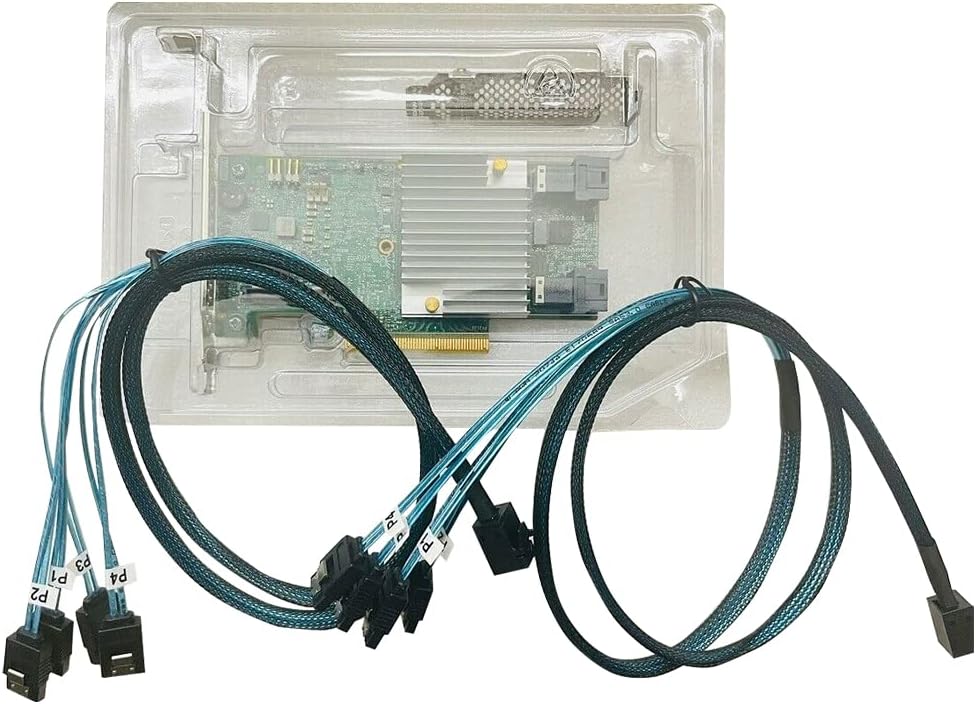
Image: The LANPAN LSI SAS9362-8I RAID Controller Card and its accompanying cables, neatly arranged within its clear plastic packaging.
Setup
1. System Requirements
- Available PCI Express 3.0 x8 or x16 slot.
- Compatible operating system (e.g., Windows, Linux, VMware).
- Sufficient power supply for the system and connected drives.
- SAS or SATA hard drives/SSDs for storage.
2. Hardware Installation
- Power Off: Shut down your computer and disconnect the power cord.
- Open Chassis: Open the computer case to access the motherboard.
- Locate PCIe Slot: Identify an available PCI Express 3.0 x8 or x16 slot.
- Install Card: Carefully insert the LANPAN LSI SAS9362-8I card into the chosen PCIe slot, ensuring it is fully seated. Secure the card with the chassis screw or latch.
- Connect Cables: Connect the Mini-SAS HD SFF-8643 cables from the controller card's internal connectors to your SAS/SATA drives. Each SFF-8643 connector supports up to four SAS/SATA drives.

Image: Front view of the LANPAN LSI SAS9362-8I RAID Controller Card, highlighting the heatsink and the two internal Mini-SAS HD SFF-8643 connectors.

Image: The LANPAN LSI SAS9362-8I RAID Controller Card with the two Mini-SAS HD SFF-8643 to SATA cables properly connected to its ports.
3. Driver Installation
After hardware installation, power on your computer. You may need to install the appropriate drivers for your operating system. Drivers are typically available on the manufacturer's website or the LSI/Broadcom support portal. Follow the on-screen instructions for driver installation.
Operating
RAID Configuration
The LANPAN LSI SAS9362-8I operates in IR (Integrated RAID) mode. RAID arrays are configured through the controller's BIOS utility, which can be accessed during system boot-up (typically by pressing a specific key like Ctrl+R or Ctrl+M when prompted). Refer to the LSI/Broadcom documentation for detailed instructions on creating and managing RAID volumes.
Common RAID levels supported by similar controllers include RAID 0, RAID 1, RAID 5, RAID 6, RAID 10, RAID 50, and RAID 60, offering various balances of performance and data redundancy.
Maintenance
- Keep Clean: Periodically clean the interior of your computer case to prevent dust buildup on the controller card and its heatsink, which can affect cooling performance.
- Firmware Updates: Check the manufacturer's website for available firmware updates. Firmware updates can improve performance, add features, or resolve known issues. Follow the provided instructions carefully when performing firmware updates.
- Environmental Conditions: Ensure the operating environment maintains appropriate temperature and humidity levels to prolong the life of the component.
Troubleshooting
If you encounter issues, consider the following troubleshooting steps:
- Card Not Detected:
- Ensure the card is fully seated in the PCIe slot.
- Try a different PCIe slot if available.
- Verify that the system BIOS is configured to detect PCIe devices.
- Drives Not Detected:
- Check all cable connections between the controller card and the drives.
- Ensure drives are properly powered.
- Verify that the drives are functional by testing them in another system or directly connected to the motherboard (if applicable).
- RAID Array Issues:
- Access the RAID BIOS utility during boot to check array status.
- Consult the LSI/Broadcom documentation for specific error codes or messages.
- Driver Problems:
- Reinstall the latest drivers from the manufacturer's website.
- Ensure operating system compatibility.
Specifications
| Feature | Detail |
|---|---|
| Model | LSI SAS9362-8I |
| Controller Chip | LSI SAS3108 |
| Firmware (FW) | IR Mode |
| Data Transfer Rate | 12Gbps |
| Host Interface | PCI Express 3.0 |
| Internal Connectors | Two Mini-SAS HD SFF-8643 |
| Brand | LANPAN |
| Hardware Interface | SAS |
| UPC | 705888652906 |

Image: Rear view of the LANPAN LSI SAS9362-8I RAID Controller Card, displaying the printed circuit board and electronic components.
Warranty
This product is covered by the standard manufacturer's warranty. Please refer to the warranty information provided at the time of purchase or contact LANPAN customer support for details regarding warranty terms and conditions.
Support
For technical assistance, driver downloads, or further information, please visit the official LANPAN website or contact their customer support. When contacting support, please have your product model (SAS9362-8I) and any relevant system information ready.