
1. Introduction
This user manual provides comprehensive instructions for the installation, care, and troubleshooting of the PDA Workshop Shock Absorbing Glossy Protection Film, specifically designed for the SUNFLAME Smartwatch BSM04. This high-quality film offers superior protection against impacts while maintaining screen clarity and touch sensitivity.

Image: The PDA Workshop Shock Absorbing Glossy Protection Film shown applied to a smartwatch, highlighting its clear and protective nature.
2. Key Features
- Shock Absorption & Unbreakable Design: Features a special shock-absorbing layer that effectively cushions impacts, minimizing damage to your smartwatch's LCD screen and internal components. Made from durable PET material, this film is designed not to shatter, ensuring safe usage without the risk of sharp fragments.
- High Transparency & Gloss: Engineered for exceptional clarity, the film provides a high-grade glossy finish that preserves the original vibrant colors and sharpness of your device's display. It is ideal for users who prioritize visual quality for video viewing and image editing.
- Fluorine Coating (Anti-Smudge & Smooth Touch): The surface is treated with a fluorine coating, which repels oils and dirt, making the screen resistant to smudges and easy to clean. This coating also ensures a smooth and comfortable touch experience.
- Antibacterial Processing: Incorporates antibacterial properties that inhibit the growth of bacteria on the film's surface, helping to maintain a hygienic screen. (Antibacterial rate 99.9% / Evaluated by JIS Z2801 antibacterial test method).
- Bubble-Free Self-Adhesion: The adhesive layer utilizes a special self-adhesion technology that minimizes air bubbles during application. Its flexible material allows for easy installation and multiple re-applications until perfect alignment is achieved, without damaging the film.
- Reliable Made in Japan Quality: Manufactured entirely in Japan using premium domestic materials and processed in PDA Workshop's own factory, ensuring superior quality and reliability.

Image: An infographic illustrating the multi-layered structure of the film, emphasizing its shock-absorbing capabilities and high gloss finish.

Image: A visual comparison demonstrating the film's high transparency and gloss, showing a screen with and without the protector applied.

Image: An illustration highlighting the fluorine coating's ability to repel dirt and the film's antibacterial processing for a cleaner screen.

Image: A diagram illustrating the film's self-adhesion properties that prevent bubbles, alongside a "Made in Japan" seal, signifying quality manufacturing.
3. Package Contents
Your package should contain the following items:
- 1 x PDA Workshop Shock Absorbing Glossy Protection Film for SUNFLAME Smartwatch BSM04
- 1 x Cleaning Wipe
4. Important Notes on Compatibility and Design
Please be aware of the following design consideration for the SUNFLAME Smartwatch BSM04:
- The SUNFLAME Smartwatch BSM04 features a rounded, curved edge design around its display. Due to this curvature, the protection film is designed to cover only the flat display area and will not extend to the very edges of the screen. This is to prevent the film from lifting or peeling due to the curved surface.
- If you require full edge-to-edge protection for your device, please consider purchasing the "Flexible Shield" series, which is designed for such curved displays.
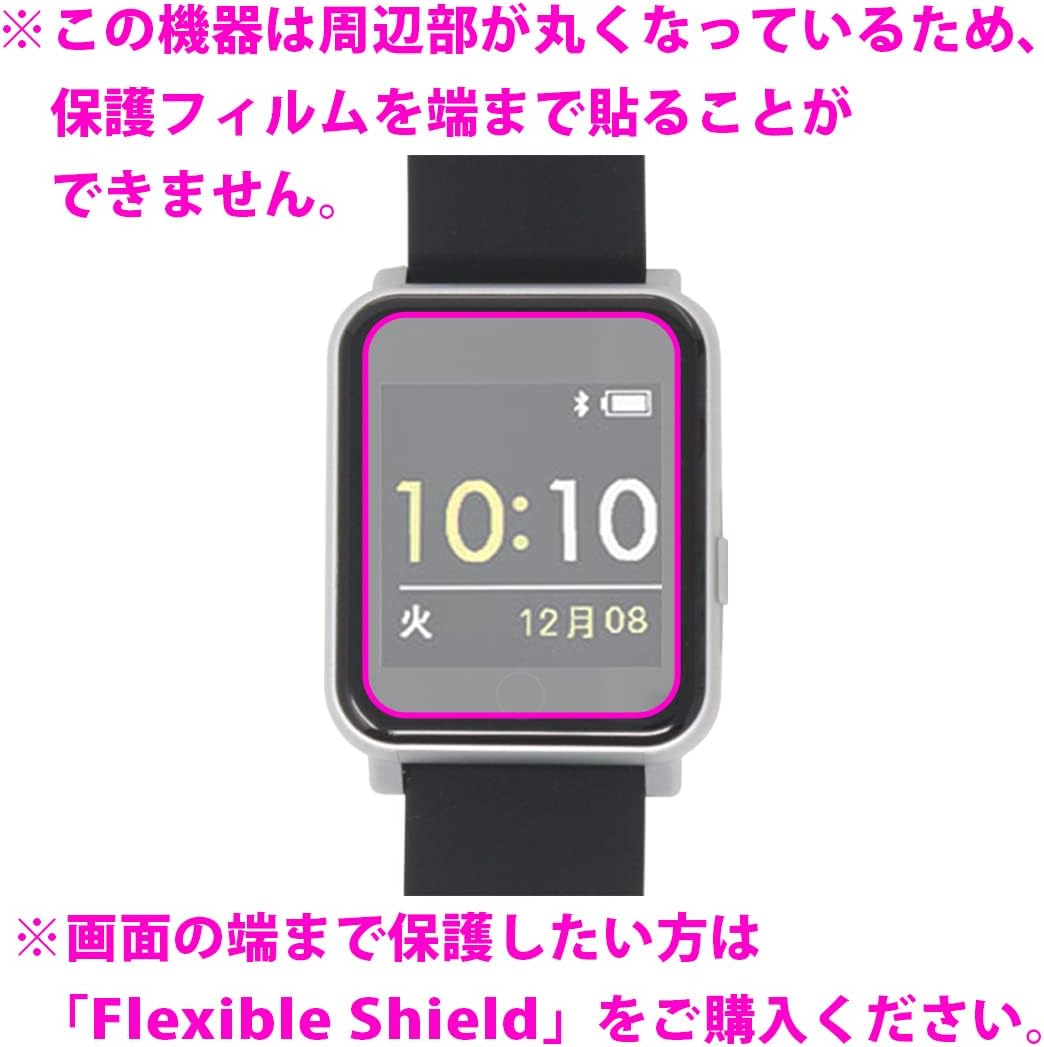
Image: A visual representation of the smartwatch screen, clearly indicating that the protection film covers the flat display area but not the curved edges.
5. Installation Guide
Follow these steps for optimal installation of your protection film:
- Preparation: Ensure your smartwatch screen is completely clean and free of dust, fingerprints, and smudges. Use the provided cleaning wipe to thoroughly clean the screen. For best results, perform installation in a dust-free environment.
- Alignment: Carefully peel off a small portion of the release liner from the adhesive side of the film. Align the film precisely with the display area of your smartwatch. Pay close attention to cutouts for sensors or buttons.
- Application: Slowly and steadily peel off the rest of the release liner while gently pressing the film onto the screen. Use a soft cloth or the provided cleaning wipe to smooth out the film from the center outwards, pushing any air bubbles towards the edges.
- Bubble Removal: Small bubbles may disappear naturally over time due to the film's self-adhesion properties. For larger bubbles, gently lift the nearest edge of the film and reapply, smoothing it down carefully.

Image: A visual guide demonstrating the initial alignment of the screen protector on the smartwatch display.

Image: A comprehensive instruction sheet detailing the application process, from cleaning the screen to smoothing out the film and removing dust or bubbles. This image also contains information about product features and warranty services.
6. Operation
Once installed, the PDA Workshop Shock Absorbing Glossy Protection Film operates passively. It provides continuous protection to your SUNFLAME Smartwatch BSM04 screen against scratches, impacts, and smudges, without affecting touch screen functionality or display clarity.
7. Care and Maintenance
To ensure the longevity and effectiveness of your protection film:
- Clean the film regularly with a soft, lint-free cloth. For stubborn smudges, slightly dampen the cloth with water or a screen-safe cleaner.
- Avoid using harsh chemicals, abrasive materials, or alcohol-based cleaners, as these may damage the film's coating.
- Do not attempt to peel off the film unnecessarily, as this may introduce dust or reduce adhesive effectiveness.
8. Troubleshooting
| Problem | Possible Cause | Solution |
|---|---|---|
| Bubbles under the film | Dust particles or uneven application. | Gently lift the nearest edge of the film and reapply, smoothing out from the center. Ensure the screen is dust-free before application. Small bubbles may disappear naturally within 24-48 hours. |
| Film not adhering properly | Dust, oil, or improper cleaning. | Ensure the screen is thoroughly cleaned before application. If the film has lost adhesion due to dust, it may be difficult to reapply perfectly. |
| Film edges lifting | Curved screen edges (as noted in Important Notes) or improper alignment. | This film is designed for the flat display area. If lifting occurs on the flat part, try pressing it down firmly. For curved edges, this is expected behavior for this specific film type. |
9. Product Specifications
| Attribute | Detail |
|---|---|
| Brand | PDA Workshop |
| Compatible Model | SUNFLAME Smartwatch BSM04 |
| Product Type | Shock Absorbing Glossy Protection Film |
| Material | Polyethylene terephthalate (PET) |
| Features | Impact Resistant, High Transparency, Fluorine Coating, Antibacterial, Bubble-Free Self-Adhesion |
| Manufacturing Origin | Japan |
| Model Number (Manufacturer Reference) | 120PDA60306131 |
| Package Dimensions | 18 x 10 x 0.2 cm |
| Weight | 2 g |
10. Warranty and Support
PDA Workshop is committed to providing high-quality products and customer satisfaction.
- Application Failure Exchange Service: This product is eligible for a one-time free exchange if the initial application fails. Please refer to the advice on application included with your product for details on how to utilize this service.
- Free Application Service: For customers who find application challenging, PDA Workshop may offer a free application service. Please check the product packaging or contact PDA Workshop directly for more information on eligibility and how to access this service.
- Contact Information: For further assistance, inquiries, or support, please visit the official PDA Workshop website or contact their customer service.