
1. Introduction
The Kamoer KCP-KK300-D is a compact and efficient 12V DC peristaltic pump designed for precise liquid dosing and transfer in various laboratory and industrial applications. It features an adjustable flow rate, a quick tube change mechanism, and a clear LED digital display for real-time speed percentage. This manual provides essential information for the safe and effective operation, setup, and maintenance of your KCP-KK300-D peristaltic pump.
2. Safety Information
- Always ensure the pump is disconnected from the power source before performing any maintenance, cleaning, or tube replacement.
- Use only the specified DC12V 1A power adapter. Using an incorrect power supply may damage the pump or create a safety hazard.
- Do not immerse the pump in water or other liquids. This pump is not waterproof.
- Ensure proper ventilation around the pump during operation to prevent overheating.
- Handle liquids carefully, especially corrosive or hazardous substances. Wear appropriate personal protective equipment.
- Keep the pump out of reach of children and unauthorized personnel.
- Inspect the silicone tubing regularly for wear, cracks, or damage. Replace tubing as needed to prevent leaks and ensure accurate flow.
3. Product Overview
The KCP-KK300-D peristaltic pump is characterized by its robust design and user-friendly interface. Key components include the pump head with a quick-change mechanism, a DC brush motor, an LED digital display, and control buttons/knobs.

Figure 3.1: Kamoer KCP-KK300-D Peristaltic Pump. This image shows the overall view of the pump unit, including the main housing, the pump head on the left, and the control panel with an LED display and adjustment knob on the top right.
Key Features:
- Adjustable Flow Rate: Easily control the liquid transfer speed from 50 to 155 ml/min.
- Quick Tube Change: The pump head is designed for fast and simple replacement of the silicone tubing.
- LED Digital Display: Provides real-time feedback on the pump's operating speed as a percentage.
- Low Noise and Smooth Pulsation: Equipped with a four-rotor design for stable and quiet operation.
- Compact and Maintenance-Free: Small footprint with a simple structure requiring minimal maintenance.
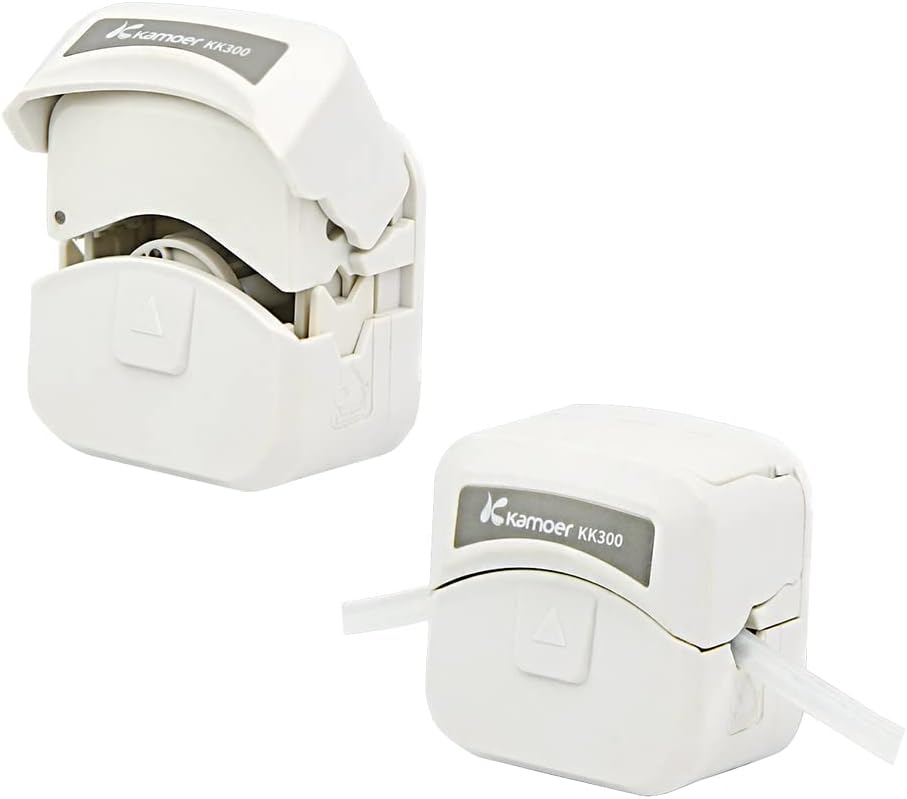
Figure 3.2: Kamoer KK300 Pump Head. This image illustrates the pump head with its cover open and closed, highlighting the quick tube change mechanism for easy access and replacement of the silicone tubing.
4. Specifications

Figure 4.1: Kamoer KCP-KK300-D Specifications and Dimensions. This image provides a visual summary of the pump's technical specifications and physical dimensions (length, width, height).
| Parameter | Value |
|---|---|
| Model | KCP-KK300-D |
| Pump Pipe Material | Silicone tube |
| Pump Pipe Dimensions | 3mm ID x 5mm OD |
| Voltage | DC 12V |
| Motor Type | DC Brush Motor |
| Power Consumption | <10W |
| Weight | ~0.95 kg (2.09 lbs) |
| Flow Rate Range | 50 ~ 155 ml/min |
| Speed Range | 30% - 100% |
| Working Mode | Percentage mode, manual start/stop, speed regulation |
| Special Features | LED digital tube, Quick tube change support |
| Dimensions (L x W x H) | 164mm x 150mm x 118mm (approximate) |
5. Setup
5.1 Unpacking
Carefully remove the pump and all accessories from the packaging. Inspect for any signs of damage during transit. Retain the packaging for future storage or transport.
5.2 Placement
Place the pump on a stable, level surface. Ensure there is adequate space around the pump for ventilation and easy access to the tubing and controls. Avoid placing the pump in direct sunlight or near heat sources.
5.3 Power Connection
- Ensure the pump's power switch (if present) is in the OFF position.
- Connect the DC12V 1A power adapter to the pump's power input port.
- Plug the power adapter into a suitable electrical outlet.
5.4 Tube Installation/Replacement
The KCP-KK300-D features a quick tube change design. Use silicone tubing with 3mm inner diameter (ID) and 5mm outer diameter (OD).
- Ensure the pump is powered off and disconnected from the power source.
- Locate the pump head cover. Gently open the cover to expose the rotor and tubing channel. (Refer to Figure 3.2).
- If replacing, carefully remove the old tubing from the channel.
- Insert the new silicone tubing into the pump head channel, ensuring it sits securely around the rollers. The tubing should be taut but not stretched excessively.
- Close the pump head cover firmly until it clicks into place. Ensure the tubing is properly seated and not pinched.
- Connect the inlet and outlet ends of the tubing to your liquid source and destination, respectively. Ensure all connections are secure to prevent leaks.
6. Operating Instructions
6.1 Powering On/Off
Once connected to power, turn on the pump using the designated power switch or button. The LED digital display will illuminate.
6.2 Adjusting Flow Rate (Speed)
- The pump operates in a percentage mode, where the LED display shows the current operating speed as a percentage (e.g., '000' for off, '050' for 50% speed).
- Use the control knob (typically located near the LED display) to adjust the pump speed. Turning the knob clockwise generally increases the speed, and counter-clockwise decreases it.
- The speed range is 30% to 100%. Adjust to your desired flow rate within the 50-155 ml/min range.
6.3 Start/Stop Operation
The pump typically has a dedicated start/stop button (often green). Press this button to initiate or halt the pumping action. The LED display will show the set speed percentage when running and '000' when stopped.
6.4 Direction Control (If applicable)
Some models may include a direction control feature. If available, use the designated switch or button to reverse the flow direction as needed. Refer to specific product labeling if this feature is present.
7. Maintenance
7.1 Tubing Replacement
Regularly inspect the silicone tubing for signs of wear, flattening, discoloration, or damage. Peristaltic pump tubing is a consumable item and should be replaced periodically to maintain accurate flow and prevent leaks. Follow the steps in Section 5.4 for quick tube replacement.
7.2 Cleaning
- Disconnect the pump from the power supply before cleaning.
- Wipe the exterior of the pump with a soft, damp cloth. Do not use abrasive cleaners or solvents.
- If the pump head requires cleaning, remove the tubing and gently wipe the internal surfaces. Ensure no liquid enters the motor housing.
- Allow all components to dry completely before reassembling or operating the pump.
7.3 General Care
Keep the pump free from dust and debris. Store the pump in a clean, dry environment when not in use. Avoid dropping or subjecting the pump to strong impacts.
8. Troubleshooting
| Problem | Possible Cause | Solution |
|---|---|---|
| Pump does not power on | No power supply; Faulty adapter; Power switch off | Check power connection; Verify adapter functionality; Ensure power switch is ON |
| No liquid flow | Tubing kinked or blocked; Pump head cover not closed; Tubing worn out; Incorrect speed setting | Inspect tubing for obstructions; Ensure pump head cover is latched; Replace tubing; Increase speed setting |
| Inconsistent flow rate | Worn tubing; Air bubbles in tubing; Inconsistent liquid supply | Replace tubing; Ensure proper priming and remove air; Verify stable liquid source |
| Unusual noise during operation | Worn motor; Damaged pump head; Tubing not properly seated | Contact support if motor/head damage suspected; Re-seat tubing correctly |
| LED display not working | Power issue; Internal fault | Check power; Contact support |
9. Warranty and Support
For warranty information and technical support, please contact Kamoer Fluid Tech (Shanghai) Co., Ltd. directly. Specific warranty terms may vary by region and purchase date.
Contact Information:
- Email: daijing@kamoer.com

Figure 9.1: Kamoer Contact Information. This image displays the Kamoer logo and an email address for support inquiries.