
1. Introduction
This manual provides essential information for the safe and effective use of your Metabo HPT 18V MultiVolt Cordless Brushless Driver Drill & Impact Driver Combo Kit, model KC18DEXQB. This kit includes an 18V Brushless Driver Drill (DS18DEX) and an 18V Power Impact Driver (WH18DEX), along with two 2.0Ah 18V Lithium-Ion batteries, a quick charger, a Phillips bit, and a carrying bag. Please read this manual thoroughly before operating the tools and retain it for future reference.
2. General Safety Information
Always observe basic safety precautions to reduce the risk of fire, electric shock, and personal injury. Failure to follow all instructions may result in serious injury.
Work Area Safety
- Keep the work area clean and well-lit. Cluttered or dark areas invite accidents.
- Do not operate power tools in explosive atmospheres, such as in the presence of flammable liquids, gases, or dust. Power tools create sparks which may ignite the dust or fumes.
- Keep children and bystanders away while operating a power tool. Distractions can cause you to lose control.
Electrical Safety
- Power tool plugs must match the outlet. Never modify the plug in any way.
- Avoid body contact with earthed or grounded surfaces, such as pipes, radiators, ranges, and refrigerators. There is an increased risk of electric shock if your body is earthed or grounded.
- Do not expose power tools to rain or wet conditions. Water entering a power tool will increase the risk of electric shock.
Personal Safety
- Always wear eye protection. Use safety glasses, goggles, or a face shield.
- Wear hearing protection when operating power tools for extended periods.
- Dress properly. Do not wear loose clothing or jewelry. Keep your hair and clothing away from moving parts.
- Stay alert, watch what you are doing, and use common sense when operating a power tool.
3. Package Contents
Your Metabo HPT KC18DEXQB Combo Kit includes the following items:
- 1x 18V Brushless Driver Drill (DS18DEX)
- 1x 18V Power Impact Driver (WH18DEX)
- 2x 2.0Ah 18V Lithium-Ion Batteries with charge indicators
- 1x Quick Charger
- 1x #2 Phillips Bit
- 1x Carrying Bag
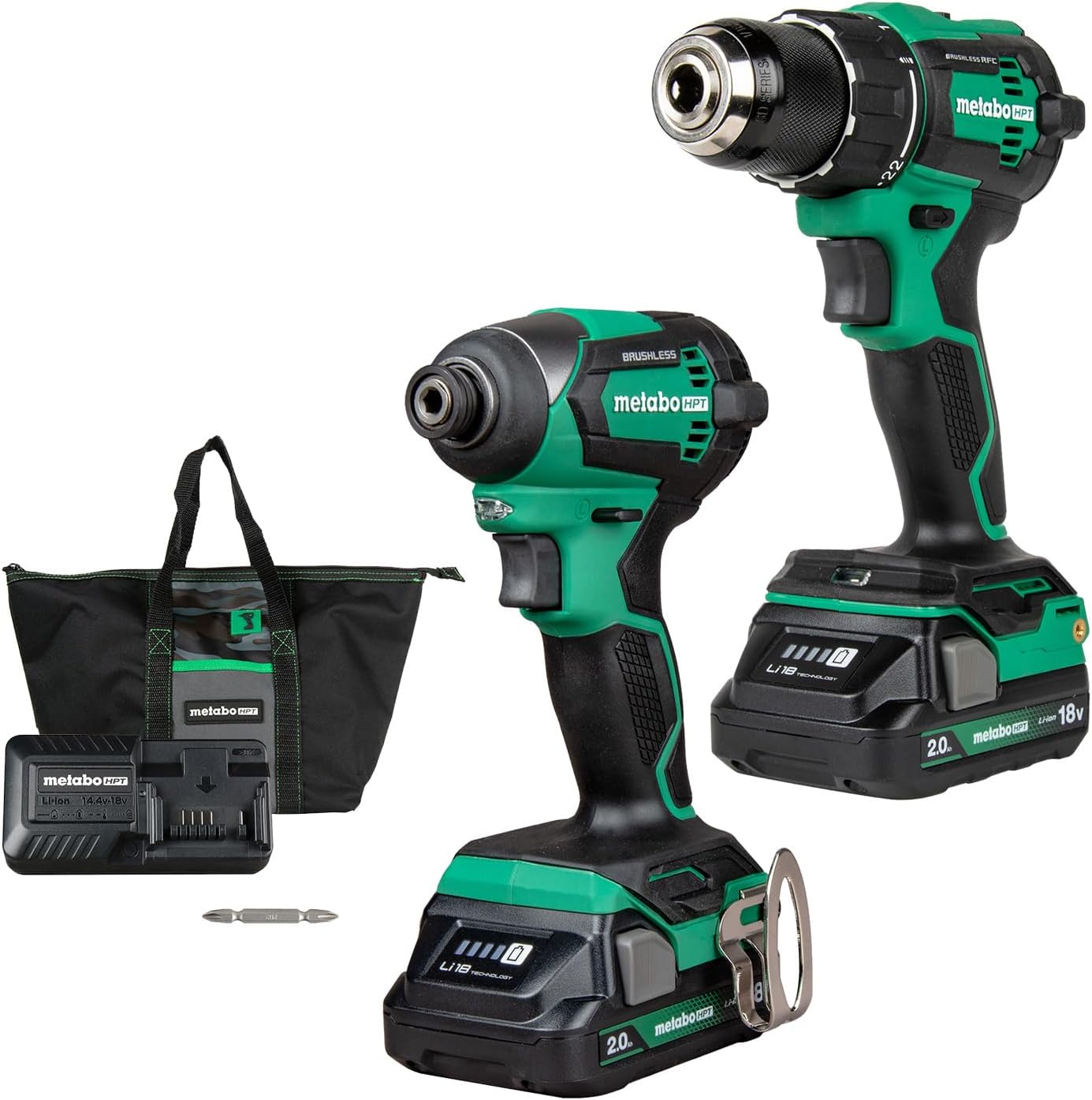
Image: The complete Metabo HPT KC18DEXQB combo kit, showing both tools, two batteries, a charger, a bit, and a carrying bag.

Image: A visual breakdown of the kit contents, including the driver drill, impact driver, two batteries, charger, Phillips bit, and carrying bag.
4. Setup and Assembly
4.1 Battery Charging
Before first use, fully charge both 18V Lithium-Ion batteries. The quick charger is designed to efficiently charge your batteries.
- Connect the charger to a standard power outlet.
- Slide the battery pack onto the charger until it clicks into place.
- The charger's indicator light will show the charging status. Refer to the charger's specific manual for detailed light indications.
- Once fully charged, remove the battery from the charger.

Image: An 18V Metabo HPT battery connected to its charger, illustrating the charging process.
4.2 Battery Installation
To install a charged battery into either tool:
- Align the battery pack with the receptacle on the bottom of the tool handle.
- Slide the battery into the tool until it locks securely into place. Ensure it is fully seated to prevent accidental dislodgement during operation.
- To remove, press the battery release button(s) and slide the battery out.
4.3 Bit Installation (Driver Drill)
The 18V Brushless Driver Drill features a keyless metal chuck for easy bit changes.
- Rotate the chuck counter-clockwise to open the jaws.
- Insert the desired drill bit or driver bit into the chuck, ensuring it is centered.
- Rotate the chuck clockwise to tighten the jaws firmly around the bit. Hand-tighten until the bit is secure.

Image: Close-up of the Metabo HPT Driver Drill, pointing out its keyless metal chuck and other features.
4.4 Bit Installation (Impact Driver)
The 18V Power Impact Driver utilizes a 1/4" quick-change chuck for rapid bit changes.
- Pull the quick-change collar forward.
- Insert the 1/4" hex shank bit into the chuck.
- Release the collar to lock the bit into place. Tug on the bit to ensure it is securely fastened.

Image: Close-up of the Metabo HPT Impact Driver, highlighting its 1/4" quick-change chuck and other features.
5. Operating Instructions
5.1 Driver Drill Operation
The 18V Brushless Driver Drill (DS18DEX) is designed for drilling and driving applications.
- Variable Speed Trigger: The trigger controls the speed of the drill. Pressing it further increases the speed.
- Forward/Reverse Switch: Located above the trigger, this switch changes the rotation direction for driving or removing fasteners. Position it in the center for a trigger lock.
- Built-in LED Light: Illuminates the work area when the trigger is pressed.
- Reactive Force Control (RFC): This safety feature senses tool overload and stops rotation to prevent kickback, enhancing user safety.

Image: The Metabo HPT Driver Drill in action, demonstrating its use for drilling.

Image: An illustration of the Reactive Force Control (RFC) feature, which stops rotation to prevent tool overload.
5.2 Impact Driver Operation
The 18V Power Impact Driver (WH18DEX) provides high torque for driving screws and fasteners.
- Variable Speed Trigger: Controls the driving speed and impact force.
- Forward/Reverse Switch: Changes the rotation direction for driving or removing fasteners.
- Built-in LED Light: Provides illumination for dark work areas.

Image: The Metabo HPT Impact Driver being used to fasten a screw into a metal structure.

Image: The built-in LED light on the Metabo HPT Impact Driver providing visibility in a dark workspace.
6. Maintenance
Regular maintenance ensures optimal performance and extends the lifespan of your tools.
- Cleaning: After each use, wipe down the tools with a clean, damp cloth. Do not use harsh chemicals or abrasive cleaners. Keep ventilation openings clear of dust and debris.
- Storage: Store tools and batteries in a cool, dry place, away from direct sunlight and extreme temperatures. Use the provided carrying bag for protection.
- Battery Care: Do not store batteries in a discharged state. Charge them periodically if not used for extended periods. Avoid exposing batteries to water or extreme heat.
- Inspection: Periodically inspect the tools for any signs of damage, loose screws, or worn parts. Do not operate damaged tools.
7. Troubleshooting
This section addresses common issues you might encounter with your Metabo HPT tools.
| Problem | Possible Cause | Solution |
|---|---|---|
| Tool does not start | Battery not charged or improperly installed. | Ensure battery is fully charged and correctly inserted. |
| Reduced power or runtime | Battery charge is low or battery is old. | Recharge battery. Consider replacing old batteries. |
| Bit slips in Driver Drill chuck | Chuck not tightened sufficiently or bit shank is damaged. | Tighten chuck firmly. Inspect bit shank for wear; replace if necessary. |
| Impact Driver not impacting | Not under load or internal mechanism issue. | Impact mechanism engages under load. If problem persists, contact support. |
| Tool overheats | Prolonged heavy use or blocked ventilation. | Allow tool to cool down. Clear any debris from ventilation slots. |
8. Technical Specifications
Key specifications for the Metabo HPT KC18DEXQB Combo Kit:
| Feature | Specification |
|---|---|
| Model Number | KC18DEXQB |
| Item Torque | 1549 Inch Pounds (Impact Driver) |
| Amperage | 2 Amps (Batteries) |
| Voltage | 18 Volts |
| Power Source | Battery Powered |
| Battery Type | Lithium Ion |
| Number of Batteries | 2 (included) |
| Item Weight | 10.5 pounds (total kit) |
| Product Dimensions | 6.18 x 3.35 x 8.5 inches |
| Manufacturer | Koki Holdings America, Ltd |
| UPC | 717709029262 |
9. Warranty and Support
9.1 Warranty Information
The Metabo HPT KC18DEXQB Combo Kit is backed by the following warranty:
- Lifetime Tool Body Warranty
- 2-Year Battery Warranty
- 1-Year Charger Warranty
Please retain your proof of purchase for warranty claims. For full warranty terms and conditions, refer to the official Metabo HPT website or contact customer support.

Image: A graphic summarizing the warranty coverage for Metabo HPT tools, batteries, and chargers.
9.2 Customer Support
For technical assistance, service, or questions regarding your Metabo HPT product, please visit the official Metabo HPT website or contact their customer service department. Contact information can typically be found on the product packaging or the official brand website.