
ZHMDJDSH ADH-CFL02
ZHMDJDSH 30" Geometric Ceiling Fan with Light
Model: ADH-CFL02
1. Introduction
Thank you for choosing the ZHMDJDSH 30" Geometric Ceiling Fan with Light. This modern and fashionable ceiling fan is designed to provide efficient air circulation and versatile lighting for various indoor environments. Featuring a silent pure copper reversible motor, 6 adjustable wind speeds, 3 color temperatures, and smart control options, it offers a comfortable and quiet living experience.

Figure 1.1: ZHMDJDSH 30" Geometric Ceiling Fan with Light
This manual provides detailed instructions for the safe installation, operation, and maintenance of your new ceiling fan. Please read it thoroughly before installation and keep it for future reference.
2. Product Features
- Geometric Design: Modern and fashionable 30-inch design with integrated lighting.
- Quiet Operation: Built-in silent pure copper motor ensures stable and strong power with minimal noise, ideal for bedrooms and nurseries.
- 6 Wind Speeds: Adjustable fan speeds (1-2 low, 3-4 middle, 5-6 high) for customized airflow.
- Reversible Motor: Forward and reverse functions to circulate air effectively throughout the year (cooling in summer, better air circulation in winter).
- 3-Color Modes & Dimmable Light: Integrated LED light with 3 color temperatures (cool white/natural white/warm white 3000K-6000K) and adjustable brightness (10%-100%). Includes a comfortable night light mode.
- Light Memory Function: The light will remember the last used setting if kept on for more than 10 seconds.
- Timing Function: Smart timer function (1-2 hours) for automatic fan shut-off.
- Control Options: Can be controlled via the included remote control or a Smart APP.

Figure 2.1: Quiet Operation and Key Features

Figure 2.2: Six Adjustable Wind Speeds
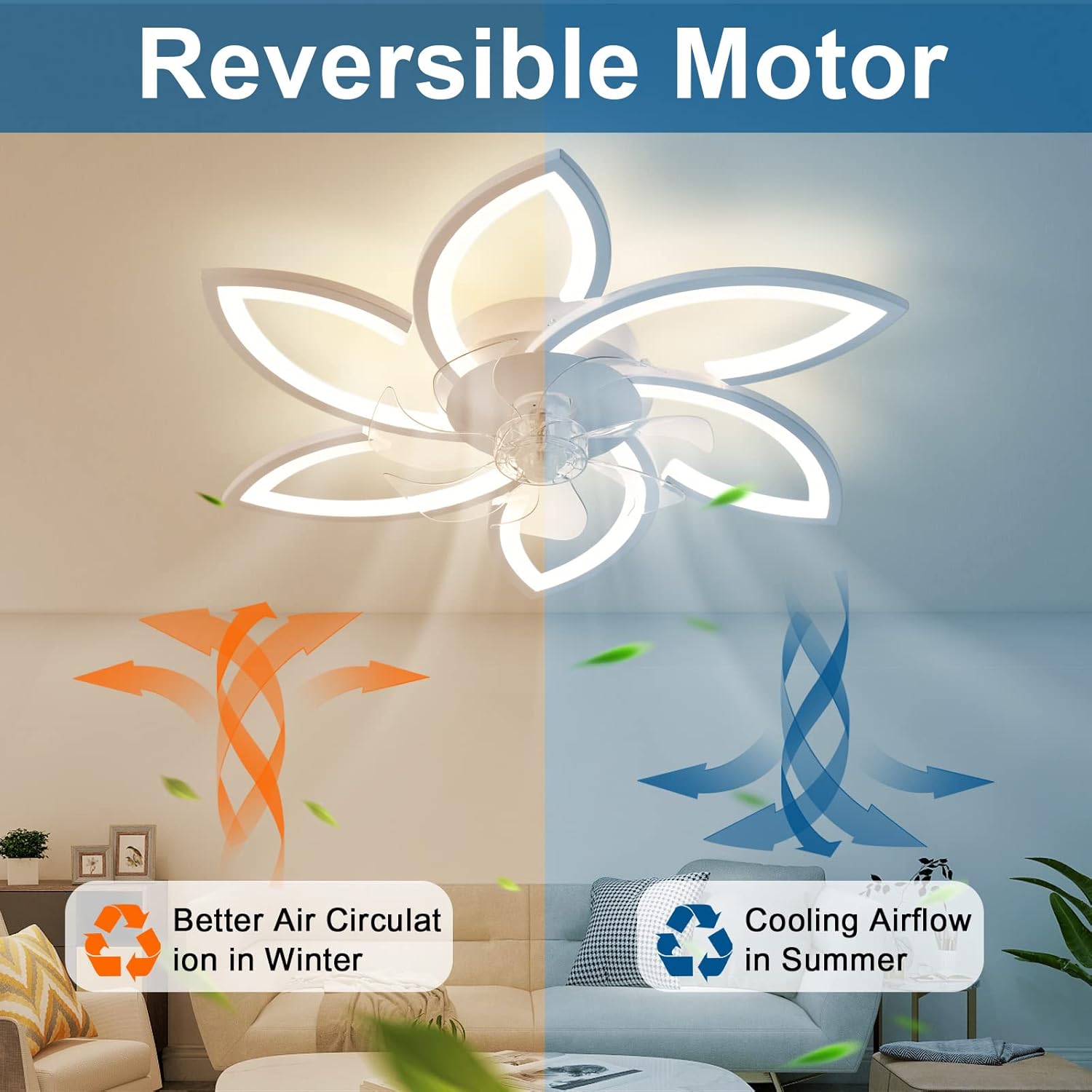
Figure 2.3: Reversible Motor Functionality

Figure 2.4: Adjustable Brightness and Color Temperature
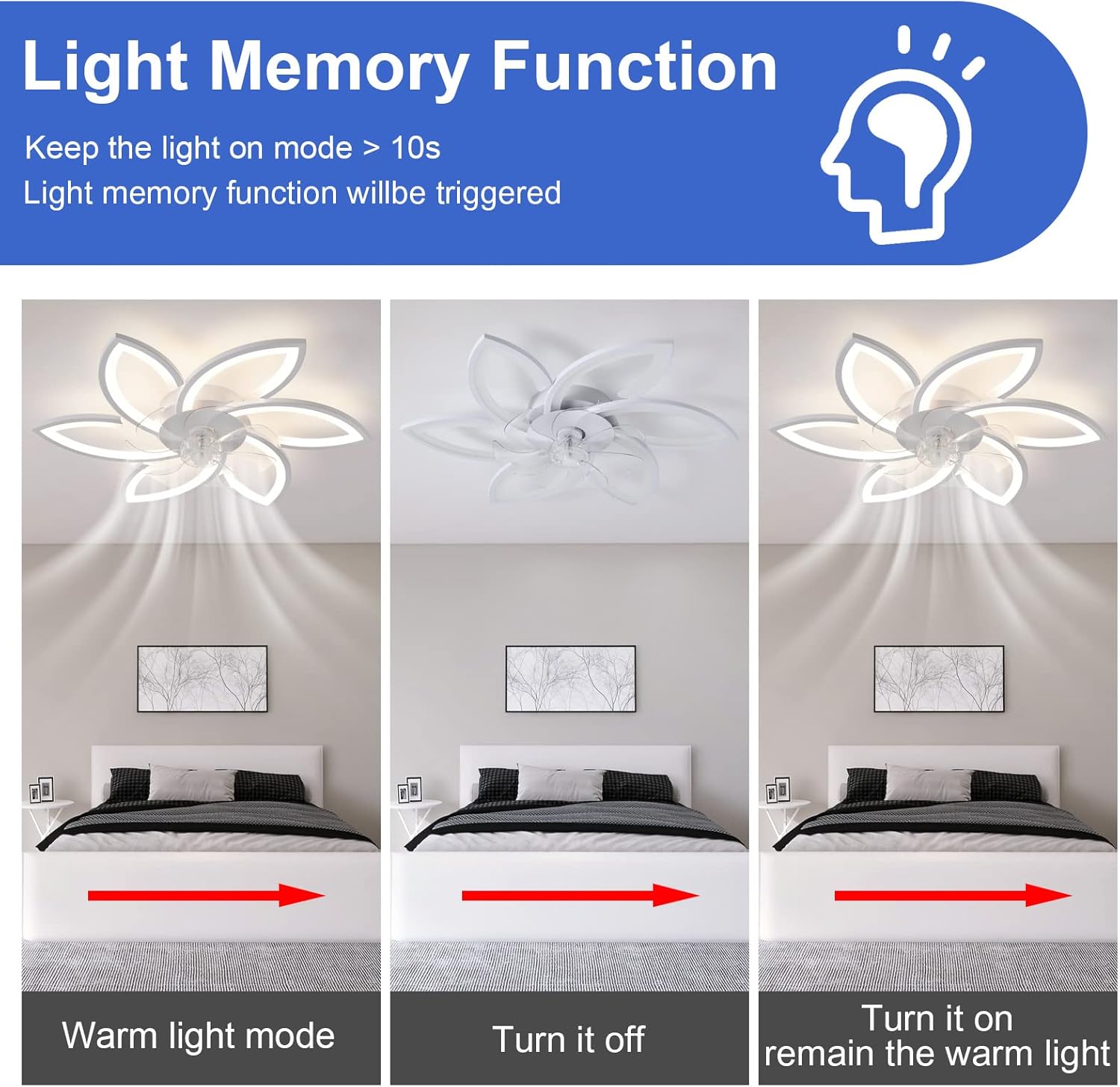
Figure 2.5: Light Memory Function
3. Specifications
| Specification | Value |
|---|---|
| Brand | ZHMDJDSH |
| Model Name | ADH-CFL02 |
| Color | White |
| Electric Fan Design | Ceiling Fan |
| Power Source | AC |
| Style | Minimalist |
| Product Dimensions | 30"D x 5.5"W x 30"H |
| Room Type | Living Room, Bedroom, Kitchen, Dining Room, Nursery |
| Wattage | 80 watts |
| Finish Type | Painted |
| Number of Blades | 7 |
| Blade Length | 30 Inches |
| Speed | 6 RPM (levels) |
| Voltage | 110 Volts (AC) |
| Switch Type | Push Button (on remote) |
| Item Weight | 3.3 pounds (1.5 Kilograms) |
| Included Components | Remote (with 2 AAA batteries) |
| Indoor/Outdoor Usage | Indoor |
| Installation Type | Flush mount |
| Manufacture Year | 2023 |

Figure 3.1: Product Dimensions and Remote Control Layout
4. Safety Instructions
Please read and understand all safety instructions before attempting to assemble, install, operate, or maintain this product. Failure to do so could result in electric shock, fire, or personal injury.
- Always turn off the power at the main circuit breaker before installation or maintenance.
- Ensure all electrical connections comply with local codes and ordinances, and are properly grounded.
- Consult a qualified electrician if you are unsure about wiring or installation.
- Mount the fan only to an outlet box marked "Acceptable for Fan Support of 35 lbs (15.9 kg) or less" and use the mounting screws provided with the outlet box.
- Do not bend the fan blades or attempt to stop the fan by hand during operation.
- Keep children away from the fan during operation and maintenance.
- Do not use the fan with a dimmer switch not specifically designed for ceiling fans.
5. Installation Guide
The package includes all necessary installation accessories and a manual. For visual assistance, it is recommended to refer to the installation video provided by the manufacturer (if available) or general ceiling fan installation tutorials.
5.1 Package Contents
Before beginning installation, verify that all parts are present:
- Ceiling Fan Unit (with integrated light)
- Remote Control (with 2 x 1.5V AAA alkaline batteries)
- Mounting Bracket
- Hardware Pack (screws, wire nuts, etc.)
- Instruction Manual
5.2 Installation Steps
- Turn Off Power: Locate the circuit breaker that supplies power to the ceiling fan location and turn it off.
- Prepare Mounting: Secure the mounting bracket to the ceiling electrical box. Ensure the electrical box is securely fastened to the building structure and can support the fan's weight.
- Wiring: Connect the fan's electrical wires to the household wiring according to the wiring diagram in the included manual. Ensure all connections are secure with wire nuts.
- Attach Fan Unit: Carefully lift the fan unit and attach it to the mounting bracket. Secure it with the provided screws.
- Install Fan Blades: Attach the fan blades to the motor housing. Note that the clear decorative nut for the fan blade is left-hand thread; tighten counter-clockwise.
- Final Assembly: Ensure all components are securely fastened.
- Restore Power: Turn the power back on at the circuit breaker.
- Remote Synchronization: Within 5 seconds of restoring power, press the sync button on the remote control. The fan light will flash to indicate successful pairing.
6. Operating Instructions
Your ZHMDJDSH ceiling fan can be operated using the included remote control or a compatible Smart APP.
6.1 Remote Control Functions
The remote control allows full command over the fan and light features:
- Lights On/Off: Toggle the light on or off.
- Color Temperature Conversion: Cycle through cool white, natural white, and warm white light (3000K-6000K).
- Brightness Adjustment: Increase or decrease light brightness (10%-100%).
- 6-Speed Wind Speed Switch: Select desired fan speed from 1 to 6.
- Switch Rotation Direction (F/R): Change fan direction for summer (downward airflow) or winter (upward airflow).
- Timing Function (1H/2H): Set the fan to automatically turn off after 1 or 2 hours.
- Night Light Mode: Activates a comfortable, low-brightness light setting.
- Natural Wind Mode: Simulates natural breeze by varying fan speed.
- ALL OFF: Turns off both fan and light.
6.2 Smart APP Control
Refer to the specific instructions in your product manual for downloading and connecting the Smart APP to your ceiling fan. The APP typically offers similar control functionalities as the remote, along with potential additional features.
7. Maintenance
Regular maintenance ensures the longevity and optimal performance of your ceiling fan.
- Cleaning: To avoid damage to the finish, clean the fan with a soft, damp cloth. Do not use abrasive cleaners or solvents. Ensure power is off before cleaning.
- Tighten Fasteners: Periodically check all screws and fasteners on the fan and mounting hardware to ensure they are secure.
- Light Source: The integrated LED light source is designed for long life and typically does not require replacement. If issues arise, contact customer support.
8. Troubleshooting
If you encounter issues with your ceiling fan, refer to the following common problems and solutions:
| Problem | Possible Cause | Solution |
|---|---|---|
| Fan does not start | No power to the fan; Loose wire connections; Remote control not paired or batteries dead. | Check circuit breaker; Verify all wire connections are secure; Replace remote batteries and re-pair the remote. |
| Light does not work | Loose wire connection; Light setting is off; Remote control issue. | Check light wiring; Ensure light is turned on via remote/app; Check remote batteries. |
| Fan is noisy | Loose mounting screws; Fan blades unbalanced; Obstruction. | Tighten all mounting screws; Ensure blades are securely attached; Check for any objects interfering with the fan's rotation. |
| Light flickers or fan stops when light is on | Electrical interference; Incompatible dimmer switch (if applicable); Internal component issue. | Ensure fan is connected to a dedicated circuit if possible; Do not use with non-compatible dimmer switches; If problem persists, contact customer support. |
| Remote control not responding or Bluetooth not working | Batteries dead; Remote not paired; Signal interference; App connectivity issue. | Replace remote batteries; Re-pair remote control (see Installation Steps); Reduce interference from other devices; For app issues, ensure Bluetooth is enabled and try re-pairing. |
9. Warranty and Support
ZHMDJDSH is committed to providing high-quality products and worry-free after-sales service.
If you have any questions about this lighting & ceiling fan or require after-sales support, please contact us via Amazon email. We aim to resolve your inquiries within 24 hours.
Please retain your proof of purchase for any warranty claims.
Ask a question about this manual
Ask about setup, troubleshooting, compatibility, parts, safety, or missing instructions. Manuals+ will review the question and use this page’s manual context to help answer it.