
1. Introduction
This manual provides essential instructions for the installation and handling of your EEEONE Optical Laser Pickup. This component is designed to replace the original optical laser pickup in compatible CD players, ensuring optimal disc reading performance.
Compatible models include CAYIN CD-50T, CAYIN CDT-15A, CAYIN CDT-23, and Venus CD-100i.
2. Safety Information and Precautions
Important Safety Notice: Optical laser pickups contain sensitive components, particularly laser diodes, which can be damaged by static electricity. Always observe the following precautions to prevent damage to the unit and ensure safe installation.
- Laser diodes are highly susceptible to static electricity. Most laser units are equipped with antistatic protection, which must be removed before installation.
- When handling the laser unit or its peripheral components, always take appropriate antistatic protection measures. This includes using an antistatic wrist strap and working on an antistatic mat.
- Avoid touching the laser diode and any peripheral actuators directly. Oils and contaminants from skin can impair performance or cause damage.
- Do not test the laser unit with a laser diode tester or a standard electric meter. Such devices can easily destroy the sensitive laser diode.
- An antistatic soldering tool is highly recommended for safely removing the protection point on the laser unit prior to installation.
Failure to follow these safety guidelines can result in irreversible damage to the optical laser pickup, voiding any potential warranty.
3. Product Overview
The EEEONE Optical Laser Pickup is a precision component responsible for reading data from compact discs. It consists of a laser diode, optical lens system, and tracking mechanisms.

Image 1: Side view of the EEEONE Optical Laser Pickup. This image displays the intricate assembly of the optical block, including the laser diode, lens, and the flexible circuit board connecting to the main connector. The connector pins are visible at the top.
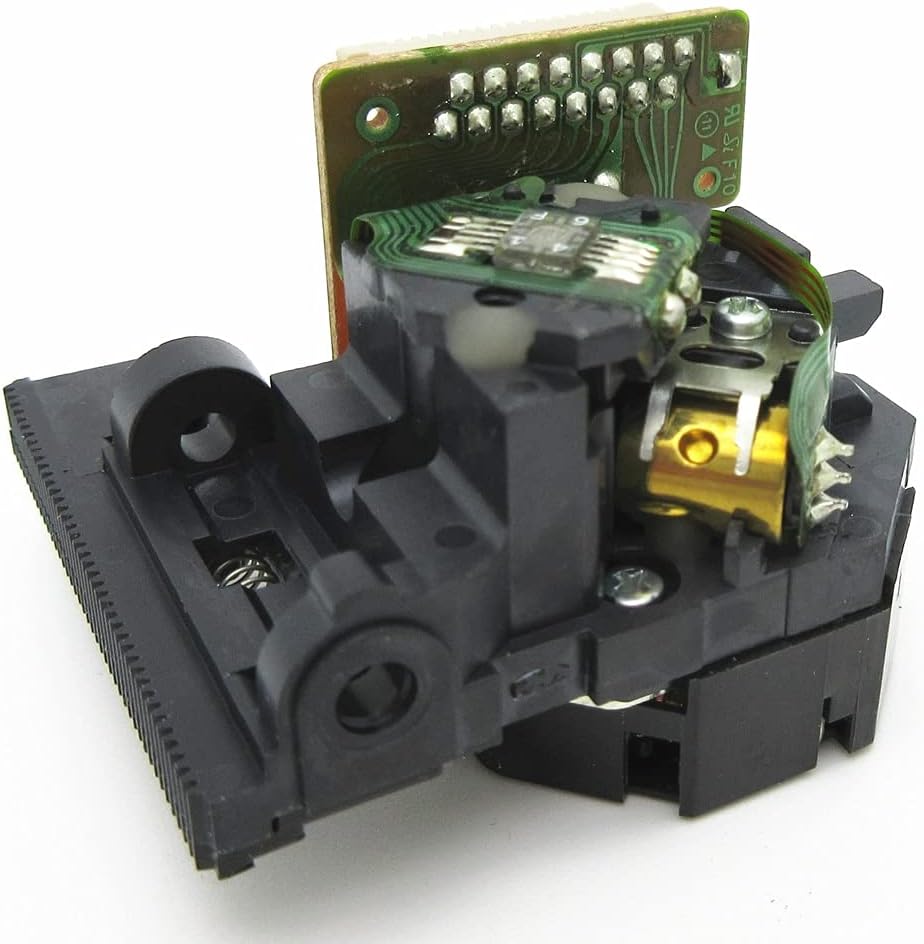
Image 2: Angled view of the EEEONE Optical Laser Pickup. This perspective shows the optical lens assembly and the mechanical components responsible for precise laser movement and disc tracking.
4. Installation Guide
Follow these steps carefully to install your new optical laser pickup. Always prioritize safety and static electricity precautions.
- Preparation: Ensure the CD player is powered off and disconnected from the mains electricity. Gather necessary tools, including an antistatic wrist strap, antistatic mat, small screwdrivers, and an antistatic soldering iron (if required for protection point removal).
- Accessing the Old Unit: Carefully open the CD player casing to gain access to the existing optical laser pickup. Refer to your CD player's service manual for specific disassembly instructions.
- Static Protection Removal: Before installing the new EEEONE Optical Laser Pickup, locate and carefully remove the antistatic protection point (often a solder bridge or shorting wire) using an antistatic soldering iron. This step is critical and must be performed correctly.
- Removing the Old Pickup: Disconnect any ribbon cables or wires attached to the old pickup. Unscrew and carefully remove the old optical laser pickup from its mounting rails or chassis.
- Installing the New Pickup: Gently place the new EEEONE Optical Laser Pickup onto the mounting rails. Secure it with screws, ensuring it is properly aligned. Reconnect all ribbon cables and wires, making sure they are seated correctly and not pinched.
- Reassembly: Carefully reassemble the CD player casing, ensuring all screws are tightened and no cables are trapped.
- Initial Test: Connect the CD player to power and insert a known good audio CD. Observe if the disc spins, the laser focuses, and audio playback begins normally.
5. Operating Instructions
The EEEONE Optical Laser Pickup operates automatically as part of your CD player's disc reading system. Once installed correctly, it will function whenever a disc is inserted and playback is initiated. No direct user interaction with the pickup itself is required during operation.
6. Maintenance
The optical laser pickup is a delicate component and generally requires minimal maintenance.
- Keep Clean: Avoid exposing the CD player's internal components to dust and debris. If cleaning is necessary, use a soft, lint-free cloth and compressed air for general dust removal.
- Lens Cleaning (Advanced Users Only): If disc reading issues persist and are suspected to be due to a dirty lens, a specialized CD lens cleaning kit may be used. However, direct manual cleaning of the lens is not recommended unless performed by an experienced technician, as improper cleaning can cause damage.
- Avoid Touching: Never touch the optical lens or any moving parts of the pickup with bare hands.
7. Troubleshooting
If you experience issues after installing the EEEONE Optical Laser Pickup, consider the following troubleshooting steps:
- Disc Not Reading / No Disc Error:
- Ensure the antistatic protection point was correctly removed from the new pickup. This is a common cause of non-functionality.
- Verify all ribbon cables and connectors are securely attached to the pickup and the main board.
- Try a different, known good audio CD to rule out disc issues.
- Check if the disc is inserted correctly (label side up).
- Skipping / Intermittent Playback:
- Ensure the pickup is securely mounted and not loose.
- Check for any obstructions in the disc tray or on the pickup's path.
- The optical lens might be dirty (refer to Maintenance section).
- No Laser Emission:
- This often indicates a faulty laser diode or incorrect installation. Re-check all connections and ensure the antistatic protection was removed. If the issue persists, the unit may be defective or damaged.
If problems persist after attempting these steps, it is recommended to consult a qualified electronics technician.
8. Specifications
| Feature | Detail |
|---|---|
| Product Type | Optical Laser Pickup |
| Compatibility | CAYIN CD-50T, CDT-15A, CDT-23; Venus CD-100i |
| Brand | EEEONE |
| Item Weight | 200 Grams |
| ASIN | B0BVLTC8KC |
| Manufacturer | Gomost |
9. Warranty and Support
For warranty information and technical support regarding your EEEONE Optical Laser Pickup, please refer to the documentation provided by your retailer or contact the seller directly. Keep your purchase receipt as proof of purchase.
This product is a replacement component, and its warranty may be subject to the terms and conditions of the original seller.


