
DC-200
WEILIANG Audio DC-200 DAC Decoder User Manual
Model: DC-200
1. Introduction
The WEILIANG Audio DC-200 is a sophisticated Digital-to-Analog Converter (DAC) designed for high-fidelity audio reproduction. This device integrates advanced audio processing technologies, including the ES9028PRO or ES9038PRO decoding chip, to deliver exceptional sound clarity and detail. With its versatile input options, including Amanero USB, Coaxial, Optical, and Bluetooth 5.0 with APTX-HD support, the DC-200 serves as a central component in any high-end audio system. This manual provides comprehensive instructions for the proper setup, operation, maintenance, and troubleshooting of your DC-200 DAC.
2. Safety Information
Please read and understand all safety instructions before operating the device. Retain this manual for future reference.
- Power Supply: Use only the specified power supply voltage. Ensure the power cord is securely connected and not damaged.
- Ventilation: Do not block ventilation openings. Ensure adequate airflow around the unit to prevent overheating.
- Moisture: Do not expose the unit to rain, moisture, or excessive humidity. Keep liquids away from the device.
- Placement: Place the unit on a stable, level surface. Avoid placing it near heat sources or in direct sunlight.
- Servicing: Do not attempt to service this product yourself. Refer all servicing to qualified service personnel.
- Cleaning: Disconnect power before cleaning. Use a soft, dry cloth. Do not use liquid or aerosol cleaners.
3. Product Overview
The WEILIANG Audio DC-200 DAC is housed in a durable aluminum case, designed for optimal performance and longevity. Key internal components include a high-precision ES9028PRO or ES9038PRO decoding chip, dual Talema transformers for stable power delivery, and a CSR8675 Bluetooth 5.0 module supporting APTX-HD for high-quality wireless audio. The audio output stage utilizes two OPA828 and two MUSES 02 operational amplifiers for superior sound reproduction. Digital inputs are managed by an AK4118 coaxial and optical fiber receiving chip, and a high-performance Amanero USB interface supports resolutions up to 384kHz/32bit and DSD512. The unit also features a mute relay control circuit and a clear display for easy operation.
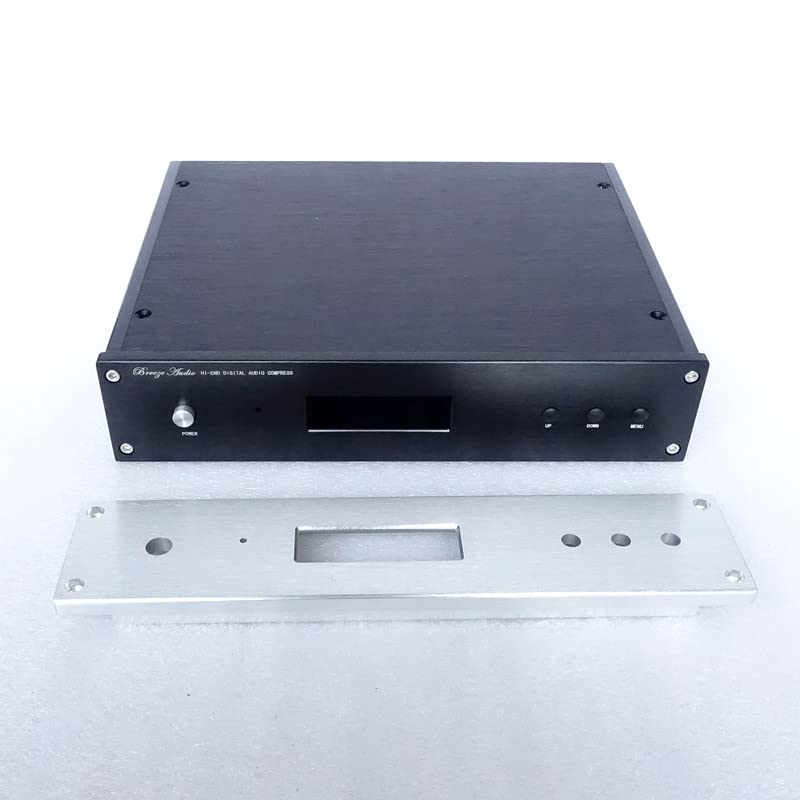
Figure 3.1: Front View (with detached panel). This image displays the main chassis of the DC-200 DAC alongside its detachable silver front panel, which houses the power button, display, and navigation controls.
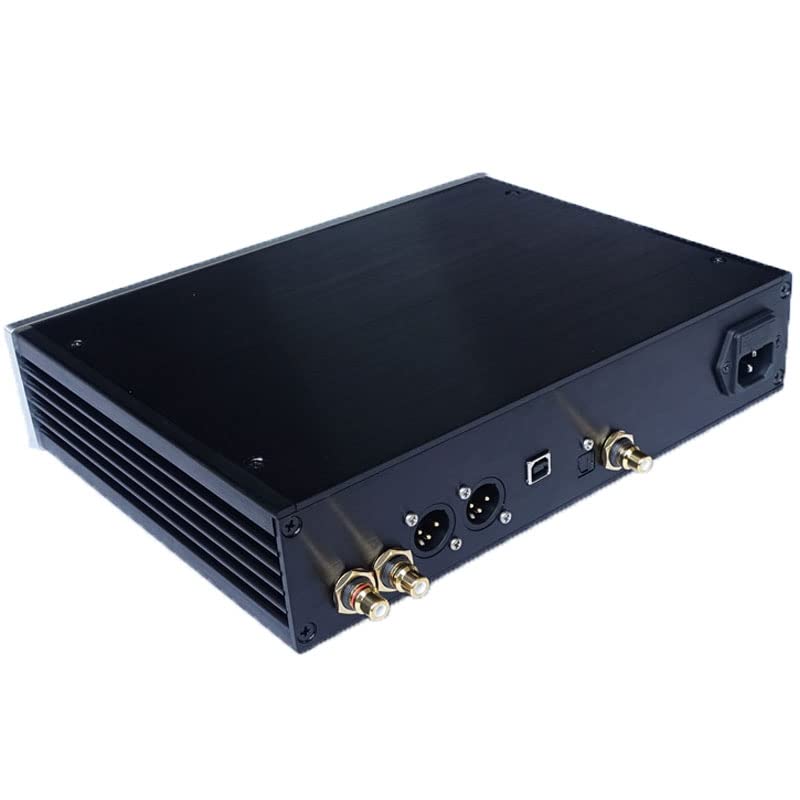
Figure 3.2: Rear Panel Connections. This image highlights the rear panel of the DC-200, featuring the power inlet, USB input, balanced XLR outputs, and unbalanced RCA outputs, along with other digital input ports.
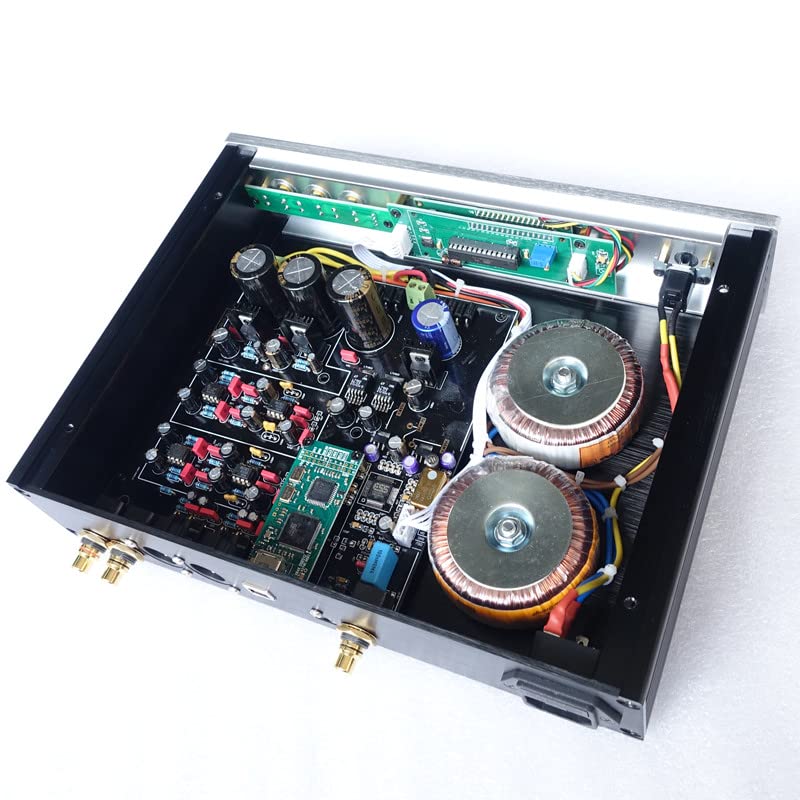
Figure 3.3: Internal Components. An inside view of the DC-200 DAC, showcasing the meticulously arranged circuit board, the prominent dual toroidal transformers, and other high-quality electronic components that contribute to its audio performance.
4. Setup
4.1 Unpacking
Carefully remove the DC-200 DAC from its packaging. Inspect the unit for any signs of damage during transit. Keep all packaging materials for future transport or servicing.
4.2 Connections
Ensure the DC-200 and all connected audio components are powered off before making any connections.
- Power Connection: Connect the provided power cord to the AC inlet on the rear panel of the DC-200 and then to a suitable wall outlet.
- Audio Output Connection:
- RCA (Unbalanced): Connect RCA cables from the "RCA OUT" ports on the DC-200 to the analog input ports of your amplifier or preamplifier.
- XLR (Balanced): For optimal performance and noise rejection, connect XLR cables from the "XLR OUT" ports on the DC-200 to the balanced analog input ports of your amplifier or preamplifier.
- Audio Input Connection: Choose one of the following input methods:
- USB Input: Connect a USB cable from your computer or digital audio player to the "USB" port on the DC-200. Drivers may be required for your operating system (refer to manufacturer's website for Amanero USB drivers).
- Coaxial Input: Connect a coaxial digital audio cable from your source device (e.g., CD player, streamer) to the "COAXIAL" port on the DC-200.
- Optical Input: Connect an optical digital audio cable (Toslink) from your source device to the "OPTICAL" port on the DC-200.
- Bluetooth Input: For wireless audio, ensure the DC-200 is powered on. On your mobile device or computer, search for Bluetooth devices and select "WEILIANG DC-200" (or similar name) to pair.
5. Operating Instructions
5.1 Powering On/Off
Press the "POWER" button on the front panel to turn the unit on or off. The display will illuminate when the unit is powered on.
5.2 Input Selection
Use the "MENU" or input selection buttons on the front panel or remote control to cycle through the available input sources (USB, Coaxial, Optical, Bluetooth). The selected input will be indicated on the display.
5.3 Digital Filter Modes
The DC-200 offers several digital filter modes to tailor the sound to your preference and the audio content. Use the navigation buttons (UP/DOWN or specific filter buttons) to select the desired filter mode. Each mode has distinct characteristics:
- FAST-M-off (FIR Fast Roll Minimum Phase Fast Roll-off): Characterized by higher reverberation, a prominent intermediate frequency, and a thick, warm sound. This mode is generally suitable for vocal-centric music and slower songs.
- SLOW-M (FIR Slow Roll-off, Minimum Phase Filter): Offers medium reverberation, a partial intermediate frequency emphasis, and a large sound field. This mode is often preferred for symphonic music and other genres benefiting from a wide soundstage.
- FAST-L (FIR Fast Roll-off, Linear Phase Filter): Provides low-order reverberation with a neutral and natural tonal balance. It is designed for fast-paced music, delivering a strong and dynamic presentation.
- BRICKW (FIR Brickwall Filter): A linear phase transfer filter with higher-order reverberation, resulting in a warm and neutral timbre.
- APODIZ (FIR Apodizing, Fast Roll-off, Linear Phase Filter): Features fast cutting intermediary reverberation and a strong musical texture. This mode is well-suited for fast-paced songs, enhancing their rhythmic drive.
5.4 Bluetooth Operation
Once paired, select the Bluetooth input on the DC-200. Your paired device will automatically connect if within range. Ensure your source device's volume is adjusted appropriately before playing audio.
6. Maintenance
6.1 Cleaning
Before cleaning, disconnect the power cord from the wall outlet. Use a soft, dry, lint-free cloth to wipe the exterior surfaces of the unit. Do not use abrasive cleaners, waxes, or solvents as they may damage the finish.
6.2 Storage
If storing the unit for an extended period, disconnect it from power and store it in a cool, dry place, away from direct sunlight and extreme temperatures. It is recommended to use the original packaging for protection.
7. Troubleshooting
If you encounter issues with your DC-200 DAC, please refer to the following common troubleshooting steps:
| Problem | Possible Cause | Solution |
|---|---|---|
| No power | Power cord not connected; Power outlet not active; Unit fuse blown. | Ensure power cord is securely plugged into the unit and wall outlet. Test the outlet with another device. If still no power, contact service personnel. |
| No sound output | Incorrect input selected; Cables not connected properly; Amplifier/preamplifier issues; Source device not playing. | Verify the correct input is selected on the DC-200. Check all audio cable connections. Ensure your amplifier/preamplifier is on and set to the correct input. Confirm the source device is playing audio. |
| Distorted or poor sound quality | Poor quality audio cables; Incorrect filter mode selected; Source audio quality is low; Ground loop interference. | Use high-quality audio cables. Experiment with different digital filter modes (refer to Section 5.3). Ensure your source audio files are of good quality. Try isolating the unit from other electronics or using a ground loop isolator if hum is present. |
| Bluetooth connection issues | Device not in pairing mode; Out of range; Interference. | Ensure the DC-200 is set to Bluetooth input. Move your Bluetooth device closer to the DAC. Turn off other Bluetooth devices nearby. Try unpairing and re-pairing the device. |
8. Specifications
| Feature | Detail |
|---|---|
| Model Number | DC-200 |
| Decoding Chip | ES9028PRO or ES9038PRO |
| USB Interface | Amanero (supports up to 384kHz/32bit and DSD512) |
| Bluetooth Module | CSR8675 Bluetooth 5.0 (supports APTX-HD) |
| Operational Amplifiers | 2 pcs OPA828 + 2 pcs MUSES 02 |
| Coaxial/Optical Chip | AK4118 |
| Power Supply | Double Talema transformer |
| Chassis Material | Aluminum case |
| Product Dimensions (L x W x H) | 11.02 x 8.35 x 2.44 inches (28 x 21.2 x 6.2 cm) |
| Weight | 7.28 Pounds (3.3 kg) |
| Number of Channels | 6 (as per product specifications, likely referring to internal processing channels or output capabilities) |
| Manufacturer | BRZHIFI |
| Date First Available | February 11, 2023 |
9. Warranty and Support
For warranty information and technical support, please refer to the documentation provided with your purchase or contact the seller/manufacturer directly. Keep your proof of purchase for any warranty claims.
Related documentsDC-200


Ask a question about this manual
Ask about setup, troubleshooting, compatibility, parts, safety, or missing instructions. Manuals+ will review the question and use this page’s manual context to help answer it.