
1. Product Overview
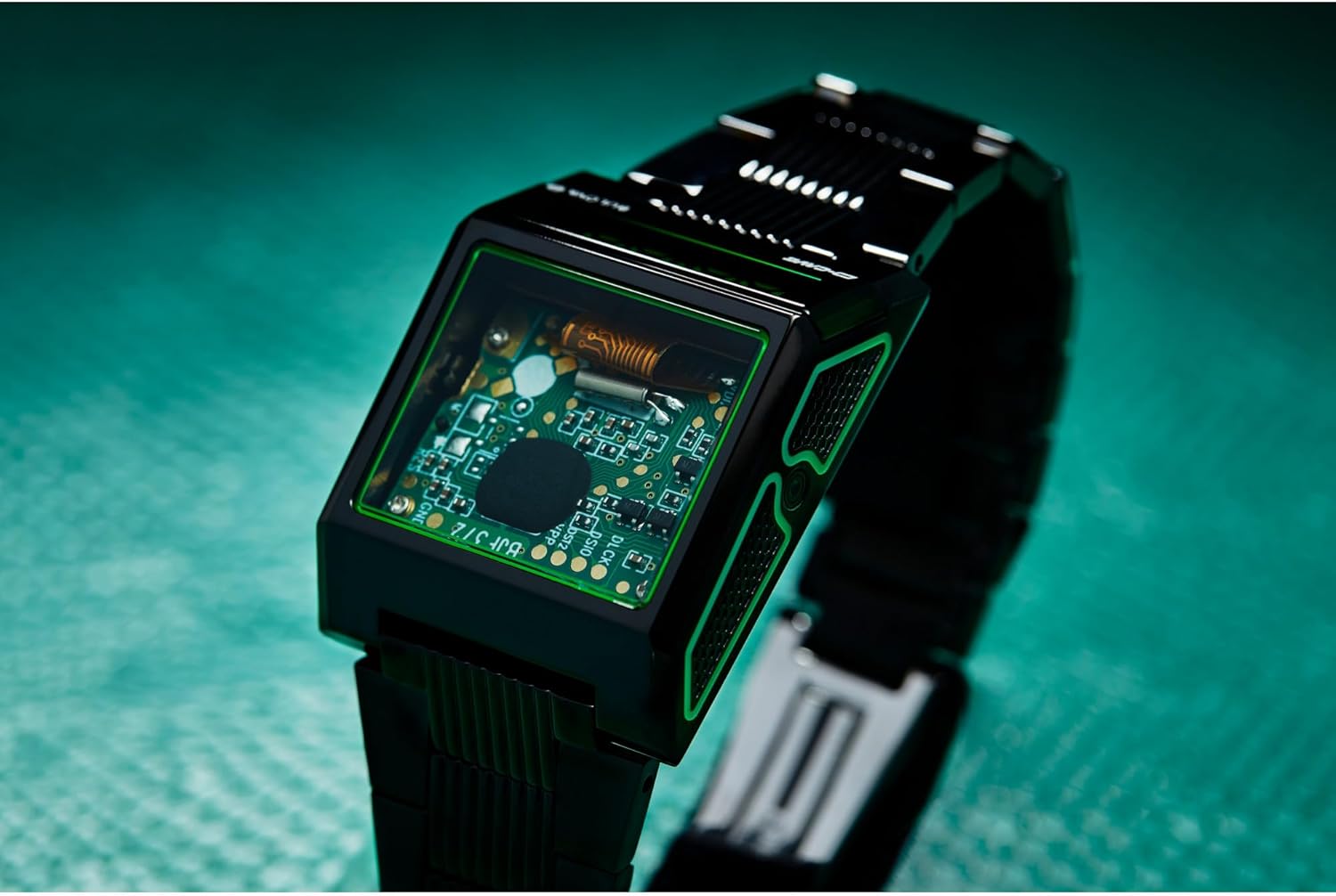
The Bulova Computron D-Cave Special Edition Watch is a unique timepiece designed in collaboration with D-Cave, blending classic Computron aesthetics with modern gaming-inspired elements. This watch features a distinctive green LED time display and dual time zone capabilities, housed within a sleek black IP stainless steel case.

The design incorporates an exhibition circuit board and an acid-etched sidewall detail, drawing inspiration from computer towers. A transparent mineral crystal allows visibility of the watch's inner workings. It is presented with a black silicone strap and a 3-piece buckle.
2. Components
- Case: Black IP stainless steel.
- Display: Green LED digital time display.
- Crystal: Transparent mineral crystal.
- Strap: Black silicone strap with 3-piece buckle.
- Buttons: Control buttons for time setting and mode selection (location and function detailed in Operating Instructions).
- Case Back: Stainless steel case back with model information.


3. Setup
Upon first use, the watch may require initial time and date setting. The Bulova Computron D-Cave watch typically features a single button on the side for navigating modes and adjusting settings.
3.1. Setting Time and Date
- Activate Display: Press the side button once to activate the LED display.
- Enter Setting Mode: Press and hold the side button for approximately 3-5 seconds until the time display begins to flash.
- Adjust Hours: While the hours are flashing, press the side button repeatedly to advance the hour. Hold the button to advance rapidly.
- Adjust Minutes: Press the side button briefly to move to the minutes setting. While minutes are flashing, press repeatedly to adjust.
- Set Date/Month/Year: Continue pressing the button briefly to cycle through date, month, and year settings. Adjust each value as needed by pressing repeatedly.
- Exit Setting Mode: After setting all desired parameters, stop pressing the button. The display will stop flashing after a few seconds, indicating that settings are saved.
3.2. Dual Time Zone Setup
This model supports dual time zone capabilities. Refer to the specific instructions provided with your watch for detailed steps on setting and switching between time zones, as the exact sequence may vary.

4. Operating Instructions
The Bulova Computron D-Cave watch is designed for straightforward operation using its side button.
4.1. Displaying Time and Date
- View Time: Press the side button once to illuminate the green LED display, showing the current time. The display will typically remain active for a few seconds before turning off to conserve power.
- Cycle Through Information: Subsequent short presses of the side button may cycle through different display modes, such as date (month/day), year, and potentially the second time zone if activated.
4.2. Using Dual Time Zone
If the dual time zone feature is enabled, a short press of the side button after viewing the primary time may switch the display to the second time zone. Consult the specific instructions for your model to understand how to activate and manage the dual time zone display.
5. Maintenance and Care
Proper care will ensure the longevity and performance of your Bulova Computron D-Cave watch.
5.1. Water Resistance
The watch is water resistant to 30 meters (3 ATM). This rating means the watch is suitable for everyday use and can withstand splashes or brief immersion in water. It is not suitable for swimming, showering, or diving. Avoid pressing buttons while the watch is wet.
5.2. Cleaning
- Wipe the case and crystal with a soft, dry, lint-free cloth.
- For the silicone strap, use a mild soap solution and a soft brush, then rinse thoroughly with clean water and dry completely.
- Avoid using harsh chemicals, solvents, or abrasive cleaners.
5.3. Storage
When not in use, store the watch in a cool, dry place, away from direct sunlight and extreme temperatures. The special box provided with the watch is ideal for storage.
6. Troubleshooting
If you encounter issues with your watch, consider the following common solutions:
- Display Not Illuminating:
- Ensure the side button is pressed firmly.
- The battery may be low or depleted. Contact an authorized service center for battery replacement.
- Incorrect Time Display:
- Re-enter the setting mode and adjust the time and date as described in Section 3.1.
- Buttons Not Responding:
- Ensure the watch is dry.
- If the issue persists, there may be an internal malfunction. Do not attempt to open the watch yourself.
For issues not resolved by these steps, please contact Bulova customer support or an authorized service center.
7. Specifications
| Model Number | 98C140 |
| Brand | Bulova |
| Case Material | Black IP Stainless Steel |
| Strap Material | Black Silicone |
| Crystal Type | Transparent Mineral Crystal |
| Display Type | Green LED Digital |
| Water Resistance | 30 Meters (3 ATM) |
| Package Dimensions | 5.31 x 3.74 x 3.35 inches |
| Item Weight | 11.82 ounces |
8. Warranty and Support
Your Bulova Computron D-Cave Special Edition Watch is covered by a 3-Year Limited Warranty. This warranty covers manufacturing defects under normal use. Please retain your proof of purchase for warranty claims.
For warranty service, technical support, or inquiries about authorized service centers, please visit the official Bulova website or contact their customer service department. Do not attempt to repair the watch yourself, as this may void the warranty.
For more information, visit the Bulova Store on Amazon.