
JBL JBLBAR700PROBLKAM
JBL Bar 700 User Manual
5.1-Channel Soundbar with Detachable Surround Speakers and Dolby Atmos®
Model: JBLBAR700PROBLKAM
Introduction
The JBL Bar 700 is a high-performance 5.1-channel soundbar system designed to elevate your home entertainment experience. Featuring detachable battery-powered surround speakers and Dolby Atmos® technology, it delivers immersive 3D audio. With 620W of total output power and a powerful 10-inch wireless subwoofer, this system provides thrilling bass and clear dialogue through PureVoice technology. It also supports various streaming options including AirPlay, Alexa MRM, and Chromecast built-in™.
Key features include:
- Dolby Atmos Surround Sound: Immerse yourself in theater-quality 3D sound with detachable surround speakers.
- Real Surround Sound: Enjoy true surround sound without extra wires, thanks to battery-powered detachable rear speakers.
- Built-In Wi-Fi: Access over 300 online music streaming services via AirPlay, Alexa MRM, and Chromecast built-in™. Automatic software updates ensure the latest features.
- 620W Output Power: Transforms movies, music, and games into immersive sound experiences.
- 10" Wireless Subwoofer: Delivers thrilling, precise bass for action movies and music.
What's in the Box
Your JBL Bar 700 package includes the following components:
- JBL Bar 700 Soundbar
- Two (2) Detachable Wireless Surround Speakers
- One (1) Wireless Subwoofer
- One (1) Remote Control
- Power cables (region specific)
- HDMI cable
- Wall-mount bracket kit with screws
- Quick start guide
- Safety sheet
- Warranty card

Image: All components of the JBL Bar 700 system, including the soundbar, detachable speakers, subwoofer, and remote.
Setup
1. Placement
For optimal sound performance, place the soundbar centrally below your TV. The wireless subwoofer can be placed anywhere in the room, ideally near a power outlet. The detachable surround speakers should be placed behind your listening position for the best surround sound experience. Ensure clear line of sight between the soundbar and subwoofer for stable wireless connection.
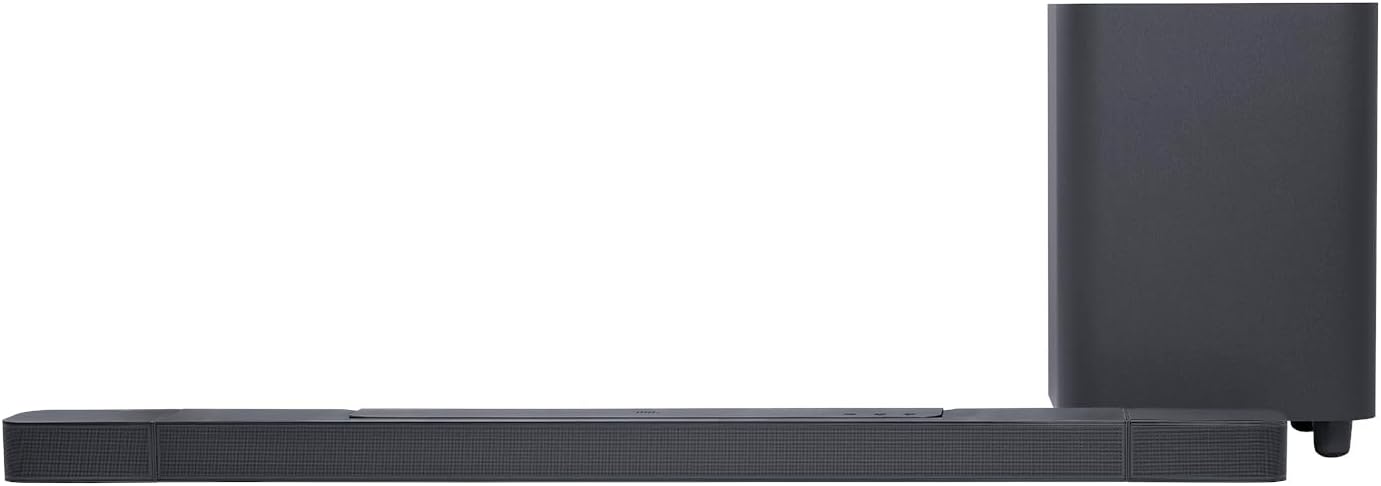
Image: Recommended placement of the soundbar and subwoofer in a typical living room environment.

Image: Detachable surround speakers positioned behind the listening area for immersive audio.
2. Connections
Connect the soundbar to your TV using the provided HDMI cable. For the best audio quality, use the HDMI ARC/eARC port on your TV. This allows audio from your TV to be sent back to the soundbar. You can also connect other devices (e.g., Blu-ray player, game console) to the soundbar's HDMI input ports.
- HDMI ARC/eARC: Connect the HDMI OUT (TV ARC/eARC) port on the soundbar to the HDMI ARC/eARC port on your TV.
- Optical: For TVs without HDMI ARC, use an optical cable to connect the soundbar's OPTICAL port to your TV's optical output.
- Power: Connect the power cables to the soundbar, subwoofer, and then to a power outlet.

Image: Rear panel of the soundbar displaying connectivity options.
3. Initial Power On & Pairing
Once all connections are made, power on the soundbar. The subwoofer and detachable surround speakers should automatically pair with the soundbar. If pairing does not occur automatically, refer to the troubleshooting section for manual pairing instructions.
Ensure the detachable speakers are fully charged by attaching them to the main soundbar or by connecting them via USB-C cables (not included) for continuous power.
Operating
1. Basic Controls
The soundbar can be controlled using the included remote control or the buttons on the top panel of the soundbar. The display on the front of the soundbar provides visual feedback on the current input, volume level, and other settings.

Image: Front display of the soundbar indicating the active input source.
- Power Button: Turns the soundbar on or off.
- Source Button: Cycles through input sources (HDMI, Optical, Bluetooth, Wi-Fi).
- Volume Buttons (+/-): Adjusts the master volume.
- Mute Button: Mutes or unmutes the sound.
- Bass Button: Adjusts subwoofer level.
- Rear Speaker Level: Adjusts the volume of the detachable surround speakers (Low, Medium, High).
2. Audio Calibration (PureVoice)
The JBL Bar 700 features PureVoice technology to enhance dialogue clarity. For optimal performance, perform the audio calibration as instructed in the quick start guide. This process adjusts the sound output to your room's acoustics and speaker placement.
3. Wireless Streaming
The soundbar supports various wireless streaming options:
- Bluetooth: Pair your mobile device via Bluetooth to stream audio wirelessly.
- Wi-Fi (AirPlay, Alexa MRM, Chromecast built-in™): Connect the soundbar to your home Wi-Fi network to access a wide range of online music streaming services and smart home integrations. Use the JBL One app for setup and control.

Image: Demonstrates music streaming capabilities via various wireless technologies.
Maintenance
To ensure the longevity and optimal performance of your JBL Bar 700 system, follow these maintenance guidelines:
- Cleaning: Use a soft, dry cloth to clean the surfaces of the soundbar, subwoofer, and speakers. Avoid using liquid cleaners or abrasive materials.
- Ventilation: Ensure that the ventilation openings on the soundbar and subwoofer are not blocked. Do not place the units on soft surfaces that may impede airflow.
- Battery Care (Detachable Speakers): Regularly charge the detachable speakers. If not used for extended periods, charge them at least once every three months to maintain battery health.
- Storage: If storing the system for a long time, disconnect it from power and store it in a cool, dry place.
Troubleshooting
If you encounter issues with your JBL Bar 700, refer to the following common problems and solutions:
| Problem | Possible Cause / Solution |
|---|---|
| No Sound from Soundbar |
|
| Subwoofer Not Pairing |
|
| Detachable Speakers Not Pairing / Low Battery |
|
| Bluetooth Connectivity Issues |
|
| Wi-Fi / Streaming Problems |
|
Specifications
Detailed technical specifications for the JBL Bar 700:
| Feature | Detail |
|---|---|
| Model Name | JBL Bar 700 |
| Speaker Type | Soundbar |
| Surround Sound Channel Configuration | 5.1 |
| Speaker Maximum Output Power | 620 Watts |
| Subwoofer Diameter | 10 Inches |
| Battery Life (Detachable Speakers) | 10 Hours |
| Product Dimensions (Soundbar) | 4.7"D x 46.2"W x 2.2"H |
| Item Weight | 39.5 pounds (total system) |
| Connectivity Technology | Wi-Fi, Bluetooth, HDMI, Optical |
| Bluetooth Range | 10 Meters |
| Audio Output Mode | Surround |
| Special Features | Bass Boost, Subwoofer, Stereo Pairing, Dolby Enabled, Detachable Speakers |
| Manufacturer | JBL |
| Item Model Number | JBLBAR700PROBLKAM |
| UPC | 050036397049 |
Warranty and Support
The JBL Bar 700 comes with a limited warranty from the manufacturer. Please refer to the warranty card included in your package for specific terms and conditions.
For technical support, product registration, or further assistance, please visit the official JBL support website or contact their customer service. Keep your proof of purchase for warranty claims.
- Online Support: Visit JBL Support
- Protection Plans: Additional protection plans may be available for purchase to extend coverage beyond the standard manufacturer's warranty. Check with your retailer for options like 2-Year or 3-Year Protection Plans.
Related Documents - JBLBAR700PROBLKAM
 |
JBL Bar 1000: Immersive 7.1.4 Channel 3D Surround Soundbar with Detachable Speakers Explore the JBL Bar 1000, a 7.1.4 channel soundbar featuring Dolby Atmos, DTS:X, and JBL MultiBeam technology for an unparalleled 3D surround sound experience. Includes detachable surround speakers, a 10-inch subwoofer, and advanced connectivity. |
 |
JBL BAR 800MK2 Owner's Manual: Immersive 3D Sound Experience Explore the JBL BAR 800MK2 soundbar system with this owner's manual. Learn about setup, Dolby Atmos, detachable speakers, JBL One app integration, and achieving a premium 3D audio experience. |
 |
JBL Bar 5.1 Quick Start Guide: Setup and Features Get started quickly with the JBL Bar 5.1 soundbar system. This guide provides essential setup instructions, connection details, and feature overviews for your 5.1-Channel 4K Ultra HD Soundbar with True Wireless Surround Speakers. |
 |
JBL BAR 800 Quick Start Guide Comprehensive setup and installation guide for the JBL BAR 800 soundbar system, including subwoofer and detachable speaker configuration, calibration, and technical specifications. |
 |
JBL Bar 9.1 True Wireless Surround with Dolby Atmos® Owner's Manual Comprehensive owner's manual for the JBL Bar 9.1 True Wireless Surround soundbar system, featuring Dolby Atmos®. Includes setup instructions, connection guides, sound settings, troubleshooting, and product specifications. |
 |
JBL BAR 1000MK2: Barra de Sonido 7.1.4 con Altavoces Inalámbricos, Dolby Atmos® y DTS:X® Experimenta un sonido espacial inmersivo con la barra de sonido JBL BAR 1000MK2. Disfruta de 7.1.4 canales, altavoces envolventes extraíbles, Dolby Atmos®, DTS:X®, MultiBeam™ 3.0 y un potente subwoofer para una experiencia de cine en casa. |
Ask a question about this manual
Ask about setup, troubleshooting, compatibility, parts, safety, or missing instructions. Manuals+ will review the question and use this page’s manual context to help answer it.