
Henn&Hart TV1876
Henn&Hart Whitman 70-inch Rectangular TV Stand Instruction Manual
Model: TV1876 | Brand: Henn&Hart
Introduction
This manual provides detailed instructions for the assembly, operation, and maintenance of your Henn&Hart Whitman 70'' Rectangular TV Stand. Please read all instructions carefully before beginning assembly and retain this manual for future reference.

Image: The Henn&Hart Whitman 70-inch Rectangular TV Stand in White, showcasing its modern design with textured doors and black metal legs.
Safety Information
Your safety is paramount. Please adhere to the following guidelines:
- Always assemble the TV stand according to the provided instructions.
- To prevent tip-overs, secure the TV stand to the wall using appropriate safety hardware.
- Clean the TV stand with a soft, dry cloth only; do not use harsh chemicals or abrasive cleaning materials.
- Keep the area around the TV stand clear of items that could pose a tip-over hazard, especially in households with children.
Package Contents
Before assembly, ensure all parts are present and undamaged. Refer to the included parts list in your physical manual for specific component identification.
- Main body panels (top, bottom, side, and divider panels)
- Four textured cabinet doors
- Metal frame base and legs
- Assembly hardware (screws, hinges, plastic pins, etc.)
- Instruction manual (this document)
Assembly Instructions
Assembly is required. It is recommended to have two people for assembly. Lay out all components on a soft, clean surface to prevent scratches.
- Step 1: Assemble the Main Body Frame
Connect the side panels to the bottom panel and internal divider panels using the provided screws and cam locks. Ensure all connections are secure but do not overtighten to avoid stripping the wood.

Image: The partially assembled TV stand frame, showing the bottom panel and internal dividers connected.
- Step 2: Attach the Back Panel
Carefully align the back panel with the assembled frame. Secure it using the small screws provided. Ensure the cable management cut-outs are correctly oriented towards the rear of the unit.

Image: The TV stand with its back panel fully attached, showing the cable management openings.
- Step 3: Assemble the Metal Base Frame
Connect the metal legs and support bars to form the base frame. Use the provided screws and an Allen wrench to tighten all connections securely.
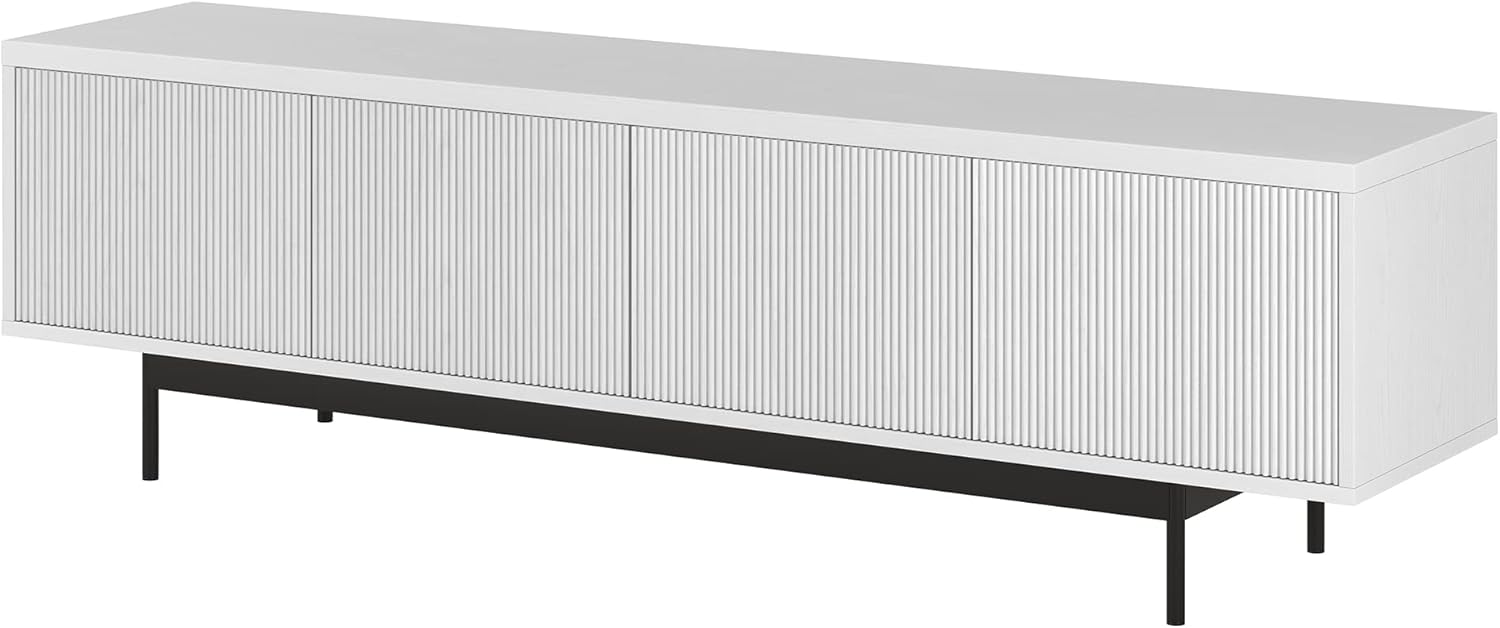
Image: The black metal base frame, showing the legs and connecting bars assembled.
- Step 4: Attach the Metal Base to the Main Body
Carefully place the main body frame onto the assembled metal base. Secure the base to the bottom of the TV stand using the designated screws. Ensure the unit is stable.
- Step 5: Install Hinges on Cabinet Doors
Attach the provided hinges to the four cabinet doors. Use the small black screws for this step. Ensure the hinges are oriented correctly as per the physical instruction diagram.
- Step 6: Attach Cabinet Doors and Adjust Alignment
Mount the cabinet doors to the main unit by attaching the hinges to the pre-drilled holes on the side and divider panels. Once all doors are attached, adjust the hinges to ensure proper alignment and even gaps between the doors. This may require minor adjustments to the hinge screws.
Video: Demonstrates how to adjust cabinet door hinges to achieve proper alignment and close any gaps.

Image: The fully assembled Henn&Hart Whitman TV stand with all four textured doors closed, showing a seamless front.
Operating Instructions
The Henn&Hart Whitman TV Stand is designed for ease of use and organization.
- Cabinet Doors: The four fully enclosed doors feature a push-to-open mechanism. Gently press the door to release the latch and open it. Push again to close and secure.
- Storage: Utilize the open inside areas behind the doors for free-form storage of devices, games, books, and other media accessories.
- Cable Management: The back panel includes cable-management cut-outs to help organize and conceal wires from your electronic devices, maintaining a tidy appearance.
Maintenance
To ensure the longevity and appearance of your TV stand:
- Cleaning: Wipe with a soft, dry cloth. Avoid using harsh chemicals or abrasive cleaning materials, as these can damage the finish.
- Door Adjustment: If cabinet doors become misaligned over time, refer to the "Attach Cabinet Doors and Adjust Alignment" section in the assembly instructions for guidance on adjusting the hinges.
- Weight Capacity: Do not exceed the specified weight limits. The top has a weight capacity of 75 lbs. Each inside storage section can hold 45 lbs.
Troubleshooting
| Problem | Possible Cause | Solution |
|---|---|---|
| Cabinet doors are misaligned or have uneven gaps. | Hinges require adjustment. | Refer to the "Adjustable Hinge Video" in the assembly section or the physical manual for detailed hinge adjustment instructions. Small adjustments to the hinge screws can correct alignment. |
| Doors do not open or close smoothly with the push mechanism. | Push latches may need adjustment or re-installation. | Ensure the push latches are securely installed and aligned with the door. Check for any obstructions. |
| Unit feels unstable or wobbly. | Screws are loose or unit is not level. | Check and tighten all assembly screws. Ensure the unit is placed on a flat, level surface. If necessary, use shims under the legs. |
Specifications
- Brand: Henn&Hart
- Model Number: TV1876
- Color: White
- Material: Engineered Wood
- Product Dimensions (L x W x H): 70 x 15.5 x 20 inches (177.8 x 39.37 x 50.8 cm)
- Item Weight: 67.5 pounds (30.6 kg)
- Top Weight Capacity: 75 lbs
- Inside Storage Capacity (each section): 45 lbs
- Assembly: Required, instructions included.
- Product Care: Wipe with Dry Cloth

Image: Detailed dimensions of the TV stand, including overall length, depth, height, and internal compartment measurements.
Warranty and Support
For warranty information, missing parts, or further assistance, please contact Henn&Hart customer support directly. Refer to the packaging or the official Henn&Hart website for contact details.
You can visit the official Henn&Hart store for more products and information: Henn&Hart Store
Ask a question about this manual
Ask about setup, troubleshooting, compatibility, parts, safety, or missing instructions. Manuals+ will review the question and use this page’s manual context to help answer it.