
Cayclay WXR-01 / HJ-XKD06
Cayclay Astronaut Galaxy Star Projector
Model: WXR-01 / HJ-XKD06
Introduction
The Cayclay Astronaut Galaxy Star Projector is designed to transform any room into a captivating celestial experience. This device projects a dynamic nebula and twinkling stars, creating a soothing and immersive environment. It also features an integrated moon night light with multiple color options, making it suitable for various settings, from children's bedrooms to adult relaxation spaces.

Image: The Cayclay Astronaut Galaxy Star Projector in action, projecting a vibrant nebula and stars onto a ceiling, accompanied by its remote control.
Package Contents
Please check the package carefully to ensure all items are present and in good condition:
- 1 x Cayclay Astronaut Galaxy Star Projector (Space Buddy)
- 1 x Power Cable
- 1 x Remote Control (requires 2 x AAA batteries, not included)
- 1 x User Manual
Product Features
- Adjustable Projection Angle: The astronaut's head is magnetically attached, allowing for a 360-degree rotation to project the nebula and stars onto walls, ceilings, or any desired flat surface.
- Integrated Moon Night Light: The small moon held by the astronaut functions as a night light with 7 selectable colors.
- Remote Control: Easily adjust projection mode, brightness, and rotation speed.
- Timer Function: Set the projector to automatically turn off after 1 hour, 2 hours, or 4 hours.
- Multiple Nebula Colors & Star Modes: Experience a variety of colorful nebula effects combined with twinkling green stars.

Image: Close-up view highlighting the magnetic head for 360-degree adjustment, the HD lens for clear projection, and the small moon night light.

Image: Examples of the diverse nebula colors and the seven distinct colors available for the moon night light.
Setup
- Unpack: Carefully remove all components from the packaging.
- Power Connection: Connect the provided power cable to the "Power Jack" port located on the astronaut's backpack. Plug the other end into a standard 5V power adapter (not included) and then into a wall outlet.
- Remote Control Batteries: Open the battery compartment on the back of the remote control and insert 2 x AAA batteries, ensuring correct polarity (+/-).
- Placement: Place the projector on a stable, flat surface. For optimal projection, position it in the center of the room or facing the desired projection area (wall or ceiling).
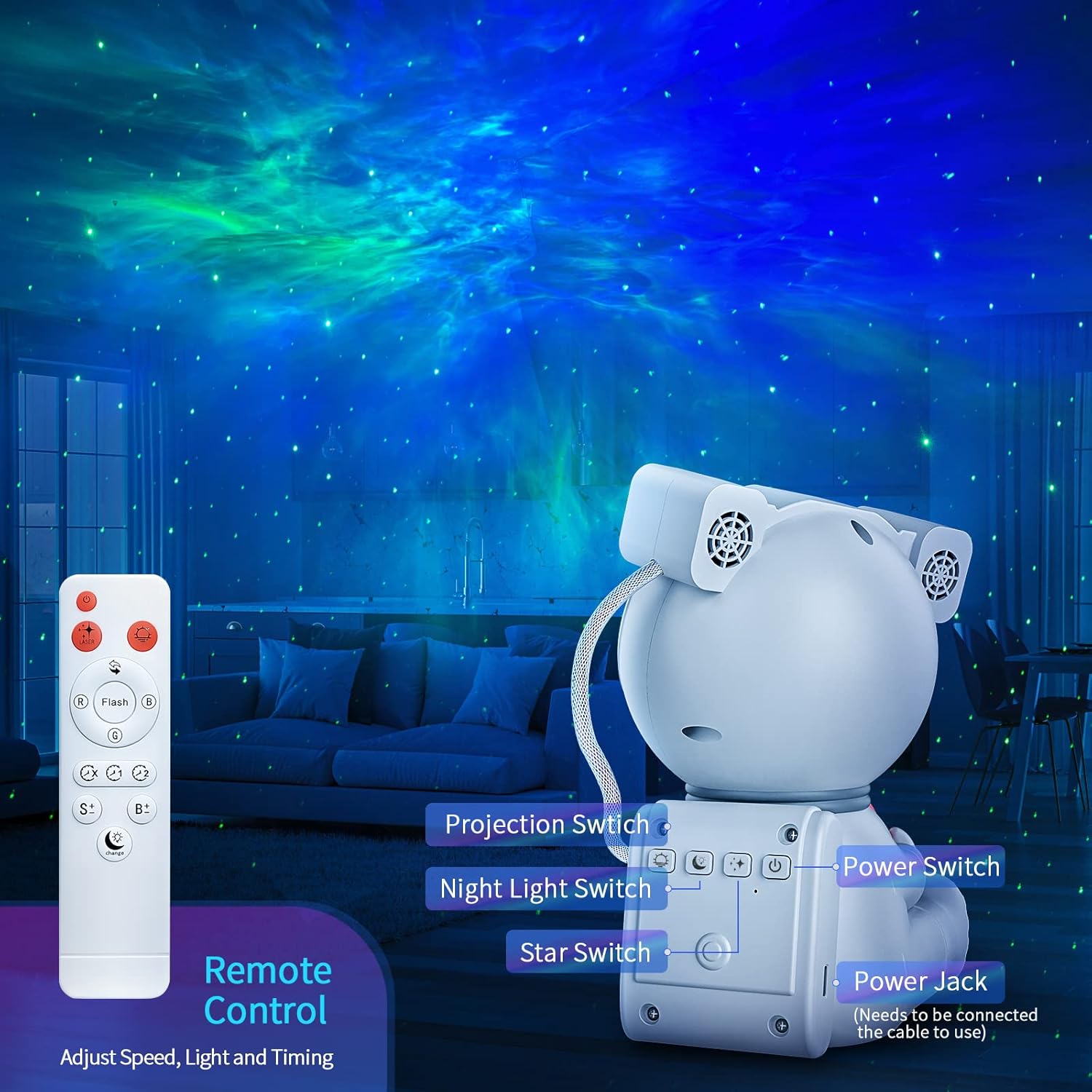
Image: Diagram showing the location of the Power Jack and other control buttons on the astronaut's backpack, along with the remote control.
Operation
Using the Remote Control
The remote control provides full functionality to manage your projector's settings:
- Power Button: Turns the projector On/Off.
- Nebula Control: Buttons to change nebula color, brightness, and rotation speed.
- Star Control: Buttons to turn stars On/Off, adjust brightness, or change their blinking pattern.
- Moon Light Control: Buttons to change the color of the moon night light.
- Timer Buttons: Set auto-off timer to 1H, 2H, or 4H.
Using On-Device Buttons
The astronaut's backpack features several buttons for basic control:
- Power Switch: Main power button for the unit.
- Projection Switch: Controls the nebula projection.
- Night Light Switch: Controls the moon night light.
- Star Switch: Controls the star projection.
Adjusting Brightness and Timer

Image: Visual representation of adjustable brightness settings and the automatic shut-off timer options.
Use the remote control to cycle through brightness levels (e.g., 30%, 60%, 100%) for both the nebula and stars. The timer function allows you to set the projector to automatically turn off after a specified duration, conserving energy and providing convenience for bedtime use.
Maintenance
- Cleaning: To clean the projector, gently wipe the exterior with a soft, dry cloth. Do not use abrasive cleaners or solvents. Ensure the device is unplugged before cleaning.
- Lens Care: Avoid touching the projection lens directly. If cleaning is necessary, use a lens cleaning cloth specifically designed for optics.
- Remote Control Batteries: Replace the AAA batteries in the remote control when its functionality diminishes. Remove batteries if the remote will not be used for an extended period.
- Storage: Store the projector in a cool, dry place away from direct sunlight and extreme temperatures when not in use.
Troubleshooting
| Problem | Possible Cause | Solution |
|---|---|---|
| Projector does not turn on. | No power connection; Power cable loose; Power adapter faulty. | Ensure power cable is securely connected to the projector and a working 5V power adapter. Try a different power outlet. |
| No nebula or star projection. | Projection switch off; Brightness set too low; Obstruction in front of lens. | Press the Projection Switch or Star Switch on the device/remote. Increase brightness using the remote. Ensure nothing is blocking the lens. |
| Remote control not working. | Batteries are dead or incorrectly inserted; Remote not pointed at sensor; Obstruction between remote and projector. | Replace AAA batteries, ensuring correct polarity. Point the remote directly at the projector's sensor. Remove any obstructions. |
| Moon night light is not working or not changing color. | Night Light Switch is off; Incorrect remote command. | Press the Night Light Switch on the device or use the dedicated moon light buttons on the remote. Note: The moon light is integrated and not a separate, detachable component. |
Specifications
| Brand | Cayclay |
| Model Number | WXR-01 / HJ-XKD06 |
| Dimensions (L x W x H) | 14.22 x 11.94 x 19.48 cm (5.6 x 4.7 x 7.67 inches) |
| Weight | 608 grams (1.34 lbs) |
| Material | ABS (Acrylonitrile Butadiene Styrene) |
| Input Voltage | 5 Volts |
| Max. Watts | 5 Watts |
| Light Source | LED |
| Remote Control Batteries | 2 x AAA (not included) |
| Special Features | Magnetic Head (360° adjustable), Timer Function, Remote Control, Integrated Moon Night Light |
Warranty and Support
Cayclay is committed to providing high-quality products and customer satisfaction. While specific warranty details are not provided in this manual, if you encounter any issues or have questions regarding your Astronaut Galaxy Star Projector, please do not hesitate to contact Cayclay customer support. We aim to provide a solution to your problem within 24 hours.
For support, please refer to the contact information provided on the product packaging or the official Cayclay website.
Ask a question about this manual
Ask about setup, troubleshooting, compatibility, parts, safety, or missing instructions. Manuals+ will review the question and use this page’s manual context to help answer it.