
EAPRO EAPRO 1500 PWM
EAPRO Solar PCU 1500 1050VA/12V Inverter Instruction Manual
Model: EAPRO 1500 PWM
1. Introduction
The EAPRO Solar PCU 1500 is a versatile Power Conditioning Unit (PCU) designed to provide reliable power for homes and offices. This inverter converts 12V DC power from a battery into 220V AC power, suitable for various appliances. It integrates a powerful 50 AMP solar charge controller, enabling efficient utilization of solar energy.
Key features include a high-frequency design, an LCD display for real-time performance monitoring, and automatic protection mechanisms against overload, short circuit, and low battery voltage. A cooling fan ensures optimal operating temperature, and its durable, compact casing allows for easy installation.
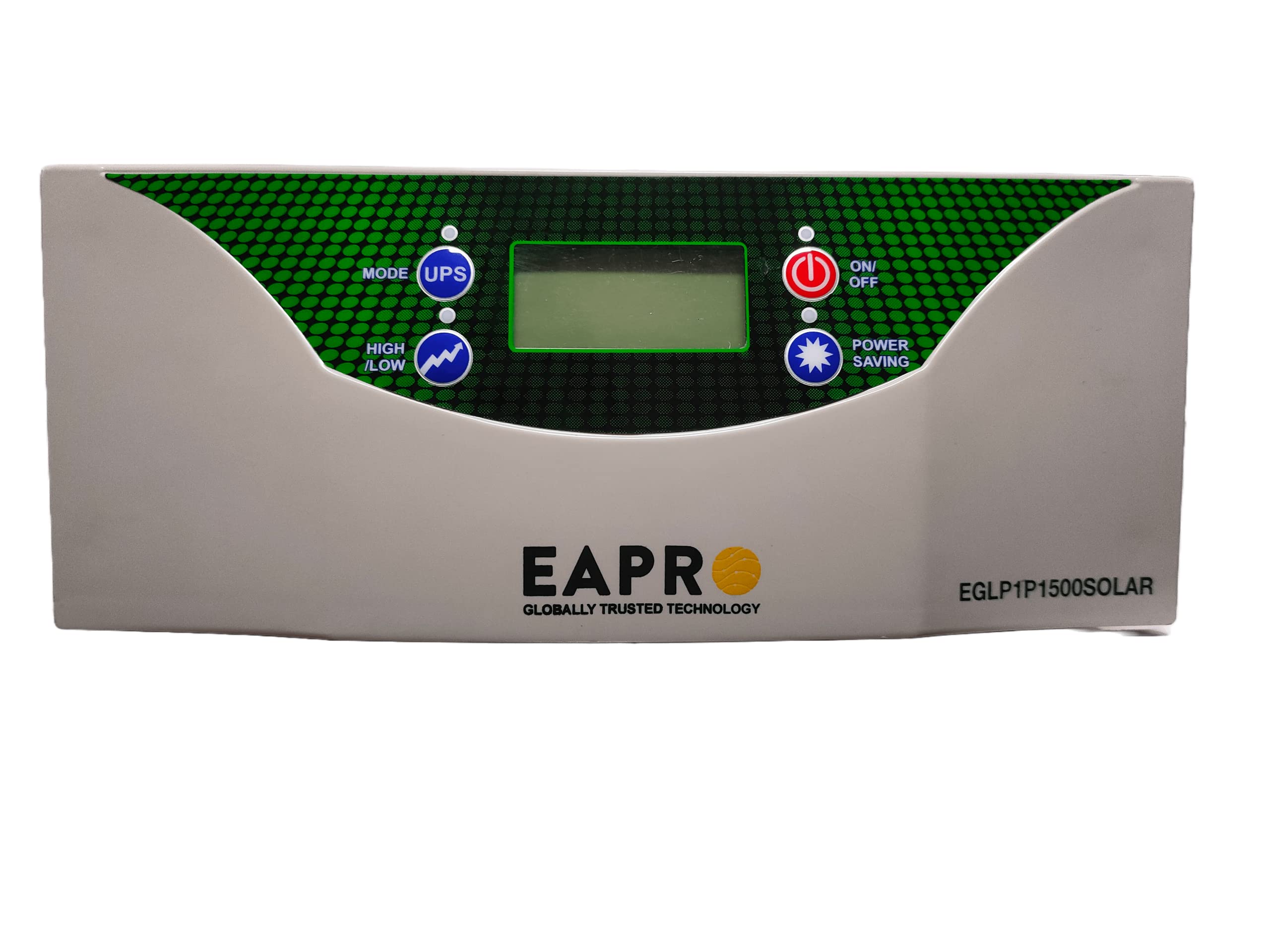
Figure 1: Front view of the EAPRO Solar PCU 1500 Inverter, showing the control panel and LCD display.
2. Safety Instructions
Please read and understand all safety instructions before installing or operating the EAPRO Solar PCU 1500. Failure to follow these instructions may result in electric shock, fire, or serious injury.
- Ensure proper ventilation around the inverter to prevent overheating.
- Do not expose the inverter to rain, moisture, or direct sunlight.
- Keep children and unauthorized personnel away from the unit.
- Always disconnect power before performing any maintenance or wiring.
- Use appropriate wiring and fuses as specified in the installation section.
- Do not open the inverter casing; there are no user-serviceable parts inside. Refer servicing to qualified personnel.
3. Package Contents
Verify that all items are present in the package:
- EAPRO Solar PCU 1500 Inverter Unit
- Battery Connecting Wires
- Fuse
- Instruction Manual (this document)
4. Product Overview
Familiarize yourself with the various components and connection points of your EAPRO Solar PCU 1500.
4.1 Front Panel
The front panel features the LCD display and control buttons for operating the inverter.
- LCD Display: Shows real-time status, battery voltage, load, and other operational parameters.
- MODE (UPS) Button: Selects the operating mode (e.g., UPS mode).
- HIGH/LOW Button: Adjusts settings or navigates menus.
- ON/OFF Button: Powers the inverter on or off.
- POWER SAVING Button: Activates or deactivates power-saving mode.
4.2 Rear Panel Connections
The rear panel provides all necessary input and output terminals.
Figure 2: Rear view of the EAPRO Solar PCU 1500 Inverter, showing AC output, Mains input, Solar input, and Battery terminals.
- AC Output Socket: Connect your appliances here.
- MAINS Input: Connect to the utility grid for battery charging and bypass operation.
- SOLAR Input (+/-): Connect solar panels to these terminals.
- BATT. (+/-) Terminals: Connect the 12V battery to these terminals using the provided battery connecting wires.
- FUSE Holder: Contains the main protection fuse.
5. Setup and Installation
Follow these steps for proper installation of your EAPRO Solar PCU 1500.
- Mounting: Choose a dry, well-ventilated area away from direct sunlight, heat sources, and flammable materials. Ensure sufficient clearance around the unit for airflow.
- Battery Connection:
- Ensure the inverter is OFF.
- Connect the positive (+) terminal of the 12V battery to the BATT. (+) terminal on the inverter using the red battery connecting wire.
- Connect the negative (-) terminal of the 12V battery to the BATT. (-) terminal on the inverter using the black battery connecting wire.
- Ensure connections are tight and secure.
- Solar Panel Connection:
- Connect your solar panels (up to 1000W total) to the SOLAR input terminals (+/-).
- Ensure the total Voc (Open Circuit Voltage) of your solar array does not exceed 22V and Vmp (Maximum Power Voltage) is around 17V for optimal charging.
- Observe correct polarity: positive to positive, negative to negative.
- AC Mains Input Connection: Connect the MAINS input socket on the inverter to a reliable utility grid power outlet using an appropriate power cord (not included).
- AC Output Connection: Plug your desired appliances into the AC Output Socket on the rear panel. Ensure the total load does not exceed 850 Watts.
Important: Always double-check all connections for correct polarity and tightness before powering on the unit.
6. Operating Instructions
This section details how to operate your EAPRO Solar PCU 1500.
6.1 Powering On/Off
- To Power On: Press and hold the ON/OFF button for a few seconds until the LCD display illuminates.
- To Power Off: Press and hold the ON/OFF button for a few seconds until the display turns off.
6.2 LCD Display
The LCD display provides critical information about the inverter's status:
- Battery Voltage: Current battery charge level.
- Load Level: Indicates the percentage of connected load.
- Input Source: Shows whether the inverter is running on Mains, Battery, or Solar power.
- Error Codes: Displays specific codes in case of a fault.
- Operating Mode: Indicates the currently selected mode (e.g., UPS, Power Saving).
6.3 Operating Modes
- UPS Mode: Provides uninterrupted power supply. When mains power is available, it charges the battery and powers the load. Upon mains failure, it seamlessly switches to battery power.
- Power Saving Mode: Optimizes energy consumption by reducing standby power. The inverter may enter a low-power state when no load or very light load is detected.
- Real Time Clock Based Operation: The inverter can be configured for specific charging and discharging cycles based on a real-time clock, optimizing solar energy usage and battery life. Refer to the advanced settings menu on the LCD for configuration.
Use the MODE (UPS) and HIGH/LOW buttons to navigate through menus and select desired operating modes or settings.
7. Maintenance
Regular maintenance ensures the longevity and optimal performance of your EAPRO Solar PCU 1500.
- Cleaning: Periodically clean the exterior of the inverter with a soft, dry cloth. Ensure ventilation openings are free from dust and debris. Do not use liquid cleaners.
- Connections: Annually check all electrical connections (battery, solar, mains, output) for tightness and corrosion. Loose connections can cause overheating and poor performance.
- Battery Health: Monitor battery health regularly, especially if using lead-acid batteries. Ensure battery terminals are clean and free of corrosion.
- Environment: Ensure the installation environment remains dry, cool, and well-ventilated.
8. Troubleshooting
This section provides solutions to common issues you might encounter.
| Problem | Possible Cause | Solution |
|---|---|---|
| Inverter does not turn on. |
|
|
| No AC output. |
|
|
| Battery not charging from solar. |
|
|
If the problem persists after attempting these solutions, please contact EAPRO customer support.
9. Specifications
| Feature | Specification |
|---|---|
| Brand | EAPRO |
| Model Name | EGIP1500PWM12V |
| Model Number | EAPRO 1500 PWM |
| Recommended Uses | Home, Office |
| Power Source | Solar Powered |
| Rated Load Capacity | 850 Watts |
| Max Output Power | 1050 VA |
| Electrical Output Waveform | Pure Sine Wave |
| Frequency | 50 Hz |
| Battery Voltage | 12V (Single Battery Operated) |
| Solar Charge Controller | 50 AMP |
| Max Solar Panel Support | Up to 1000W (Voc up to 22V, Vmp 17V) |
| Dimensions (L x W x H) | 330 x 325 x 185 mm |
| Item Weight | 11.1 kg |
10. Warranty Information
The EAPRO Solar PCU 1500 comes with a 30 Months Warranty from the date of purchase. This warranty covers manufacturing defects under normal use and service conditions. Please retain your purchase receipt as proof of purchase for warranty claims.
The warranty does not cover damage caused by improper installation, misuse, unauthorized modifications, natural disasters, or normal wear and tear.
11. Customer Support
For technical assistance, troubleshooting, or warranty inquiries, please contact EAPRO customer support:
- Phone: 8650115000
- Website: www.eapro.in
Related documentsEAPRO 1500 PWM

Ask a question about this manual
Ask about setup, troubleshooting, compatibility, parts, safety, or missing instructions. Manuals+ will review the question and use this page’s manual context to help answer it.