
Product Overview
The AX WABER Dual Monitor Stand (Model AX05TB02) is a free-standing desk mount arm riser designed to support two computer monitors vertically. It is compatible with most 13-inch to 34-inch LCD monitors that have VESA patterns of 75x75mm or 100x100mm, and can support monitors weighing up to 44lbs. This stand helps optimize desk space and promotes ergonomic viewing angles.

Figure 1: The AX WABER Dual Monitor Stand with two monitors mounted vertically.
Key Features
- Vertical Dual Monitor Support: Accommodates two monitors from 13" to 34" in a stacked configuration.
- VESA Compatibility: Supports VESA patterns of 75x75mm and 100x100mm.
- Weight Capacity: Each arm supports up to 44lbs.
- Space Saving Design: Frees up valuable desk space by eliminating bulky monitor bases.
- Full Motion Adjustment: Offers ±15° tilt, ±45° swivel, and 360° rotation for optimal viewing.
- Ergonomic Benefits: Helps improve posture and reduce strain on the neck, back, and shoulders.
- Stable Base: Features a heavy-duty free-standing base for secure placement without drilling.
- Cable Management: Integrated system to keep cables organized and out of sight.
Package Contents
Please ensure all parts are present before beginning assembly. All accessories are equipped and packaged in categories for easy identification.

Figure 2: VESA compatibility details and a visual representation of all included parts, neatly categorized.
Setup and Installation
Follow these steps to assemble your Dual Monitor Stand:
- Assemble the Base: Attach the main vertical pole to the heavy-duty glass base. Ensure all screws are tightened securely. The base provides stability without requiring drilling into your desk.
- Attach VESA Plates to Monitors: Secure the VESA mounting plates to the back of your monitors using the provided screws. The stand supports VESA patterns of 75x75mm and 100x100mm.
- Mount Monitors to Stand: Slide the VESA plates with attached monitors onto the vertical pole. The design allows for easy attachment and detachment.
- Adjust Height: The vertical pole features 12 levels of height adjustment. You can adjust the monitors to your preferred ergonomic height. The upper section offers 8 levels (19"-29.2") and the lower section offers 4 levels (9.3"-13.7").
- Secure Monitors: Once the monitors are at the desired height, tighten the reinforcing screws on the back of the VESA mounts to secure them in place.
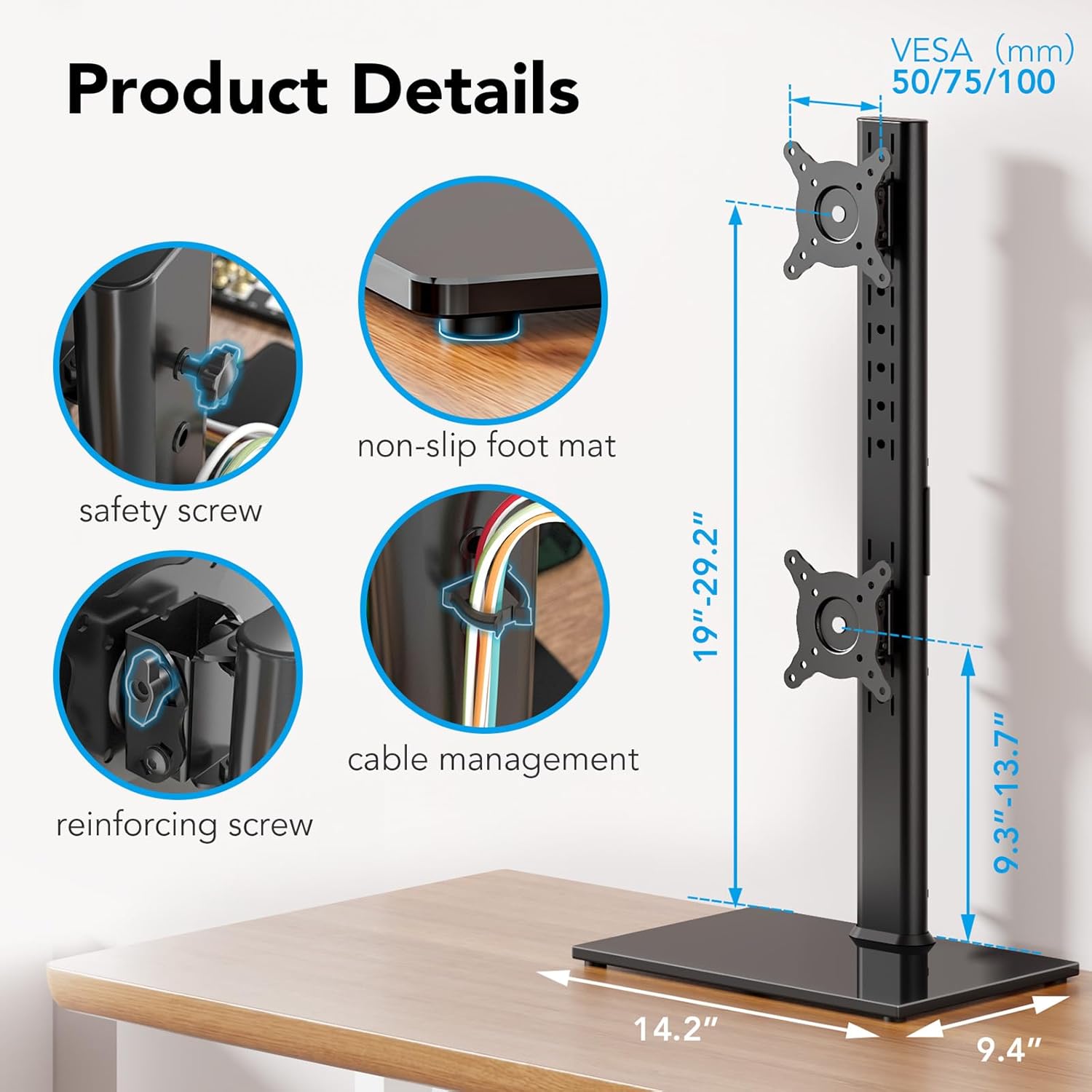
Figure 3: Detailed view of the stand's components, including the safety screw for secure monitor attachment and integrated cable management.

Figure 4: Illustration of the stand's 12-level height adjustment capability, allowing for precise positioning of both monitors.
For a more detailed visual guide, please refer to the official User Manual PDF linked in the support section.
Operating Instructions and Adjustments
The AX WABER Dual Monitor Stand offers versatile adjustments to achieve your optimal viewing experience:
- Tilt Adjustment: Each monitor can be tilted ±15° to reduce glare and find the perfect viewing angle.
- Swivel Adjustment: Swivel your monitors ±45° to share your screen with colleagues or adjust for different tasks.
- Rotation: Rotate your monitors 360° to switch between landscape and portrait orientations as needed.
- Cable Management: Utilize the integrated cable management system along the vertical pole to keep your workspace tidy and cables organized.
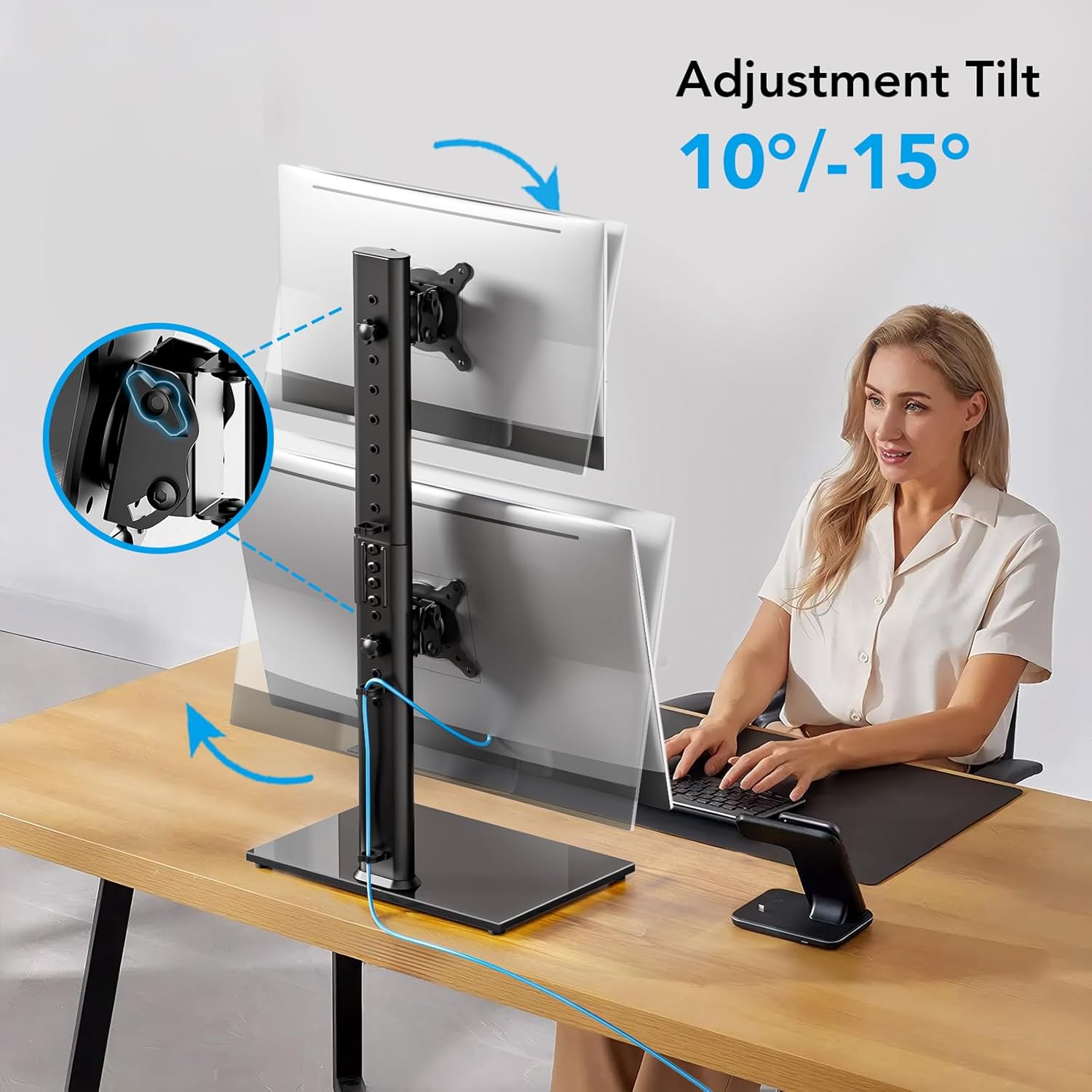
Figure 5: Demonstrates the monitor's tilt adjustment, allowing users to angle their screens for comfort.

Figure 6: Illustrates the swivel capability, enabling easy screen sharing and flexible positioning.
Maintenance
To ensure the longevity and optimal performance of your monitor stand, follow these simple maintenance guidelines:
- Cleaning: Use a soft, damp cloth to wipe down the metal and glass surfaces. Avoid abrasive cleaners or solvents that could damage the finish.
- Tightness Check: Periodically check all screws and connections to ensure they remain tight. Re-tighten if necessary to maintain stability and prevent wobbling.
- Movement: When adjusting the monitors, do so gently to avoid unnecessary strain on the joints.
Troubleshooting
If you encounter any issues with your monitor stand, consider the following common solutions:
- Monitors are not stable/wobbling:
- Ensure all assembly screws, especially those connecting the pole to the base and the VESA mounts to the monitors, are fully tightened.
- Verify that the monitor weight does not exceed the 44lbs per arm capacity.
- Difficulty adjusting tilt/swivel:
- Check if the adjustment knobs or screws on the VESA mounts are loosened sufficiently to allow movement. Tighten them once the desired position is achieved.
- Monitors not aligning properly:
- Ensure both VESA mounts are attached at the same height on the vertical pole.
- Adjust the individual tilt and swivel of each monitor to achieve perfect alignment.
If problems persist, please contact AX WABER customer support for further assistance.
Specifications
| Attribute | Detail |
|---|---|
| Brand Name | AX WABER |
| Item Weight | 4.84 pounds |
| Package Dimensions | 16.81 x 10.91 x 3.7 inches |
| Country of Origin | China |
| Item Model Number | AX05TB02 |
| Color Name | Black |
| Mounting Type | Tabletop Mount |
| Movement Type | Rotate, Swivel, Tilt, Articulating |
| Material | Metal |
| Maximum Compatible Size | 34 Inches |
| Minimum Compatible Size | 13 Inches |
| Maximum Tilt Angle | 15 Degrees |
Warranty and Support
For detailed warranty information and customer support, please refer to the official user manual or contact AX WABER directly.
Official User Manual (PDF): Download Here