DUOFU365 DFUS-BSQ-4P-FBA

LED Flash Strobe Controller Flasher Module User Manual

Brand: DUOFU365 | Model: DFUS-BSQ-4P-FBA

Introduction

This manual provides instructions for the DUOFU365 LED Flash Strobe Controller Flasher Module. This module is designed to control LED strips or bulbs, offering various flashing modes and dimming capabilities. Made with high-quality ABS material and 5050 LED chips, and UL approved, it is compatible with DC 5V to 24V power sources and includes a memory function to retain settings. The product is suitable for automotive applications (cars, boats, trucks, campers) and household LED lighting.

Product Overview

Four DUOFU365 LED Flash Strobe Controller Flasher Modules with red and black wires.

Figure 1: The DUOFU365 LED Flash Strobe Controller Flasher Modules.

The controller features a compact design with clearly labeled input and output wires. It includes three control buttons: MODE, SPEED/BRIGHT, and LIGHT. These buttons allow for selection of dynamic modes, adjustment of speed or brightness, and switching to static light mode.

Setup and Installation

Before installation, ensure the power supply is disconnected. The module is designed for DC 5V to 24V input. Proper polarity is crucial for correct operation.

Diagram showing how to connect the LED Flash Strobe Controller. The red wire connects to positive (+) and the black wire connects to negative (-). The input is from a power supply (5-24V) and the output connects to an LED light strip.

Figure 2: Wiring diagram for the LED Flash Strobe Controller.

  1. Identify the input and output wires on the controller. The input side is marked "5-24V" and the output side is marked "LED".
  2. Connect the red wire of the "5-24V" side to the positive (+) terminal of your DC power supply (e.g., 12V battery).
  3. Connect the black wire of the "5-24V" side to the negative (-) terminal of your DC power supply.
  4. Connect the red wire of the "LED" side to the positive (+) terminal of your LED strip light or LED bulb.
  5. Connect the black wire of the "LED" side to the negative (-) terminal of your LED strip light or LED bulb.
  6. Important Note: If the input and output connections are reversed, the module will not function normally. Ensure correct polarity.
  7. Utilize the 3M strong double-sided adhesive on the back of the controller to mount it securely on a dry, clean surface.

Video 1: Demonstration of the LED Flash Strobe Controller's wiring and various lighting modes.

Operating Instructions

The controller features three buttons for easy operation:
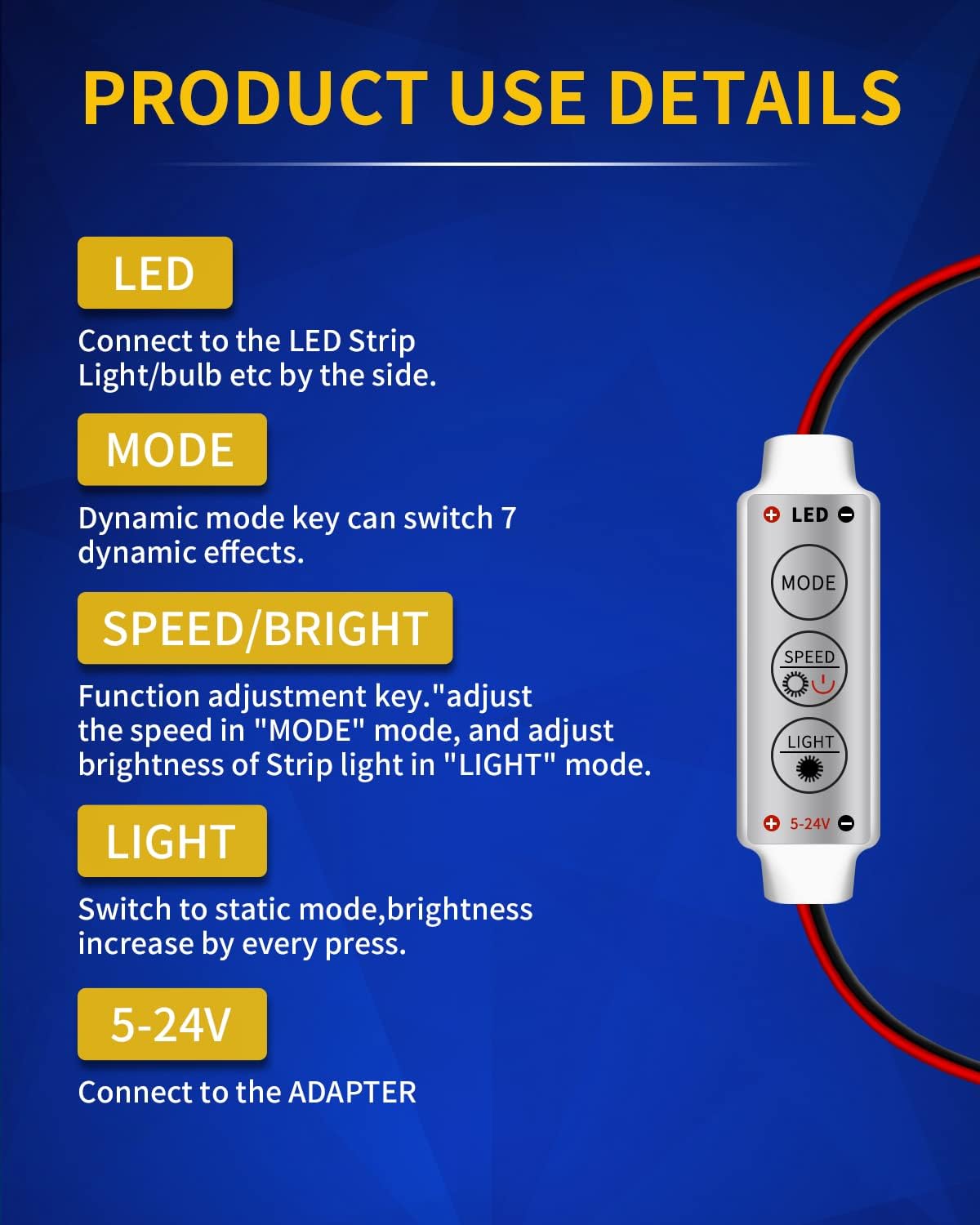
Close-up of the LED Flash Strobe Controller showing the three buttons: MODE, SPEED/BRIGHT, and LIGHT, with descriptions of their functions.

Figure 3: Control buttons and their functions.

  • MODE Button: Press this button to cycle through 7 dynamic lighting effects. The module has 8 modes in total, including static light.
  • SPEED/BRIGHT Button:
    • In "MODE" (dynamic) mode, press this button to adjust the speed of the selected dynamic effect.
    • In "LIGHT" (static) mode, press this button to adjust the brightness of the LED light.
  • LIGHT Button: Press this button to switch to static light mode. Each press will increase the brightness. This button also serves as a "Reset Static" function.

The module includes a memory function, which means it will remember the last selected mode and brightness/speed setting when powered off and on again.

Maintenance

The DUOFU365 LED Flash Strobe Controller is designed for durability. To ensure optimal performance and longevity:

  • Keep the module clean and free from dust and debris.
  • While the product has an IP67 waterproof rating, avoid prolonged submersion or exposure to extreme moisture.
  • Ensure all connections remain secure and free from corrosion.
  • Do not attempt to open or modify the module, as this may void the warranty and cause damage.

Troubleshooting

If you encounter issues with your LED Flash Strobe Controller, consider the following troubleshooting steps:

ProblemPossible CauseSolution
LEDs do not light up.
  • Incorrect wiring (reversed input/output).
  • No power to the module.
  • Faulty LED strip/bulb.
  • Module malfunction.
  • Verify input and output polarity as per the wiring diagram.
  • Check power supply connection and voltage (5V-24V).
  • Test the LED strip/bulb directly with a known good power source.
  • If issues persist, contact customer support.
Modes or brightness not changing.
  • Buttons not functioning.
  • Module malfunction.
  • Ensure buttons are pressed firmly.
  • Power cycle the module.
  • If issues persist, contact customer support.
Module gets excessively hot.
  • Overload (LEDs drawing too much current, exceeding 2A or 24W).
  • Internal short circuit.
  • Ensure total power consumption of LEDs is less than 24W (2A at 12V).
  • Immediately disconnect power. Do not use if overheating occurs. Contact customer support.

Specifications

FeatureDetail
BrandDUOFU365
Model NumberDFUS-BSQ-4P-FBA
MaterialABS
Working VoltageDC 5V~24V
Maximum Current2A
Working Power<24W
Operating Temperature-20~60°C
Dynamic Modes8 modes (including static)
PWM Grade256 grades
Smooth Dimmer EffectYes
FeatureMemory Function
Waterproof RatingIP67
Lifespan>50,000 hours

Warranty and Support

For warranty information or technical support, please contact DUOFU365 customer service. You can also visit the official DUOFU365 store for more product information and assistance: DUOFU365 Store.

Ask a question about this manual

Ask about setup, troubleshooting, compatibility, parts, safety, or missing instructions. Manuals+ will review the question and use this page’s manual context to help answer it.