
Introduction
The Gigastone Dual Output Power Bank 10000mAh (Model: PB-7122W) is a compact and efficient portable charger designed to provide reliable power for your mobile devices. With a 10,000mAh battery capacity, it features dual output ports (USB-A and USB-C) allowing you to charge two devices simultaneously. It supports fast charging protocols and includes an LED display to indicate the battery level. This manual provides essential information for the safe and effective use of your power bank.
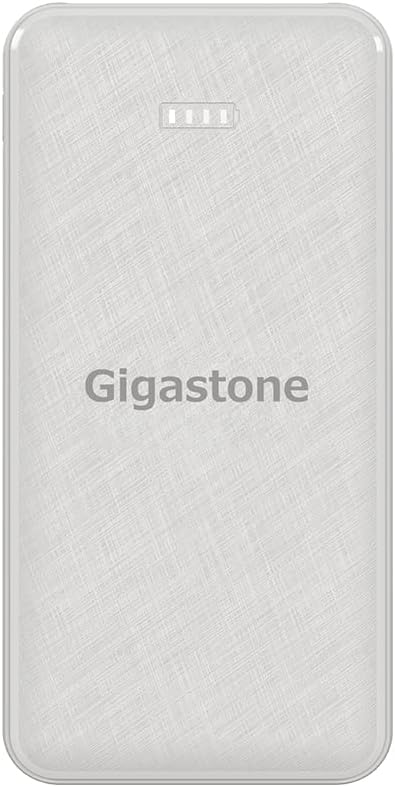
Image: Front view of the Gigastone 10000mAh Power Bank, showing the Gigastone logo and an LED battery indicator.
Package Contents
- Gigastone Dual Output Power Bank 10000mAh
- USB Charging Cable (USB-A to USB-C)
- User Manual
Setup
Initial Charging of the Power Bank
Before first use, it is recommended to fully charge your Gigastone Power Bank. This ensures optimal battery performance and longevity.
- Connect the provided USB charging cable (USB-A to USB-C) to the USB-C input port on the power bank.
- Connect the other end of the cable (USB-A) to a compatible USB wall charger (not included) or a computer's USB port.
- The LED display on the power bank will illuminate, indicating the charging status. The battery level will increase as it charges.
- Once fully charged, the LED display will show 100% or a full battery icon. Disconnect the power bank from the charging source.

Image: Diagram illustrating the USB-A output and USB-C input ports on the Gigastone Power Bank.
Operating Instructions
Charging Your Devices
The Gigastone Power Bank can charge a wide range of devices, including smartphones, tablets, and other USB-powered gadgets.
- Connect your device's charging cable to one of the output ports on the power bank (USB-A or USB-C).
- Connect the other end of the cable to your device.
- The power bank will automatically begin charging your device. The LED display will show the remaining battery level of the power bank.
- To charge two devices simultaneously, connect each device to a separate output port.
- Once your device is fully charged, or when you wish to stop charging, disconnect the cable from both the power bank and your device.

Image: The Gigastone Power Bank simultaneously charging an iPhone via USB-C and a pair of wireless earbuds via USB-A.
LED Display Indicator
The LED display provides a clear indication of the power bank's remaining battery capacity.
- Solid Lights: Indicate the current battery level.
- Flashing Lights: Indicate that the power bank is currently charging.

Image: A collection of devices including smartphones, tablets, smartwatches, and gaming consoles, demonstrating the wide compatibility of the Gigastone Power Bank.
Maintenance
Proper maintenance will extend the life of your power bank.
- Cleaning: Use a soft, dry cloth to clean the surface of the power bank. Do not use liquid cleaners or aerosols.
- Storage: Store the power bank in a cool, dry place away from direct sunlight and extreme temperatures.
- Battery Care: To maintain battery health, fully charge and discharge the power bank at least once every three months if not in regular use.
- Avoid Drops: Do not drop or subject the power bank to strong impacts.
Safety Information
Your Gigastone Power Bank is built with multiple safety mechanisms to ensure safe operation. Please adhere to the following guidelines:
- Do not disassemble, open, or shred the power bank.
- Do not expose the power bank to heat or fire. Avoid storage in direct sunlight.
- Do not short-circuit the power bank.
- Do not expose the power bank to mechanical shock.
- In case of a battery leak, do not allow the liquid to come into contact with skin or eyes. If contact occurs, wash the affected area with copious amounts of water and seek medical advice.
- Keep out of reach of children.
- Dispose of the power bank according to local regulations. Do not dispose of with household waste.

Image: An infographic detailing the multiple safety mechanisms integrated into the power bank, including extreme-temperature protection, overcharge protection, reset protection, ESD protection, short circuit protection, overcurrent protection, overvoltage protection, over discharge protection, and ABS + PC high quality fireproof housing.
Troubleshooting
| Problem | Possible Cause | Solution |
|---|---|---|
| Power bank not charging | Cable not connected properly; Faulty cable/charger; Power bank battery depleted. | Ensure cable is securely connected. Try a different cable or wall charger. Allow power bank to charge for a few minutes. |
| Device not charging from power bank | Power bank battery depleted; Cable not connected properly; Device not compatible; Faulty cable. | Charge the power bank. Ensure cable is securely connected to both power bank and device. Use the original charging cable for your device. Try a different cable. |
| Slow charging | Using a non-fast charging port/cable; Device drawing high power; Cable resistance. | Ensure you are using the correct port for fast charging (if applicable). Use a high-quality cable. Avoid using the device while charging. |
| LED display not working | Power bank is off; Malfunction. | Press the power button (if available) to activate the display. If issue persists, contact customer support. |
Specifications
| Feature | Detail |
|---|---|
| Model Number | PB-7122W |
| Battery Capacity | 10000mAh |
| USB-A Output | 5V/2A (10W) |
| USB-C Input | 5V/2A |
| Dimensions | 5.64 x 2.75 x 2.48 inches |
| Color | White |
| Special Features | LED Display, Fast Charging, Dual Output |
| Certifications | UL, ETL, FCC, RoHS |
Warranty and Support
Manufacturer's Warranty
The Gigastone Dual Output Power Bank 10000mAh is covered by a 1-year Gigastone limited manufacturer warranty from the date of purchase. This warranty covers defects in materials and workmanship under normal use.
The warranty does not cover damage caused by accident, misuse, abuse, unauthorized modification, or natural disasters. Proof of purchase is required for warranty claims.

Image: Gigastone logo with "1 Year Global Manufacturer Warranty" text and a "Worldwide Certified" seal.
Customer Support
For technical support, warranty claims, or any questions regarding your Gigastone Power Bank, please contact Gigastone customer service:
- Website: www.gigastone.com
- Email: Refer to the Gigastone website for the most current contact information.
Please have your product model number (PB-7122W) and proof of purchase ready when contacting support.


