
Introduction
This instruction manual provides guidance for the installation, adjustment, and maintenance of your RuenTech stainless steel replacement strap. This strap is designed for compatibility with Blackview BV-SW01 and Blackview BV-SW02 smartwatch models.
The strap is crafted from high-quality stainless steel, offering both comfort and durability. The metal buckle clasp provides a secure and elegant fit.
Setup and Installation
Follow these steps to properly install and adjust your RuenTech smartwatch strap:
- Prepare the Smartwatch: Ensure your Blackview BV-SW01 or BV-SW02 smartwatch is clean and free of any debris where the strap will attach.
- Attach the First Strap Segment: Locate the quick-release pins on the strap. Align one end of the pin with the lug hole on one side of your smartwatch. Push the quick-release lever inward, then slide the other end of the pin into the opposite lug hole. Release the lever to secure the pin. Gently pull on the strap to ensure it is firmly attached.
- Attach the Second Strap Segment: Repeat the process for the second strap segment on the other side of your smartwatch.
- Adjusting the Strap Length: The strap is designed to fit wrists from 14 to 20 cm. An adjustment tool is included in the package to help you remove or add links for a comfortable fit.
- Place the strap on a flat surface.
- Identify the arrows on the inside of the strap links, indicating the direction to push the pins.
- Use the adjustment tool to push out the pins from the links you wish to remove.
- Remove the desired number of links.
- Reassemble the strap by inserting the pins back into the links in the opposite direction of the arrows.

Image: Rose gold strap unattached, highlighting the quick-release pins for easy installation.
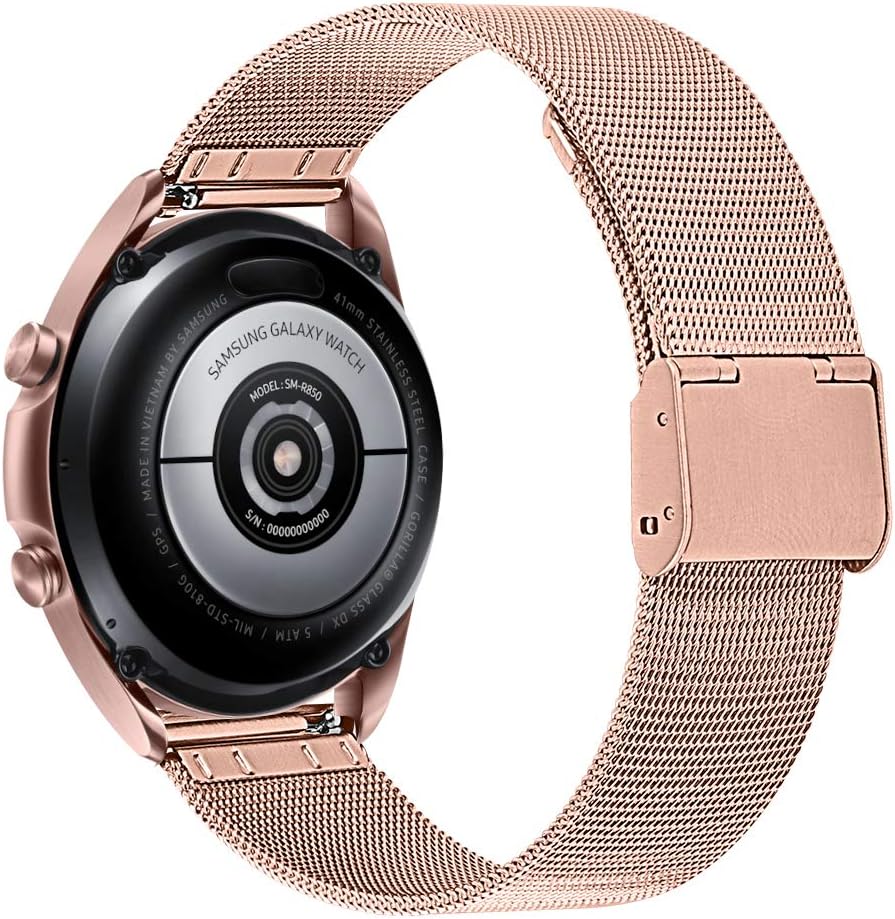
Image: Rose gold strap correctly attached to a smartwatch, viewed from the back.
Operating Instructions
Once installed and adjusted, the RuenTech smartwatch strap is ready for use. The strap's design ensures a comfortable and secure fit for daily wear.
- Wearing the Smartwatch: Fasten the strap securely around your wrist. Ensure it is snug but not overly tight to allow for proper blood circulation and sensor function (if applicable to your smartwatch model).
- Removing the Smartwatch: To remove the smartwatch, unfasten the buckle clasp and gently slide the watch off your wrist.
Maintenance and Care
To ensure the longevity and appearance of your stainless steel strap, follow these maintenance guidelines:
- Cleaning: Wipe the strap regularly with a soft, damp cloth to remove dirt, sweat, and oils. For more thorough cleaning, use a mild soap solution and rinse thoroughly with clean water. Ensure the strap is completely dry before reattaching it to your smartwatch or wearing it.
- Avoid Harsh Chemicals: Do not expose the strap to harsh chemicals, solvents, or abrasive cleaners, as these can damage the finish.
- Storage: When not in use, store the strap in a clean, dry place away from direct sunlight and extreme temperatures.
- Inspection: Periodically inspect the quick-release pins and clasp for any signs of wear or damage. If any components appear compromised, consider replacing the strap to prevent accidental detachment of your smartwatch.
Troubleshooting
If you encounter any issues with your RuenTech smartwatch strap, refer to the following common solutions:
- Strap Not Attaching Securely:
- Ensure the quick-release pins are fully engaged in the lug holes of the smartwatch.
- Verify that the pins are not bent or damaged. If damaged, contact support for a replacement.
- Strap Too Loose or Too Tight:
- Use the included adjustment tool to add or remove links as described in the "Setup and Installation" section.
- Ensure the clasp is properly closed and secured.
- Discomfort During Wear:
- Adjust the strap to a comfortable fit that is not too tight.
- Clean the strap regularly to prevent skin irritation from accumulated dirt or sweat.
If these steps do not resolve your issue, please contact customer support.
Product Specifications
| Product Name | RuenTech Smartwatch Replacement Strap |
| Compatible Models | Blackview BV-SW01, Blackview BV-SW02 |
| Material | High-quality Stainless Steel |
| Wrist Size Range | 14 cm to 20 cm (adjustable) |
| Clasp Type | Metal Buckle Clasp |
| Installation Type | Quick-release pins |
| Package Contents | 2 x RuenTech Smartwatch Straps, 1 x Adjustment Tool (Smartwatch not included) |

Image: A selection of RuenTech stainless steel straps in various colors.
Warranty Information
RuenTech offers a one-year warranty for this product. In the event that this replacement strap is unsuitable or does not meet your expectations, a full refund or replacement will be provided.
For warranty claims or issues, please contact customer support directly.
Customer Support
For any questions, concerns, or support needs regarding your RuenTech smartwatch strap, please contact our customer service team. All inquiries will be addressed promptly to ensure a satisfactory shopping experience.
Please refer to your purchase documentation or the seller's information on the platform where you purchased the product for specific contact details.
Note: The smartwatch itself is not included with this product and is not covered by this strap's warranty.