
Samsung SM-S9180
SAMSUNG Galaxy S23 Ultra User Manual
Model: SM-S9180
Introduction
The SAMSUNG Galaxy S23 Ultra is a cutting-edge 5G smartphone designed for exceptional performance and advanced photography. Featuring a powerful 200 MP camera, a robust 5000mAh battery, and the versatile S Pen, it offers a premium mobile experience. This manual provides essential information for setting up, operating, and maintaining your device.
What's in the Box
Upon unboxing your SAMSUNG Galaxy S23 Ultra, you will find the following items:
- SAMSUNG Galaxy S23 Ultra 5G Smartphone (Cream)
- USB-C to USB-C Charging Cable
- SIM Ejection Tool
- Quick Start Guide & Terms and Conditions
- NGP Wireless Charger
Note: A wall adapter for the charging cable is not included and must be purchased separately.
Physical Overview
Familiarize yourself with the key physical components of your Galaxy S23 Ultra.
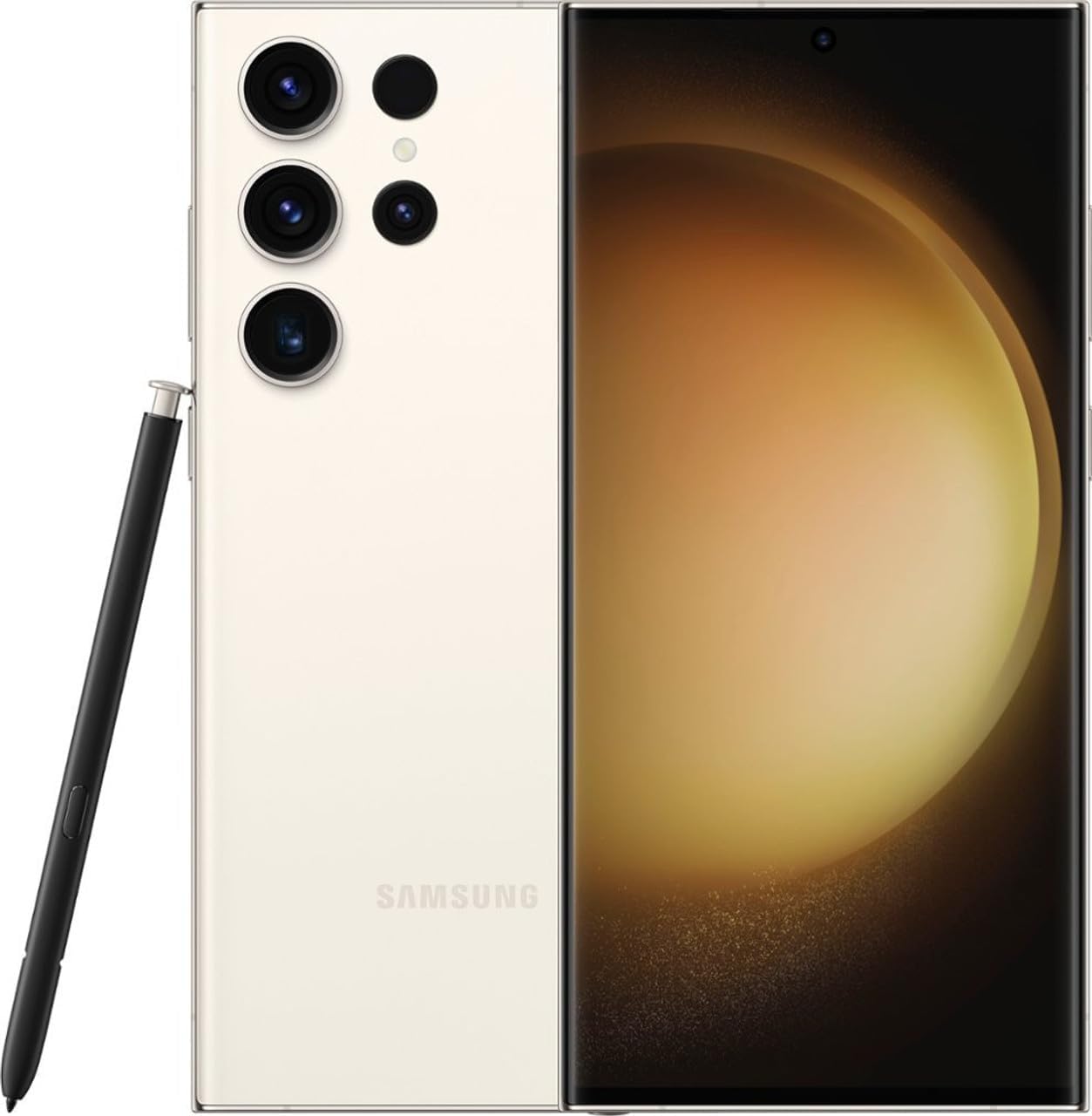
Image: Front and back view of the SAMSUNG Galaxy S23 Ultra in Cream color, showcasing its multi-camera setup and the integrated S Pen.
- Display: 6.8-inch Dynamic AMOLED 2X display with a punch-hole cutout for the front camera.
- Rear Cameras: Multiple lenses including a 200 MP wide-angle lens, telephoto lenses, and an ultrawide lens.
- S Pen Slot: Integrated S Pen for enhanced productivity and creativity, located at the bottom right.
- Ports & Buttons: USB-C charging port, speaker grille, SIM card tray at the bottom. Power and volume buttons on the right side.
Setup
Follow these steps to set up your new SAMSUNG Galaxy S23 Ultra:
- Insert SIM Card: Use the provided SIM ejection tool to open the SIM tray. Insert your Nano SIM card(s) into the tray. This device supports dual SIM.
- Power On: Press and hold the Power button on the right side until the Samsung logo appears.
- Initial Configuration: Follow the on-screen prompts to select your language, connect to a Wi-Fi network, and agree to the terms and conditions.
- Data Transfer: You can transfer data from an old device (Android or iOS) using Samsung Smart Switch or by signing into your Google account.
- Security Setup: Configure your preferred security method, including fingerprint recognition, face recognition, PIN, password, or pattern.
- Complete Setup: Finish the remaining setup steps to customize your device settings and preferences.
Operating Instructions
Learn how to navigate and use your Galaxy S23 Ultra effectively.
Basic Navigation
- Home Screen: Swipe left or right to access different home screens. Swipe up from the bottom to open the app drawer.
- Notification Panel: Swipe down from the top of the screen to access quick settings and notifications.
- Recent Apps: Tap the square icon (or swipe up and hold if using gestures) to view recently opened applications.
S Pen Usage
The integrated S Pen offers enhanced control and functionality:
- Removing S Pen: Gently press the top of the S Pen to release it from its slot.
- Air Command: When the S Pen is removed or hovering over the screen, press the S Pen button to open the Air Command menu for quick access to features like Create Note, Smart Select, and Screen Write.
- Screen Off Memo: Quickly jot down notes on the screen even when it's off, by simply removing the S Pen.
- Air Actions: Use the S Pen as a remote control for various apps, such as taking photos, controlling media playback, or navigating presentations.
Camera Features
The Galaxy S23 Ultra boasts a powerful 200 MP camera system for stunning photos and videos.
- 200 MP Main Camera: Capture incredibly detailed and high-resolution images.
- Nightography: Enhanced low-light performance for clear and vibrant photos and videos in dark environments.
- Video Stabilization: Record smooth and steady videos, even when on the move.
- 8K Video Recording: Capture cinematic quality videos with incredible detail.
- Pro Mode: Manual controls for advanced photography, including ISO, shutter speed, and white balance.
- Single Take: Capture multiple types of photos and videos with one tap.
Performance
Experience seamless multitasking and powerful gaming with the advanced hardware of the Galaxy S23 Ultra.
- Processor: Powered by the Qualcomm SM8550-AC Snapdragon 8 Gen 2 (4 nm), ensuring top-tier performance.
- RAM: Equipped with 12GB RAM LPDDR5X for smooth app switching and heavy usage.
- Storage: Comes with 512GB UFS3.1 internal storage, providing ample space for all your files.
Battery Life
The Galaxy S23 Ultra is designed for extended usage with its large battery capacity and efficient power management.
- Capacity: Features a non-removable Li-Ion 5000 mAh battery.
- Super-Fast Charging: Supports up to 45W Super-Fast Charging for quick power-ups.
- Wireless Charging: Compatible with wireless charging standards.
Maintenance
To ensure the longevity and optimal performance of your device, follow these maintenance tips:
- Software Updates: Regularly check for and install software updates to ensure your device has the latest features and security patches. Go to Settings > Software update > Download and install.
- Cleaning: Use a soft, lint-free cloth to clean the screen and body of the phone. Avoid harsh chemicals.
- Storage Management: Periodically clear unnecessary files and apps to free up storage space and improve performance. Go to Settings > Battery and device care > Storage.
- Battery Care: Avoid extreme temperatures and do not let the battery completely drain frequently.
Troubleshooting
If you encounter issues with your Galaxy S23 Ultra, try these common troubleshooting steps:
- Device Not Responding: Press and hold the Power button and Volume Down button simultaneously for more than 7 seconds to restart the device.
- App Issues: Clear the cache and data of the problematic app (Settings > Apps > [App Name] > Storage > Clear cache/Clear data). If the issue persists, uninstall and reinstall the app.
- Network Connectivity: Toggle Airplane Mode on and off. Reset network settings (Settings > General management > Reset > Reset network settings).
- Factory Reset: As a last resort, you can perform a factory data reset. Warning: This will erase all data on your device. Back up important data before proceeding. (Settings > General management > Reset > Factory data reset).
Specifications
| Feature | Detail |
|---|---|
| Product Dimensions | 6.8 x 3 x 0.4 inches |
| Item Model Number | SM-S9180 |
| Operating System | Android 13.0, One UI 5.1 |
| RAM | 12 GB LPDDR5X |
| Storage | 512 GB UFS3.1 |
| Display Size | 6.8 Inches |
| Resolution | 1920 x 1080 (Full HD+) |
| Wireless Technologies | Cellular, 5G |
| Connectivity Technologies | USB Type-C |
| GPS | True |
| Human Interface Input | Touchscreen |
| Audio Jack | No headphone jack |
| Color | Cream |
| Manufacturer | Samsung |
| Battery Capacity | 5000 mAh |
| Wireless Carrier | Unlocked |
Warranty and Support
Your SAMSUNG Galaxy S23 Ultra comes with a manufacturer's warranty. For detailed warranty information, product support, and service inquiries, please visit the official Samsung website or contact Samsung customer service.
You can also find additional support resources, FAQs, and software downloads on the Samsung support portal.
For protection plans, please refer to the options available at the point of purchase or through authorized retailers.