
1. Introduction
This manual provides essential information for the safe and effective use of your Acogedor 30W 4000RPM DC Electric Concrete Vibration Motor. Please read these instructions carefully before installation, operation, or maintenance to ensure proper function and prevent damage or injury. Keep this manual for future reference.
2. Safety Information
Always observe the following safety precautions to reduce the risk of injury or damage:
- Ensure the power supply matches the motor's voltage requirements (DC12V).
- Disconnect power before performing any installation, wiring, or maintenance.
- Wear appropriate personal protective equipment, including eye protection, when operating the motor.
- Do not operate the motor in wet conditions or expose it to excessive moisture, as it is rated IP65 for dust and water jet protection, but not submersion.
- Mount the motor securely to a stable surface to prevent movement during operation.
- Keep hands and loose clothing away from moving parts.
- Do not modify the motor or its components. Use only original replacement parts if necessary.
3. Product Overview
The Acogedor DC Electric Concrete Vibration Motor is designed for various applications requiring vibration, such as shaker tables in mining, metallurgy, construction, and food processing. It features a brushless design for efficiency and durability, an aluminum alloy casing, and an adjustable exciting force via an eccentric block.
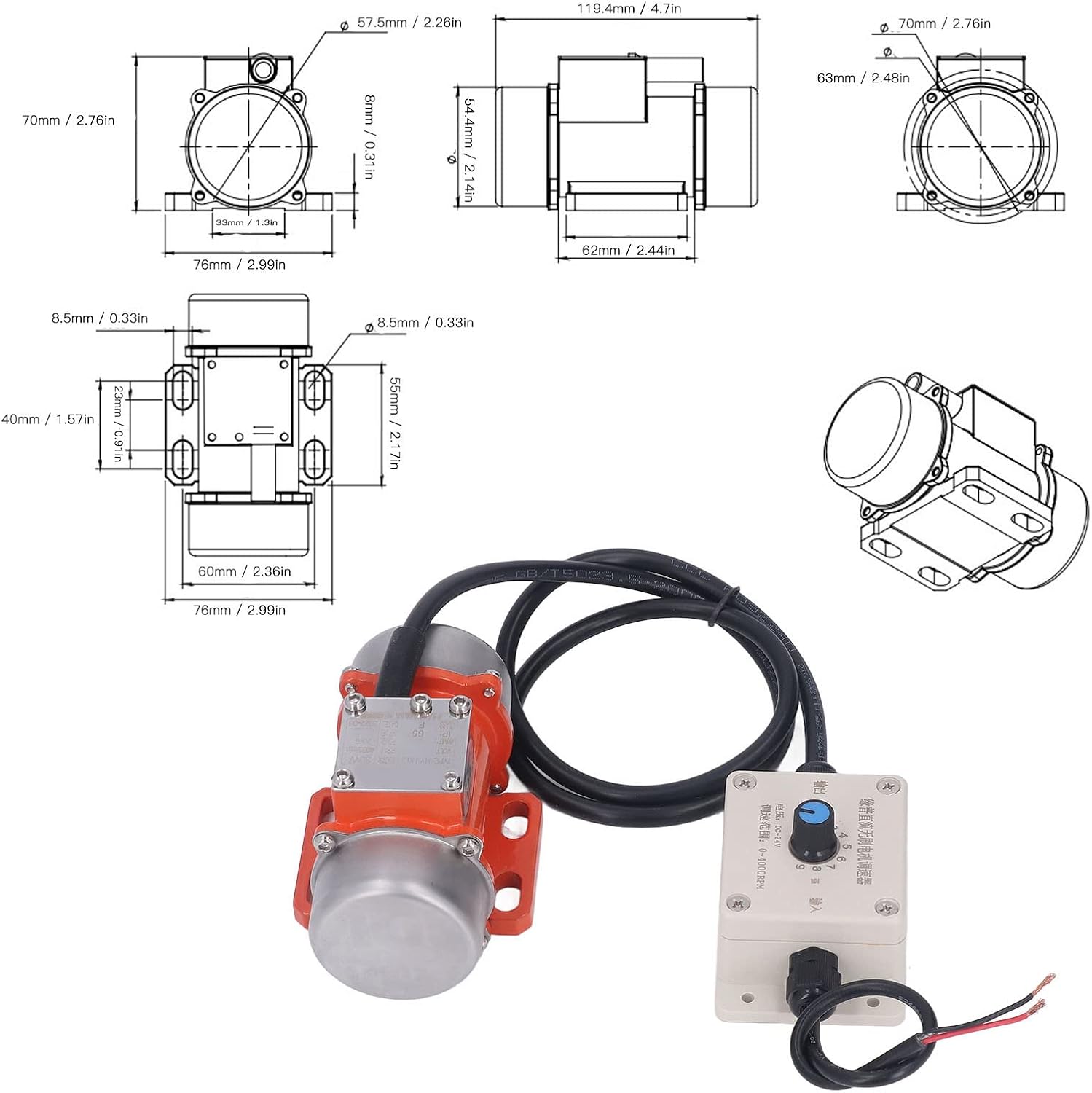
Figure 3.1: Overall view of the Acogedor DC Electric Concrete Vibration Motor with key dimensions.
Key Features:
- Brushless DC Motor: Provides strong power, high efficiency, and low noise operation.
- Aluminum Alloy Case: Ensures durability and wear resistance.
- IP65 Rating: Offers protection against dust ingress and low-pressure water jets.
- Adjustable Exciting Force: The eccentric block angle can be adjusted to vary the vibration intensity.
- Integrated Speed Controller: Allows for precise control over the motor's RPM.

Figure 3.2: The vibration motor and its speed controller, illustrating key operational characteristics.
4. Specifications
| Parameter | Value |
|---|---|
| Item Type | Electric Vibrating Motor |
| Material | Aluminum alloy, red copper |
| Vibration Force | Approx. 20kg / 44.1lb |
| Frequency | 50Hz |
| Maximum Speed | 4000RPM |
| Class | IP65 |
| Voltage | 12 Volts DC |
| Power | 30 Watts |
| Model | Acogedor8n2pavgf7h-11 |

Figure 4.1: Motor label showing detailed specifications.
5. Setup
5.1 Mounting
The vibration motor must be securely mounted to the application surface (e.g., shaker table) using appropriate fasteners through the mounting holes on its base. Ensure the mounting surface is robust enough to withstand continuous vibration.
5.2 Wiring
The motor comes with a speed controller for easy integration. Follow these steps for wiring:
- Ensure the power source is disconnected.
- Connect the motor's cable to the output terminal of the speed controller.
- Connect the input wires of the speed controller to your DC12V power supply. Observe correct polarity (red wire for positive, black wire for negative).
- Verify all connections are secure and properly insulated.

Figure 5.1: Illustration of the motor and speed controller wiring connections.
6. Operating Instructions
6.1 Powering On
Once the motor is securely mounted and wired, connect the DC12V power supply. The motor will be in a standby state or begin operating at the lowest speed setting, depending on the controller's initial position.
6.2 Adjusting Speed and Vibration Force
Use the rotary knob on the speed controller to adjust the motor's RPM from 0 to 4000RPM. Turning the knob clockwise typically increases the speed and vibration force, while turning it counter-clockwise decreases it. Start with a low setting and gradually increase to the desired intensity for your application.
6.3 Powering Off
To turn off the motor, rotate the speed controller knob to its minimum setting or disconnect the power supply.
6.4 Adjusting Eccentric Block (Vibration Force)
The vibration force can be further adjusted by changing the angle of the eccentric blocks on the motor. This typically involves loosening fasteners, rotating the eccentric weights to a new position, and then re-tightening the fasteners. Refer to the motor's specific design for detailed instructions on this adjustment, if applicable.
7. Maintenance
Regular maintenance ensures optimal performance and extends the lifespan of your vibration motor.
- Cleaning: Periodically clean the motor's exterior to remove dust, dirt, and debris. Use a dry cloth or soft brush. Do not use harsh chemicals or immerse the motor in liquids.
- Inspection: Regularly inspect the motor for any signs of wear, damage, or loose connections. Check the mounting bolts for tightness.
- Cable Integrity: Ensure the power cable and controller connections are free from cuts, abrasions, or damage.
- Storage: When not in use, store the motor in a dry, clean environment, away from extreme temperatures and corrosive substances.
8. Troubleshooting
| Problem | Possible Cause | Solution |
|---|---|---|
| Motor does not start | No power supply; Incorrect wiring; Faulty speed controller; Motor damage | Check power connection; Verify wiring polarity; Test speed controller; Contact support |
| Weak or inconsistent vibration | Low speed setting; Loose mounting; Incorrect eccentric block adjustment; Insufficient power | Increase speed via controller; Tighten mounting bolts; Adjust eccentric blocks; Check power supply voltage |
| Motor overheating | Overload; Insufficient ventilation; Prolonged continuous operation | Reduce load; Ensure adequate airflow around motor; Allow motor to cool down periodically |
| Unusual noise during operation | Loose components; Internal damage; Bearing wear | Check for loose parts and tighten; Discontinue use and contact support if noise persists |
9. Warranty and Support
Acogedor products are manufactured to high-quality standards. For warranty information, technical support, or service inquiries, please refer to the contact information provided with your purchase or visit the official Acogedor website. Please have your model number (Acogedor8n2pavgf7h-11) and purchase details ready when contacting support.
For additional information, you may visit the Acogedor Store on Amazon.


