
Rolanstar hq-kfzh010-08
Rolanstar Multi-Function Lift-Top Coffee Table Instruction Manual
Model: hq-kfzh010-08
Introduction
This manual provides detailed instructions for the assembly, operation, and maintenance of your Rolanstar Multi-Function Lift-Top Coffee Table. Please read all instructions carefully before use to ensure safe and proper functionality.
Safety Information
Caution: Lower table must be raised first to avoid damage. Do not exceed the maximum weight recommendation of 150 pounds for safe use and stability.
- Ensure all parts are securely fastened before use.
- Keep hands and fingers clear of moving parts during operation of the lift-top mechanism.
- Do not allow children to play on or around the table unsupervised.
- Place the table on a flat, stable surface.
Package Contents
Verify that all components are present before beginning assembly. Refer to the included assembly guide for a complete list of parts and hardware.
- Tabletop panels (2)
- Table frame components
- Lift-top mechanism (metal gas support)
- Drawer components (2 drawers)
- Open shelf panel
- Assembly Guide
- Installation Tool (Hex key/screwdriver)
- All necessary screws, bolts, and fasteners
Assembly Instructions
Assembly typically requires two people and can be completed within 45 minutes to 2.5 hours, depending on experience. Follow the step-by-step instructions provided in the included Assembly Guide. Ensure all parts are correctly oriented before tightening fasteners.

Image: Detailed assembly diagram showing various components and their connections.
Video: Demonstration of the assembly process for the lift-top coffee table, highlighting key steps and component installation.
- Unpack all components and verify against the parts list.
- Assemble the base frame using the provided hardware.
- Install the two storage drawers into their designated slots.
- Attach the open shelf panel.
- Install the lift-top mechanism onto the frame.
- Carefully attach the tabletop panels to the lift mechanism. (Two people recommended for this step).
Operating Instructions
Lift-Top Function
The table features a split lift-top design, allowing for versatile use. The high-quality metal gas support mechanism ensures smooth and quiet operation.
- Single Side Lift: Gently lift one side of the tabletop to raise it to a comfortable height for working or eating while seated on a sofa.
- Two-Way Lift: Both sides of the tabletop can be lifted independently or simultaneously.
- Lowering: Apply gentle downward pressure to the tabletop to smoothly lower it back into the coffee table position.
Convertible Dining Table
The larger tabletop board can be turned 180 degrees to convert the coffee table into a dining table suitable for 4-8 people.
- Ensure both lift-top panels are in the fully raised position.
- Carefully rotate the larger tabletop panel 180 degrees.
- Adjust the panels to form a continuous, expanded dining surface.

Image: The coffee table with one side of the tabletop lifted, demonstrating its use as a workstation.
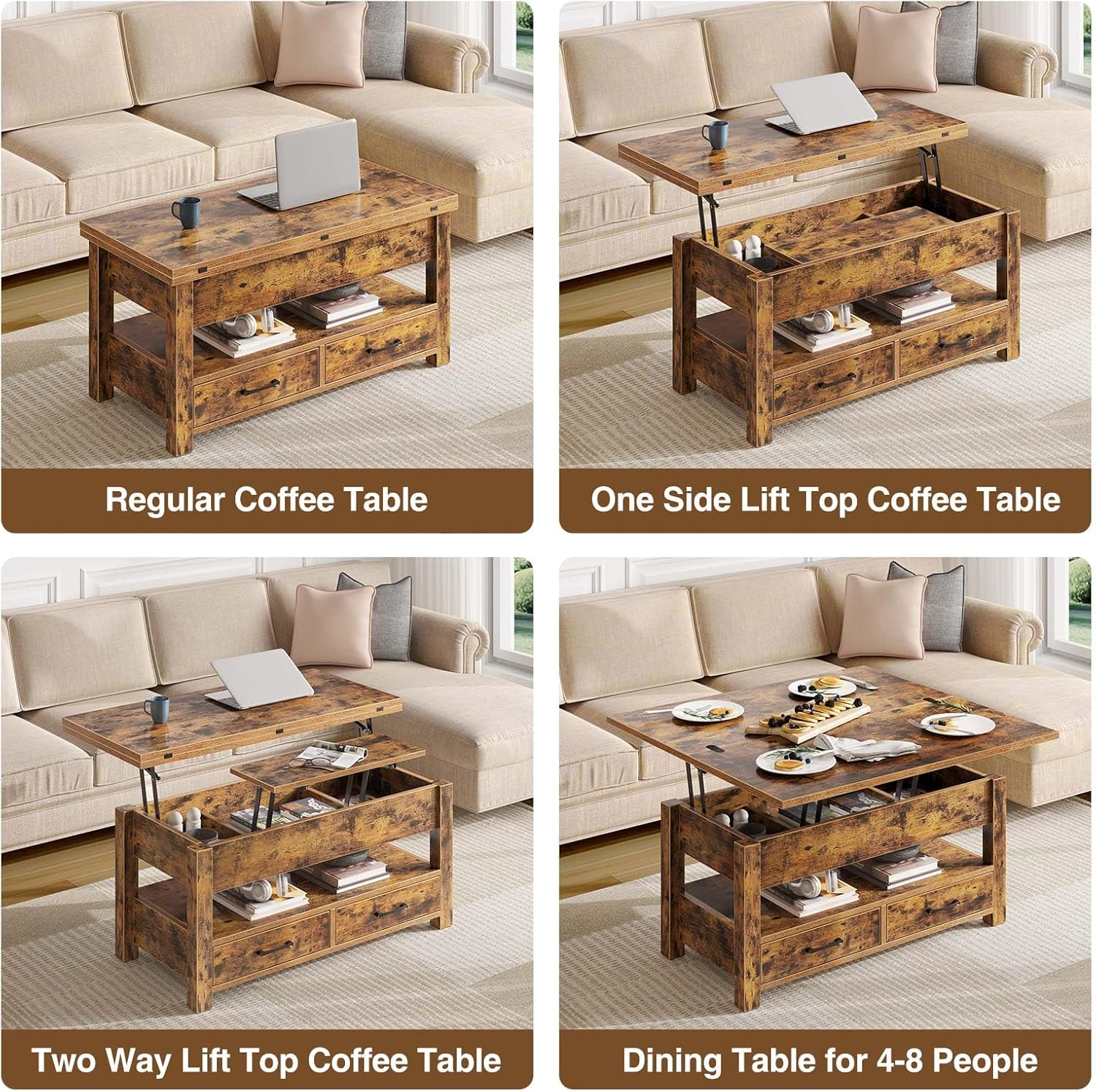
Image: The coffee table fully extended and converted into a dining table, set with plates and food.
Storage Features
The Rolanstar coffee table offers ample storage solutions to keep your living space organized.
- Hidden Compartments: Beneath the lift-top surface are three hidden storage areas, ideal for stowing away remotes, magazines, or other small items.
- Open Shelf: A convenient open shelf provides space for displaying decorative items or keeping frequently accessed books and magazines.
- Storage Drawers: Two sliding drawers offer additional enclosed storage for various household essentials.

Image: An overhead view of the coffee table with the lift-top raised, revealing the three hidden compartments and two open drawers filled with items.
Maintenance and Care
To maintain the appearance and longevity of your coffee table, follow these care instructions:
- Cleaning: Wipe the surface with a damp cloth for general cleaning. For tougher spots, use a mild soap solution and then wipe dry immediately with a clean, dry cloth.
- Spills: The melamine veneer is waterproof and heat-resistant. Wipe up spills promptly to prevent any potential damage.
- Avoid Harsh Chemicals: Do not use abrasive cleaners or harsh chemicals, as these can damage the finish.
- Weight Limit: Do not exceed the maximum weight recommendation of 150 pounds on the tabletop.
Specifications
| Feature | Detail |
|---|---|
| Brand | Rolanstar |
| Model Name | hq-kfzh010 |
| Model Number | hq-kfzh010-08 |
| Product Dimensions (Closed) | 19.7"D x 39.4"W x 20.1"H |
| Product Dimensions (Fully Expanded) | 39.4"D x 39.4"W x 26.8"H |
| Maximum Weight Recommendation | 150 Pounds |
| Color | Rustic Brown |
| Material Type | Engineered Wood, Metal |
| Number of Drawers | 2 |
| Recommended People for Assembly | 2 |
| Includes All Assembly Tools | Yes |
Troubleshooting
- Tabletop not lifting smoothly: Ensure no objects are obstructing the lift mechanism. Check that all screws on the mechanism are securely tightened.
- Drawers sticking: Verify that the drawer slides are properly aligned and free of debris. Apply a silicone-based lubricant if necessary.
- Table wobbles: Check all assembly fasteners and tighten any loose connections. Ensure the table is on a level surface.
- Damage during assembly: If any part is damaged, refer to the warranty information for replacement options.
Warranty and Support
For warranty information, product support, or to order replacement parts, please contact Rolanstar customer service. Refer to the contact details provided in your original purchase documentation or visit the official Rolanstar website.
Protection plans are available for purchase separately to extend coverage beyond the standard manufacturer's warranty. Please check with your retailer for details on available protection plans.
Ask a question about this manual
Ask about setup, troubleshooting, compatibility, parts, safety, or missing instructions. Manuals+ will review the question and use this page’s manual context to help answer it.