
1. Introduction
The Geekstory BE-280 GPS Module is a compact and versatile positioning and tracking device. It integrates the M10050 chip and a ceramic antenna, supporting multiple satellite navigation systems including GPS, Galileo, BDS, QZSS, and SBAS. Designed for various applications, this module provides reliable location data for projects involving Arduino, Raspberry Pi, aircraft, Pixhawk, and APM flight controllers.
This manual provides essential information for the proper setup, operation, and maintenance of your BE-280 GPS Module.
2. Key Features
- Chip: M10050
- Receiver Mode: GPS, Galileo, BDS, QZSS, and SBAS
- Frequency: GPS L1, GLONASS L1, BeiDou B1, SBAS L1, Galileo E1
- Channels: 72 search channels
- Baud Rate: Configurable from 4800bps to 921600bps (default 38400bps)
- Output Level: TTL (default) or RS-232 (requires converter)
- Output Protocol: NMEA-0183 (default) or UBX
- Update Frequency: 1Hz-18Hz (standard 1Hz-10Hz, default 1Hz)
- Dimensions: 28mm x 28mm x 8.4mm
- Note: This module does not include flash memory for saving configuration and does not have a compass.
3. Technical Specifications
| Parameter | Description |
|---|---|
| Chip | M10050 |
| Frequency | GPS L1 C/A, QZSS L1 C/A/S, BDS B1I/B1C, Galileo E1B/C, SBAS L1 C/A: WAAS, EGNOS, MSAS, GAGAN |
| Operating Mode | GPS+BDS+GALILEO+SBAS+QZSS |
| Sensitivity (Track) | -166dBm |
| Sensitivity (Re-acquire) | -160dBm |
| Sensitivity (Cold Start) | -148dBm |
| Sensitivity (Hot Start) | -160dBm |
| Horizontal Accuracy | 1.5m CEP 2D RMS SBAS Auxiliary (for Open Sky) |
| Speed Accuracy | 0.05m/s |
| Dynamic Heading Angle Accuracy | 0.3 deg |
| 1PPS Time Accuracy | RMS 30ns, 99% 60ns |
| Cold Start Time | 27s |
| Hot Start Time | 1s |
| Assisted Start Time | 1s |
| Baud Rate | 4800bps - 921600bps, default 38400bps |
| Output Level | TTL level |
| Output Protocol | NMEA, UBX |
| NMEA Sentences | RMC, VTG, GGA, GSA, GSV, GLL |
| Update Frequency | 0.25Hz-18Hz, default 1Hz |
| Second Pulse | Configurable from 0.25 Hz to 10 MHz, default period is 1s, high level lasts 100ms |
| Work Restrictions (Height) | 80,000m |
| Work Restrictions (Speed) | <500m/s |
| Work Restrictions (Gravitational Acceleration) | <4g |
| Power Consumption (Voltage) | DC 3.0V-5.5V, typical: 5.0V |
| Power Consumption (Current) | Normal 50mA/5.0V |
| Size | 28*28*8.4 mm |
| Weight | 11.8g (0.529 ounces) |
| Package | 1.25mm 6pins connector |
| Operating Temperature | -40 ℃ ~ +85 ℃ |
| Storage Temperature | -40 ℃ ~ +105 ℃ |
| LED | Built-in LED: Blue. The data output, TX LED flashing. |
4. Pin Description
The BE-280 GPS module features a 6-pin connector for power, data, and pulse output. Refer to the image and table below for detailed pin assignments.

Image: BE-280 GPS Module showing the M10050 chip and pin descriptions.
| PIN | Name | I/O | Description |
|---|---|---|---|
| 1 | PPS | O | 1 Pulse Per Second output after 3D fix, used for system synchronization. |
| 2 | GND | G | Ground connection. |
| 3 | TX | O | TTL Serial Data Output from the module. |
| 4 | RX | I | TTL Serial Data Input to the module. |
| 5 | VCC | I | DC 3.0V - 5.5V supply input, recommended 5.0V. |
| 6 | BOOT | I | Not Connected (N.C.). |
5. Dimensions
The BE-280 GPS module has compact dimensions suitable for integration into various projects. The physical size is 28mm x 28mm x 8.4mm.

Image: Top-down and side views illustrating the physical dimensions of the BE-280 GPS Module.
6. Setup and Connection
This section outlines general connection guidelines. Specific wiring may vary based on your host device (e.g., Arduino, Raspberry Pi, flight controller).
6.1. General Wiring
- VCC: Connect to a 3.0V-5.5V power supply (5.0V recommended).
- GND: Connect to ground.
- TX: Connect to the RX (receive) pin of your host device.
- RX: Connect to the TX (transmit) pin of your host device.
- PPS: (Optional) Connect to an interrupt-capable pin on your host device for precise timing.
6.2. Connection with Raspberry Pi
For Raspberry Pi, no specific driver is needed. Connect as follows:
- Red wire (VCC): Connect to Raspberry Pi's 3.3V pin.
- Black wire (GND): Connect to Raspberry Pi's Ground pin.
- Green wire (TX): Connect to Raspberry Pi's RXD pin.
- White wire (RX): Connect to Raspberry Pi's TXD pin.
6.3. RS-232 Output
The module defaults to TTL level output. To use RS-232 output, an external TTL to RS-232 converter cable is required.
7. Operation and Indicators
7.1. LED Indicators
- TX LED (Blue): This LED flashes when the GPS module is outputting data normally.
- PPS LED (Red): This LED flashes once the GPS module has successfully acquired a 3D fix and located your position. If it is not flashing, the module has not yet achieved a fix.
7.2. Data Monitoring (U-Center)
You can monitor the GPS data output using software like U-Center. This allows you to view raw NMEA sentences, satellite information, and positioning status.
Video: Demonstrates how to install the TinyGPS library in Arduino IDE, upload code, and monitor GPS data using U-Center software. This helps verify module functionality and satellite fix.
8. Model Comparison
The following table provides a comparison of the BE-280 with other Geekstory GPS modules, highlighting key differences such as flash memory, antenna type, compass, and interface.
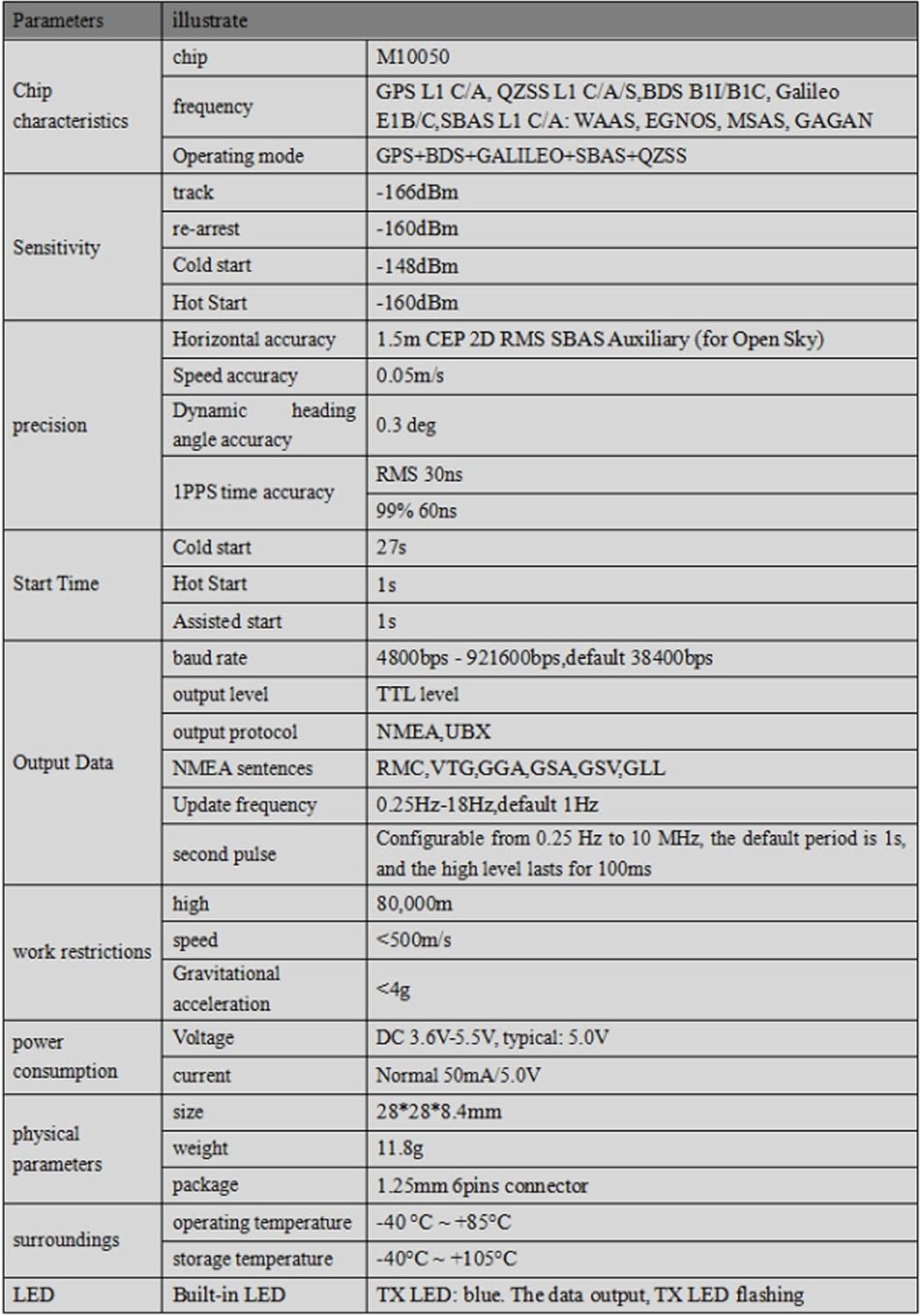
Image: Comparison table detailing features of various BE series GPS modules including BE-180, BE-220, BE-880, BE-880Q, and BE-280.
| Model | Flash | Antenna Type | Compass | Interface |
|---|---|---|---|---|
| BE-180 | No | Passive | No | 1.0mm 4pin |
| BE-220 | 4M Flash | Passive | No | 1.0mm 4pin |
| BE-880 | 4M Flash | Active | HMC5883L | 1.25mm 6pin |
| BE-880Q | 4M Flash | Passive | QMC5883L | 1.25mm 6pin |
| BE-280 | 4M Flash | Passive | No | 1.25mm 6pin |
9. Troubleshooting
- No Configuration Saved: The BE-280 module does not have flash memory to save configuration settings. Any changes made will need to be re-applied after power cycling. If you require a module with flash memory, consider models like the BN-880, BN-880Q, BE-880, or BE-880Q from Geekstory.
- No Compass Functionality: The BE-280 module does not include a compass. If your application requires a compass, refer to models like the BN-880, BN-880Q, BE-880, or BE-880Q.
- No GPS Fix (PPS LED not flashing): Ensure the module has a clear view of the sky. Initial cold starts can take up to 27 seconds. Verify power supply and connections. Check data output using a serial monitor or U-Center to confirm NMEA data is being received.
- No Data Output (TX LED not flashing): Check power supply (VCC and GND) and ensure the module is receiving power. Verify serial connections (TX/RX) to your host device. Confirm baud rate settings match between the module and your host device (default is 38400bps).
10. What's in the Box
The package includes the following components:
- 1 x BE-280 GPS Module
- 1 x 1.25mm 6-pin Cable
- 1 x 1.25mm 6P Connector Male Cable
- 1 x 1.25mm 6P Connector Female Cable

Image: The BE-280 GPS module shown with its included 6-pin cables.
11. Warranty and Support
For warranty information and technical support, please refer to the official Geekstory website or contact your retailer. Keep your purchase receipt for warranty claims.