
UPTATSUPPLY TK202
UPTATSUPPLY POSEIDON Cordless Rotary Tattoo Machine Kit TK202 User Manual
Brand: UPTATSUPPLY | Model: TK202
1. Introduction
This manual provides detailed instructions for the safe and effective use of your UPTATSUPPLY POSEIDON Cordless Rotary Tattoo Machine Kit TK202. Please read this manual thoroughly before operating the device to ensure proper setup, operation, and maintenance. This kit is designed for precise control in various tattooing applications, including lining, shading, and permanent makeup.
2. Package Contents
Verify that all items listed below are included in your package:
- Cordless Rotary Tattoo Pen (HM073 model)
- 2 Rechargeable 1200mAh Batteries
- USB-C Charging Cord
- 20 EO Gas-Sterilized Cartridge Needles (5x1205RL, 5x1207RL, 5x1209RS, 5x1007CM)
- 30ml Black Tattoo Ink
- 10 x 5ml Color Tattoo Inks
- 40 Ink Cups
- Gloves
- Grips Cover
- 2 Practice Skins (3mm thickness)
- 2 Transfer Papers

Image 2.1: All components included in the POSEIDON Cordless Rotary Tattoo Machine Kit TK202.
3. Product Overview
The POSEIDON Cordless Rotary Tattoo Machine (HM073 model) features a robust design for professional and beginner use. It operates wirelessly with rechargeable batteries, offering flexibility and consistent performance.

Image 3.1: Exploded view of the tattoo pen showing its main components: Battery, RCA jack, Motor holder, Transmission Frame, Non-slip handle, and Cartridges.

Image 3.2: Internal view highlighting the high-quality motor, working voltage range (5-12V), stroke length (3.5mm), and speed (8V 10000RPM).
4. Setup Instructions
- Charge Batteries: Before first use, fully charge both 1200mAh Lithium Polymer batteries using the provided USB-C charging cord. A full charge typically takes 3.5-4 hours with a 1A+ charger.
- Assemble the Machine:
- Attach a charged battery to the top of the tattoo pen by screwing it clockwise until secure.
- Ensure the RCA jack connection is firm.
- Insert Cartridge Needle: Gently push a sterile cartridge needle into the front opening of the tattoo pen until it clicks into place.
- Adjust Needle Length: Rotate the grip section of the tattoo pen to adjust the needle protrusion (depth).

Image 4.1: The Type-C charging interface on the battery. Full charging takes 3.5-4 hours, providing approximately 8 hours of operation at 8V.
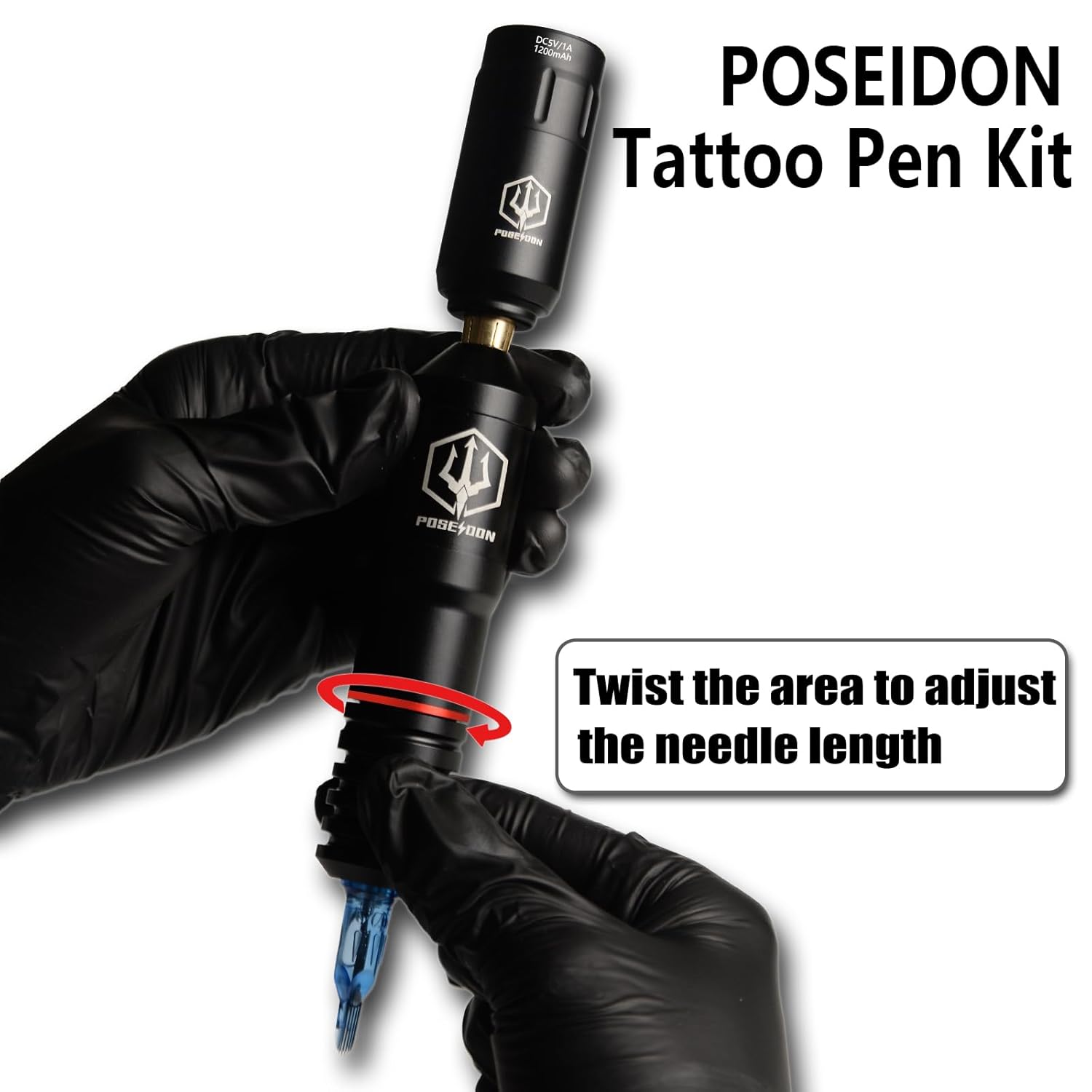
Image 4.2: A user wearing black gloves demonstrates attaching the battery to the tattoo pen.

Image 4.3: A user wearing black gloves twists the grip area of the tattoo pen to adjust the needle length.
5. Operating Instructions
- Power On/Off: Press and hold the power button on the battery for 2 seconds to turn the machine on or off.
- Adjust Voltage:
- Quickly press the power button to display the current voltage.
- Double-click the power button to switch between the 5 adjustable voltage settings (6V, 7V, 8V, 9V, 11V). The blue indicator lights represent the current voltage.
- After the battery is turned on for more than 2 seconds without pressing any key, it will automatically display the battery level (20%, 40%, 60%, 80%, 100%).
- Practice Use: Use the provided practice skins and inks to familiarize yourself with the machine's operation and needle control. The included inks are for practice only and should not be used on human skin.

Image 5.1: The battery unit showing button functions for power, voltage adjustment, and battery display. Voltage settings range from 6V to 11V.
Video 5.1: Demonstration of the POSEIDON Wireless Tattoo Machine Kit in use, showing assembly and practice on a synthetic skin. This video is provided by the seller, UP Tattoo Supply.
6. Maintenance
- Cleaning: After each use, carefully clean the exterior of the tattoo pen with a suitable disinfectant wipe. Ensure no liquids enter the internal components.
- Needle Disposal: Always dispose of used cartridge needles in a designated sharps container.
- Storage: Store the tattoo machine and accessories in a clean, dry place away from direct sunlight and extreme temperatures.
- Battery Care: To prolong battery life, avoid fully discharging the batteries frequently. Charge them regularly, even if not in use for extended periods.
7. Troubleshooting
| Problem | Possible Cause | Solution |
|---|---|---|
| Machine does not turn on. | Battery is not charged or not properly connected. | Ensure battery is fully charged and securely attached. Press and hold power button for 2 seconds. |
| Needle not moving or vibrating weakly. | Low battery, incorrect voltage setting, or needle cartridge issue. | Charge battery. Increase voltage setting. Replace needle cartridge. |
| Machine overheats. | Prolonged continuous use at high voltage. | Allow the machine to cool down. Reduce operating time or voltage. |
| Needle depth cannot be adjusted. | Grip mechanism is stuck or damaged. | Gently try to rotate the grip. If persistent, contact customer support. |
8. Specifications
- Model: HM073 (Tattoo Pen), TK202 (Kit)
- Stroke Length: 3.5mm
- Working Voltage: 6V-11V (5-step adjustable)
- Motor Speed: 10000 RPM (at 8V)
- Battery Type: Lithium Polymer
- Battery Capacity: 1200mAh (x2 included)
- Charging Interface: USB-C
- Full Charge Time: 3.5-4 hours (with 1A+ charger)
- Operating Time: Approximately 5 hours (at 8V)
- Compatibility: All standard cartridge needles
- Package Dimensions: 8.54 x 7.8 x 3.9 inches
- Weight: 2.07 Pounds (total package)
9. Warranty and Support
UPTATSUPPLY offers a risk-free guarantee with a refund/replacement policy. For any questions, concerns, or technical support regarding your POSEIDON Cordless Rotary Tattoo Machine Kit TK202, please contact UPTATSUPPLY customer service. Refer to your purchase documentation for specific warranty terms and contact information.
You can visit the UPTATSUPPLY Store on Amazon for more information.