
Latwne 500169167A2
Latwne S830 LCD Display Screen User Manual
Model: 500169167A2
Introduction
The Latwne S830 LCD Display Screen is a versatile and essential component for electric bicycles (ebikes), designed to provide comprehensive information and control over your ebike system. This universal meter panel is compatible with 24V, 36V, and 48V ebike setups and features a convenient USB port for charging or data transfer. It functions as a driving computer, displaying critical data such as remaining battery, current speed, average speed, maximum speed, clock, and trip distance. When a Pedal Assist System (PAS) is installed, the S830 LCD allows the rider to select the desired auxiliary level, enhancing the riding experience.
This manual provides detailed instructions for the installation, operation, maintenance, and troubleshooting of your S830 LCD Display Screen to ensure optimal performance and longevity.
Safety Information
- Always ensure the display is securely mounted before riding.
- While the S830 display is waterproof, avoid submerging it in water. Ensure all connections are dry and properly sealed before use.
- Do not attempt to open or modify the display unit. Refer all repairs to qualified technicians.
- Ensure the communication protocol of your ebike controller is compatible with the S830's lithium battery No. 2 protocol. Incompatibility may prevent proper function (e.g., E10 communication error).
- Disconnect power from the ebike battery before performing any installation or maintenance.
Product Overview and Components
The Latwne S830 LCD Display Screen package includes the following components:
- S830 LCD Display Unit
- Mounting Base for Handlebar
- 5-pin Waterproof Jiet Connector Cable
- Integrated Control Buttons

Figure 1: Front view of the S830 LCD Display, showing the screen, integrated control buttons, and the 5-pin waterproof connector.

Figure 2: Angled view of the S830 display, highlighting the robust handlebar mounting brackets.
Setup and Installation
Follow these steps to properly install your S830 LCD Display on your electric bicycle:
- Mounting the Display: Secure the S830 display unit to your ebike's handlebar using the provided mounting base. Ensure it is positioned for easy viewing and access to the control buttons. Tighten the mounting screws firmly but do not overtighten.
- Connecting the Cables: Locate the 5-pin waterproof Jiet connector cable from the S830 display. Connect this cable to the corresponding port on your ebike's controller. Ensure the connection is secure and the waterproof seal is intact.
- Power Source: The S830 display is designed to work with 24V, 36V, and 48V ebike systems. Ensure your ebike's battery voltage matches one of these compatible levels.
- Initial Power On: Once all connections are secure, power on your ebike system. The S830 display should illuminate and show initial readings.
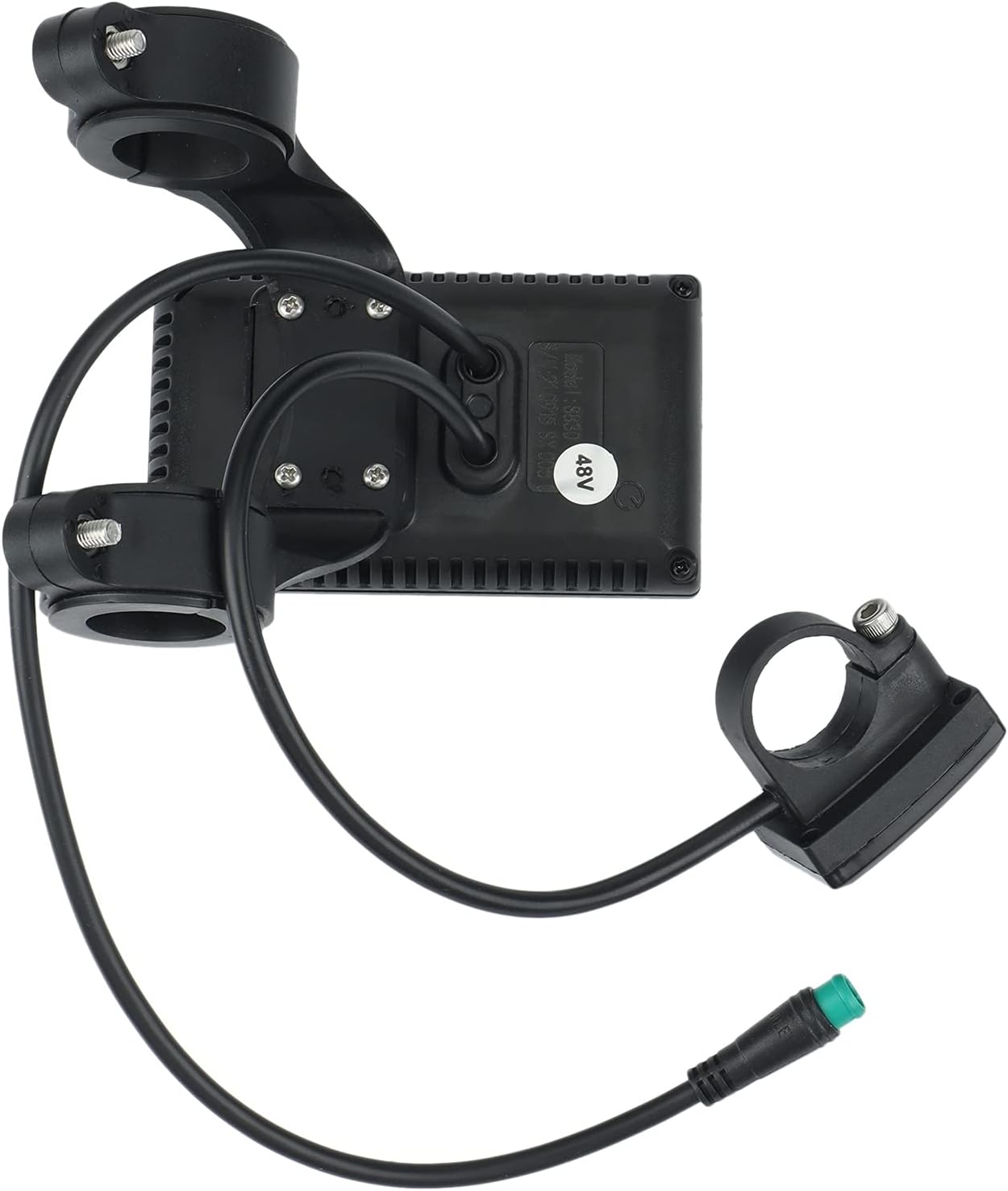
Figure 3: Rear view of the S830 display, illustrating the cable routing and connection points.
Operating Instructions
The S830 LCD display provides various functions and settings accessible via its control buttons. Long press the up and down buttons simultaneously to enter the instrument settings menu.
Display Information:
The display shows real-time information including:
- Remaining Battery Level
- Current Speed
- Average Speed
- Maximum Speed
- Clock
- Trip Distance
- Selected Assist Level (if PAS is installed)
Parameter Settings (P-Codes):
To access and modify settings, long press the Up and Down buttons simultaneously. Use the Up/Down buttons to navigate and the middle button (or power button) to confirm/enter.
- P01: Backlight Brightness
Adjusts the screen backlight intensity. Level 1 is the darkest, Level 3 is the brightest. - P02: Mileage Unit
Selects the unit for distance measurement. 0: Kilometers (KM); 1: Miles (MILE). - P03: Voltage Level
Sets the nominal voltage of your ebike battery. Options: 24V, 36V, 48V. Ensure this matches your battery. - P04: Auto-Sleep Timer
Sets the time (in minutes) after which the display will automatically turn off due to inactivity. 0: No sleep; Range: 1-60 minutes. - P05: Assist Gear Levels
Defines the number of assist levels available. Range: 1-9. - P06: Wheel Diameter
Sets the diameter of your ebike wheel in inches. Precision: 0.1. Accurate setting is crucial for correct speed and distance readings. - P07: Number of Speed Magnets
Configures the number of magnets on your speed sensor. Range: 1-100. - P08: Speed Limit
Sets the maximum speed percentage. Range: 0-100%. 100% means no speed limit imposed by the display. - P09: Start Mode
Determines how the motor assistance starts. 0: Zero Start (motor assists from standstill); 1: Non-Zero Start (motor assists only after initial pedal rotation). - P10: Drive Mode Setting
Configures the ebike's drive mode:- 0: Power-assisted drive only (throttle/handlebar is invalid).
- 1: Electric drive only (throttle/handlebar controls speed; assist gear is invalid).
- 2: Power-assisted drive and electric drive coexist.
- P11: Assist Sensitivity
Adjusts the sensitivity of the pedal assist system. Range: 1-24. Higher values mean more sensitive assist. - P12: Power-assisted Start Intensity
Sets the initial power output when pedal assist engages. Range: 0-5. - P13: Power-assisted Magnet Type Setting
Selects the type of PAS sensor. Options: 5, 8, or 12 magnets. 5 and 8 are for single-Hall sensors; 12 is for dual-Hall sensors. - P14: No Function
This parameter currently has no assigned function. - P15: No Function
This parameter currently has no assigned function. - P16: ODO Reset
To reset the Odometer (ODO), long press the Up button for 5 seconds while on this setting.
Maintenance
Proper maintenance ensures the longevity and reliable performance of your S830 LCD Display:
- Cleaning: Use a soft, damp cloth to wipe the display screen and body. Avoid abrasive cleaners, solvents, or harsh chemicals that could damage the plastic or screen.
- Connections: Periodically check all cable connections, especially the 5-pin waterproof connector, to ensure they are secure and free from dirt or corrosion.
- Storage: When not in use for extended periods, store the ebike and display in a cool, dry place, away from direct sunlight and extreme temperatures.
- Impact Protection: While durable, avoid dropping the display or subjecting it to strong impacts, which could damage internal components or the screen.
Troubleshooting
If you encounter issues with your S830 LCD Display, refer to the following common problems and solutions:
| Problem | Possible Cause | Solution |
|---|---|---|
| Display does not power on. | No power from battery; loose cable connection; incorrect voltage setting (P03). | Check ebike battery power. Ensure all cables are securely connected. Verify P03 setting matches your battery voltage (24V, 36V, or 48V). |
| "E10" communication error or no data displayed. | Incompatible communication protocol with controller. | The S830 display uses the lithium battery No. 2 protocol. Ensure your ebike controller supports this protocol. If not, the display may not be compatible with your current controller. |
| Incorrect speed or distance readings. | Incorrect P06 (Wheel Diameter) or P07 (Speed Magnets) settings. | Access settings and verify P06 and P07 are set correctly according to your ebike's specifications. |
| Display goes to sleep too quickly or not at all. | Incorrect P04 (Auto-Sleep Timer) setting. | Adjust P04 to your desired auto-sleep duration or set to 0 for no sleep. |
If the problem persists after attempting these solutions, please contact the seller or a qualified ebike technician for further assistance.
Specifications
| Feature | Specification |
|---|---|
| Brand | Latwne |
| Model Number | 500169167A2 |
| Color | Black |
| Item Weight | 179.5 Grams |
| Display Type | LCD |
| Sensor Type | Speed Sensor |
| Connectivity Technology | USB |
| Included Components | Sensor, Mounting Base, 5-pin waterproof plug |
| Mounting Type | Handlebar Mount |
| Human Interface Input | Buttons |
| Compatible Voltage | 24V, 36V, 48V |
| Item Package Dimensions L x W x H | 5.51 x 3.94 x 3.15 inches |
Warranty and Support
For information regarding product warranty, please refer to the terms and conditions provided by your retailer or the manufacturer, Latwne, at the time of purchase. Warranty details may vary based on region and seller policies.
For technical support or further assistance with your S830 LCD Display, please contact the seller from whom you purchased the product. They can provide specific guidance and support related to your purchase.
Ask a question about this manual
Ask about setup, troubleshooting, compatibility, parts, safety, or missing instructions. Manuals+ will review the question and use this page’s manual context to help answer it.