
1. Introduction
The LogiLink SP0061 Emergency Radio is a versatile and essential device designed for emergency situations, offering multiple power sources and critical functions. This compact unit integrates a radio receiver, a powerful LED flashlight, and the capability to charge external devices. Its robust design ensures reliable performance when conventional electricity sources are unavailable, making it an indispensable tool for preparedness.
Key features include:
- Multiple charging options: Dynamo crank, solar panel, and USB input.
- Integrated 3.7V lithium polymer battery.
- Option to use 3 AAA batteries (not included) for alternative power.
- Built-in LED flashlight with continuous and SOS flash modes.
- USB-A output for charging external devices.
- FM/AM/SW1/SW2 World Receiver.
2. Safety Information
Please read and understand all safety instructions before using this product. Failure to follow these instructions may result in electric shock, fire, or serious injury.
- Water Resistance: The device is water-resistant. However, avoid submerging it in water or exposing it to heavy rain for extended periods. Ensure all port covers are securely closed to maintain water resistance.
- Temperature: Do not expose the device to extreme temperatures (above 50°C / 122°F or below -10°C / 14°F) or direct sunlight for prolonged periods, especially when charging via solar panel.
- Battery Safety: The device contains an integrated lithium-ion battery. Do not attempt to replace it. If using AAA batteries, ensure correct polarity and do not mix old and new batteries or different types of batteries. Remove AAA batteries if the device will not be used for an extended period.
- Cleaning: Disconnect the device from all power sources before cleaning. Use a soft, dry cloth. Do not use liquid cleaners or aerosols.
- Disassembly: Do not attempt to disassemble, repair, or modify the device. This will void the warranty and may cause damage or injury.
- Children: Keep the device out of reach of children.
3. Product Overview
Familiarize yourself with the components of your LogiLink Emergency Radio:

Figure 3.1: Front view of the LogiLink Emergency Radio, highlighting the radio dial, volume control, and integrated flashlight.
- 1. Telescopic Antenna: For improved radio reception.
- 2. Solar Panel: For charging the internal battery via sunlight.
- 3. Crank Handle: For manual power generation (dynamo charging).
- 4. Flashlight: Integrated LED light with multiple modes.
- 5. Radio Dial/Tuner: To select radio frequencies (FM/AM/SW1/SW2).
- 6. Volume/Power Knob: To turn the radio on/off and adjust volume.
- 7. Band Selector Switch: To switch between FM, AM, SW1, and SW2 bands.
- 8. USB-A Output Port: For charging external devices.
- 9. Micro-B Input Port: For charging the radio via USB cable.
- 10. AAA Battery Compartment: For optional AAA battery power.
- 11. SOS Button: Activates emergency alarm and flashlight flash mode.
4. Setup
4.1. Battery Installation (Optional AAA Batteries)
The LogiLink Emergency Radio has an integrated lithium-ion battery. For alternative power, you can install 3 AAA batteries (not included).
- Locate the battery compartment cover on the back of the radio.
- Slide the cover open.
- Insert 3 AAA batteries, ensuring correct polarity (+ and -).
- Close the battery compartment cover securely.

Figure 4.1: Open battery compartment for AAA battery installation.
4.2. Initial Charging
It is recommended to fully charge the integrated lithium-ion battery via USB before first use to ensure optimal performance.
- Connect the provided USB cable to the Micro-B input port on the radio.
- Connect the other end of the USB cable to a USB power adapter (not included) or a computer USB port.
- The charging indicator light will illuminate. Allow the radio to charge until the indicator light changes or turns off (refer to the indicator light behavior in the specifications).
5. Operating Instructions
5.1. Radio Function
- Turn the Volume/Power Knob clockwise to turn on the radio and adjust the volume.
- Extend the Telescopic Antenna for better reception.
- Use the Band Selector Switch to choose between FM, AM, SW1, or SW2 bands.
- Rotate the Radio Dial/Tuner to find your desired station.
- Adjust the antenna position and location for optimal signal clarity.

Figure 5.1: Operating the radio function with extended antenna and visible tuning controls.
5.2. Flashlight Operation
The integrated LED flashlight offers two modes:
- Continuous Light: Press the flashlight button once to turn on the continuous light. Press again to turn it off.
- SOS Flash Mode: Press and hold the SOS Button to activate the emergency alarm and flashing light. Release the button to turn it off.

Figure 5.2: The integrated flashlight in operation.
5.3. Charging External Devices
The radio can act as a power bank to charge small electronic devices like smartphones.
- Ensure the radio's internal battery has sufficient charge.
- Connect your device's charging cable to the USB-A Output Port on the radio.
- The radio will begin charging your external device.
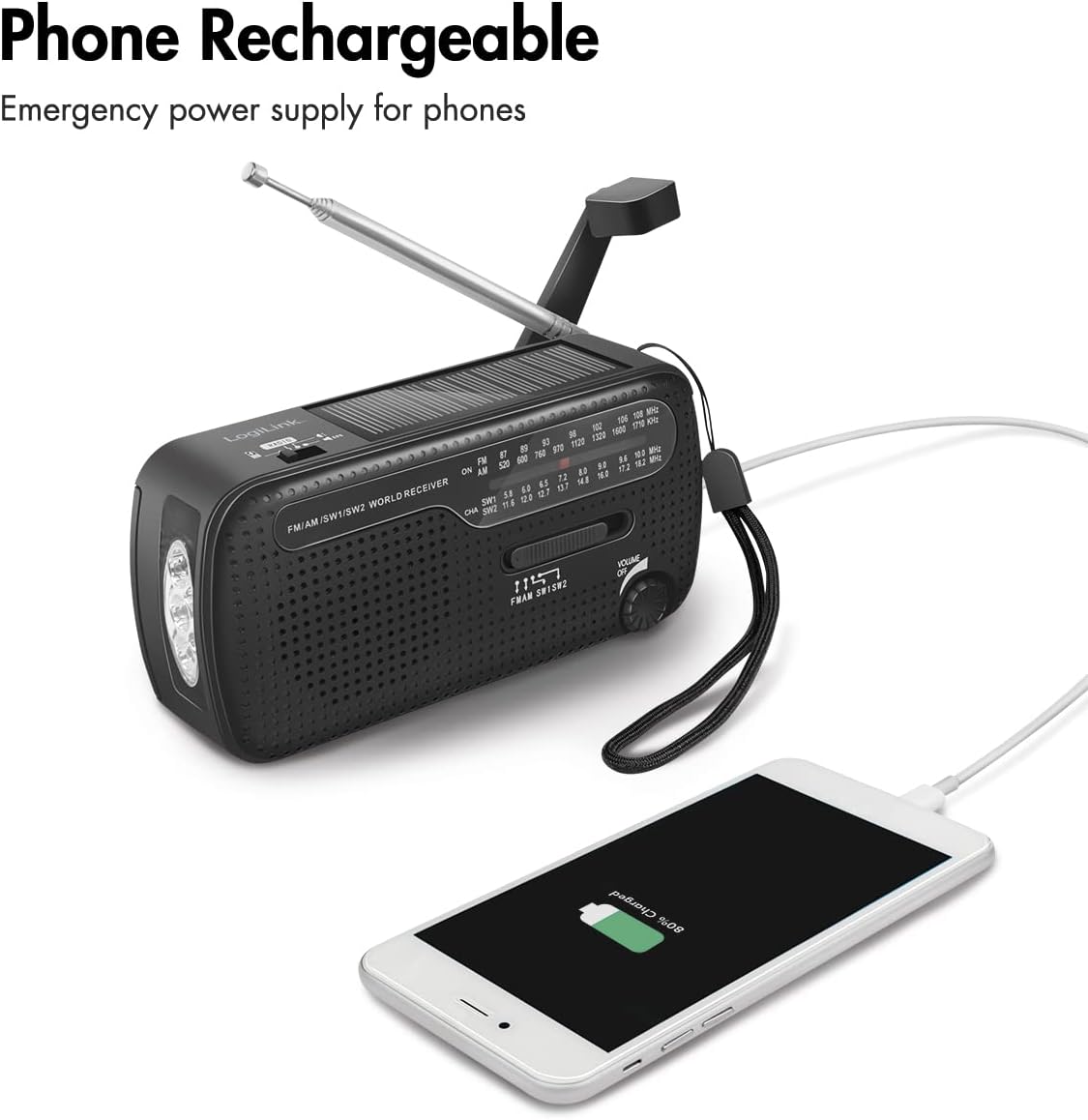
Figure 5.3: Charging a smartphone using the radio's USB output.
6. Charging Methods for the Radio
The LogiLink Emergency Radio offers three primary ways to charge its internal battery:
6.1. Dynamo Crank Charging
This method allows you to generate power manually.
- Unfold the Crank Handle located on the back of the radio.
- Rotate the crank handle clockwise or counter-clockwise at a steady pace (approximately 120-150 RPM) for several minutes.
- A charging indicator light will show that the battery is being charged.

Figure 6.1: The dynamo crank handle in position for manual charging.
6.2. Solar Panel Charging
The integrated solar panel provides a convenient way to charge the radio using sunlight.
- Place the radio in direct sunlight, ensuring the Solar Panel is facing upwards and unobstructed.
- The solar charging indicator light will illuminate when charging is active.
- Note that solar charging is slower than USB charging and is best for maintaining charge or for emergency top-ups.

Figure 6.2: The solar panel on top of the radio.
6.3. USB Charging
For the fastest and most efficient charging, use the USB input.
- Connect the provided USB cable to the Micro-B Input Port on the radio.
- Connect the other end of the USB cable to a USB power adapter (not included) or a computer USB port.
- The charging indicator light will show that the battery is being charged.

Figure 6.3: USB cable connected to the radio's Micro-B input port for charging.
7. Maintenance
- Cleaning: Use a soft, dry cloth to clean the exterior of the radio. Do not use abrasive cleaners or solvents.
- Storage: Store the radio in a cool, dry place away from direct sunlight and extreme temperatures. If storing for an extended period, ensure the internal battery has some charge, and remove any optional AAA batteries.
- Battery Care: To prolong the life of the internal lithium-ion battery, avoid fully discharging it frequently. Recharge it periodically if not in use.
8. Troubleshooting
If you encounter issues with your LogiLink Emergency Radio, refer to the following troubleshooting guide:
| Problem | Possible Cause | Solution |
|---|---|---|
| Radio does not turn on. | Internal battery is depleted. Optional AAA batteries are depleted or incorrectly installed. | Charge the internal battery via USB, solar, or dynamo crank. Check and replace AAA batteries if used. Ensure correct AAA battery polarity. |
| Poor radio reception. | Antenna not extended. Weak signal in current location. Incorrect band selected. | Fully extend the telescopic antenna. Move to an open area or higher ground. Ensure the correct band (FM/AM/SW1/SW2) is selected. Adjust the tuning dial slowly. |
| Flashlight not working. | Internal battery is depleted. | Charge the internal battery. |
| External device not charging from USB-A output. | Radio's internal battery is too low. USB cable is faulty. External device is incompatible or fully charged. | Ensure the radio's internal battery has sufficient charge. Try a different USB cable. Check if the external device is compatible or already charged. |
| Crank handle is stiff or not charging. | Mechanism might be obstructed or damaged. | Ensure no debris is obstructing the crank. If damaged, do not force it; contact support. |
9. Specifications
Detailed technical specifications for the LogiLink Emergency Radio SP0061:

Figure 9.1: Product dimensions of the LogiLink Emergency Radio.
| Feature | Specification |
|---|---|
| Model Number | SP0061 |
| Brand | Logilink |
| Color | Black |
| Power Source | Battery Powered (Integrated Lithium-ion, optional 3x AAA) |
| Integrated Battery | 1 Lithium-ion (3.7V) |
| Optional Batteries | 3x AAA (not included) |
| Micro-B Input | 5V/0.3A (1.5W) |
| Solar Panel Output | 5V/0.035A (0.175W) |
| Crank Generator Output | 5V/0.4A (2W) |
| USB-A Output | 5V/0.4A (2W) |
| Supported Radio Bands | FM, AM, SW1, SW2 |
| Frequency Range | 45 Hz - 20 kHz |
| Speaker Diameter | 50 mm |
| Flashlight Modes | Continuous light, Flash (SOS mode) |
| Special Features | Integrated AM Antenna, Integrated Flashlight, Portable, Rechargeable, Overcharge and Discharge Protection |
| Connectivity Technology | USB |
| Display Type | LED |
| Water Resistance Level | Waterproof |
| Product Dimensions (L x W x H) | 13.4L x 4.5W x 6.3H cm |
| Item Weight | 223 Grams |
| Manufacturer | 2direct GmbH |
| Included Components | User Manual |
| Spare Parts Availability | Information unavailable |
| Software Updates Guaranteed Until | Information unavailable |
10. Warranty and Support
This product comes with a standard manufacturer's warranty. Please refer to the warranty card included in your product packaging for specific terms and conditions. For technical support, troubleshooting assistance, or warranty claims, please contact the manufacturer or your point of purchase.
Manufacturer: 2direct GmbH
For further assistance, please visit the LogiLink official website or contact their customer service department.

