
YEABRICKS LLK446
YEABRICKS LED Light Kit for LEGO 76178 Daily Bugle
Instruction Manual
1. Introduction
This instruction manual provides detailed guidance for installing and operating your YEABRICKS LED Light Kit, specifically designed to illuminate the LEGO 76178 Daily Bugle building blocks model. This light kit enhances the visual appeal of your LEGO set, bringing it to life with dynamic lighting effects. Please note that the LEGO model itself is not included with this light kit.

The LEGO Daily Bugle model illuminated by the YEABRICKS LED Light Kit, showcasing the vibrant lighting effects.

Visual comparison demonstrating the significant enhancement provided by the LED light kit to the LEGO Daily Bugle model.
2. Safety Information
- Power Supply: Ensure the power supply voltage is less than 5V to prevent damage to the light kit. Use recommended batteries or a power bank.
- Handling Wires: Handle wires with care. Avoid excessive pulling, bending, or shaking, as this can damage the delicate connections.
- Small Parts: This product contains small parts and is not suitable for children under 3 years old due to choking hazards.
- Adult Supervision: Adult supervision is recommended during installation, especially for younger users.
- Indoor Use Only: This light kit is designed for indoor use only. Avoid exposure to water or extreme temperatures.
3. Package Contents
Before beginning installation, please verify that all components listed below are present in your package:

An illustration of the typical contents included in the YEABRICKS LED Light Kit package.
- LED Light Kit (various light strings and components)
- Battery Box (requires batteries, not included)
- USB Power Cable
- Connecting Cables and Expansion Boards
- Adhesive Squares/Bricks (for securing lights)
- User Guide (digital instructions via QR code)
4. Setup and Installation
The installation process involves carefully integrating the LED lights into your existing LEGO 76178 Daily Bugle model. Detailed step-by-step instructions are provided digitally. Please follow them precisely for optimal results.
4.1 Accessing Instructions
To access the comprehensive installation guide, scan the QR code provided in your package or visit the official YEABRICKS instruction page:
Official YEABRICKS Instruction Page
The instructions are available in both PDF and video formats to assist you through each step.
4.2 General Installation Tips
- Test Lights: Before full installation, test all lights to ensure they are working correctly.
- Disassembly: You may need to partially disassemble sections of your LEGO model to properly route and secure the wires.
- Wire Management: Carefully route wires between LEGO bricks and plates to conceal them and prevent pinching. Use the provided adhesive squares or small LEGO elements to secure lights and wires where necessary.
- Connectors: Ensure all connectors are firmly seated. Do not force connections.
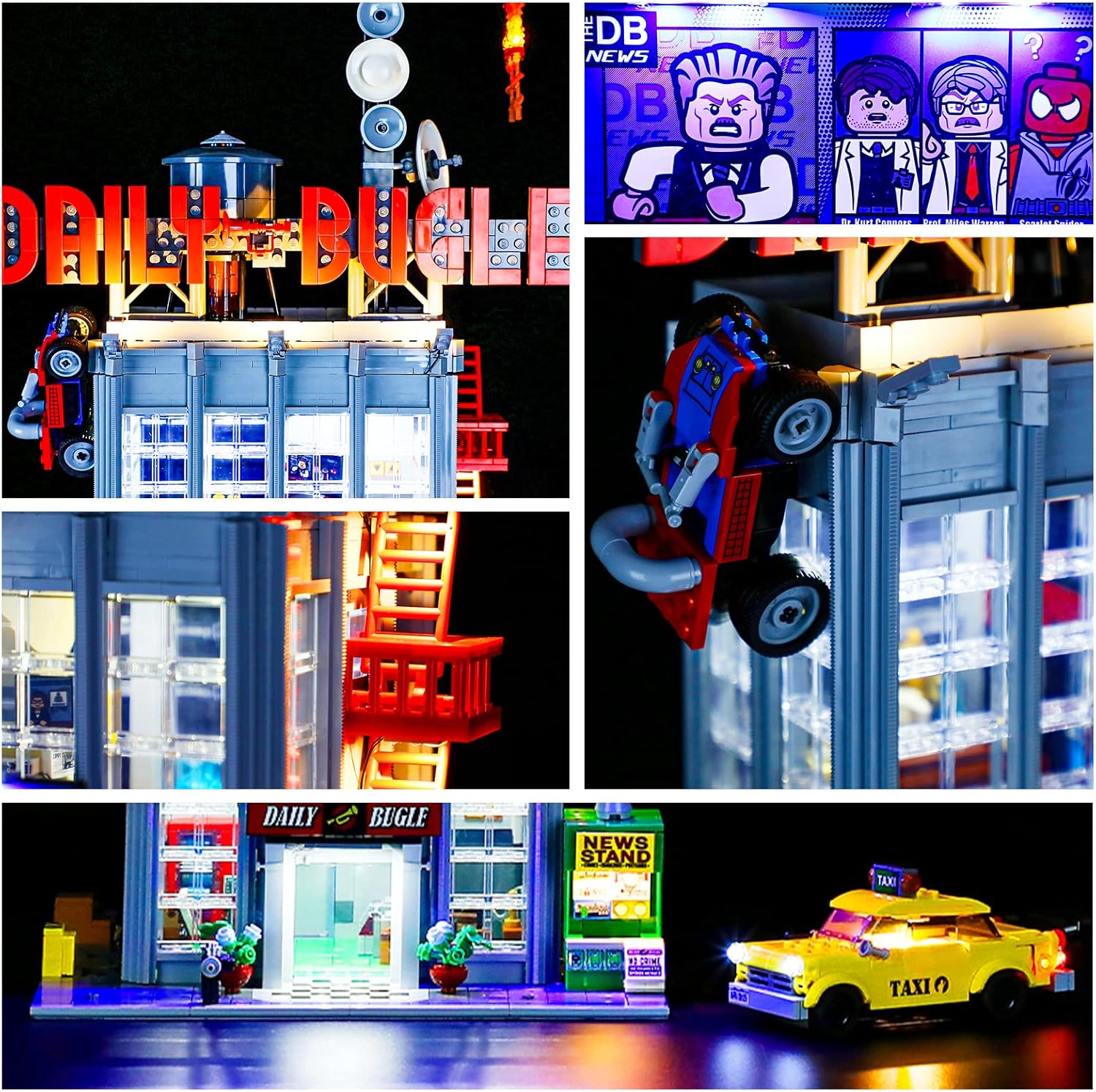
Detailed view of the illuminated Daily Bugle, highlighting the integrated lighting in different sections like the news screen and top sign.
5. Operating Instructions
Once the light kit is fully installed and connected to a power source, operating it is straightforward.
5.1 Powering On/Off
- Battery Box: If using the battery box, insert the required batteries (typically AA or AAA, check the battery box for specifics) and switch the power button to the 'ON' position.
- USB Power: If using the USB power cable, connect it to a compatible USB power adapter (e.g., phone charger, power bank, computer USB port). The lights will typically turn on automatically.
5.2 Light Effects (If Applicable)
Some YEABRICKS kits may include features for different light effects or brightness adjustments. Refer to the specific digital instructions for your model (accessed via QR code) for details on any advanced operating features.
Official product video demonstrating the YEABRICKS LED Light Kit illuminating the LEGO Daily Bugle model, showcasing various lit areas and the overall effect.
6. Maintenance
Proper care will ensure the longevity and continued performance of your LED light kit.
- Cleaning: Use a soft, dry cloth to gently wipe dust from the lights and wires. Avoid using liquid cleaners.
- Battery Replacement: If using batteries, replace them when the lights dim or stop working. Ensure correct polarity when inserting new batteries.
- Storage: If storing the LEGO model with the light kit for an extended period, it is recommended to disconnect the power source (remove batteries or unplug USB) to prevent battery leakage or unnecessary power drain.
7. Troubleshooting
If you encounter any issues with your light kit, please refer to the common problems and solutions below:
| Problem | Possible Cause | Solution |
|---|---|---|
| Lights do not turn on. | No power, loose connection, faulty component. | Check battery installation/USB connection. Ensure all connectors are secure. Test individual light strings if possible. |
| Some lights are dim or flickering. | Low battery, loose connection, damaged wire. | Replace batteries. Check connections. Inspect wires for damage. |
| Lights are too bright/dim. | No brightness control (if applicable), power source issue. | Verify if your kit supports brightness adjustment. Ensure power source is stable. |
| Wires are visible or difficult to hide. | Improper routing. | Refer to the digital instructions for wire routing tips. Gently re-route wires through gaps in bricks. |
If you continue to experience issues, please contact customer support as detailed in the 'Warranty and Support' section.
8. Specifications
| Feature | Detail |
|---|---|
| Product Model Number | LLK446 |
| Compatibility | LEGO 76178 Daily Bugle Building Blocks Model |
| Power Input | Less than 5V (USB or Battery Box) |
| Recommended Age | 6 years and up |
| Country of Origin | China |
9. Warranty and Support
YEABRICKS is committed to providing high-quality products and excellent customer service.
9.1 Free Replacement Policy
We offer complimentary replacements for any quality issues, including missing parts or non-functional lights. Please contact us immediately if you encounter such problems.
9.2 Customer Support
For any questions, suggestions, or assistance with your product, please do not hesitate to contact YEABRICKS customer support. We are available to help and ensure your satisfaction.
- Contact Method: Refer to the service card included in your package for specific contact details.
- Response Time: We aim to provide 24-hour quality help.

YEABRICKS offers comprehensive support, including two types of instructions, free replacements, and 24-hour assistance.