
1. Product Overview
The LANPAN LSI 9207-8i is a high-performance SAS/SATA Host Bus Adapter (HBA) designed for server and storage applications. Featuring the LSI SAS2308 controller, this card operates in HBA IT Mode, providing direct access to connected drives. It supports a data transfer rate of 6Gbps and utilizes a PCI Express 3.0 host interface. This card is particularly well-suited for storage solutions requiring direct drive access, such as ZFS, FreeNAS (TrueNAS CORE), and unRAID systems.
The package includes the controller card and two Mini-SAS SFF8087 to SATA breakout cables, allowing connection of up to eight SATA drives.
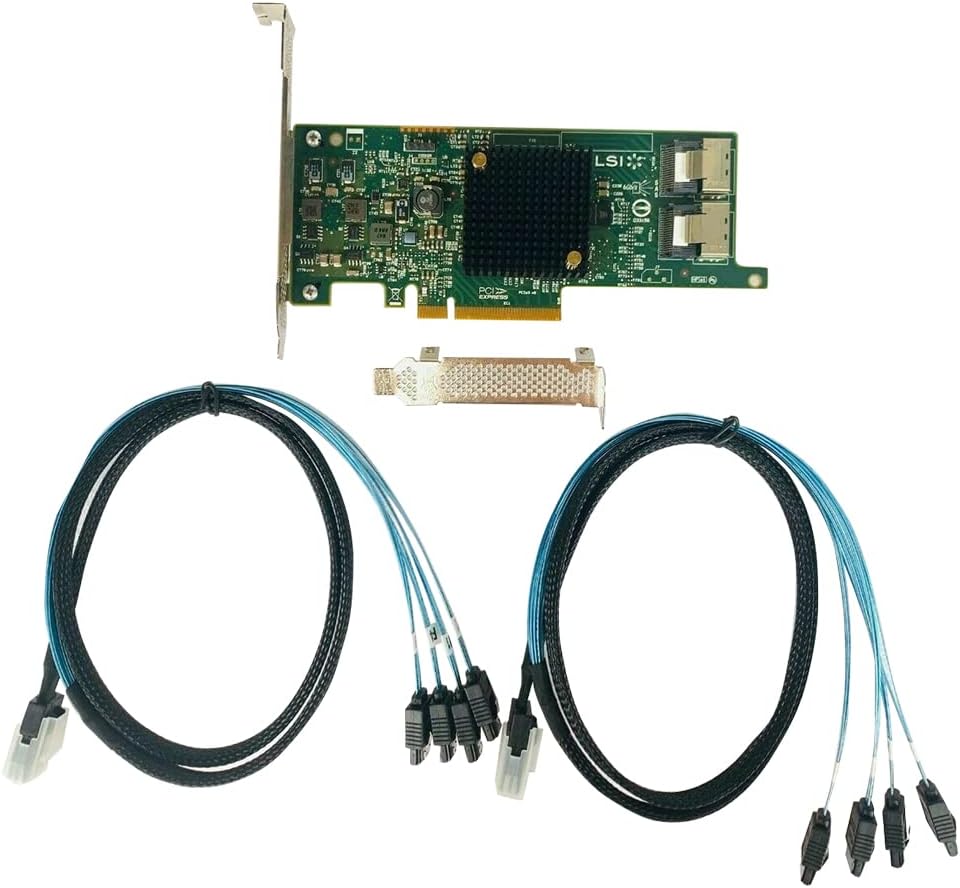
Figure 1: LANPAN LSI 9207-8i Controller Card and included cables.
2. Package Contents
Verify that all items are present in your package:
- 1 x LSI SAS9207-8I Controller Card
- 2 x Mini-SAS SFF8087 to SATA Breakout Cables

Figure 2: Contents as packaged.
3. Specifications
| Feature | Description |
|---|---|
| Model | LSI SAS9207-8I |
| Controller | LSI SAS2308 |
| Firmware | HBA IT Mode |
| Data Transfer Rate | 6Gbps |
| Host Interface | PCI Express 3.0 |
| Internal Connectors | Two Mini-SAS SFF8087 |
| Operating System Compatibility | Linux (and other OS supporting HBA IT Mode) |
| Compatible Devices | Storage Devices (HDD, SSD) |
| Item Weight | 9.9 ounces (approx. 0.28 kg) |
| Package Dimensions | 8.74 x 5.75 x 1.73 inches |
4. Installation Guide
4.1 Pre-installation Checklist
- Ensure your system has an available PCI Express 3.0 (or compatible) slot.
- Power down your computer and disconnect the power cord.
- Open your computer case.
- Ground yourself to prevent electrostatic discharge (ESD) damage.
4.2 Physical Installation Steps
- Locate an available PCI Express slot on your motherboard. The LSI 9207-8i requires a PCIe x8 or x16 slot for optimal performance, though it can function in a smaller slot (e.g., x4) if physically compatible.
- Carefully align the controller card with the chosen PCIe slot and press down firmly until it is securely seated.
- Secure the card with the retention clip or screw provided by your computer case.
- Connect the Mini-SAS SFF8087 cables to the two internal connectors on the LSI 9207-8i card.
- Connect the SATA breakout ends of the cables to your SATA hard drives or SSDs. Each SFF8087 connector supports up to four SATA drives.
- Ensure all drives are properly powered.
- Close your computer case, reconnect the power cord, and power on the system.

Figure 3: Rear view of the controller card, highlighting the Mini-SAS SFF8087 connectors.
5. Operating in IT Mode
The LSI 9207-8i card is pre-flashed with HBA IT Mode firmware. This mode is crucial for specific storage operating systems like ZFS, FreeNAS (TrueNAS CORE), and unRAID because it presents each connected drive directly to the operating system without any RAID abstraction. This allows the software RAID solution to manage the drives independently and efficiently.
5.1 Driver Installation
Most modern operating systems, especially Linux distributions and FreeBSD-based systems like FreeNAS/TrueNAS, include native drivers for LSI SAS HBAs. Upon system boot, the operating system should detect the card and its connected drives automatically. If drivers are not automatically installed, consult your operating system's documentation for installing LSI SAS HBA drivers.
5.2 Drive Recognition
After successful installation and driver recognition, your operating system's disk management utilities or storage management software (e.g., ZFS tools, unRAID array management) should list the individual drives connected to the LSI 9207-8i card. You can then proceed to configure your storage pools or arrays as per your software's instructions.
6. Troubleshooting
6.1 Card Not Detected
- Reseat the Card: Ensure the card is fully seated in the PCIe slot.
- Try Another Slot: Test the card in a different PCIe slot if available.
- Check BIOS/UEFI: Verify that the PCIe slot is enabled in your system's BIOS/UEFI settings.
6.2 Drives Not Detected
- Cable Connections: Ensure all Mini-SAS SFF8087 and SATA cables are securely connected to both the card and the drives.
- Drive Power: Confirm that all connected drives are receiving adequate power.
- Cable Quality: In some instances, the quality of the breakout cables can affect drive detection or lead to read/write errors. If experiencing persistent issues, consider testing with alternative, high-quality Mini-SAS to SATA cables.
- Drive Health: Test the drives individually to ensure they are functional.
6.3 Performance Issues / Read Errors
- Cable Integrity: Poor quality or damaged cables can cause data corruption or reduced performance. Inspect cables for damage and replace if necessary.
- System Resources: Ensure your system has sufficient CPU and RAM for the storage workload.
- Operating System Drivers: Verify that the correct and latest drivers for the HBA are installed.
7. Maintenance
The LSI 9207-8i controller card is a robust component designed for continuous operation. Minimal maintenance is required:
- Dust Removal: Periodically inspect the card and surrounding area for dust accumulation. Use compressed air to gently clean the card and its heatsink to ensure proper cooling.
- Cable Inspection: Occasionally check all connected cables for secure connections and signs of wear or damage.
- Firmware Updates: While the card comes pre-flashed with IT Mode firmware, occasional firmware updates may be released by the original manufacturer (LSI/Broadcom) to improve compatibility or address issues. Consult the manufacturer's website for the latest firmware and update procedures if necessary.
8. Warranty and Support
For warranty information and technical support, please refer to the documentation provided with your purchase or contact your retailer. Keep your proof of purchase for warranty claims.


