
RANRAO 1
RANRAO 30-110 Degrees Celsius Temperature Control Capillary Thermostat User Manual
Model: 1
1. Introduction
This user manual provides comprehensive instructions for the installation, operation, and maintenance of the RANRAO 30-110 Degrees Celsius Capillary Thermostat. This device is designed for precise temperature control in various applications, including water heaters, electric fryers, and electric cake molds, ensuring optimal performance and safety.

Figure 1.1: Front view of the RANRAO Capillary Thermostat, showing the temperature adjustment dial and the capillary tube.
2. Safety Instructions
Please read and understand all safety instructions before installing or operating the thermostat. Failure to do so may result in injury, damage to the device, or property damage.
- Electrical Safety: Ensure the power supply is disconnected before any installation or maintenance. All wiring should be performed by a qualified electrician in accordance with local electrical codes. The thermostat operates at 250 Volts.
- Temperature Range: Do not exceed the specified temperature range of 0℃ to 120℃. Operating outside this range may damage the unit.
- Probe Handling: Handle the capillary probe with care. Bending or damaging the probe can affect its accuracy and functionality.
- Installation Environment: Install the thermostat in an environment free from excessive moisture, dust, or corrosive substances.
- Secure Mounting: Ensure the thermostat is securely mounted to prevent accidental dislodgement.
3. Product Features
The RANRAO Capillary Thermostat offers the following key features:
- Manufactured from high-quality materials for durability and practical use.
- Allows adjustment of the operating temperature between 0℃ and 120℃.
- Suitable for use with any 12V aftermarket fan (when used in automotive applications).
- The connected device (e.g., fan) activates at the selected temperature and deactivates when the temperature drops below the set point.
- Features a capillary tube and probe for accurate temperature sensing.
4. Specifications
| Attribute | Value |
|---|---|
| Brand | RANRAO |
| Model Number | 1 |
| Voltage | 250 Volts |
| Material | Wire (referring to the capillary tube material) |
| Temperature Range | 0℃ to 120℃ |
| ASIN | B0BTVWM3MZ |
| First Available Date | February 4, 2023 |
5. Setup and Installation
Proper installation is crucial for the accurate and safe operation of the thermostat. Follow these steps carefully:
- Disconnect Power: Before beginning any installation, ensure that the power supply to the appliance or system where the thermostat will be installed is completely disconnected.
- Mounting the Thermostat: Securely mount the main body of the thermostat in a suitable location, away from direct heat sources or excessive vibrations.
- Probe Installation:
- For applications like a radiator or cooler, remove the upper cooler component.
- Fully insert the capillary probe into the radiator inlet tube. Ensure the probe is positioned correctly and will remain stable within the hose.
- Reattach the cooler component and tighten it onto the capillary wire. Exercise caution to avoid damaging the probe inside during this process.
- If necessary, a silicone sealant can be applied to ensure a proper seal and prevent leaks.
- Wiring Connections: Connect the thermostat according to the specific wiring diagram for your application. The thermostat has terminals for electrical connections. Refer to the diagram below for a typical automotive fan setup example.
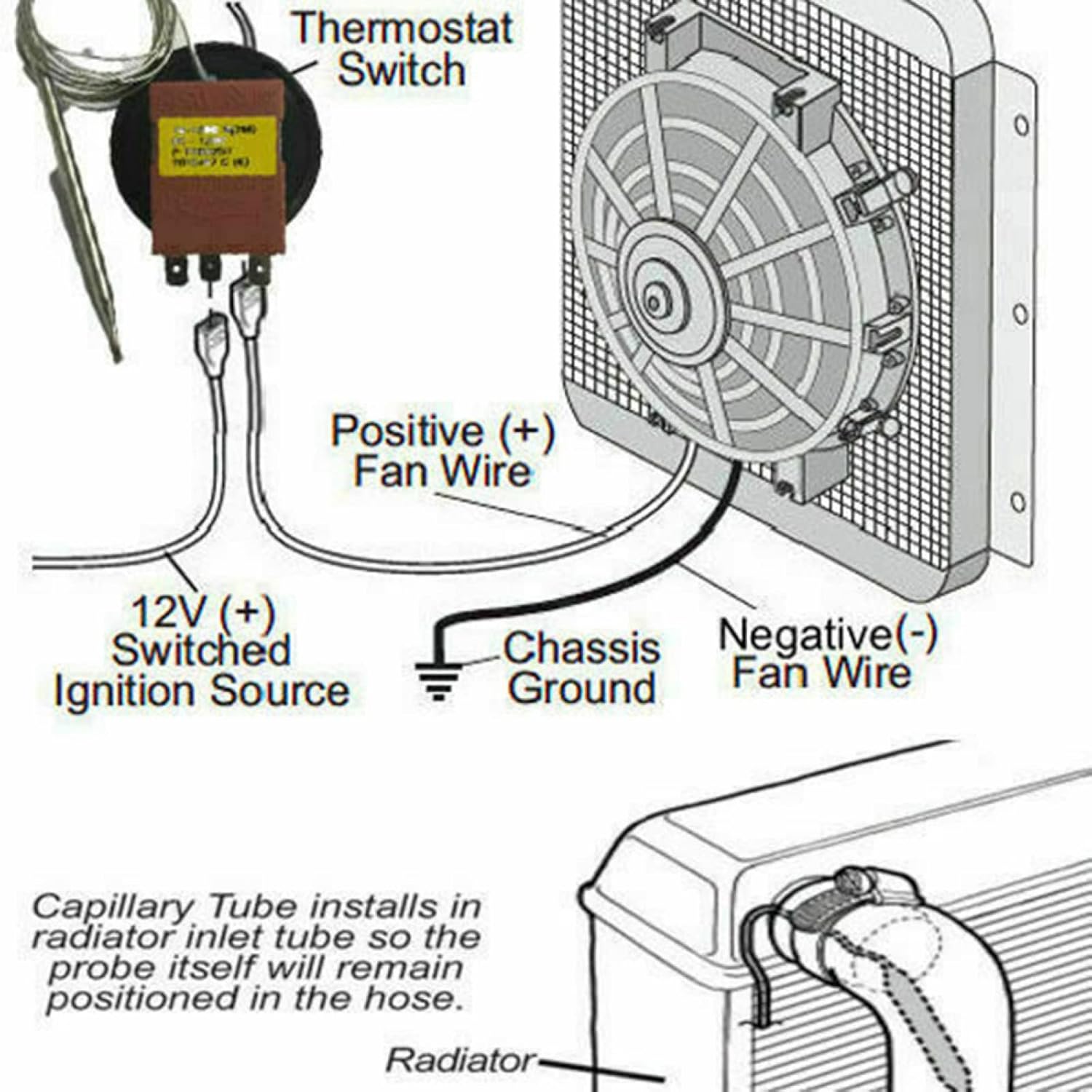
Figure 5.1: Example wiring diagram for connecting the thermostat to a 12V fan system. This illustrates the connection points for the thermostat switch, positive fan wire, negative fan wire, 12V switched ignition source, and chassis ground.

Figure 5.2: Rear view of the thermostat, highlighting the electrical connection terminals (labeled 1, 2, C) for wiring.
6. Operating Instructions
Once installed and wired correctly, operating the RANRAO Capillary Thermostat is straightforward:
- Power On: Restore power to the system or appliance.
- Set Temperature: Rotate the temperature adjustment dial on the front of the thermostat to your desired temperature setting within the 0℃ to 120℃ range. The markings on the dial indicate the temperature in degrees Celsius.
- Automatic Operation: The thermostat will monitor the temperature via its capillary probe. When the sensed temperature reaches or exceeds the set point, the connected device (e.g., heating element, fan) will activate.
- Deactivation: The connected device will automatically deactivate when the temperature drops below the set point, maintaining the desired temperature range.

Figure 6.1: Top view of the thermostat, showing the extended capillary tube which houses the temperature sensing probe.
7. Maintenance
The RANRAO Capillary Thermostat is designed for low maintenance. However, periodic checks can ensure its longevity and optimal performance:
- Cleaning: Gently wipe the exterior of the thermostat with a dry, soft cloth to remove dust or debris. Do not use abrasive cleaners or solvents.
- Probe Inspection: Periodically inspect the capillary tube and probe for any signs of damage, kinks, or corrosion. Ensure it remains securely in place.
- Wiring Check: Verify that all electrical connections remain tight and free from corrosion.
- Environmental Check: Ensure the operating environment remains within suitable conditions (e.g., not excessively humid or dusty).
8. Troubleshooting
If you encounter issues with your RANRAO Capillary Thermostat, refer to the following common problems and solutions:
| Problem | Possible Cause | Solution |
|---|---|---|
| Device not activating at set temperature. | Incorrect wiring; no power; faulty probe; temperature not reaching set point. | Check all electrical connections. Verify power supply. Ensure probe is correctly installed and sensing temperature. Test the thermostat with a known temperature source if possible. |
| Device remains on continuously. | Thermostat stuck in ON position; probe not sensing temperature drop. | Check probe installation. Ensure the temperature is actually dropping below the set point. If the issue persists, the thermostat may be faulty. |
| Inaccurate temperature readings. | Damaged or improperly installed probe; external interference. | Inspect the capillary probe for damage or kinks. Ensure it is fully inserted and making good contact with the medium being measured. Relocate if exposed to external heat sources. |
If troubleshooting steps do not resolve the issue, contact customer support or a qualified technician.
9. Warranty and Support
Information regarding specific warranty terms and customer support contacts for the RANRAO Capillary Thermostat is not available in the provided product details. Please refer to the product packaging or the seller's website for any applicable warranty information or support channels.
For general inquiries or assistance, you may visit the RANRAO Store on Amazon.
Ask a question about this manual
Ask about setup, troubleshooting, compatibility, parts, safety, or missing instructions. Manuals+ will review the question and use this page’s manual context to help answer it.